⚠ 這是歷史版本頁面 — 查看 Simple Sticky Notes 最新版本 →

Simple Sticky Notes 6.0.1
v 6.0.1
Windows
免費軟體
8.64/10 (41)
- 目前版本6.0.1
- 更新日期2023-06-07
- 檔案大小2.53 MB
- 檔案名稱Setup_SimpleStickyNotes.exe
- 作業系統Windows 7 / Windows 8 / Windows 10 / Windows 11
- 支援語系English
- 授權型式免費軟體
- 開發商 Simnet Limited
- 軟體分類Windows 軟體 / 辦公商務
##
編輯短評
Simple Sticky Notes 是一款專為 Windows 設計的免費桌面便利貼工具,讓你把虛擬便條直接釘在桌面上,隨時記錄臨時事項。它不追求成為功能繁雜的筆記管理軟體,而是回歸便利貼的本質——輕量、快速、隨手可用。開發商 Simnet Limited 多年來持續維護,更新頻率雖不算密集,但仍有在經營;在辦公商務類工具中屬於小眾但穩定的選擇,評價人數不多,整體口碑相當不錯。
這套軟體適合需要快速記下電話號碼、待辦清單或臨時靈感的用戶,尤其是那些不想被複雜筆記軟體綁架的人。與同類替代工具相比,它沒有雲端同步、進階排版或跨平台支援,取捨在於極簡與專注。免費授權、僅支援 Windows 平台,且介面只有英文,對不熟悉英文的使用者來說稍有門檻,但若只是當作臨時便條使用,影響不大。
##
翻譯排程處理中,以下暫以英文原文呈現
軟體介紹
In a world of productivity apps and complex note-taking platforms, sometimes all you need is a straightforward, no-frills solution. Enter Simple Sticky Notes, a free Windows application that lets users create virtual sticky notes on their desktop.
Simple Sticky Notes is a lightweight and easy-to-use note-taking utility developed by Simnet Ltd. It allows users to pin digital sticky notes directly on their desktop.
The program doesn’t aim to compete with full-fledged note managers but focuses instead on speed, simplicity, and accessibility—just like sticky notes should be.
Key Features
The interface is minimalistic and user-friendly. Each note pops up in a bright, color-coded window that is easy to resize or move around the desktop.
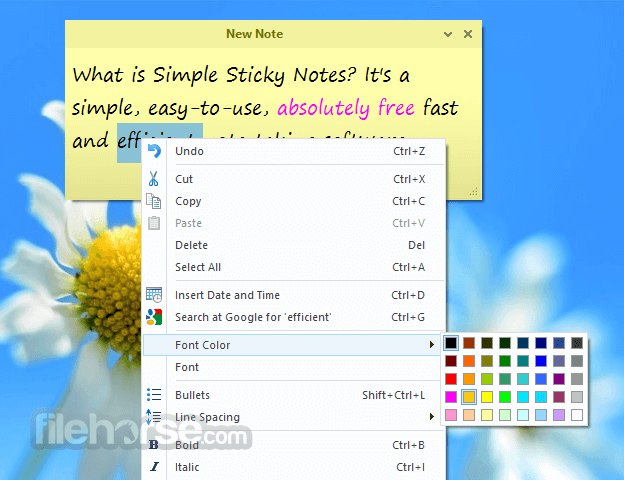
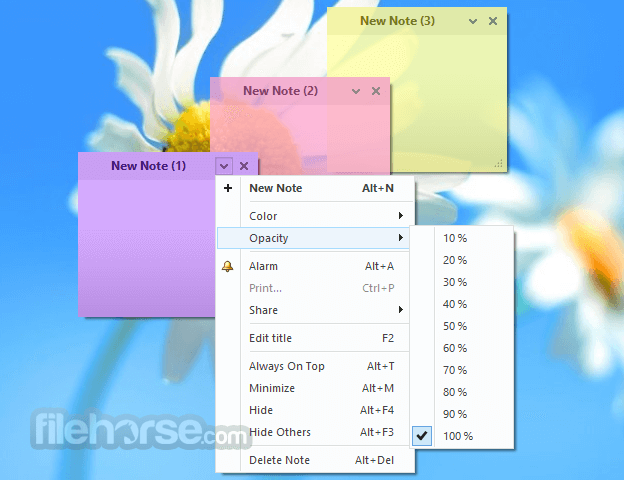
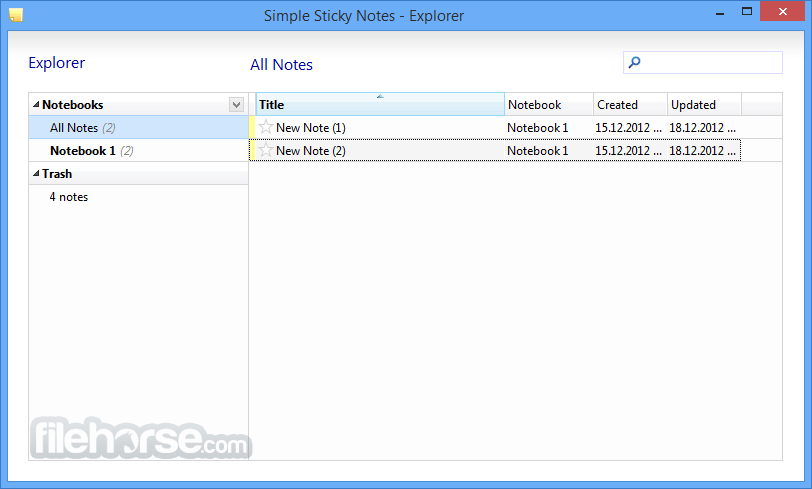
Right-clicking a note brings up customization options such as color, font, or pinning options. The main control panel provides an overview of all notes and access to the backup/restore feature.
How to Use
Is Simple Sticky Notes free?
Yes, it's 100% free for personal use.
Can I back up my notes?
Yes, there’s a built-in backup and restore option in the control panel.
Does it support alarms or reminders?
Yes, you can set an alarm for any sticky note.
Can I sync notes between devices?
No, it currently doesn’t offer syncing or cloud integration.
Does it run on Windows 11?
Yes, it's fully compatible with Windows 11, as well as Windows 10 and earlier.
Alternatives to Simple Sticky Notes
Microsoft Sticky Notes
Notezilla
Stickies by Zhorn Software
Google Keep (web-based)
Evernote (heavier but more feature-rich)
System Requirements
Download Simple Sticky Notes Latest Version Why is this app published on FileHorse? (More info)
Simple Sticky Notes is a lightweight and easy-to-use note-taking utility developed by Simnet Ltd. It allows users to pin digital sticky notes directly on their desktop.
The program doesn’t aim to compete with full-fledged note managers but focuses instead on speed, simplicity, and accessibility—just like sticky notes should be.
Key Features
- Create unlimited sticky notes
- Customizable note color, font, and transparency
- Resize and reposition notes freely
- Always-on-top feature
- Backup and restore notes
- Built-in search function
- Note alarms and reminders
- Drag-and-drop support
- Multi-monitor support
- Minimize to system tray
The interface is minimalistic and user-friendly. Each note pops up in a bright, color-coded window that is easy to resize or move around the desktop.
Right-clicking a note brings up customization options such as color, font, or pinning options. The main control panel provides an overview of all notes and access to the backup/restore feature.
How to Use
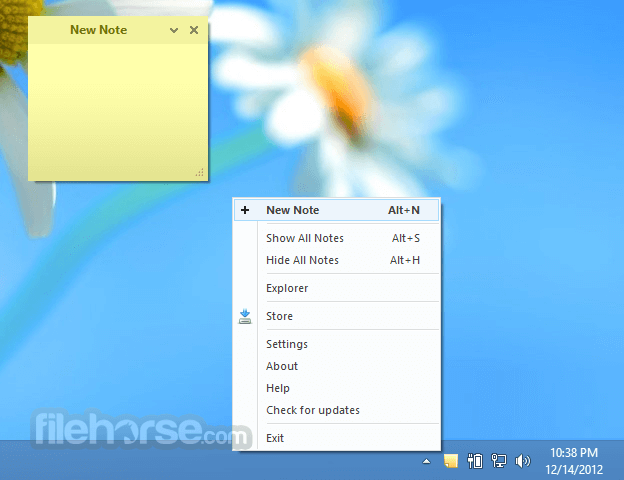
- Right-click the tray icon and choose “New Note” to create a sticky note.
- Type in your content directly.
- Customize it via right-click: change color, font, size, or set an alarm.
- Move the note anywhere on your screen or pin it above all windows.
- Access all notes and settings from the control panel in the system tray.
Is Simple Sticky Notes free?
Yes, it's 100% free for personal use.
Can I back up my notes?
Yes, there’s a built-in backup and restore option in the control panel.
Does it support alarms or reminders?
Yes, you can set an alarm for any sticky note.
Can I sync notes between devices?
No, it currently doesn’t offer syncing or cloud integration.
Does it run on Windows 11?
Yes, it's fully compatible with Windows 11, as well as Windows 10 and earlier.
Alternatives to Simple Sticky Notes
Microsoft Sticky Notes
Notezilla
Stickies by Zhorn Software
Google Keep (web-based)
Evernote (heavier but more feature-rich)
System Requirements
- OS: Windows 7, 8, 10, or 11
- RAM: 1GB or higher
- Disk Space: ~2MB
- Processor: Any modern processor
- Lightweight and fast
- Free with no ads
- Easy to use and customize
- Useful alarm/reminder system
- Supports multi-monitor setups
- No cloud syncing or mobile app
- Limited to plain text
- No collaboration features
Download Simple Sticky Notes Latest Version Why is this app published on FileHorse? (More info)
##
畫面截圖
- 2026-02-23 Simple Sticky Notes 6.9.0 2.77 MB
- 2025-11-24 Simple Sticky Notes 6.8.5 2.76 MB
- 2025-07-28 Simple Sticky Notes 6.8.0 2.76 MB
- 2025-02-24 Simple Sticky Notes 6.7.5 2.75 MB
- 2024-11-25 Simple Sticky Notes 6.7.0 2.76 MB
- 2024-09-16 Simple Sticky Notes 6.6.0 2.75 MB
- 2024-07-08 Simple Sticky Notes 6.5.0 2.75 MB
- 2024-03-25 Simple Sticky Notes 6.4.0 2.78 MB