SmoothVideo Project (SVP) 4.7.0.302
v 4.7.0.302
Windows
商業試用
8/10 (19)
- 目前版本4.7.0.302
- 更新日期2026-04-07
- 檔案大小9.6 MB
- 檔案名稱svp4-online.exe
- 作業系統Windows Vista / Windows 7 / Windows 8 / Windows 10 / Windows 11
- 支援語系English
- 授權型式商業試用
- 開發商 SVP Team
- 軟體分類Windows 軟體 / 影片軟體
##
翻譯排程處理中,以下暫以英文原文呈現
軟體介紹
SmoothVideo Project (SVP) converts any video to 60 fps (and even higher) and performs this in real time right in your favorite video player.
Some would say that frame rate conversion is not worth the effort and results in almost the same low-quality video as image upscaling, often with the soap opera effect, which they hate.
But they are wrong! From the extensive feedback from the community, it was learned that anyone who actually watched at least 3 movies at high frame rate would never ever want to watch anything in the obsolete 24 fps standard.
SmoothVideo Project (SVP) uses the same frame interpolation technique as available in high-end TVs and projectors (see "TrimensionDNM", "Motion Plus", "Motionflow", and others). It increases the frame rate by generating intermediate frames between existing ones to produce very smooth, fluid, and clear motion.
SVPtube 2 extension - watch almost any online video (including YouTube, Crunchyroll, Twitch, and tons of adult websites) in your preferred video player with SVP and/or any post-processing enabled.
SVPcode extension - a one-click video re-encoding solution aimed to produce the same high frame rate video as you see in your video player, with SVP doing its magic in real time.
SVPcast extension - stream high frame rate video in real time to Chromecast, Apple TV, or any Android / iOS device in HTTP live streaming (HLS) format.
SVPlight extension - control hardware ambient backlight (so-called "Ambilight-like") systems (such as Lightpack and Boblight) with SVP.
Features and Highlights
What does SmoothVideo Project (SVP) actually do to videos?
SVP increases video frame rate in real time using frame interpolation, turning standard 24/30 FPS videos into smoother 60 FPS (or higher) playback. It generates intermediate frames on the fly, creating a “soap opera effect” similar to motion smoothing on TVs.
Does SVP work with any video player?
Not directly with all players. SVP integrates with supported media players (like MPC-HC, VLC, etc.) through its own pipeline, meaning it works alongside them rather than replacing them. Proper setup is required for it to function correctly.
Is SmoothVideo Project still relevant in 2026?
Yes, but for a specific audience. In 2026, it remains popular among users who prefer ultra-smooth video playback on PCs, especially for anime or high-motion content, though not everyone likes the interpolated look.
System Requirements
Download SmoothVideo Project (SVP) Latest Version Why is this app published on FileHorse? (More info)
Some would say that frame rate conversion is not worth the effort and results in almost the same low-quality video as image upscaling, often with the soap opera effect, which they hate.
But they are wrong! From the extensive feedback from the community, it was learned that anyone who actually watched at least 3 movies at high frame rate would never ever want to watch anything in the obsolete 24 fps standard.
SmoothVideo Project (SVP) uses the same frame interpolation technique as available in high-end TVs and projectors (see "TrimensionDNM", "Motion Plus", "Motionflow", and others). It increases the frame rate by generating intermediate frames between existing ones to produce very smooth, fluid, and clear motion.
SVPtube 2 extension - watch almost any online video (including YouTube, Crunchyroll, Twitch, and tons of adult websites) in your preferred video player with SVP and/or any post-processing enabled.
SVPcode extension - a one-click video re-encoding solution aimed to produce the same high frame rate video as you see in your video player, with SVP doing its magic in real time.
SVPcast extension - stream high frame rate video in real time to Chromecast, Apple TV, or any Android / iOS device in HTTP live streaming (HLS) format.
SVPlight extension - control hardware ambient backlight (so-called "Ambilight-like") systems (such as Lightpack and Boblight) with SVP.
Features and Highlights
- Supports DirectShow-based players (32-/64-bit)
- Frame rate conversion up to 60/120/144 Hz
- Frame rate conversion options auto-tuning
- GPU acceleration
- Localization to 10+ languages
- Support for stereo videos
- Remote control via HTTP
- Can auto-update madVR
- Support for VLC media player
- Support for mpv-based players
- Extensions
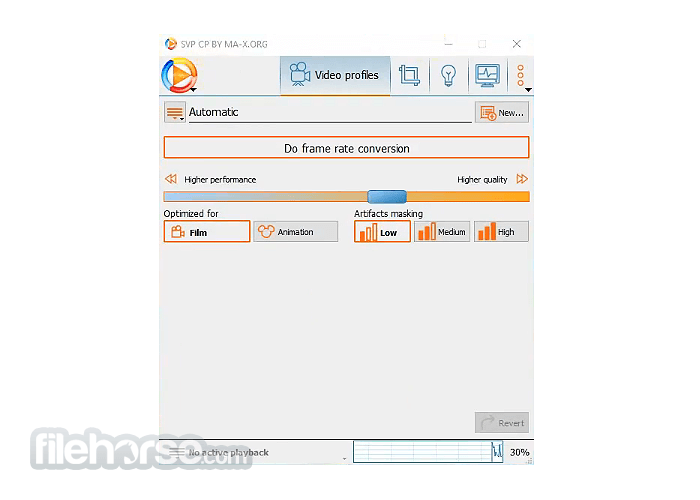
- Manual adjustment of video profiles
- User-defined conditions for video profiles selection
- Support for BD-3D video (MVC)
- Processing of Hi10p videos in 10-bit mode
- Control multiple videos at the same time
- Updated System Requirements: Now requires Windows 10/11 (64-bit), with older systems supported only up to previous versions
- UI Improvements: Upgraded to Qt 6.9 with various interface fixes and added dark theme support
- Simplified Installation: Easier setup process across macOS and Linux platforms
- Linux Updates: Components refreshed to the latest versions, with licensing now required
- Stability Fixes: Resolved a potential crash issue when playing content in mpv
- Install SVP along with the required components
- Launch the SVP Manager from the system tray
- Open your preferred video player (e.g., MPC-HC, VLC)
- Play a video and let SVP interpolate frames
- Adjust settings via SVP Manager if needed
- Enable or disable SVP effects as desired
What does SmoothVideo Project (SVP) actually do to videos?
SVP increases video frame rate in real time using frame interpolation, turning standard 24/30 FPS videos into smoother 60 FPS (or higher) playback. It generates intermediate frames on the fly, creating a “soap opera effect” similar to motion smoothing on TVs.
Does SVP work with any video player?
Not directly with all players. SVP integrates with supported media players (like MPC-HC, VLC, etc.) through its own pipeline, meaning it works alongside them rather than replacing them. Proper setup is required for it to function correctly.
Is SmoothVideo Project still relevant in 2026?
Yes, but for a specific audience. In 2026, it remains popular among users who prefer ultra-smooth video playback on PCs, especially for anime or high-motion content, though not everyone likes the interpolated look.
System Requirements
- OS: Windows 7/8/10/11 (64-bit recommended)
- CPU: Intel Core i5 or AMD Ryzen 5 (quad-core or better)
- RAM: 8 GB minimum
- GPU: NVIDIA GeForce GTX 1050 / AMD RX 560 or better
- Video Player: MPC-HC, VLC, or PotPlayer
- Software: Avisynth, VapourSynth, or mpv (auto-installed)
- Storage: At least 300 MB free disk space
- Smoother video playback experience
- Supports high frame rate conversion
- Compatible with major video players
- Highly customizable settings
- Uses GPU acceleration for better performance
- Can be demanding on system resources
- Setup is not beginner-friendly
- Might introduce video artifacts
- Limited support for DRM-protected files
- The free version has some limitations
Download SmoothVideo Project (SVP) Latest Version Why is this app published on FileHorse? (More info)
##
畫面截圖