- 目前版本9.43.1
- 更新日期2026-08-10
- 檔案大小256 MB
- 檔案名稱Install Termius.exe
- 作業系統Windows 7 64 / Windows 8 64 / Windows 10 64 / Windows 11
- 支援語系English
- 授權型式商業試用
- 開發商 Termius Corporation
- 軟體分類Windows 軟體 / 檔案傳輸與網路
##
翻譯排程處理中,以下暫以英文原文呈現
軟體介紹
Termius is a powerful and modern SSH and SFTP client for Windows designed for system administrators, developers, and IT professionals.
It offers a cross-platform experience with seamless connectivity to remote servers and devices.
With advanced features like end-to-end encryption, multi-device sync, and automation tools, Termius is an excellent alternative to traditional SSH clients like PuTTY and WinSCP.
Whether you're managing a single server or an extensive cloud-based infrastructure, it simplifies remote system access while maintaining top-notch security.
Key Features
Cross-Platform Support – Available on Windows, macOS, Linux, iOS, and Android.
Intuitive Interface – User-friendly terminal with customizable themes.
Sync and Cloud Backup – Save your hosts and settings across multiple devices.
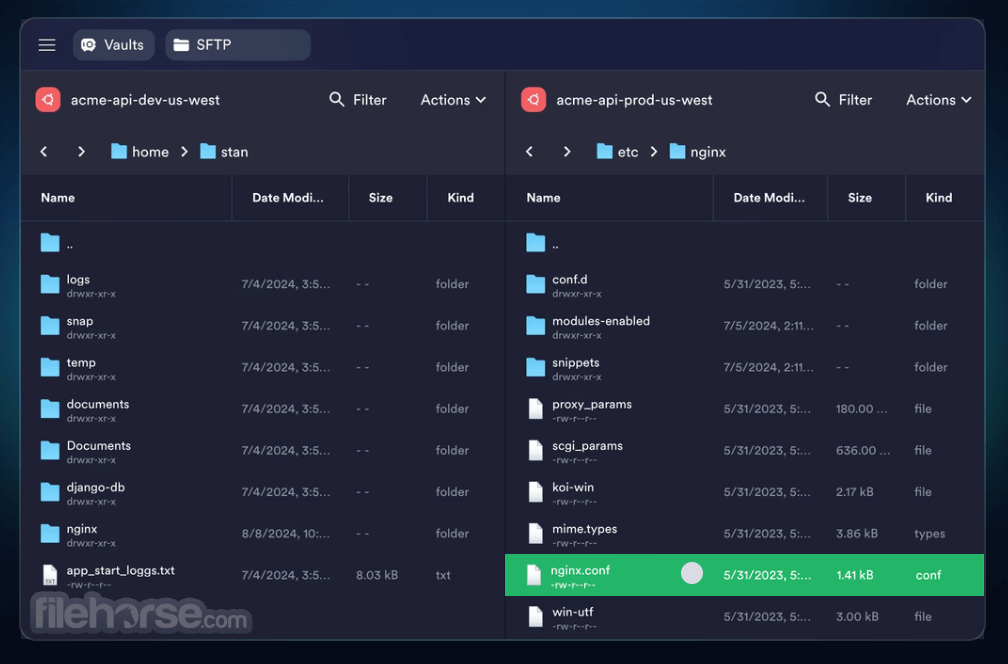
SFTP File Transfer – Integrated SFTP functionality for easy file management.
Port Forwarding – Secure access to remote resources.
End-to-End Encryption – Strong AES-256 encryption ensures secure communications.
Multiple Connection Support – Manage multiple SSH sessions simultaneously.
Snippets and Automation – Store reusable commands for faster workflows.
Mosh Protocol Support – Enables smooth performance on unstable networks.
Password and Key Authentication – Supports both authentication methods for added security.
User Interface (UI)
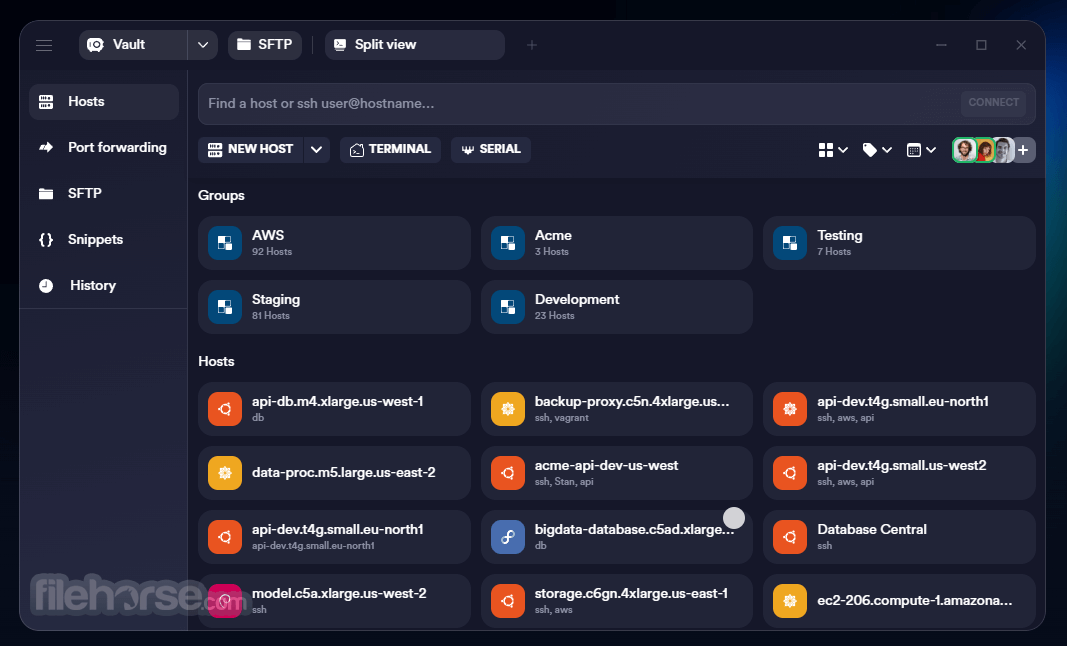
It provides a clean and modern UI compared to traditional SSH clients. The dashboard offers an organized view of all your stored servers and keys.
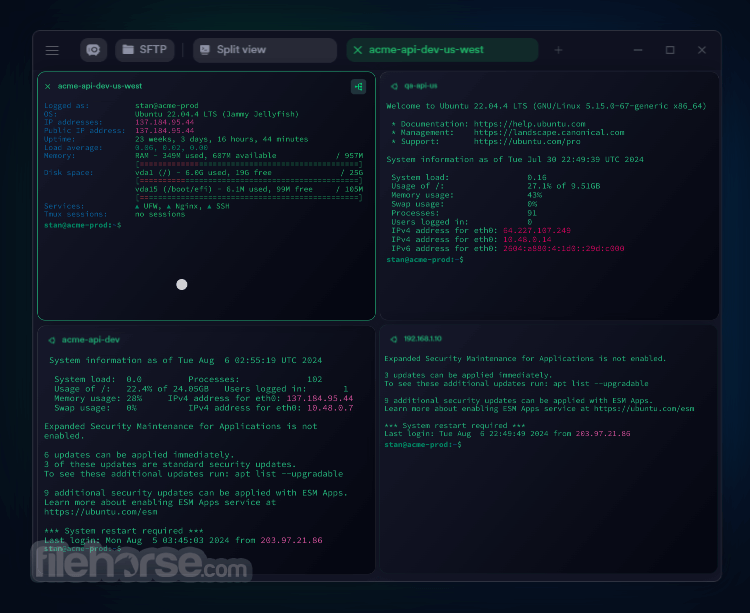
The tabbed interface allows users to switch between multiple SSH sessions seamlessly. Additionally, customizable themes and fonts make it visually appealing while improving usability.
Installation and Setup
FAQ
Is Termius for PC free to use?
Yes, the app offers a free version with basic SSH functionality. However, advanced features like sync, snippets, and team collaboration require a premium subscription.
Does Termius support SSH key authentication?
Yes, it allows users to authenticate using SSH keys, providing a more secure login method.
Can I use Termius without an internet connection?
Yes, it works offline. However, features like cloud sync require an active internet connection.
Is Termius secure?
Yes, it employs AES-256 encryption for data security, ensuring safe communication between devices.
Does Termius support SFTP file transfer?
Yes, it includes an integrated SFTP client for easy file transfer between local and remote systems.
Alternatives
PuTTY – A free, lightweight SSH client but lacks modern UI and additional features.
MobaXterm – A powerful alternative with built-in X11 server and multiple remote session support.
WinSCP – A dedicated SFTP and FTP client, but lacks SSH features.
Bitvise SSH Client – Offers SSH and SFTP with advanced tunneling features.
OpenSSH for Windows – A built-in Windows alternative for command-line SSH access.
Pricing
Free Plan – Basic SSH client with essential features.
Pro Plan ($10/month or $8.33/month billed annually) – Includes sync, snippets, and advanced terminal features.
Team Plan ($20/user/month) – Collaboration tools, audit logs, and team management features.
Enterprise Plan – Custom pricing for large organizations.
System Requirements
Termius is an excellent choice for system administrators and developers looking for a powerful, modern, and secure SSH and SFTP client. Its user-friendly interface, cross-device synchronization, and advanced features set it apart from traditional clients like PuTTY.
While the free version covers basic SSH needs, the premium plans unlock powerful tools for automation, security, and team collaboration.
Also Available: Download Termius for Mac
Download Termius Latest Version Why is this app published on FileHorse? (More info)
It offers a cross-platform experience with seamless connectivity to remote servers and devices.
With advanced features like end-to-end encryption, multi-device sync, and automation tools, Termius is an excellent alternative to traditional SSH clients like PuTTY and WinSCP.
Whether you're managing a single server or an extensive cloud-based infrastructure, it simplifies remote system access while maintaining top-notch security.
Key Features
Cross-Platform Support – Available on Windows, macOS, Linux, iOS, and Android.
Intuitive Interface – User-friendly terminal with customizable themes.
Sync and Cloud Backup – Save your hosts and settings across multiple devices.
SFTP File Transfer – Integrated SFTP functionality for easy file management.
Port Forwarding – Secure access to remote resources.
End-to-End Encryption – Strong AES-256 encryption ensures secure communications.
Multiple Connection Support – Manage multiple SSH sessions simultaneously.
Snippets and Automation – Store reusable commands for faster workflows.
Mosh Protocol Support – Enables smooth performance on unstable networks.
Password and Key Authentication – Supports both authentication methods for added security.
User Interface (UI)
It provides a clean and modern UI compared to traditional SSH clients. The dashboard offers an organized view of all your stored servers and keys.
The tabbed interface allows users to switch between multiple SSH sessions seamlessly. Additionally, customizable themes and fonts make it visually appealing while improving usability.
Installation and Setup
- Download the app installer from the official website or FileHorse.
- Install the software following the guided setup process.
- Create an account (optional but recommended for syncing settings across devices).
- Add a Host by entering the SSH server details, including IP address, username, and authentication method (password or SSH key).
- Connect and start managing remote servers effortlessly.
- Open Termius and sign in (if using cloud sync).
- Add a new host by clicking on the "New Host" button.
- Enter connection details – hostname, port, username, and authentication method.
- Save the connection for quick access later.
- Click Connect to establish an SSH session.
- Use the Terminal to execute commands on the remote system.
- Transfer files via SFTP by opening the file transfer interface.
- Utilize Snippets to automate repetitive command sequences.
FAQ
Is Termius for PC free to use?
Yes, the app offers a free version with basic SSH functionality. However, advanced features like sync, snippets, and team collaboration require a premium subscription.
Does Termius support SSH key authentication?
Yes, it allows users to authenticate using SSH keys, providing a more secure login method.
Can I use Termius without an internet connection?
Yes, it works offline. However, features like cloud sync require an active internet connection.
Is Termius secure?
Yes, it employs AES-256 encryption for data security, ensuring safe communication between devices.
Does Termius support SFTP file transfer?
Yes, it includes an integrated SFTP client for easy file transfer between local and remote systems.
Alternatives
PuTTY – A free, lightweight SSH client but lacks modern UI and additional features.
MobaXterm – A powerful alternative with built-in X11 server and multiple remote session support.
WinSCP – A dedicated SFTP and FTP client, but lacks SSH features.
Bitvise SSH Client – Offers SSH and SFTP with advanced tunneling features.
OpenSSH for Windows – A built-in Windows alternative for command-line SSH access.
Pricing
Free Plan – Basic SSH client with essential features.
Pro Plan ($10/month or $8.33/month billed annually) – Includes sync, snippets, and advanced terminal features.
Team Plan ($20/user/month) – Collaboration tools, audit logs, and team management features.
Enterprise Plan – Custom pricing for large organizations.
System Requirements
- OS: Windows 10/11 (64-bit)
- RAM: 2GB minimum (4GB recommended)
- Storage: 200MB free space
- Internet: Required for cloud sync and team collaboration features
- Modern and intuitive UI
- Cross-platform compatibility
- Sync across devices
- Secure encryption and authentication methods
- Integrated SFTP for seamless file transfer
- Some advanced features locked behind a paywall
- Heavier compared to lightweight alternatives like PuTTY
- Cloud-based sync may not be ideal for highly sensitive environments
Termius is an excellent choice for system administrators and developers looking for a powerful, modern, and secure SSH and SFTP client. Its user-friendly interface, cross-device synchronization, and advanced features set it apart from traditional clients like PuTTY.
While the free version covers basic SSH needs, the premium plans unlock powerful tools for automation, security, and team collaboration.
Also Available: Download Termius for Mac
Download Termius Latest Version Why is this app published on FileHorse? (More info)
##
畫面截圖