- 目前版本2.9360
- 更新日期2026-03-25
- 檔案大小25.46 MB
- 檔案名稱TLauncher-Installer-1.9.5.1.exe
- 作業系統Windows 7 / Windows 8 / Windows 10 / Windows 11
- 支援語系English
- 授權型式免費軟體
- 開發商 TLauncher Team
- 軟體分類Windows 軟體 / 遊戲
##
翻譯排程處理中,以下暫以英文原文呈現
軟體介紹
Today not many good launchers for the game Minecraft, but they are still there, and one of them TLauncher for Windows PC.
The launcher is equipped with all available versions of the game developers, at any time, you will be able to install one of them, even the newest Minecraft version.
They had not made any changes, all files are downloaded from the server developers, and that means you get perfectly clean Minecraft.
Latest version:
Minecraft 1.21.4 and Minecraft Bedrock 1.21
This launcher for the desktop version of Minecraft is a unique development of this team. You can use it to install add-ons, texture packs, maps, seeds, and skins in one click! Enjoy!
Thanks, TLauncher, you have it it is possible to install a modified version of the game: Forge is required to work with mods Optifine - to optimize the game and increase FPS. Imagine how much time you'll save, and in fact quite TLauncher for Desktop download.
Do not stop to play through your license account, use all its advantages: a License server, the system skins, your nickname, and all the best parties TLauncher, it is enough to log in under your email and password. Of course, requests are sent straight to the developer's server in encrypted form, no one will ever get access to your account only maximum security!
Create your own builds with mods in one click, with a new mod-pack system! A huge catalog of mods, maps, and resource packs with full descriptions and screenshots is already waiting for you.
The system helps to avoid various errors, as it checks for compatibility of each mod installed by you. There is a system of backup and manual installation.
Plus, everything is absolutely free, without any restrictions. Enjoy yourself and do not forget to recommend to friends MC launcher with mods!
How to Use
ATLauncher - User-friendly launcher with mod pack support.
Technic Launcher - Popular launcher for modded Minecraft packs.
CurseForge App - Official launcher for CurseForge mod packs.
Badlion Client - Enhanced client with mods and optimizations.
Minecraft Launcher - Official launcher by Mojang Studios.
FTB Launcher - The official launcher for Feed The Beast modpacks.
PROS
Download TLauncher Latest Version Why is this app published on FileHorse? (More info)
The launcher is equipped with all available versions of the game developers, at any time, you will be able to install one of them, even the newest Minecraft version.
They had not made any changes, all files are downloaded from the server developers, and that means you get perfectly clean Minecraft.
Latest version:
Minecraft 1.21.4 and Minecraft Bedrock 1.21
This launcher for the desktop version of Minecraft is a unique development of this team. You can use it to install add-ons, texture packs, maps, seeds, and skins in one click! Enjoy!
Thanks, TLauncher, you have it it is possible to install a modified version of the game: Forge is required to work with mods Optifine - to optimize the game and increase FPS. Imagine how much time you'll save, and in fact quite TLauncher for Desktop download.
Do not stop to play through your license account, use all its advantages: a License server, the system skins, your nickname, and all the best parties TLauncher, it is enough to log in under your email and password. Of course, requests are sent straight to the developer's server in encrypted form, no one will ever get access to your account only maximum security!
Create your own builds with mods in one click, with a new mod-pack system! A huge catalog of mods, maps, and resource packs with full descriptions and screenshots is already waiting for you.
The system helps to avoid various errors, as it checks for compatibility of each mod installed by you. There is a system of backup and manual installation.
Plus, everything is absolutely free, without any restrictions. Enjoy yourself and do not forget to recommend to friends MC launcher with mods!
How to Use
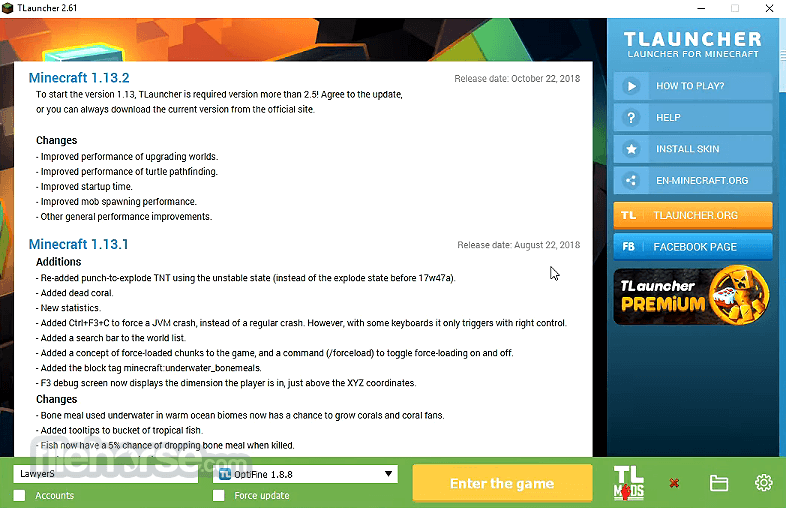
- Launch the Program – Open this program and allow it to load the interface.
- Create an Account – Enter a username or log in with this app or Mojang/Microsoft account.
- Select a Minecraft Version – Choose your desired Minecraft version from the dropdown menu.
- Configure Settings – Adjust RAM allocation, resolution, and mods if needed.
- Install Mods and Skins – Use the built-in options to add mods, resource packs, and custom skins.
- Click "Install & Play" – Wait for the game to download and launch automatically.
- Multiplayer Setup – Join cracked servers or configure access to premium servers.
- Manage Game Files – Use the launcher to access and modify Minecraft installation files.
- Update When Needed – Keep TLauncher and Minecraft versions up to date for a smooth experience.
ATLauncher - User-friendly launcher with mod pack support.
Technic Launcher - Popular launcher for modded Minecraft packs.
CurseForge App - Official launcher for CurseForge mod packs.
Badlion Client - Enhanced client with mods and optimizations.
Minecraft Launcher - Official launcher by Mojang Studios.
FTB Launcher - The official launcher for Feed The Beast modpacks.
PROS
- Free to Use – No cost to download and play.
- Supports Mods – Easily install Minecraft mods.
- Customization – Skins and settings flexibility.
- Offline Mode – Play without an official account.
- Frequent Updates – Keeps up with new Minecraft versions.
- No Multiplayer – Limited access to online servers.
- Security Risks – Potential malware concerns.
- Legal Issues – Violates Minecraft's terms.
- Limited Features – No premium Minecraft benefits.
Download TLauncher Latest Version Why is this app published on FileHorse? (More info)
##
畫面截圖