⚠ 這是歷史版本頁面 — 查看 Universal Media Server 最新版本 →

- 目前版本14.11.0
- 更新日期2025-03-09
- 檔案大小142 MB
- 檔案名稱UMS-Windows-14.11.0-x86_64.exe
- 作業系統Windows 7 / Windows 8 / Windows 10
- 支援語系English
- 授權型式開源軟體
- 開發商 Subjunk
- 軟體分類Windows 軟體 / 檔案傳輸與網路
##
編輯短評
Universal Media Server 是一款開源的媒體伺服器軟體,主要解決跨裝置播放多媒體內容的問題。它能將影片或音樂串流至電視、手機及遊戲主機等設備,並具備強大的轉碼能力與 UPnP/DLNA 相容性,還能自動從 IMDb 和 MusicBrainz 抓取元數據。該軟體目前維護活躍且更新頻繁,在同類工具中評價普遍不錯。
這套工具適合希望在家庭網路中共享媒體庫的使用者,當你需要將電腦內的檔案投射到大螢幕或行動裝置時非常實用。相較於同分類中偏向下載的替代方案,本軟體更專注於內容的分發與播放。使用者在下載前需留意其僅提供英文介面,且除了 Windows 平台外也支援 macOS 與 Linux,採開源授權方式提供。
##
翻譯排程處理中,以下暫以英文原文呈現
軟體介紹
Universal Media Server (UMS) is a free, open-source media server designed to stream or transcode multimedia content across various devices, including TVs, smartphones, gaming consoles, and computers.
Universal Media Server for Windows supports major operating systems such as Windows, Linux, and macOS, ensuring broad compatibility for users.
Key Features
Extensive Device Support: UMS connects seamlessly with a wide range of UPnP or DLNA-compatible devices, ensuring flexibility in media consumption.
Dynamic Metadata Retrieval: The server integrates with services like IMDb and MusicBrainz to fetch metadata, allowing users to filter videos by actor, director, genre, and more.
Online Media Integration: Users can add and manage online radio channels, podcasts, and RSS feeds, expanding their media library beyond local content.
Live Subtitles: UMS can download subtitles on-the-fly, enhancing the viewing experience for international audiences.
Privacy-Focused: The server does not track user actions, ensuring that media consumption remains private and secure.
User Interface
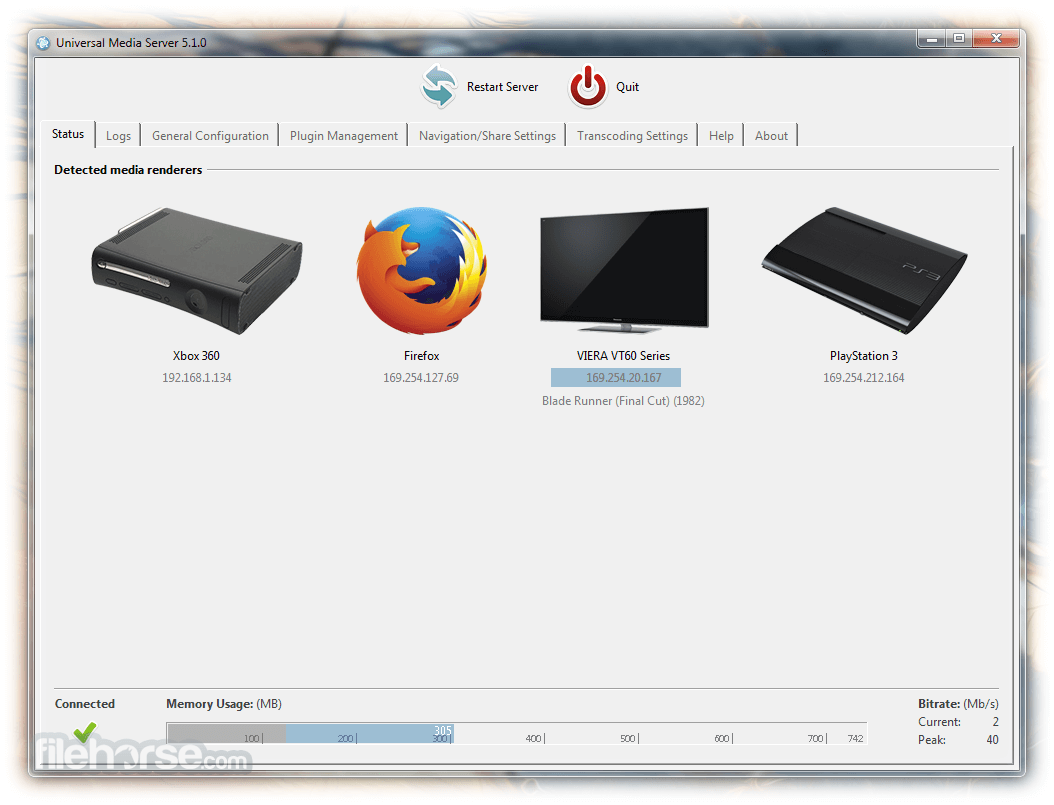
UMS offers a web-based interface accessible via any web browser, providing dynamic pages for each media file.
This design facilitates easy navigation and playback, either directly from the browser or by sending content to connected devices.
Installation and Setup
Installing Universal Media Server on a Windows PC involves downloading the installer from the official website and following the on-screen prompts.
The setup process is straightforward, requiring minimal configuration to get started.
How to Use
Launch UMS: After installation, open the application.
Add Media Libraries: Navigate to the "Shared Folders" section to add directories containing your media files.
Configure Settings: Adjust transcoding settings, network configurations, and subtitle preferences as needed.
Access Media: Use a web browser or a DLNA-compatible device to browse and play your media content.
FAQs
Which media formats does UMS support?
It supports a wide array of media formats, including but not limited to AVI, MP4, MKV, MP3, and FLAC.
Can UMS stream content over the internet?
UMS is primarily designed for local network streaming. Streaming over the internet may require additional configuration and poses security risks.
How do I update UMS to the latest version?
Visit the official website to download the latest version and follow the installation instructions. It's recommended to back up your configuration before updating.
Does UMS support transcoding?
Yes, it can transcode media files in real-time to ensure compatibility with various devices.
Is there a mobile app for UMS?
UMS does not have an official mobile app, but you can access the web interface via mobile browsers or use third-party DLNA-compatible apps.
Alternatives
Plex: Offers a polished interface with additional features like remote streaming and media organization.
Emby: Provides similar functionalities with a focus on customization and live TV support.
System Requirements
Universal Media Server is a robust solution for users seeking a free and privacy-conscious media server. While it may not have all the bells and whistles of some competitors, its extensive format support and ease of use make it a valuable tool for streaming media across various devices.
Note: Requires Java Runtime Environment.
Also Available: Download Universal Media Server for Mac
Download Universal Media Server Latest Version Why is this app published on FileHorse? (More info)
Universal Media Server for Windows supports major operating systems such as Windows, Linux, and macOS, ensuring broad compatibility for users.
Key Features
Extensive Device Support: UMS connects seamlessly with a wide range of UPnP or DLNA-compatible devices, ensuring flexibility in media consumption.
Dynamic Metadata Retrieval: The server integrates with services like IMDb and MusicBrainz to fetch metadata, allowing users to filter videos by actor, director, genre, and more.
Online Media Integration: Users can add and manage online radio channels, podcasts, and RSS feeds, expanding their media library beyond local content.
Live Subtitles: UMS can download subtitles on-the-fly, enhancing the viewing experience for international audiences.
Privacy-Focused: The server does not track user actions, ensuring that media consumption remains private and secure.
User Interface
UMS offers a web-based interface accessible via any web browser, providing dynamic pages for each media file.
This design facilitates easy navigation and playback, either directly from the browser or by sending content to connected devices.
Installation and Setup
Installing Universal Media Server on a Windows PC involves downloading the installer from the official website and following the on-screen prompts.
The setup process is straightforward, requiring minimal configuration to get started.
How to Use
Launch UMS: After installation, open the application.
Add Media Libraries: Navigate to the "Shared Folders" section to add directories containing your media files.
Configure Settings: Adjust transcoding settings, network configurations, and subtitle preferences as needed.
Access Media: Use a web browser or a DLNA-compatible device to browse and play your media content.
FAQs
Which media formats does UMS support?
It supports a wide array of media formats, including but not limited to AVI, MP4, MKV, MP3, and FLAC.
Can UMS stream content over the internet?
UMS is primarily designed for local network streaming. Streaming over the internet may require additional configuration and poses security risks.
How do I update UMS to the latest version?
Visit the official website to download the latest version and follow the installation instructions. It's recommended to back up your configuration before updating.
Does UMS support transcoding?
Yes, it can transcode media files in real-time to ensure compatibility with various devices.
Is there a mobile app for UMS?
UMS does not have an official mobile app, but you can access the web interface via mobile browsers or use third-party DLNA-compatible apps.
Alternatives
Plex: Offers a polished interface with additional features like remote streaming and media organization.
Emby: Provides similar functionalities with a focus on customization and live TV support.
System Requirements
- Operating System: Windows 11, 10, 8 or 7
- Processor: Dual-core CPU or higher
- Memory: At least 1 GB RAM
- Storage: Sufficient disk space for media libraries
- Free and open-source
- Supports a wide range of devices and formats
- Privacy-focused with no user tracking
- Lacks some advanced features found in competitors
- Interface may seem basic compared to alternatives
Universal Media Server is a robust solution for users seeking a free and privacy-conscious media server. While it may not have all the bells and whistles of some competitors, its extensive format support and ease of use make it a valuable tool for streaming media across various devices.
Note: Requires Java Runtime Environment.
Also Available: Download Universal Media Server for Mac
Download Universal Media Server Latest Version Why is this app published on FileHorse? (More info)
##
畫面截圖
- 2026-07-25 Universal Media Server 15.7.0 165 MB
- 2026-06-05 Universal Media Server 15.6.0 157 MB
- 2026-04-26 Universal Media Server 15.5.0 157 MB
- 2026-03-02 Universal Media Server 15.4.0 156 MB
- 2026-01-11 Universal Media Server 15.3.0 157 MB
- 2025-12-14 Universal Media Server 15.2.0 157 MB
- 2025-11-02 Universal Media Server 15.1.0 155 MB
- 2025-09-29 Universal Media Server 15.0.0 155 MB