⚠ 這是歷史版本頁面 — 查看 Unreal Commander 4.21 Build 最新版本 →

Unreal Commander 3.57 Build 1470
v 1470
Windows
免費軟體
8.2/10 (60)
- 目前版本1470
- 更新日期2020-07-19
- 檔案大小28.59 MB
- 檔案名稱uncomsetup3.57(build1470).exe
- 作業系統Windows Vista / Windows 7 / Windows 8 / Windows 10 / Windows 11
- 支援語系English
- 授權型式免費軟體
- 開發商 Max Diesel
- 軟體分類Windows 軟體 / 檔案傳輸與網路
##
編輯短評
Unreal Commander 是一款 Windows 上的免費檔案管理工具,由 Max Diesel 開發,主要目的是取代傳統的檔案總管,提供更有效率的檔案與目錄管理方式。它最具辨識度的特色是雙窗格介面,讓使用者可以同時瀏覽兩個資料夾,搭配多種進階功能,無論新手或進階用戶都能快速上手。這套軟體輕量且免費,開發者多年來持續維護,但更新步調較慢;在檔案管理同類工具中屬於小眾選擇,不過評價普遍不錯,只是評分人數不多。
這套工具適合需要頻繁搬移、比對或整理大量檔案的使用者,尤其是習慣雙窗格操作的人,能明顯提升工作效率。相較於同分類常見的下載工具(如 Internet Download Manager、uTorrent 等),它專注於本機檔案管理,沒有下載加速或 BT 功能,取捨上較為單純。軟體僅提供英文介面,沒有中文版,使用前需留意;授權為免費軟體,可在 Windows 平台上直接下載使用,無需付費。
##
翻譯排程處理中,以下暫以英文原文呈現
軟體介紹
Unreal Commander, developed by Max Diesel, is a powerful file manager app for Windows that aims to provide users with a versatile and efficient way to manage files and directories.
It is designed as an alternative to the traditional Windows File Explorer, offering a dual-pane interface and a plethora of advanced features that cater to both novice and experienced users.
The Unreal Commander for PC program is lightweight, free to use, and comes with a range of functionalities that make it a solid choice for those seeking an enhanced file management experience.
Key Features
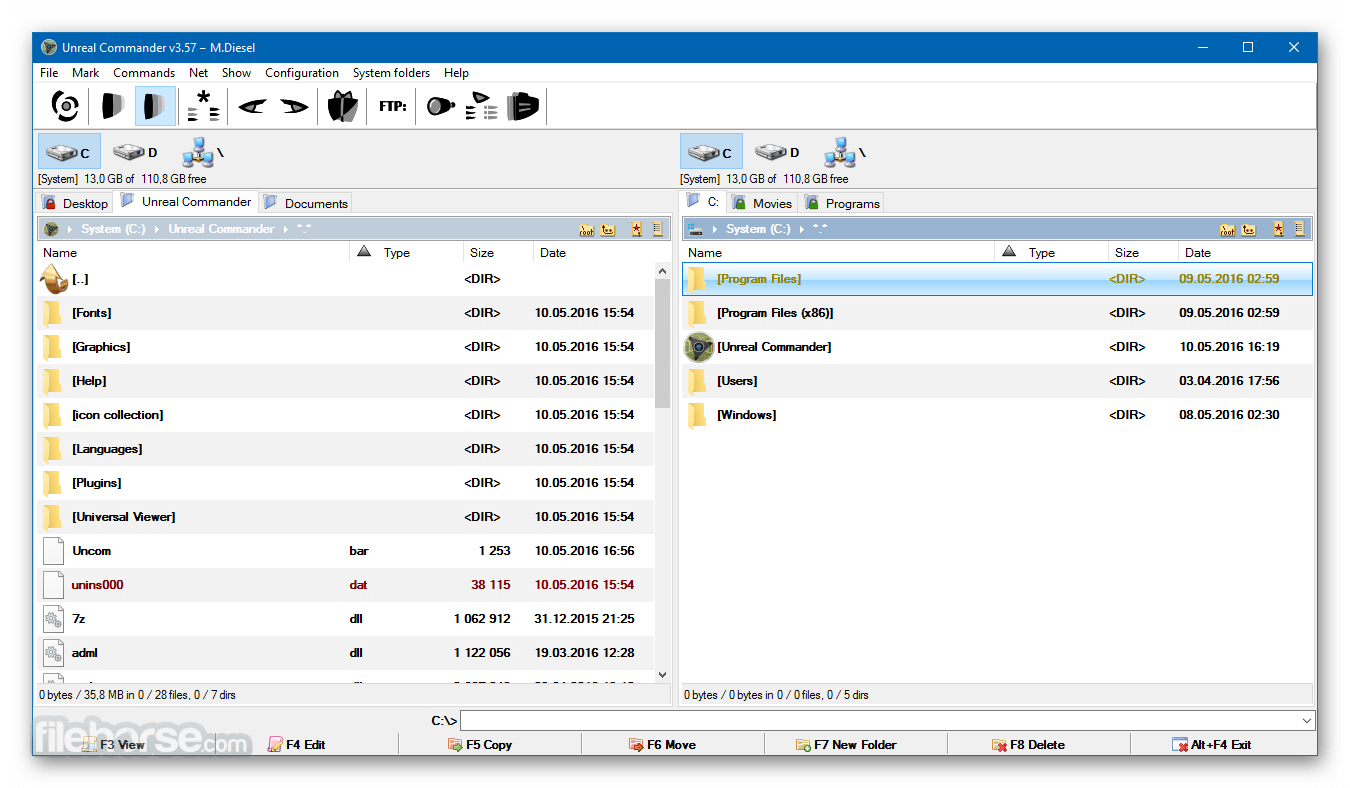
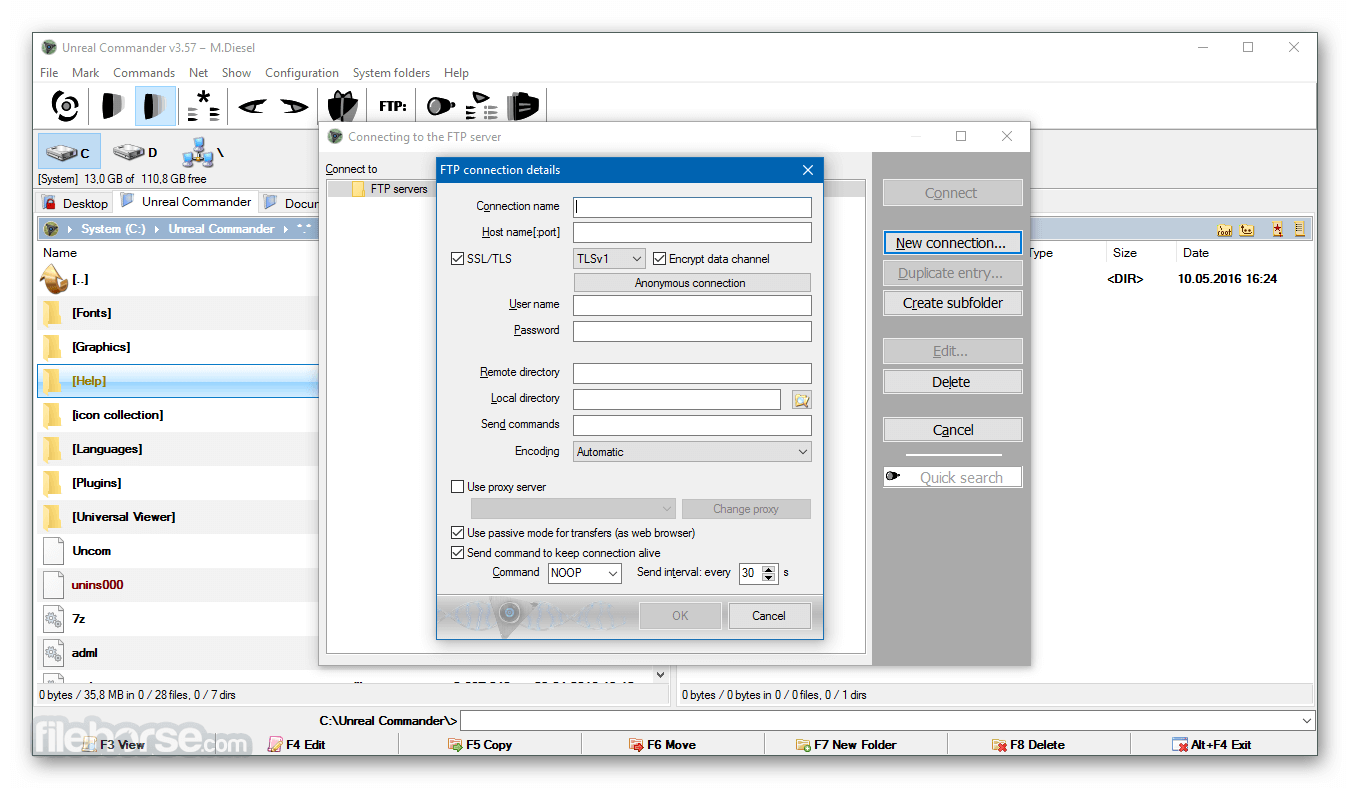
Dual-Pane Interface: The dual-pane layout allows users to view two directories simultaneously, making it easy to copy, move, or compare files between locations.
Archive Support: It supports popular archive formats like ZIP, RAR, ACE, TAR, and CAB. Users can create, extract, and manage archives directly from the interface.
FTP/SFTP Client: The built-in FTP/SFTP client allows users to connect to remote servers, upload, download, and manage files as if they were on their local machine.
Extended File Search: The advanced search functionality enables users to perform detailed searches across multiple directories, including searching within archives.
File Synchronization: The software offers a robust file synchronization tool, allowing users to keep directories up-to-date by comparing and synchronizing the contents.
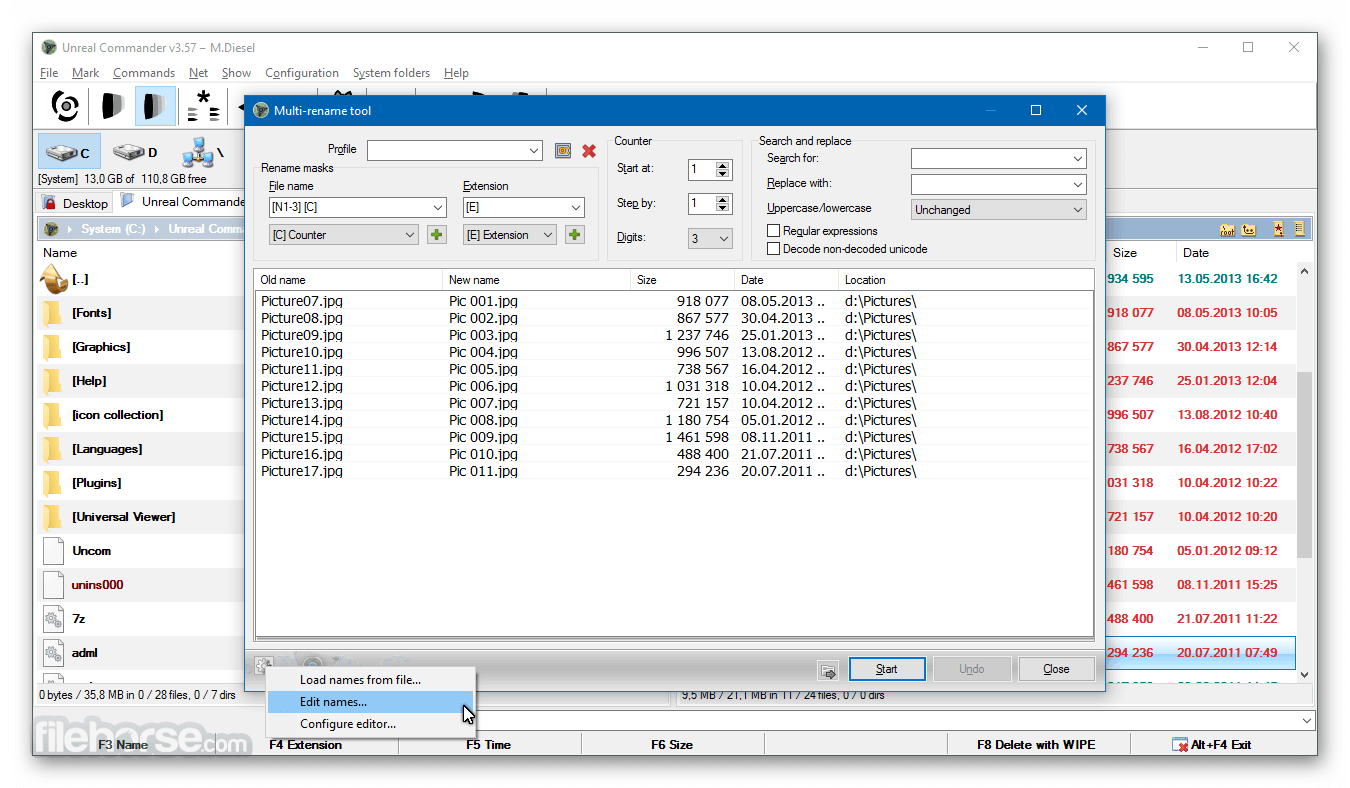
Batch File Rename: It includes a powerful batch rename tool, enabling users to rename multiple files using customizable templates and options.
Customizable Interface: Users can personalize the interface with custom color schemes, fonts, and toolbar arrangements to suit their preferences.
Multi-Language Support: The app supports multiple languages, making it accessible to users worldwide.
Plugins and Add-ons: It supports Total Commander plugins, extending its functionality with additional tools and features.
Full Features
The user interface of this software is intuitive and user-friendly, with a focus on functionality. The dual-pane layout is the centerpiece, providing users with a side-by-side view of two directories.
The interface is fully customizable, allowing users to adjust colors, fonts, and toolbar placements to their liking. The icons are clear, and the layout is logical, making navigation easy even for those unfamiliar with advanced file managers. The software also offers keyboard shortcuts for most operations, enhancing productivity for power users.
Installation and Setup
Installing this software is a straightforward process. The software is available for download from the official website or other trusted sources, like FileHorse. The installation package is lightweight, and the setup wizard guides users through the installation process.
Users can choose between a standard installation or a portable version, the latter of which can be run directly from a USB drive without installation.
Once installed, this utility is ready to use out of the box, with default settings that suit most users. However, advanced users can delve into the settings menu to configure the software to their specific needs.
How to Use
Navigating Files: Use the dual-pane interface to navigate between directories. Clicking on a folder in one pane will display its contents in that pane, while the other pane remains unchanged, allowing for easy file transfers.
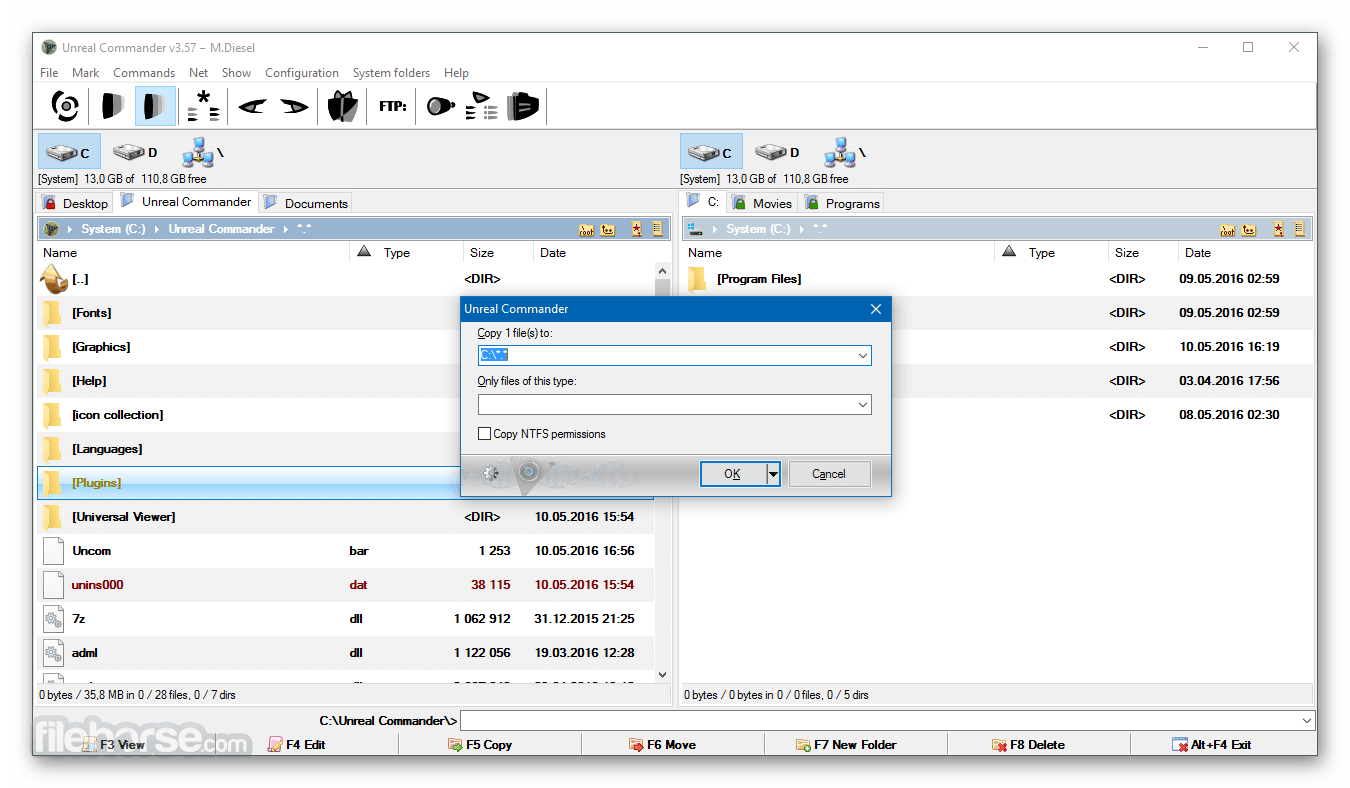
Copying/Moving Files: To copy or move files, select the desired files in one pane, then drag and drop them into the other pane, or use the F5 (Copy) and F6 (Move) keys.
Managing Archives: To manage archives, select the archive file and choose the appropriate option from the toolbar to extract, create, or modify the archive.
Connecting to FTP/SFTP: To connect to a remote server, go to the FTP menu, select 'Connect,' and enter the required credentials. Once connected, the server’s directory structure will appear in one of the panes.
File Synchronization: To synchronize files, select the directories you want to compare, then use the synchronization tool to identify differences and update the files as needed.
It is designed as an alternative to the traditional Windows File Explorer, offering a dual-pane interface and a plethora of advanced features that cater to both novice and experienced users.
The Unreal Commander for PC program is lightweight, free to use, and comes with a range of functionalities that make it a solid choice for those seeking an enhanced file management experience.
Key Features
Dual-Pane Interface: The dual-pane layout allows users to view two directories simultaneously, making it easy to copy, move, or compare files between locations.
Archive Support: It supports popular archive formats like ZIP, RAR, ACE, TAR, and CAB. Users can create, extract, and manage archives directly from the interface.
FTP/SFTP Client: The built-in FTP/SFTP client allows users to connect to remote servers, upload, download, and manage files as if they were on their local machine.
Extended File Search: The advanced search functionality enables users to perform detailed searches across multiple directories, including searching within archives.
File Synchronization: The software offers a robust file synchronization tool, allowing users to keep directories up-to-date by comparing and synchronizing the contents.
Batch File Rename: It includes a powerful batch rename tool, enabling users to rename multiple files using customizable templates and options.
Customizable Interface: Users can personalize the interface with custom color schemes, fonts, and toolbar arrangements to suit their preferences.
Multi-Language Support: The app supports multiple languages, making it accessible to users worldwide.
Plugins and Add-ons: It supports Total Commander plugins, extending its functionality with additional tools and features.
Full Features
- Dual-panel interface
- Full UNICODE support
- Advanced file search capabilities
- Multi-file rename tool
- Directory synchronization
- Archive support for ZIP, 7Z, RAR, CAB, WIM, TAR, GZ, TGZ, BZ2, TBZ2, LHA, ARJ formats
- Integrated FTP client
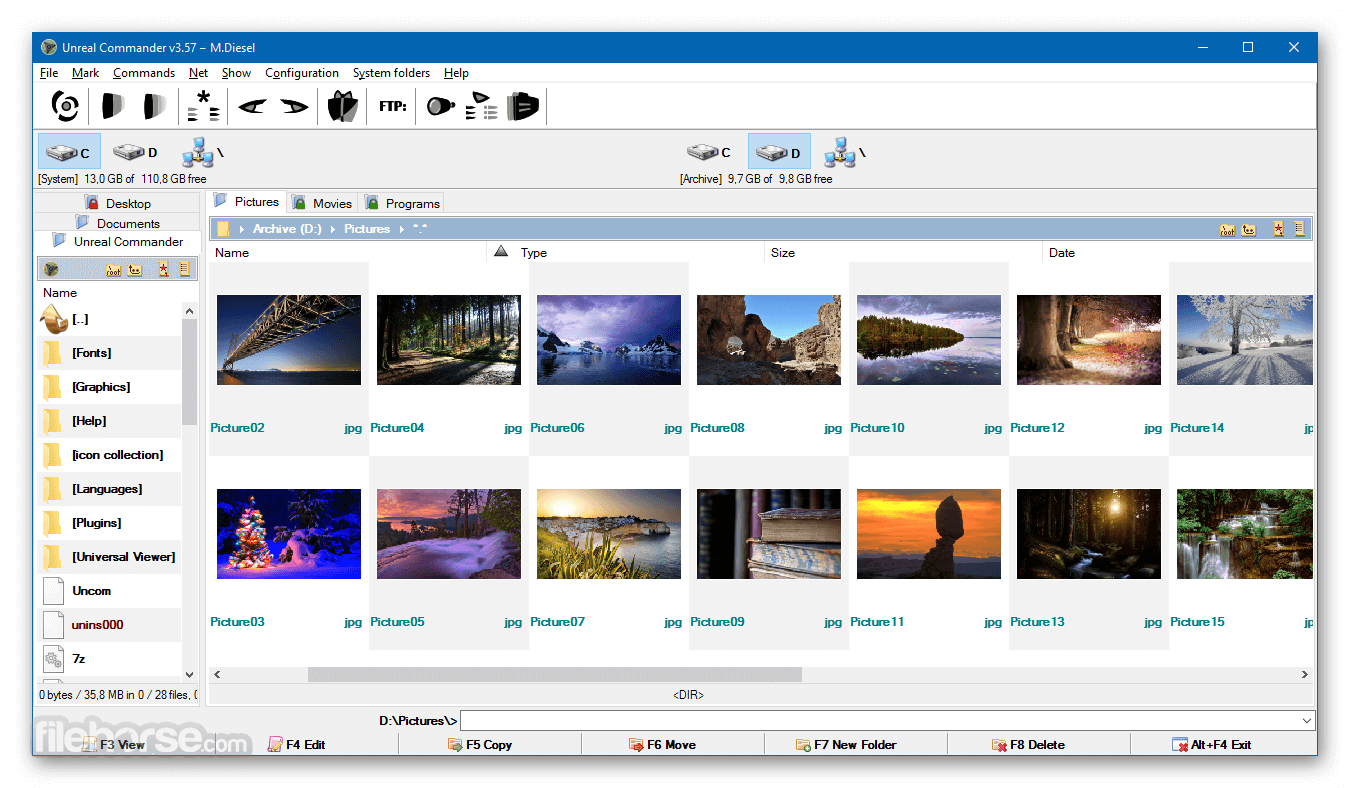
- Thumbnail view mode
- Folder tabs for better organization
- Compatibility with WLX/WCX/WDX plugins
- Built-in viewer with quick view function
- Network access support
- Drag-and-drop functionality
- History and Hotlist features
- Background operations for file copy/move/delete
- Secure file deletion with WIPE
- Customizable background images
- Visual styles, including file color categories and customizable fonts for all interface elements
- And more.
The user interface of this software is intuitive and user-friendly, with a focus on functionality. The dual-pane layout is the centerpiece, providing users with a side-by-side view of two directories.
The interface is fully customizable, allowing users to adjust colors, fonts, and toolbar placements to their liking. The icons are clear, and the layout is logical, making navigation easy even for those unfamiliar with advanced file managers. The software also offers keyboard shortcuts for most operations, enhancing productivity for power users.
Installation and Setup
Installing this software is a straightforward process. The software is available for download from the official website or other trusted sources, like FileHorse. The installation package is lightweight, and the setup wizard guides users through the installation process.
Users can choose between a standard installation or a portable version, the latter of which can be run directly from a USB drive without installation.
Once installed, this utility is ready to use out of the box, with default settings that suit most users. However, advanced users can delve into the settings menu to configure the software to their specific needs.
How to Use
Navigating Files: Use the dual-pane interface to navigate between directories. Clicking on a folder in one pane will display its contents in that pane, while the other pane remains unchanged, allowing for easy file transfers.
Copying/Moving Files: To copy or move files, select the desired files in one pane, then drag and drop them into the other pane, or use the F5 (Copy) and F6 (Move) keys.
Managing Archives: To manage archives, select the archive file and choose the appropriate option from the toolbar to extract, create, or modify the archive.
Connecting to FTP/SFTP: To connect to a remote server, go to the FTP menu, select 'Connect,' and enter the required credentials. Once connected, the server’s directory structure will appear in one of the panes.
File Synchronization: To synchronize files, select the directories you want to compare, then use the synchronization tool to identify differences and update the files as needed.
##
畫面截圖
- 2026-02-17 Unreal Commander 4.21 Build 1659 41.83 MB
- 2024-08-29 Unreal Commander 4.21 Build 1645 33.65 MB
- 2022-02-11 Unreal Commander 4.21 Build 1497 34.03 MB
- 2022-02-10 Unreal Commander 4.21 Build 1556 34.03 MB
- 2021-11-21 Unreal Commander 3.57 Build 1497 28.69 MB
- 2021-08-29 Unreal Commander 3.57 Build 1496 28.68 MB
- 2020-12-12 Unreal Commander 3.57 Build 1495 28.67 MB
- 2020-10-18 Unreal Commander 3.57 Build 1490 28.67 MB