⚠ 這是歷史版本頁面 — 查看 UVI Workstation 最新版本 →

- 目前版本3.1.12
- 更新日期2023-06-02
- 檔案大小352 MB
- 檔案名稱uviworkstation-x64-3.1.12.exe
- 作業系統Windows 10 (64-bit) / Windows 11
- 支援語系English
- 授權型式免費軟體
- 開發商 UVI Team
- 軟體分類Windows 軟體 / 音訊軟體
##
編輯短評
UVI Workstation 是一款完全免費的多音色樂器工具,內建效果器與琶音器,並支援無限聲部與現場表演功能,主打流暢的即時工作流程。它本質上是強大的取樣播放器,能完整相容所有 UVI 與 UVI-Powered 音色庫,並透過全新 UI 設計、Favorites 標記與介面縮放,讓使用者更有效率地管理與演奏音色。這套軟體歷經超過十五年的開發,在同類工具中屬於備受信賴的常青樹,更新活躍,評價普遍不錯,但評分人數不多,屬於專業領域中的口碑型選擇。
這套軟體適合音樂製作人、編曲者與現場演出者,尤其是已經投資 UVI 音色庫、需要一個穩定且免費的播放平台來整合多聲部編曲與即時控制的人。與同分類的 Virtual DJ 或 iTunes 相比,UVI Workstation 定位完全不同,它專注於樂器音色播放而非 DJ 混音或媒體管理,取捨在於它綁定 UVI 生態系,若你沒有相關音色庫,用途會受限。授權上完全免費,提供 Windows 與 macOS 版本,但介面僅有英文,且官方未提供中文版,使用前需留意語系門檻。
##
翻譯排程處理中,以下暫以英文原文呈現
軟體介紹
UVI Workstation is a completely free multitimbral instrument tool that provides integrated effects and arpeggiator, unlimited parts, live performance features, and a smooth real-time workflow, The app is a powerful sample player and more for your Windows PC platform.
With over 15 years of development under the hood, UVI is a tested, proven, and trusted industry staple. Focused on creating an even more optimized workflow by bringing in a new UI design, Favorites tagging, and UI scaling to adapt to all user screens.
UVI Workstation is fully compatible with all UVI and UVI-Powered instruments from a growing list of companies such as Acousticsamples, VI Labs, and Virharmonic. From vintage synths, samplers, and drum machines to immaculate grand pianos, choirs, and orchestras, Workstation is your gateway into some of the world's most sophisticated and best-sounding instruments.
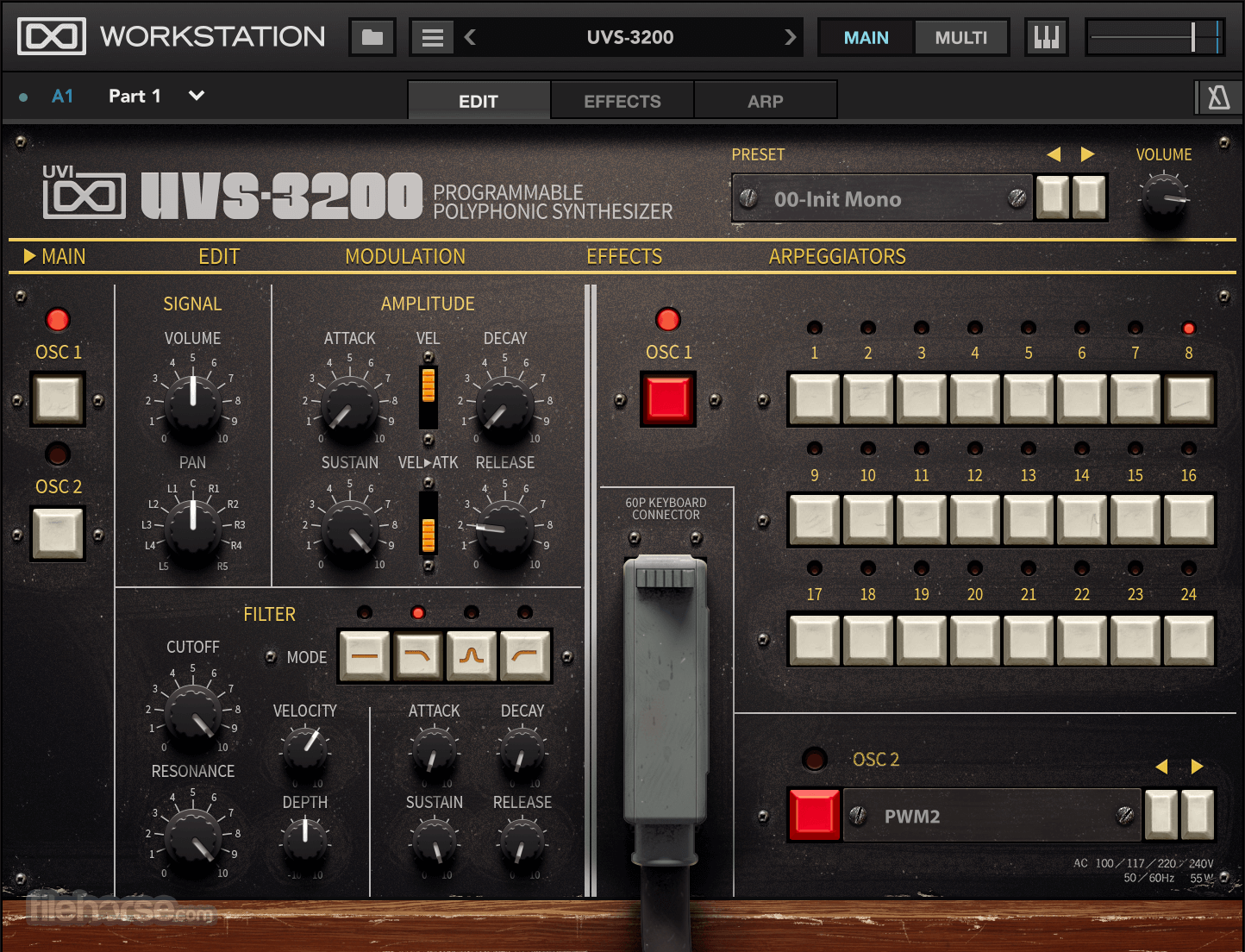
Crafted for efficient and intuitive operation, It has been built to offer clarity and ease-of-use. Carefully thought out and tested for usability, controls are logically arranged and ergonomically designed.
Inspiring Effects
The effect system in the program is extensive, offering a full suite of dynamics, delays, distortions, EQs, filters, and reverbs. UVI effects are of the highest quality, offering sounds that range from modern and transparent to warm and textured. With unlimited effects per-part, two aux channels, and a master, you can freely shape or mangle your sound in any way imaginable.
Advanced Arpeggiator
An advanced variation of the classic synthesizer effect modifies incoming notes and plays them back in programmable patterns. Includes up to 128 steps of variable pitch, velocity, and step length modulation, 26 playback modes, resolution from 1/64 tri to 32x, and dozens of preset factory shapes.
Unlimited Parts
Use as many parts as your system can handle. Built-in browser and search functions make it painless to locate the sound or instrument you're looking for, then tag them as Favorites to recall them later. From setups as basic as a single synth to complex orchestral arrangements, UVI Workstations' sophisticated architecture can handle them with ease. Even arrange parts by Keyswitches or limit their range to certain sections of your MIDI keyboard.
Optimized Mixing
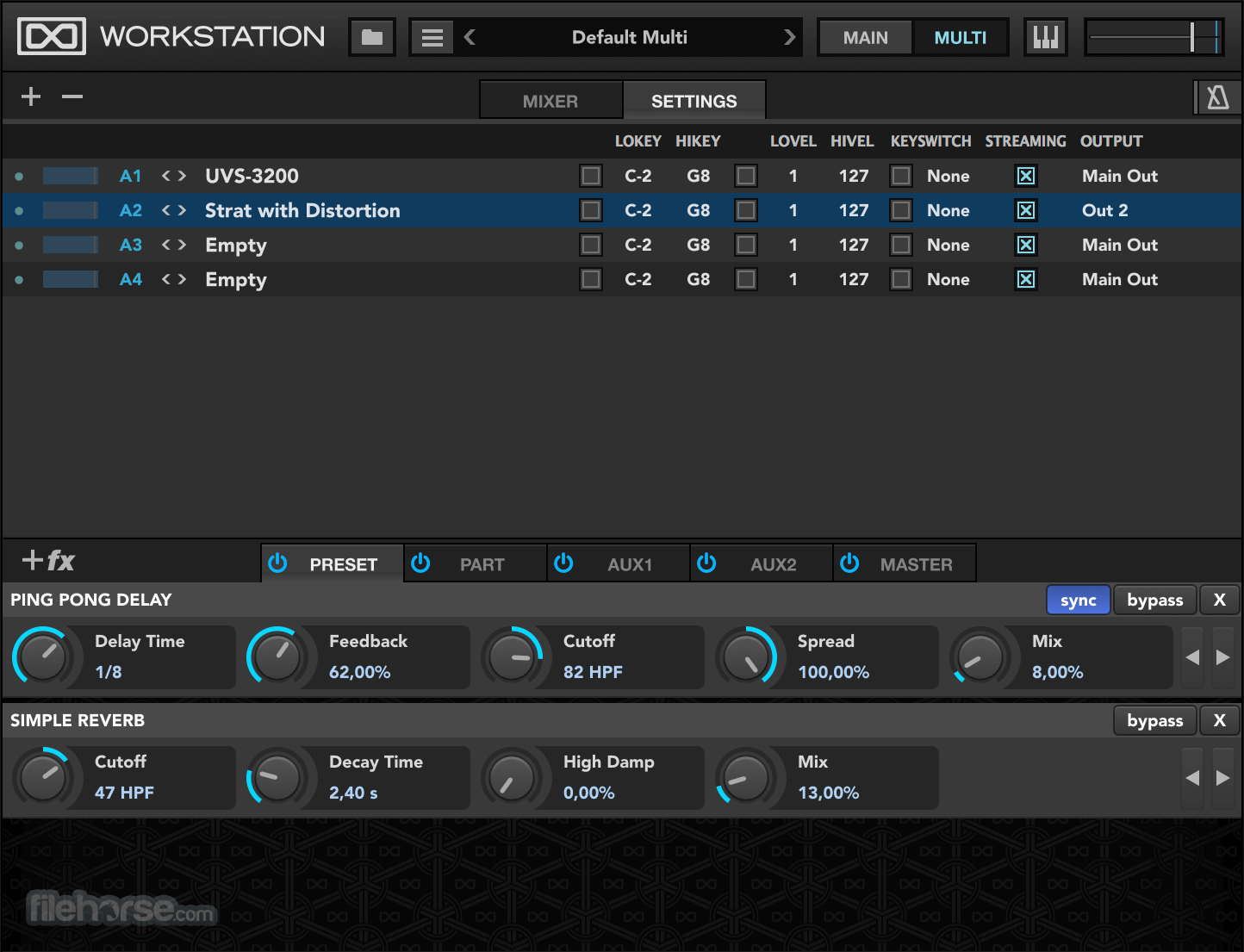
It offers a clear and efficient mixing interface, giving you immediate access to core functions like solo, mute, volume, and pan as well as 2 aux sends and pitch control per-part. Explore the rich potential of layered sounds or mix complex arrangements with ease.
Tested and Certified in Digital Performer 8+, Pro Tools 11+, Logic 9+, Cubase 7+, Nuendo 6+, Ableton Live 8+, Studio One 2+, Garage Band 6, Maschine 1 & 2, Tracktion 4+, Vienna Ensemble 5, Reaper 4+, Sonar X3, Main Stage 3, MuLab 5.5+, FL Studio, Bitwig 1+, Reason 9.5+
Supported File Formats: Soundbanks (.ufs), AIFF, FLAC, MP3, MP4 (with QuickTime installed on Windows for MP3/MP4), REX1, REX2, SDII (on Mac), WAV, WAV64, SND, CAF. Supported Plugins: Audio Units, AAX, VST, Stand-alone.
Features and Highlights
Wide Range of Sounds: It comes with a vast library of high-quality virtual instruments and samples, covering a wide range of genres and styles. This can be a significant advantage for musicians and producers looking for diverse sounds.
Sample Editing: It offers basic sample editing capabilities, allowing you to trim, loop, and manipulate samples to some extent. This can be useful for customizing sounds to fit your project.
Stability: Many users find the app to be stable and reliable, even when running multiple instances and using a large number of samples and instruments.
Compatibility: UVI Workstation is compatible with both Mac and Windows operating systems, making it accessible to a broad user base. It also supports various plugin formats, including VST, AU, and AAX.
User-Friendly Interface: The interface of the program is generally considered user-friendly and intuitive, making it accessible to musicians and producers of varying skill levels.
Free Version: The app is available for FREE, and it includes a selection of sounds and instruments. This allows users to get started without any initial investment.
CONS
Limited Editing Features: While the app does offer basic sample editing features, it is not as powerful or feature-rich as dedicated digital audio workstations (DAWs) or other sample editing software. Advanced users may find its editing capabilities to be lacking.
Resource Intensive: Running multiple instances of the app with high-quality samples can be resource-intensive, which may lead to performance issues on less powerful computers.
No MIDI Recording: The program is primarily a sample player and virtual instrument host; it does not provide MIDI recording and sequencing capabilities. You'll need a separate DAW for full MIDI production.
Limited Effects: While the software does come with a selection of built-in effects, it may not offer the same level of control and flexibility as dedicated audio effect plugins.
Sound Library Size: While UVI Workstation's sound library is extensive, it may not have as vast a library as some other virtual instrument platforms, such as Native Instruments Kontakt.
Also Available: Download UVI Workstation for Mac
Download UVI Workstation Latest Version Why is this app published on FileHorse? (More info)
With over 15 years of development under the hood, UVI is a tested, proven, and trusted industry staple. Focused on creating an even more optimized workflow by bringing in a new UI design, Favorites tagging, and UI scaling to adapt to all user screens.
UVI Workstation is fully compatible with all UVI and UVI-Powered instruments from a growing list of companies such as Acousticsamples, VI Labs, and Virharmonic. From vintage synths, samplers, and drum machines to immaculate grand pianos, choirs, and orchestras, Workstation is your gateway into some of the world's most sophisticated and best-sounding instruments.
Crafted for efficient and intuitive operation, It has been built to offer clarity and ease-of-use. Carefully thought out and tested for usability, controls are logically arranged and ergonomically designed.
Inspiring Effects
The effect system in the program is extensive, offering a full suite of dynamics, delays, distortions, EQs, filters, and reverbs. UVI effects are of the highest quality, offering sounds that range from modern and transparent to warm and textured. With unlimited effects per-part, two aux channels, and a master, you can freely shape or mangle your sound in any way imaginable.
Advanced Arpeggiator
An advanced variation of the classic synthesizer effect modifies incoming notes and plays them back in programmable patterns. Includes up to 128 steps of variable pitch, velocity, and step length modulation, 26 playback modes, resolution from 1/64 tri to 32x, and dozens of preset factory shapes.
Unlimited Parts
Use as many parts as your system can handle. Built-in browser and search functions make it painless to locate the sound or instrument you're looking for, then tag them as Favorites to recall them later. From setups as basic as a single synth to complex orchestral arrangements, UVI Workstations' sophisticated architecture can handle them with ease. Even arrange parts by Keyswitches or limit their range to certain sections of your MIDI keyboard.
Optimized Mixing
It offers a clear and efficient mixing interface, giving you immediate access to core functions like solo, mute, volume, and pan as well as 2 aux sends and pitch control per-part. Explore the rich potential of layered sounds or mix complex arrangements with ease.
Tested and Certified in Digital Performer 8+, Pro Tools 11+, Logic 9+, Cubase 7+, Nuendo 6+, Ableton Live 8+, Studio One 2+, Garage Band 6, Maschine 1 & 2, Tracktion 4+, Vienna Ensemble 5, Reaper 4+, Sonar X3, Main Stage 3, MuLab 5.5+, FL Studio, Bitwig 1+, Reason 9.5+
Supported File Formats: Soundbanks (.ufs), AIFF, FLAC, MP3, MP4 (with QuickTime installed on Windows for MP3/MP4), REX1, REX2, SDII (on Mac), WAV, WAV64, SND, CAF. Supported Plugins: Audio Units, AAX, VST, Stand-alone.
Features and Highlights
- Single-mode for loading UVI sounds and instruments
- Multi-mode including unlimited parts and convenient mixing environment with meters, mute, solo, volume, pan, performance settings (key switches, range), and separate outputs
- Smart integrated browser with Search/Favorites to quickly find what you’re looking for
- Scalable UI adapts to different monitor sizes
- Powerful and extremely flexible Arpeggiator
- Expandable with all UVI-Powered instruments
- Manage instruments and loops in the same interface
- A comprehensive suite of professional FX can be infinitely stacked and combined with easily editable parameters (delay, reverb, phaser, chorus, EQ, filter, drive, distortion, compressor...)
- Real-time time-stretch and slice algorithm with real-time beat syncing: loops are always in time
- Drag & drop MIDI & audio
- Import user REX files, Apple Loops, AIFF, WAV, ...
- MIDI learn & 128 user assignable Host automations
- Download and Install: Visit the official UVI website or FileHorse.com to download the UVI Workstation installer for Windows.
- Launch the Application: After installation, open UVI Workstation in standalone mode or as a plugin within your preferred DAW.
- Load Soundbanks: Use the integrated browser to navigate and load UVI soundbanks (.ufs files) into the workstation.
- Explore Presets: Browse through available presets, utilizing the search and tagging features to find sounds that suit your project.
- Edit Sounds: Adjust parameters, apply integrated effects, and use the arpeggiator to customize your sound.
- Save Your Work: Save your customized presets and setups for future use.
- Operating System: Windows 10 to Windows 11 (64-bit)
- Processor: 64-bit compatible CPU
- RAM: Minimum 4GB (8GB or more recommended)
- Hard Drive: 7,200 rpm HDD recommended or Solid State Drive (SSD)
- Free iLok account (physical iLok dongle not required)
- Internet connection for product registration and activation (offline use possible after activation)
- UVI Workstation (free) or Falcon to run libraries
Wide Range of Sounds: It comes with a vast library of high-quality virtual instruments and samples, covering a wide range of genres and styles. This can be a significant advantage for musicians and producers looking for diverse sounds.
Sample Editing: It offers basic sample editing capabilities, allowing you to trim, loop, and manipulate samples to some extent. This can be useful for customizing sounds to fit your project.
Stability: Many users find the app to be stable and reliable, even when running multiple instances and using a large number of samples and instruments.
Compatibility: UVI Workstation is compatible with both Mac and Windows operating systems, making it accessible to a broad user base. It also supports various plugin formats, including VST, AU, and AAX.
User-Friendly Interface: The interface of the program is generally considered user-friendly and intuitive, making it accessible to musicians and producers of varying skill levels.
Free Version: The app is available for FREE, and it includes a selection of sounds and instruments. This allows users to get started without any initial investment.
CONS
Limited Editing Features: While the app does offer basic sample editing features, it is not as powerful or feature-rich as dedicated digital audio workstations (DAWs) or other sample editing software. Advanced users may find its editing capabilities to be lacking.
Resource Intensive: Running multiple instances of the app with high-quality samples can be resource-intensive, which may lead to performance issues on less powerful computers.
No MIDI Recording: The program is primarily a sample player and virtual instrument host; it does not provide MIDI recording and sequencing capabilities. You'll need a separate DAW for full MIDI production.
Limited Effects: While the software does come with a selection of built-in effects, it may not offer the same level of control and flexibility as dedicated audio effect plugins.
Sound Library Size: While UVI Workstation's sound library is extensive, it may not have as vast a library as some other virtual instrument platforms, such as Native Instruments Kontakt.
Also Available: Download UVI Workstation for Mac
Download UVI Workstation Latest Version Why is this app published on FileHorse? (More info)
##
畫面截圖



- 2026-07-23 UVI Workstation 4.0.9 343 MB
- 2026-06-29 UVI Workstation 4.0.6 343 MB
- 2026-01-20 UVI Workstation 4.0.5 340 MB
- 2026-01-14 UVI Workstation 4.0.4 340 MB
- 2026-01-12 UVI Workstation 4.0.3 367 MB
- 2025-08-25 UVI Workstation 4.0.2 363 MB
- 2025-04-15 UVI Workstation 4.0.1 362 MB
- 2025-03-05 UVI Workstation 4.0.0 362 MB