- 目前版本9.17
- 更新日期2025-12-28
- 檔案大小11.2 MB
- 檔案名稱wpro.exe
- 作業系統Windows XP / Vista / Windows 7 / Windows 8 / Windows 10 / Windows 11
- 支援語系English
- 授權型式商業試用
- 開發商 Crystal Office Systems
- 軟體分類Windows 軟體 / 安全工具
##
翻譯排程處理中,以下暫以英文原文呈現
軟體介紹
WinLock Professional is a robust security and access management tool designed for Windows 11/10 users. It provides administrators with the ability to control access to the system and enforce a variety of restrictions to ensure that data, applications, and system settings are secure.
Tailored for corporate and educational environments, WinLock Professional offers granular control over what users can see and do, effectively preventing unauthorized changes, data breaches, or inappropriate usage.
Key Features
Access Restriction:
Block access to specific files, folders, and drives.
Restrict access to system utilities such as Task Manager, Control Panel, and Registry Editor.
Application Control:
Specify which applications users can run or block.
Schedule time-based application usage.
Internet Filtering:
Block specific websites or categories of websites.
Configure internet restrictions based on user roles.
Monitoring and Reporting:
Generate detailed logs of user activity.
Monitor login times, accessed files, and visited websites.
Customizable Restrictions:
Set up time limits for system usage.
Restrict printing, USB drives, and clipboard usage.
Password Protection:
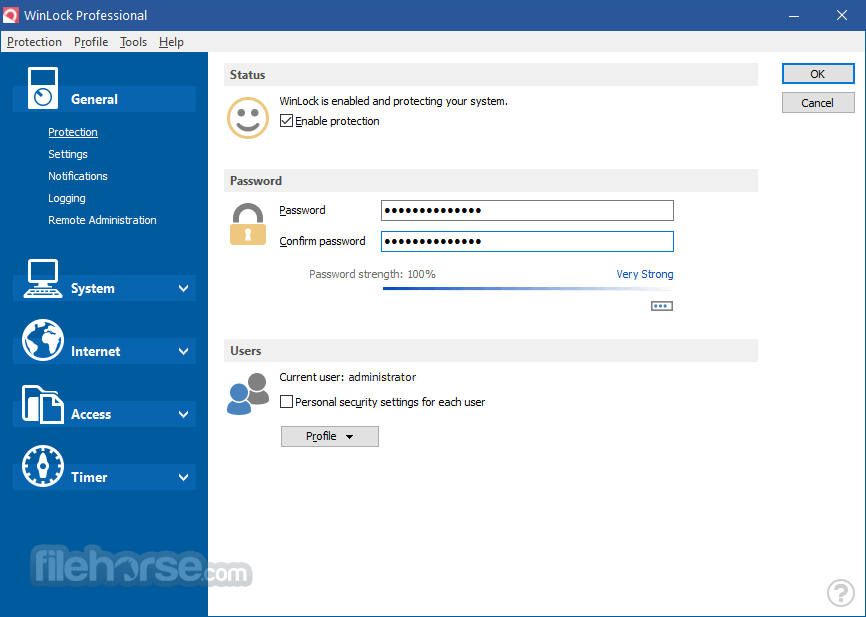
Secure the application settings with a password to prevent tampering.
Remote Management:
Manage restrictions on multiple machines through a network.
Ease of Deployment:
Create restriction templates and deploy them across multiple systems.
User Interface
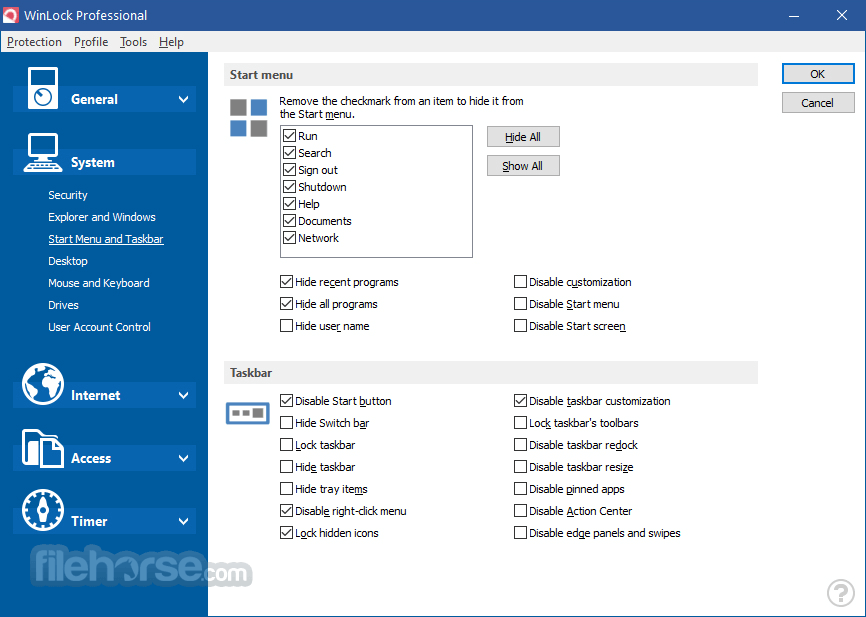
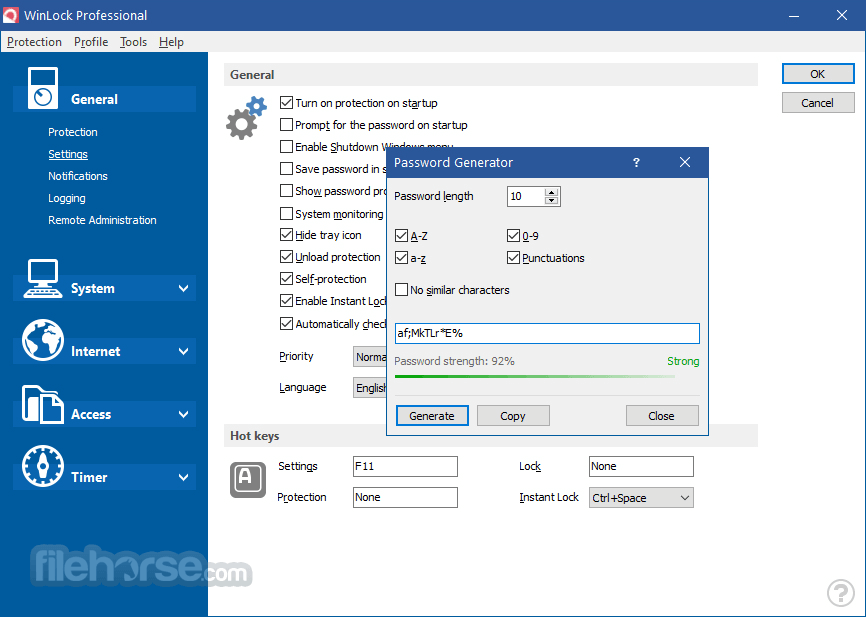
WinLock Professional’s user interface is clean and straightforward, designed with administrators in mind. The dashboard categorizes features into easily navigable sections like “Restrictions,” “Applications,” “Web Control,” and “Settings.”
Each section provides detailed options for customization, accompanied by tooltips for better understanding. While the UI prioritizes functionality over aesthetics, its logical layout ensures that even less-experienced users can quickly configure settings.
Highlights
Smart Restrictions
Create tailored protection schemes for each user in a multi-user environment. The tool activates only the selected restrictions for each account.
Internet Restrictions
Implement Internet Explorer restrictions and website content filters to control and safeguard Internet access. Compatible with most major browsers.
USB Authentication
Securely access the app using a USB flash drive. Transform any USB drive into a protection key for Win Lock.
Parental Control
Restrict access to inappropriate and questionable websites, ensuring a safer online experience for children.
Snapshots
Automatically capture desktop and webcam snapshots at scheduled intervals.
Guest Password
Enable system access for guests without requiring the master password.
Remote Control
Lock devices, capture snapshots, and manage restrictions remotely via PC or mobile.
Data Protection
Securely block access to specific files, folders, and applications.
Onscreen Timer
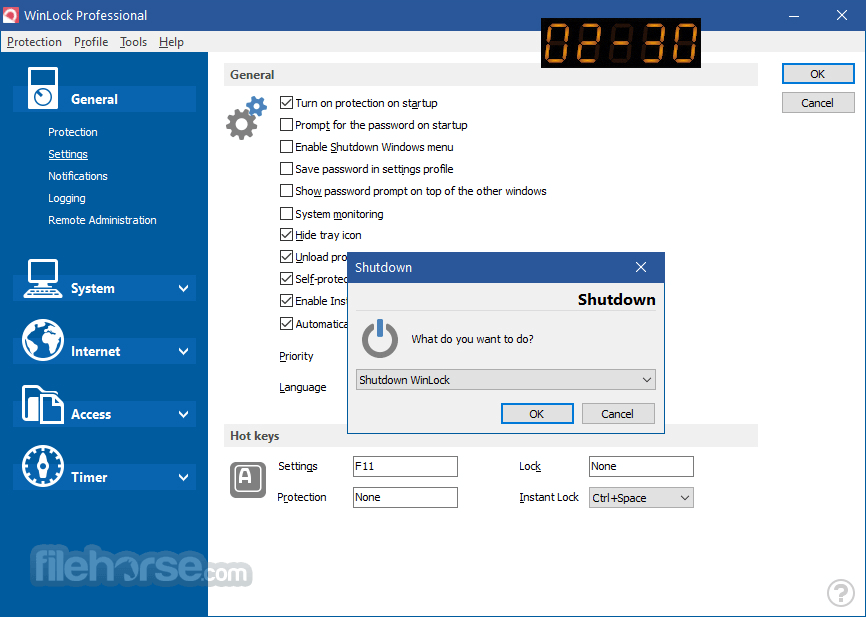
Display the remaining time with a convenient digital clock interface.
Removable Device Management
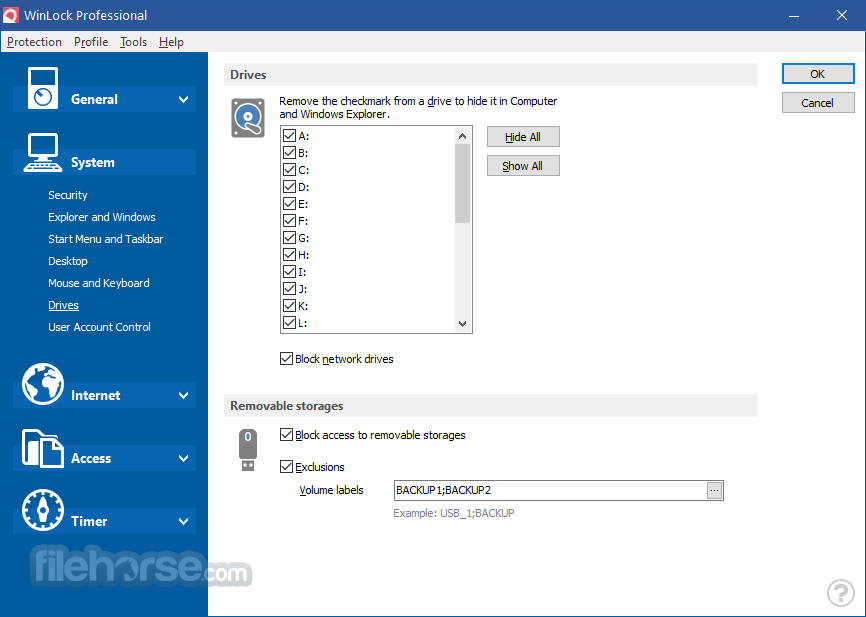
Provide flexible access control for flash drives, networks, and other removable devices.
Executable Protection
Set password protection for programs and applications.
Priority Support
Receive personalized technical assistance for prompt issue resolution.
Installation and Setup
How to Use
Setting Up Restrictions:
FAQs
Can I bypass WinLock Professional without knowing the password?
No, the application is password-protected and cannot be disabled or uninstalled without administrator credentials.
Does WinLock Professional work on all Windows versions?
It supports Windows 7, 8, 10, and 11. Older versions of Windows may not be compatible with the latest software updates.
Can I set different restrictions for multiple users on the same system?
Yes, the software allows role-based restrictions, so each user can have unique settings.
How does the internet filtering feature work?
It blocks websites based on a predefined list of URLs or keywords. You can customize the list to suit your organizational policies.
Is remote management available in the standard version?
No, remote management is only available in the Professional edition, which is designed for networked environments.
Pricing
Single License: $39.95 (lifetime license for one PC).
Business Pack: $199.95 (5 licenses, ideal for small businesses).
A free trial is available for users to test its capabilities before purchasing.
System Requirements
WinLock Professional stands out as an all-in-one access management and security solution for organizations seeking to control user activity and protect sensitive data.
While its interface may not win any design awards, the functionality and reliability of the software more than make up for it. With features like application control, internet filtering, and remote management, it is a valuable tool for IT administrators in corporate and educational environments. The reasonable pricing and lifetime licensing make it a cost-effective option compared to competitors.
Whether you’re managing a small office or a large network of computers, it delivers the peace of mind you need for secure system usage.
Note: 30-day trial version.
Download WinLock Professional Latest Version Why is this app published on FileHorse? (More info)
Tailored for corporate and educational environments, WinLock Professional offers granular control over what users can see and do, effectively preventing unauthorized changes, data breaches, or inappropriate usage.
Key Features
Access Restriction:
Block access to specific files, folders, and drives.
Restrict access to system utilities such as Task Manager, Control Panel, and Registry Editor.
Application Control:
Specify which applications users can run or block.
Schedule time-based application usage.
Internet Filtering:
Block specific websites or categories of websites.
Configure internet restrictions based on user roles.
Monitoring and Reporting:
Generate detailed logs of user activity.
Monitor login times, accessed files, and visited websites.
Customizable Restrictions:
Set up time limits for system usage.
Restrict printing, USB drives, and clipboard usage.
Password Protection:
Secure the application settings with a password to prevent tampering.
Remote Management:
Manage restrictions on multiple machines through a network.
Ease of Deployment:
Create restriction templates and deploy them across multiple systems.
User Interface
WinLock Professional’s user interface is clean and straightforward, designed with administrators in mind. The dashboard categorizes features into easily navigable sections like “Restrictions,” “Applications,” “Web Control,” and “Settings.”
Each section provides detailed options for customization, accompanied by tooltips for better understanding. While the UI prioritizes functionality over aesthetics, its logical layout ensures that even less-experienced users can quickly configure settings.
Highlights
Smart Restrictions
Create tailored protection schemes for each user in a multi-user environment. The tool activates only the selected restrictions for each account.
Internet Restrictions
Implement Internet Explorer restrictions and website content filters to control and safeguard Internet access. Compatible with most major browsers.
USB Authentication
Securely access the app using a USB flash drive. Transform any USB drive into a protection key for Win Lock.
Parental Control
Restrict access to inappropriate and questionable websites, ensuring a safer online experience for children.
Snapshots
Automatically capture desktop and webcam snapshots at scheduled intervals.
Guest Password
Enable system access for guests without requiring the master password.
Remote Control
Lock devices, capture snapshots, and manage restrictions remotely via PC or mobile.
Data Protection
Securely block access to specific files, folders, and applications.
Onscreen Timer
Display the remaining time with a convenient digital clock interface.
Removable Device Management
Provide flexible access control for flash drives, networks, and other removable devices.
Executable Protection
Set password protection for programs and applications.
Priority Support
Receive personalized technical assistance for prompt issue resolution.
Installation and Setup
- Download the installer from the official website or FileHorse.
- Follow the step-by-step installation wizard.
- Configure initial settings, such as the admin password and default restrictions.
- Restart the system to apply changes.
How to Use
Setting Up Restrictions:
- Open the application and navigate to the “Restrictions” tab.
- Select the elements (files, drives, or utilities) you wish to restrict.
- Save changes.
- Go to the “Web Control” section.
- Add specific URLs or keywords to block.
- Apply restrictions to individual users or user groups.
- Access the “Reports” tab to view logs.
- Filter results by date, user, or activity type.
- Configure settings for one machine.
- Export the template and import it into other systems via the “Deployment” feature.
FAQs
Can I bypass WinLock Professional without knowing the password?
No, the application is password-protected and cannot be disabled or uninstalled without administrator credentials.
Does WinLock Professional work on all Windows versions?
It supports Windows 7, 8, 10, and 11. Older versions of Windows may not be compatible with the latest software updates.
Can I set different restrictions for multiple users on the same system?
Yes, the software allows role-based restrictions, so each user can have unique settings.
How does the internet filtering feature work?
It blocks websites based on a predefined list of URLs or keywords. You can customize the list to suit your organizational policies.
Is remote management available in the standard version?
No, remote management is only available in the Professional edition, which is designed for networked environments.
Pricing
Single License: $39.95 (lifetime license for one PC).
Business Pack: $199.95 (5 licenses, ideal for small businesses).
A free trial is available for users to test its capabilities before purchasing.
System Requirements
- Operating System: Windows 7/8/10/11 (32-bit and 64-bit).
- Processor: Intel Pentium 4 or higher.
- RAM: 1 GB minimum (2 GB recommended).
- Disk Space: 100 MB for installation.
- Network: Required for remote management features.
- Comprehensive restriction features.
- Simple setup and deployment.
- Strong internet filtering capabilities.
- Effective monitoring and reporting tools.
- Flexible licensing options.
- Requires an initial learning curve for new users.
- Limited to Windows OS.
WinLock Professional stands out as an all-in-one access management and security solution for organizations seeking to control user activity and protect sensitive data.
While its interface may not win any design awards, the functionality and reliability of the software more than make up for it. With features like application control, internet filtering, and remote management, it is a valuable tool for IT administrators in corporate and educational environments. The reasonable pricing and lifetime licensing make it a cost-effective option compared to competitors.
Whether you’re managing a small office or a large network of computers, it delivers the peace of mind you need for secure system usage.
Note: 30-day trial version.
Download WinLock Professional Latest Version Why is this app published on FileHorse? (More info)
##
畫面截圖