⚠ 這是歷史版本頁面 — 查看 WinMerge 最新版本 →

WinMerge 2.16.44
v 2.16.44
Windows
開源軟體
8/10 (18)
- 目前版本2.16.44
- 更新日期2024-10-27
- 檔案大小9.54 MB
- 檔案名稱WinMerge-2.16.44-x64-Setup.exe
- 作業系統Windows 7 64 / Windows 8 64 / Windows 10 64 / Windows 11
- 支援語系English
- 授權型式開源軟體
- 開發商 The WinMerge Development Team
- 軟體分類Windows 軟體 / 開發者工具
##
編輯短評
WinMerge 是一套免費開源的 Windows 檔案與目錄比對工具,主要解決使用者需要快速找出檔案差異、合併變更或同步資料夾的需求。它的視覺化介面以左右並排方式呈現差異,並以語法上色標示,讓開發者或文字工作者能直覺地追蹤修改內容。此軟體由開發團隊長期維護,更新相當活躍,在同類工具中屬於小眾但口碑穩定的選擇。
適合需要頻繁比對程式碼、文件版本或同步目錄的使用者,例如開發者、編輯或版本控管人員。與同分類中其他熱門工具相比,WinMerge 的定位更專門,沒有多餘功能,但操作直覺且完全免費。需注意的是它僅提供英文介面,且僅支援 Windows 平台,若需要中文介面或跨平台支援,可能得考慮其他替代方案。開源授權讓使用者可自由檢視與修改原始碼。
##
翻譯排程處理中,以下暫以英文原文呈現
軟體介紹
WinMerge is a free and open-source tool designed for file and folder comparison on Windows. WinMerge helps users identify differences between files, merge changes, and synchronize directories.
Its visual interface makes it easy to see changes side-by-side, making it an essential tool for developers, writers, and anyone who needs to track file changes efficiently.
Main Features
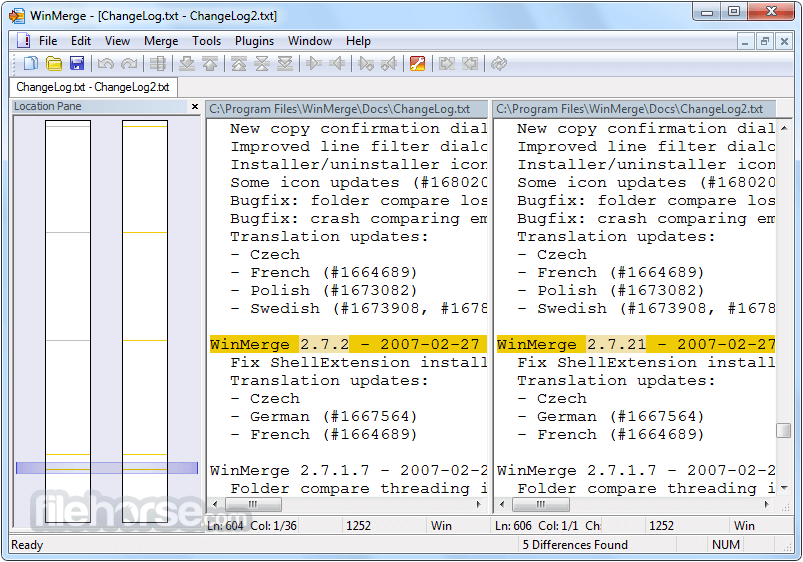
File Comparison: Highlights differences between two files using syntax coloring for better readability.
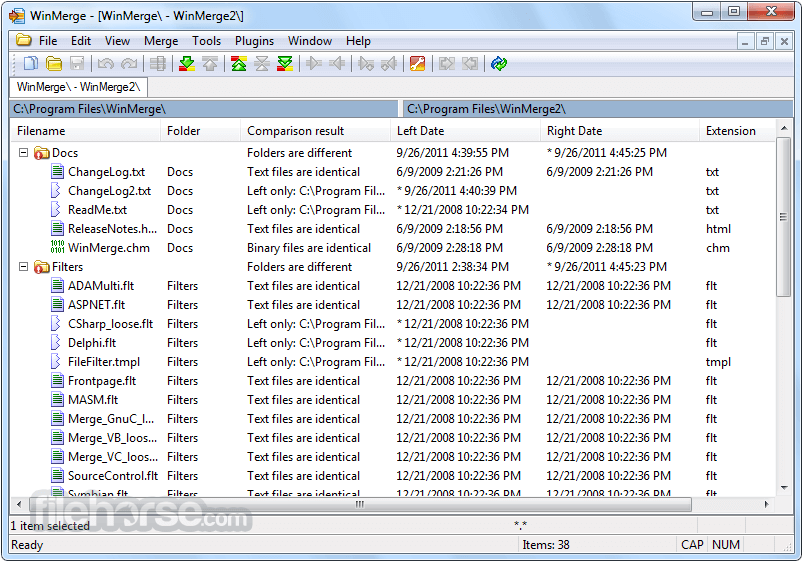
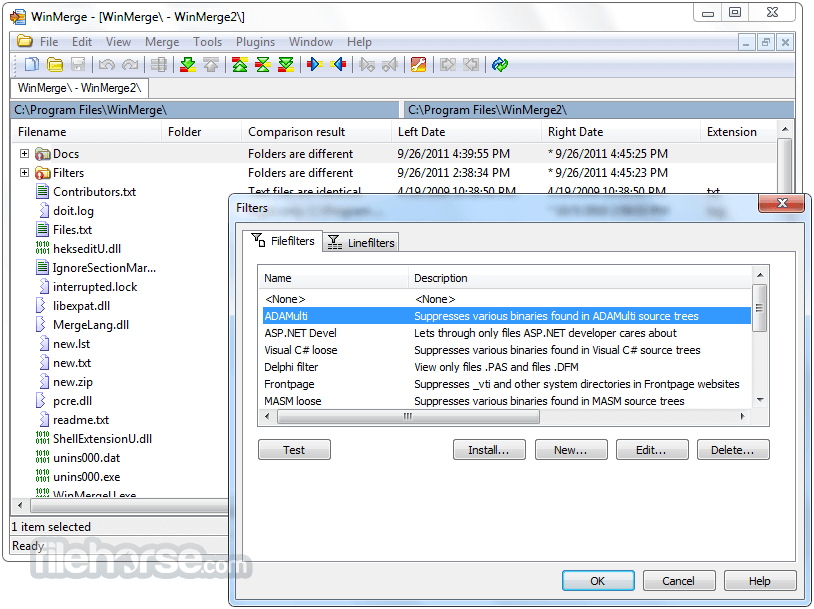
Folder Comparison: Allows users to compare and synchronize entire directories.
Merge Capabilities: Provides three-way merging to consolidate differences from multiple files.
Syntax Highlighting: Supports various programming languages for easier code review.
Version Control Integration: Works well with Git, SVN, and other version control systems.
Plugins and Extensions: Expandable with custom scripts and plugins.
Drag and Drop Support: Easily load files for comparison.
Unicode and Multiple Encoding Support: Ensures compatibility with different file formats.
Backup and Undo Functionality: Enables safe modifications and rollbacks.
What`s New
WinMerge features a straightforward, dual-pane interface that visually highlights differences between files and folders.
The left and right panes represent the files being compared, with color-coded markers indicating changes.
The toolbar provides quick access to essential functions, and users can customize the layout and colors to fit their preferences.
Installation and Setup
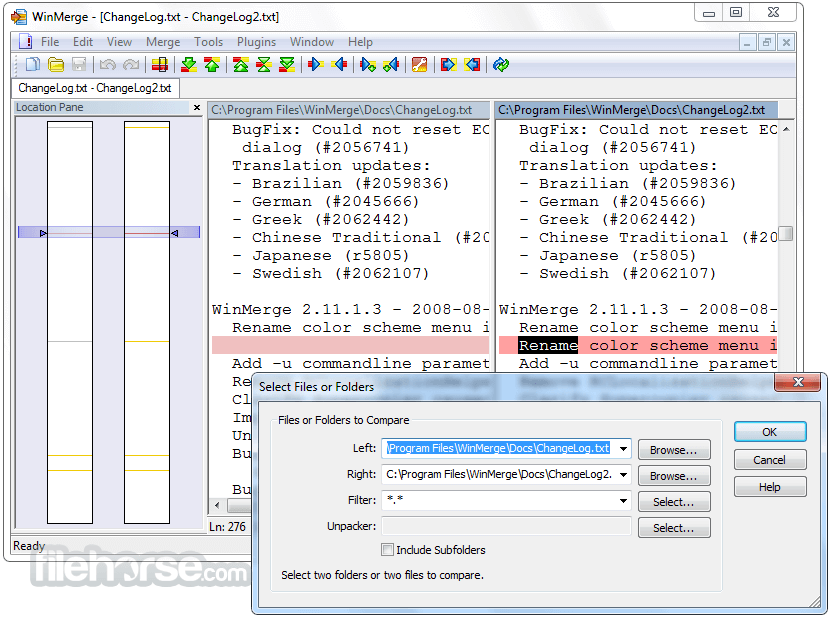
Compare Two Files: Open WinMerge and select “File” > “Open” to choose two files for comparison.
Analyze Differences: View highlighted sections to see added, removed, or modified lines.
Merge Changes: Use the toolbar buttons or right-click menu to move changes from one file to another.
Compare Folders: Select “File” > “Open” and choose directories for comparison.
Synchronize Folders: Copy missing or modified files between directories to keep them in sync.
FAQ
Is WinMerge free?
Yes, this tool is completely FREE and open-source.
Can WinMerge compare binary files?
Yes, it supports binary file comparison and highlights byte-level differences.
Does WinMerge work with large files?
Yes, but performance may be slower with extremely large files.
Can I integrate WinMerge with version control systems?
Yes, it works with Git, SVN, and other systems for comparing and merging changes.
Does WinMerge support Mac or Linux?
No, this software is officially available only for Windows, though alternatives exist for other platforms.
Alternatives
Beyond Compare: A paid alternative with powerful comparison and synchronization features.
UltraCompare: A feature-rich alternative with FTP and cloud comparison support.
Pricing
This tool is completely FREE and open-source, with no premium versions or hidden costs.
System Requirements
WinMerge is an invaluable tool for Windows users who need to compare files and folders efficiently. Its free, open-source nature and ease of use make it a must-have for developers, writers, and IT professionals.
While it lacks native support for Mac and Linux, and some advanced merging features require plugins, its functionality and reliability make it a top choice in its category. If you’re looking for a robust, no-cost file comparison tool, WinMerge is an excellent desktop solution.
Download WinMerge Latest Version Why is this app published on FileHorse? (More info)
Its visual interface makes it easy to see changes side-by-side, making it an essential tool for developers, writers, and anyone who needs to track file changes efficiently.
Main Features
File Comparison: Highlights differences between two files using syntax coloring for better readability.
Folder Comparison: Allows users to compare and synchronize entire directories.
Merge Capabilities: Provides three-way merging to consolidate differences from multiple files.
Syntax Highlighting: Supports various programming languages for easier code review.
Version Control Integration: Works well with Git, SVN, and other version control systems.
Plugins and Extensions: Expandable with custom scripts and plugins.
Drag and Drop Support: Easily load files for comparison.
Unicode and Multiple Encoding Support: Ensures compatibility with different file formats.
Backup and Undo Functionality: Enables safe modifications and rollbacks.
What`s New
- 3-way File Comparison - New!
- Image Compare - New!
- Support many types of images
- Can highlight the differences with blocks
- Overlaying of the pictures is possible
- Table Compare - New!
- Shows CSV/TSV file contents in table format
- Text can be wrapped for each column
WinMerge features a straightforward, dual-pane interface that visually highlights differences between files and folders.
The left and right panes represent the files being compared, with color-coded markers indicating changes.
The toolbar provides quick access to essential functions, and users can customize the layout and colors to fit their preferences.
Installation and Setup
- Download the latest version from the official website or FileHorse.
- Run the installer and follow the on-screen instructions.
- Choose additional components, such as shell integration, for easier access.
- Complete the installation and launch the application.
Compare Two Files: Open WinMerge and select “File” > “Open” to choose two files for comparison.
Analyze Differences: View highlighted sections to see added, removed, or modified lines.
Merge Changes: Use the toolbar buttons or right-click menu to move changes from one file to another.
Compare Folders: Select “File” > “Open” and choose directories for comparison.
Synchronize Folders: Copy missing or modified files between directories to keep them in sync.
FAQ
Is WinMerge free?
Yes, this tool is completely FREE and open-source.
Can WinMerge compare binary files?
Yes, it supports binary file comparison and highlights byte-level differences.
Does WinMerge work with large files?
Yes, but performance may be slower with extremely large files.
Can I integrate WinMerge with version control systems?
Yes, it works with Git, SVN, and other systems for comparing and merging changes.
Does WinMerge support Mac or Linux?
No, this software is officially available only for Windows, though alternatives exist for other platforms.
Alternatives
Beyond Compare: A paid alternative with powerful comparison and synchronization features.
UltraCompare: A feature-rich alternative with FTP and cloud comparison support.
Pricing
This tool is completely FREE and open-source, with no premium versions or hidden costs.
System Requirements
- Operating System: Windows 7, 8, 10, and 11 (both 32-bit and 64-bit versions supported)
- Processor: 1 GHz or faster
- Memory: 1 GB RAM (recommended)
- Storage: At least 50 MB free disk space
- 3-way File Comparison
- Image Compare
- Table Compare
- Free and open-source
- User-friendly interface
- Supports text and folder comparison
- Syntax highlighting for better readability
- Works with version control systems
- Only available for Windows
WinMerge is an invaluable tool for Windows users who need to compare files and folders efficiently. Its free, open-source nature and ease of use make it a must-have for developers, writers, and IT professionals.
While it lacks native support for Mac and Linux, and some advanced merging features require plugins, its functionality and reliability make it a top choice in its category. If you’re looking for a robust, no-cost file comparison tool, WinMerge is an excellent desktop solution.
Download WinMerge Latest Version Why is this app published on FileHorse? (More info)
##
畫面截圖
- 2026-07-28 WinMerge 2.16.58 16.37 MB
- 2026-05-28 WinMerge 2.16.56.2 13.87 MB
- 2026-04-28 WinMerge 2.16.56 13.02 MB
- 2026-02-28 WinMerge 2.16.54.2 11.88 MB
- 2026-01-27 WinMerge 2.16.54 10.85 MB
- 2025-11-27 WinMerge 2.16.52.2 11.8 MB
- 2025-10-27 WinMerge 2.16.52 11.8 MB
- 2025-07-28 WinMerge 2.16.50 11.71 MB