- 目前版本26.6
- 更新日期2026-06-28
- 檔案大小54.3 MB
- 檔案名稱xtreme.zip
- 作業系統Windows 7 / Windows 8 / Windows 10 / Windows 11
- 支援語系English
- 授權型式商業試用
- 開發商 Winstep Team
- 軟體分類Windows 軟體 / 桌面強化
##
翻譯排程處理中,以下暫以英文原文呈現
軟體介紹
Winstep Xtreme is a powerful desktop enhancement suite designed to transform the Windows interface into a highly customizable, visually appealing, and functional workspace.
Unlike standard Windows themes or launchers, Winstep Xtreme for PC/Laptop offers a complete overhaul of the taskbar, start menu, and dock system, integrating widgets, animated effects, and productivity tools.
It is ideal for users who want to personalize their Windows experience beyond the default customization options.
You might also like:
Object Desktop - The Complete Productivity and Personalization Suite for PC!
Main Features
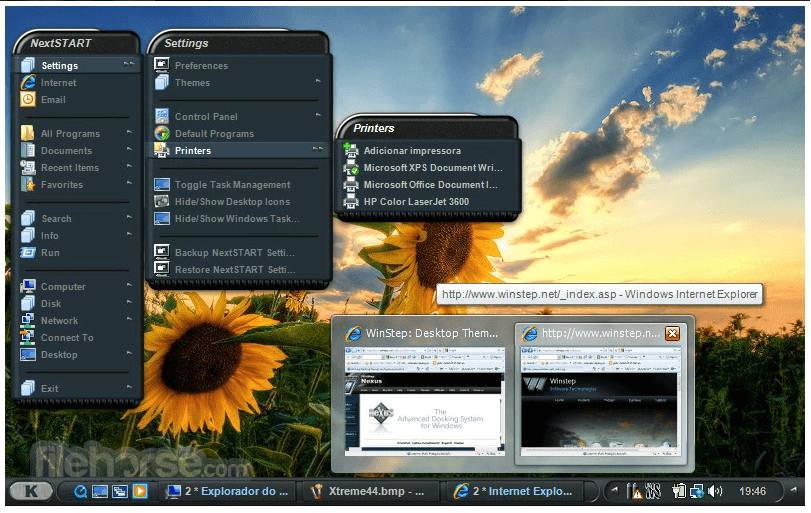
NextSTART Taskbar Replacement – Replaces the standard Windows taskbar with a feature-rich, highly customizable alternative.
WorkShelf Dock System – Provides a dock with multiple shelf layers to organize applications, documents, and widgets.
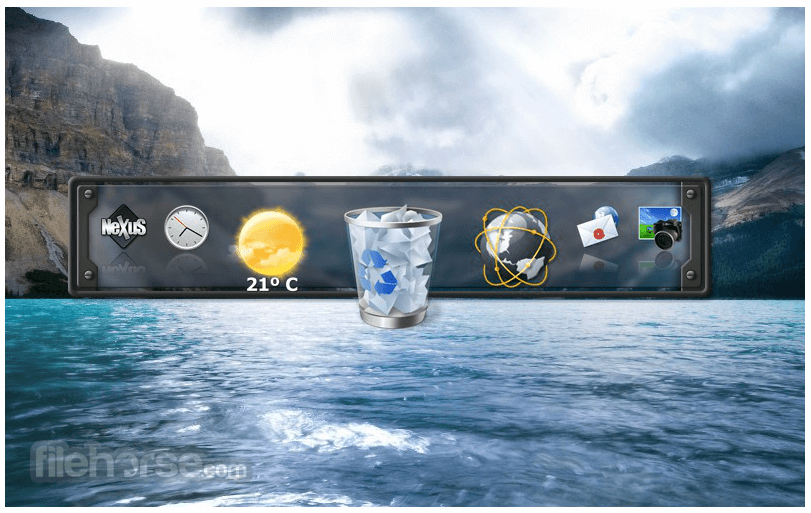
Nexus Dock – A sleek, Mac-like dock for quick access to frequently used applications.
Multiple Themes & Skins – Comes with various high-quality themes and supports third-party skins.
Animated Effects & Transitions – Offers smooth animations, reflections, and transparency effects.
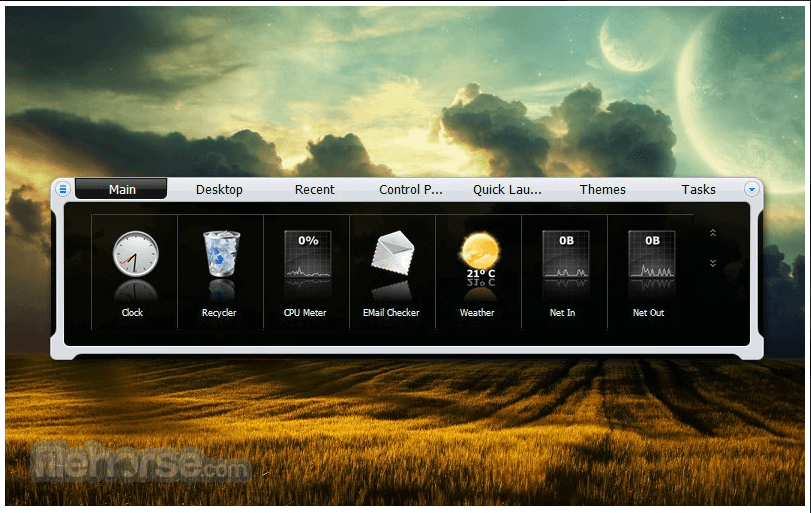
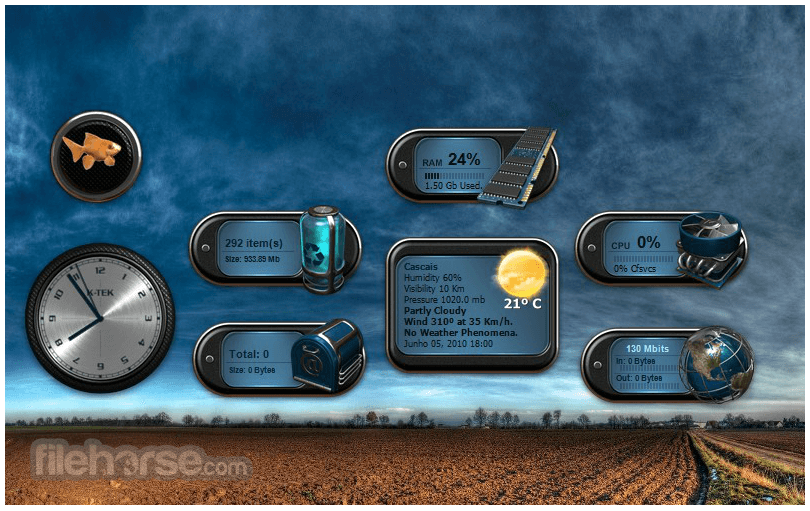
Integrated Widgets – Includes CPU meters, weather forecasts, clocks, and other useful desktop gadgets.
Hotkeys & Shortcuts – Supports keyboard shortcuts for quick access to applications and system functions.
Backup & Restore Settings – Allows saving and restoring custom desktop layouts.
Multi-Monitor Support – Works seamlessly with multiple screens for improved productivity.
Task Management Features – Enhances task switching with advanced grouping and preview options.
User Interface
Winstep Xtreme boasts an eye-catching, modern interface that significantly deviates from the standard Windows look.
The dock and taskbar elements are fully customizable, with options for transparency, colors, and 3D effects.
The software integrates seamlessly into Windows, allowing users to switch between different styles and configurations effortlessly.
While the UI is visually rich, first-time users may find it slightly overwhelming due to the sheer number of customization options.
Installation and Setup
Configuring the Dock: Use the Nexus Dock to add frequently used applications, adjust animations, and organize shortcuts.
Customizing the Taskbar: Replace the Windows taskbar with NextSTART, setting up menus, hotspots, and hotkeys.
Managing Widgets: Drag and drop built-in widgets such as weather, CPU monitors, and clocks to the desktop.
Applying Themes: Choose from a variety of built-in or downloadable skins to change the overall look.
Backup Settings: Regularly save customizations using the built-in backup tool to restore preferences if needed.
FAQ
Is Winstep Xtreme compatible with Windows 11?
Yes, this program is compatible with Windows 11 and earlier versions, including Windows 10.
Does Winstep Xtreme impact system performance?
While it adds visual enhancements, it is optimized for performance. However, enabling too many effects may slow down lower-end PCs.
Can I revert back to the default Windows UI?
Yes, it can be uninstalled or disabled, restoring the default Windows interface.
Does it support multiple monitors?
Yes, Winstep Xtreme fully supports multi-monitor setups with independent settings for each screen.
Is there a free version available?
Winstep offers a free version called "Nexus Dock," but Winstep Xtreme is a paid suite with additional features.
Alternatives
Stardock ObjectDock – A similar dock replacement with customizable widgets and app launchers.
Classic Shell or Open-Shell – For users who prefer a traditional Windows start menu experience.
Fences by Stardock – A tool that organizes desktop icons into resizable, customizable groups.
Pricing
This is a premium software with a one-time purchase or subscription model.
Prices typically range from $39.95 to $44.95, depending on discounts or promotions. The license covers updates and premium support.
System Requirements
Winstep Xtreme is an excellent choice for Windows users looking to enhance their desktop experience with a feature-rich customization suite.
It offers a sleek dock, an advanced taskbar replacement, and a variety of themes and widgets that significantly improve both aesthetics and functionality. While it may take some time to master, the software provides an unparalleled level of personalization.
Note: 30 days trial version.
Download Winstep Xtreme Latest Version Why is this app published on FileHorse? (More info)
Unlike standard Windows themes or launchers, Winstep Xtreme for PC/Laptop offers a complete overhaul of the taskbar, start menu, and dock system, integrating widgets, animated effects, and productivity tools.
It is ideal for users who want to personalize their Windows experience beyond the default customization options.
You might also like:
Object Desktop - The Complete Productivity and Personalization Suite for PC!
Main Features
NextSTART Taskbar Replacement – Replaces the standard Windows taskbar with a feature-rich, highly customizable alternative.
WorkShelf Dock System – Provides a dock with multiple shelf layers to organize applications, documents, and widgets.
Nexus Dock – A sleek, Mac-like dock for quick access to frequently used applications.
Multiple Themes & Skins – Comes with various high-quality themes and supports third-party skins.
Animated Effects & Transitions – Offers smooth animations, reflections, and transparency effects.
Integrated Widgets – Includes CPU meters, weather forecasts, clocks, and other useful desktop gadgets.
Hotkeys & Shortcuts – Supports keyboard shortcuts for quick access to applications and system functions.
Backup & Restore Settings – Allows saving and restoring custom desktop layouts.
Multi-Monitor Support – Works seamlessly with multiple screens for improved productivity.
Task Management Features – Enhances task switching with advanced grouping and preview options.
User Interface
Winstep Xtreme boasts an eye-catching, modern interface that significantly deviates from the standard Windows look.
The dock and taskbar elements are fully customizable, with options for transparency, colors, and 3D effects.
The software integrates seamlessly into Windows, allowing users to switch between different styles and configurations effortlessly.
While the UI is visually rich, first-time users may find it slightly overwhelming due to the sheer number of customization options.
Installation and Setup
- Download this software from the official website or FileHorse.
- Run the installer and follow the on-screen instructions.
- Choose the initial theme or layout setup during installation.
- Customize settings through the main Winstep Xtreme control panel.
- Restart Windows to apply certain visual changes fully.
- The installation process is straightforward, though users should have a basic understanding of Windows customization settings for best results.
Configuring the Dock: Use the Nexus Dock to add frequently used applications, adjust animations, and organize shortcuts.
Customizing the Taskbar: Replace the Windows taskbar with NextSTART, setting up menus, hotspots, and hotkeys.
Managing Widgets: Drag and drop built-in widgets such as weather, CPU monitors, and clocks to the desktop.
Applying Themes: Choose from a variety of built-in or downloadable skins to change the overall look.
Backup Settings: Regularly save customizations using the built-in backup tool to restore preferences if needed.
FAQ
Is Winstep Xtreme compatible with Windows 11?
Yes, this program is compatible with Windows 11 and earlier versions, including Windows 10.
Does Winstep Xtreme impact system performance?
While it adds visual enhancements, it is optimized for performance. However, enabling too many effects may slow down lower-end PCs.
Can I revert back to the default Windows UI?
Yes, it can be uninstalled or disabled, restoring the default Windows interface.
Does it support multiple monitors?
Yes, Winstep Xtreme fully supports multi-monitor setups with independent settings for each screen.
Is there a free version available?
Winstep offers a free version called "Nexus Dock," but Winstep Xtreme is a paid suite with additional features.
Alternatives
Stardock ObjectDock – A similar dock replacement with customizable widgets and app launchers.
Classic Shell or Open-Shell – For users who prefer a traditional Windows start menu experience.
Fences by Stardock – A tool that organizes desktop icons into resizable, customizable groups.
Pricing
This is a premium software with a one-time purchase or subscription model.
Prices typically range from $39.95 to $44.95, depending on discounts or promotions. The license covers updates and premium support.
System Requirements
- Operating System: Windows 7, 8, 10, and 11
- Processor: 1 GHz or faster
- RAM: 2 GB minimum (4 GB recommended for smooth performance)
- Storage: 200 MB free disk space
- Graphics: DirectX 9-compatible GPU recommended
- Highly customizable with multiple themes and visual effects
- Includes a powerful dock and taskbar replacement
- Enhances productivity with widgets and task management tools
- Supports multi-monitor configurations
- Regular updates and premium support
- Can be overwhelming for beginners
- May impact performance on older hardware
- Premium pricing compared to some free alternatives
- Some skins and themes require manual tweaking
- Learning curve due to extensive customization options
Winstep Xtreme is an excellent choice for Windows users looking to enhance their desktop experience with a feature-rich customization suite.
It offers a sleek dock, an advanced taskbar replacement, and a variety of themes and widgets that significantly improve both aesthetics and functionality. While it may take some time to master, the software provides an unparalleled level of personalization.
Note: 30 days trial version.
Download Winstep Xtreme Latest Version Why is this app published on FileHorse? (More info)
##
影片介紹
##
畫面截圖