⚠ 這是歷史版本頁面 — 查看 WinX DVD Author 最新版本 →

- 目前版本6.2.3
- 更新日期2013-01-18
- 檔案大小10.58 MB
- 檔案名稱winx-dvd-author.exe
- 作業系統Windows XP / Vista / Windows 7 / Windows 8 / Windows 10
- 支援語系English
- 授權型式免費軟體
- 開發商 Digiarty Software
- 軟體分類Windows 軟體 / 光碟藍光
##
編輯短評
WinX DVD Author 是一套專門將各種影片檔案製作成 DVD 的免費工具,由 Digiarty Software 開發。它提供直覺的操作介面,能將家庭影片、下載影片等轉成可播放的 DVD 光碟,解決一般使用者需要簡單燒錄 DVD 的需求。這套軟體長期維護,近期仍有更新,但更新頻率不高;在同類工具中屬於中等熱門,使用者評價中等偏上。
適合需要將影片備份成 DVD 的用戶,例如製作家庭紀念光碟或將下載的影片燒錄到光碟播放。與 DVD Shrink、Nero 等替代軟體相比,WinX DVD Author 專注於 DVD 製作,功能較單純,但免費且操作簡單。需要注意的是,它僅支援英文介面,且僅提供 Windows 平台版本,使用前需確認系統環境。
##
翻譯排程處理中,以下暫以英文原文呈現
軟體介紹
WinX DVD Author is a comprehensive software solution designed to make DVD creation an effortless task for users. Developed by Digiarty Software, this app offers a range of features to create professional-looking DVDs from various video files, including home videos, downloaded videos, and more.
WinX DVD Ripper Platinum - Rip DVD to MP4 (H.264/HEVC) in 5 minutes! GPU Accelerated.
Backup & rip DVD to MP4, WMV, AVI, ISO image, Video_TS folder, and 350+ more. Regional, encrypted, old, and new DVDs are all supported.
With its intuitive interface and powerful functionality, this software aims to cater to both novice users and experienced DVD authoring enthusiasts.
Are you looking for an easy and fast way to create a home video DVD from video files, camcorder, webcam, Youtube and personalize it with DVD chapter menu & subtitle (*.srt)? WinX DVD Author is your ideal solution, and it is totally FREE!
With step-by-step wizards built in, even a novice can easily convert and burn MKV, MP4, FLV, MPEG, MOV, RM, RMVB, H.264, AVI to DVD, etc.
Equipped with a fast and powerful decode encoder engine, this free DVD burner software takes less than one hour to create a full 4.3 G high-quality DVD, while delivering 100% excellent audio and video effects.
Furthermore, it is fully compatible with DVD+/-R, DVD+/-RW, DVD DL+R, DVD DL+/-RW, which perfectly helps you backup your precious files.
Convert and Burn All Videos to DVD
This free DVD creator helps you easily convert AVI to DVD, MP4 to DVD, MKV to DVD, M2TS to DVD, M4V to DVD, FLV to DVD, ASF, MOV, RM, RMVB, H.264, OGG, QT, MPEG to DVD, etc. Moreover, it can download YouTube videos and burn its own created videos or website videos.
Create a DVD with a DVD Chapter Menu & Subtitle
This free DVD authoring tool allows you to author the DVD menu, chapter menu, add your favorite music, and pictures as background. In addition, it supports DVD languages like English, French, Chinese, German, Italian, Japanese, Spanish, etc.
Enjoy Unmatchable Video Audio Effect
Inside, with a high-quality decoder and encoder engine, it offers the highest possible video quality and fully supports Dolby Digital AC-3 audio. Furthermore, it supports 16:9 widescreen TV and 4:3 standard TV. And this feature allows you to watch your own-made DVD on TV.
Fast Speed and Easy to Use
This free DVD burner provides fast speed to finish burning DVDs. It takes less than 1 hour to convert and burn a full 4.2 GB high-quality DVD. Completely user-friendly, it could be easily operated by all users. With just three steps, you can perfectly burn your desired video to DVD.
Best Free DVD Author for Windows 11 or 10
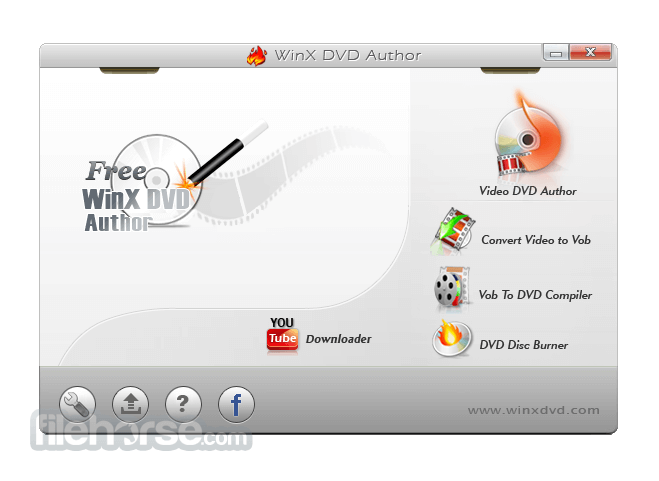
The user interface of WinX DVD Author for PC is clean, intuitive, and user-friendly. The main dashboard provides easy access to all the key features, with clearly labeled buttons and menus.
Users can navigate through the various functions effortlessly, making the DVD creation process smooth and efficient.
Installation and Setup
Installing this program is a straightforward process. Users can download the software from the official website or trusted sources like FileHorse and follow the on-screen instructions to complete the installation.
Once installed, the setup wizard guides users through the initial configuration, ensuring that the software is ready for use in no time.
How to Use
Can I create DVD menus with custom backgrounds?
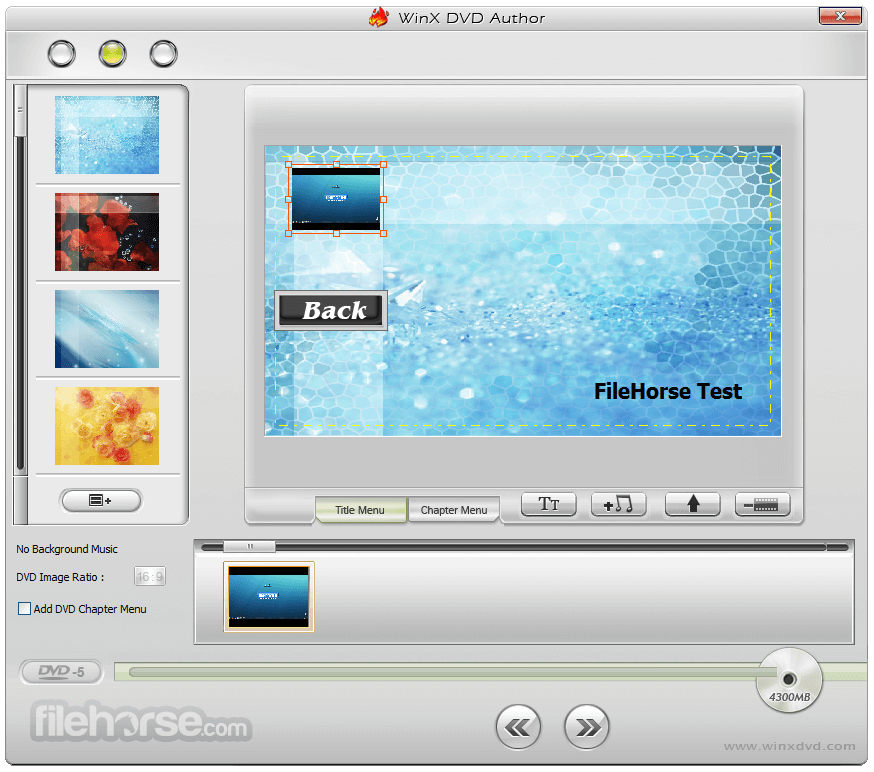
Yes, it allows you to choose from a selection of templates and backgrounds for your DVD menus. You can also add your own background images or music to customize the menus further.
Does Free DVD Author support Blu-ray disc burning?
No, WinX DVD Author for PC is specifically designed for creating standard DVDs. It does not support Blu-ray disc burning.
Can I add subtitles to my DVD videos?
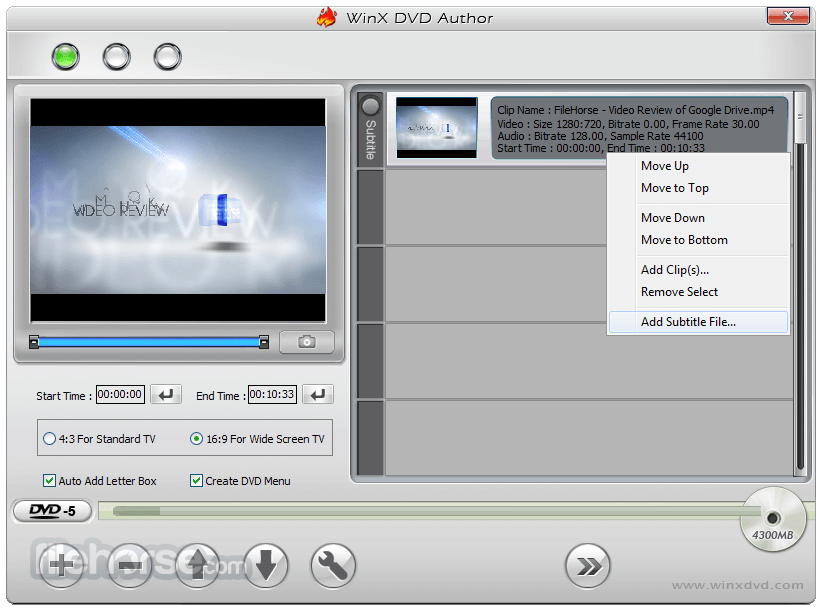
Yes, you can add subtitles to your DVD videos using WinX DVD Author. Simply import the subtitle files (.srt) along with your video files, and the software will include them in the DVD project.
Is there a limit to the number of videos I can add to a DVD project?
This software does not impose a strict limit on the number of videos you can add to a DVD project. However, the total duration of all videos combined should not exceed the capacity of the DVD you are using.
Can I create DVD chapters for easy navigation?
Yes, it allows you to create DVD chapters and titles, making it easy for viewers to navigate through your DVD content.
Alternatives
Nero Platinum - A comprehensive multimedia suite that includes DVD authoring capabilities along with other multimedia tools.
Wondershare DVD Creator - A user-friendly DVD authoring tool with support for a wide range of video formats and DVD menu templates.
CyberLink PowerDirector - Provides advanced video editing capabilities and DVD authoring functionality in one package.
Roxio Creator NXT - A popular choice for DVD creation, featuring a range of multimedia tools for editing, authoring, and more.
System Requirements
It offers a user-friendly solution for creating DVDs from various video files. With its intuitive interface, customizable DVD menus, and basic editing tools, it caters to both novice users and experienced DVD authoring enthusiasts.
While it may lack some advanced features found in more expensive software, it provides all the essential tools needed to create professional-looking DVDs with ease. Overall, WinX DVD Author is a solid choice for anyone looking to create DVDs on their Windows 11/10.
Download WinX DVD Author Latest Version Why is this app published on FileHorse? (More info)
WinX DVD Ripper Platinum - Rip DVD to MP4 (H.264/HEVC) in 5 minutes! GPU Accelerated.
Backup & rip DVD to MP4, WMV, AVI, ISO image, Video_TS folder, and 350+ more. Regional, encrypted, old, and new DVDs are all supported.
With its intuitive interface and powerful functionality, this software aims to cater to both novice users and experienced DVD authoring enthusiasts.
Are you looking for an easy and fast way to create a home video DVD from video files, camcorder, webcam, Youtube and personalize it with DVD chapter menu & subtitle (*.srt)? WinX DVD Author is your ideal solution, and it is totally FREE!
With step-by-step wizards built in, even a novice can easily convert and burn MKV, MP4, FLV, MPEG, MOV, RM, RMVB, H.264, AVI to DVD, etc.
Equipped with a fast and powerful decode encoder engine, this free DVD burner software takes less than one hour to create a full 4.3 G high-quality DVD, while delivering 100% excellent audio and video effects.
Furthermore, it is fully compatible with DVD+/-R, DVD+/-RW, DVD DL+R, DVD DL+/-RW, which perfectly helps you backup your precious files.
- Burn MP4, ISO, VOB, any video, and URLs to DVD.
- Burn DVDs with personalized menu, subtitles, music, etc.
- Create professional-looking DVDs with high quality.
- Trim, crop, cut, edit resolutions, parameters, and more.
- Burn DVDs fast and easily. No limits or watermarks.
Convert and Burn All Videos to DVD
This free DVD creator helps you easily convert AVI to DVD, MP4 to DVD, MKV to DVD, M2TS to DVD, M4V to DVD, FLV to DVD, ASF, MOV, RM, RMVB, H.264, OGG, QT, MPEG to DVD, etc. Moreover, it can download YouTube videos and burn its own created videos or website videos.
Create a DVD with a DVD Chapter Menu & Subtitle
This free DVD authoring tool allows you to author the DVD menu, chapter menu, add your favorite music, and pictures as background. In addition, it supports DVD languages like English, French, Chinese, German, Italian, Japanese, Spanish, etc.
Enjoy Unmatchable Video Audio Effect
Inside, with a high-quality decoder and encoder engine, it offers the highest possible video quality and fully supports Dolby Digital AC-3 audio. Furthermore, it supports 16:9 widescreen TV and 4:3 standard TV. And this feature allows you to watch your own-made DVD on TV.
Fast Speed and Easy to Use
This free DVD burner provides fast speed to finish burning DVDs. It takes less than 1 hour to convert and burn a full 4.2 GB high-quality DVD. Completely user-friendly, it could be easily operated by all users. With just three steps, you can perfectly burn your desired video to DVD.
Best Free DVD Author for Windows 11 or 10
- Support for a wide range of video formats, including AVI, MP4, WMV, MKV, and more.
- Ability to create DVD menus with customizable templates and backgrounds.
- Option to add background music and subtitles to DVD menus.
- Basic video editing tools for trimming, cropping, and adding effects to videos.
- Support for creating DVD chapters and titles.
- Burn videos to DVDs directly or save them as ISO files for later burning.
- High-quality output with support for both NTSC and PAL DVD formats.
The user interface of WinX DVD Author for PC is clean, intuitive, and user-friendly. The main dashboard provides easy access to all the key features, with clearly labeled buttons and menus.
Users can navigate through the various functions effortlessly, making the DVD creation process smooth and efficient.
Installation and Setup
Installing this program is a straightforward process. Users can download the software from the official website or trusted sources like FileHorse and follow the on-screen instructions to complete the installation.
Once installed, the setup wizard guides users through the initial configuration, ensuring that the software is ready for use in no time.
How to Use
- Launch the program and select the "Video DVD Author" option from the main dashboard.
- Click on the "Add Video" button to import the video files you want to include in your DVD project.
- Customize your DVD menu by choosing from a range of templates and backgrounds. You can also add background music and subtitles to enhance the menu.
- Use the built-in video editing tools to trim, crop, or add effects to your videos if desired.
- Arrange your videos into chapters and titles for easy navigation.
- Preview your DVD project to ensure everything looks as expected.
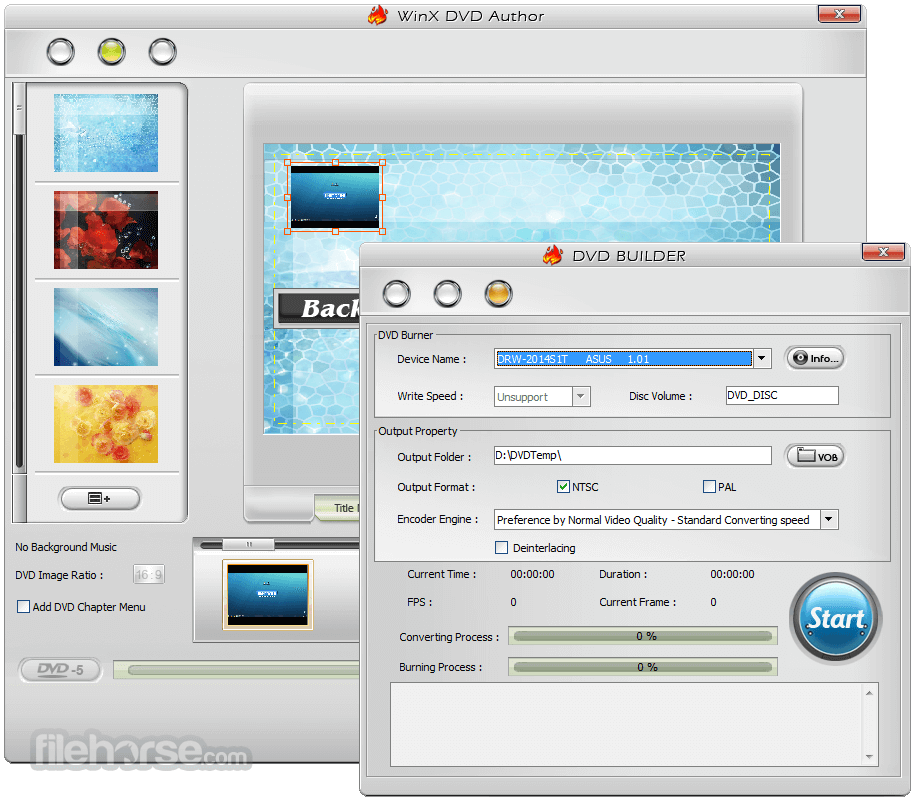
- Insert a blank DVD into your computer's DVD drive and click on the "Start" button to burn your project to disc.
Can I create DVD menus with custom backgrounds?
Yes, it allows you to choose from a selection of templates and backgrounds for your DVD menus. You can also add your own background images or music to customize the menus further.
Does Free DVD Author support Blu-ray disc burning?
No, WinX DVD Author for PC is specifically designed for creating standard DVDs. It does not support Blu-ray disc burning.
Can I add subtitles to my DVD videos?
Yes, you can add subtitles to your DVD videos using WinX DVD Author. Simply import the subtitle files (.srt) along with your video files, and the software will include them in the DVD project.
Is there a limit to the number of videos I can add to a DVD project?
This software does not impose a strict limit on the number of videos you can add to a DVD project. However, the total duration of all videos combined should not exceed the capacity of the DVD you are using.
Can I create DVD chapters for easy navigation?
Yes, it allows you to create DVD chapters and titles, making it easy for viewers to navigate through your DVD content.
Alternatives
Nero Platinum - A comprehensive multimedia suite that includes DVD authoring capabilities along with other multimedia tools.
Wondershare DVD Creator - A user-friendly DVD authoring tool with support for a wide range of video formats and DVD menu templates.
CyberLink PowerDirector - Provides advanced video editing capabilities and DVD authoring functionality in one package.
Roxio Creator NXT - A popular choice for DVD creation, featuring a range of multimedia tools for editing, authoring, and more.
System Requirements
- Operating System: Windows 7/8/10/11
- Processor: Intel or AMD processor, 1GHz or above
- RAM: 256MB RAM (512MB or above recommended)
- Disk Space: 100MB or more for installation
- Intuitive user interface.
- Wide range of supported video formats.
- Customizable DVD menus.
- Basic video editing tools included.
- High-quality output.
- Limited advanced editing features.
- No support for Blu-ray disc burning.
- Windows-only compatibility.
- It's been a long time since there was an update on the official website.
It offers a user-friendly solution for creating DVDs from various video files. With its intuitive interface, customizable DVD menus, and basic editing tools, it caters to both novice users and experienced DVD authoring enthusiasts.
While it may lack some advanced features found in more expensive software, it provides all the essential tools needed to create professional-looking DVDs with ease. Overall, WinX DVD Author is a solid choice for anyone looking to create DVDs on their Windows 11/10.
Download WinX DVD Author Latest Version Why is this app published on FileHorse? (More info)
##
畫面截圖
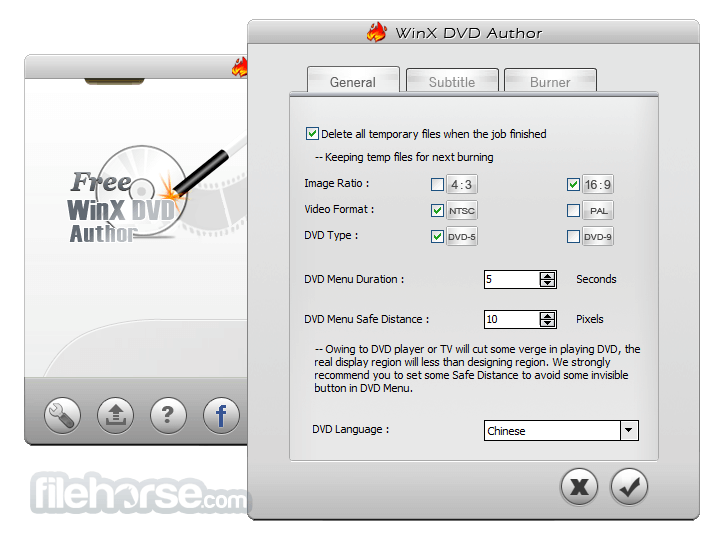
- 2026-03-01 WinX DVD Author 6.3.10 10.56 MB
- 2018-01-03 WinX DVD Author 6.3.9 10.55 MB
- 2016-12-21 WinX DVD Author 6.3.8 10.54 MB
- 2016-04-22 WinX DVD Author 6.3.7 10.54 MB
- 2015-07-23 WinX DVD Author 6.3.6 10.54 MB
- 2015-04-09 WinX DVD Author 6.3.5 10.53 MB
- 2014-08-16 WinX DVD Author 6.3.4 10.53 MB
- 2014-06-20 WinX DVD Author 6.3.3 10.53 MB