⚠ 這是歷史版本頁面 — 查看 Xftp Free 8.0 Build 最新版本 →

- 目前版本0162
- 更新日期2024-07-02
- 檔案大小39.02 MB
- 檔案名稱Xftp-7.0.0162.exe
- 作業系統Windows 7 / Windows 8 / Windows 10 / Windows 11
- 支援語系English
- 授權型式免費軟體
- 開發商 NetSarang Computer, Inc.
- 軟體分類Windows 軟體 / 檔案傳輸與網路
##
編輯短評
Xftp Free 是一款輕量且靈活的 SFTP/FTP 用戶端,主要解決透過網路安全傳輸檔案的需求。它具備直接編輯、多窗格介面、資料夾同步、FXP 伺服器對伺服器傳輸,以及第三方編輯器整合等實用功能,能有效提升遠端檔案處理效率。這套軟體由 NetSarang 開發,目前仍持續維護,更新頻率穩定;在同類工具中屬於中等熱門選擇,使用者評價普通,但功能完整度受到肯定。
這款軟體特別適合家庭與學校用戶,因為授權免費,且操作介面直覺,能快速上手。若你常需要管理遠端伺服器檔案、進行同步或直接編輯,Xftp Free 是實用的輕量方案。相較於 Internet Download Manager 或 uTorrent 等偏重下載的工具,Xftp 專注於 FTP/SFTP 傳輸,功能更貼近專業需求,但僅支援英文介面,且免費版僅限非商業用途,使用前需留意授權範圍。
##
翻譯排程處理中,以下暫以英文原文呈現
軟體介紹
Xftp Free is a flexible and lightweight SFTP/FTP client for users who need to transfer files securely over a network. It offers powerful features such as direct edit, multiple panes, folder synchronization, FXP support, server-to-server transfer, and 3rd party editor integration.
Xftp Free will save you time and effort when working with remote files. The app is free for home and school use.
Packed with User convenient features to Maximize productivity
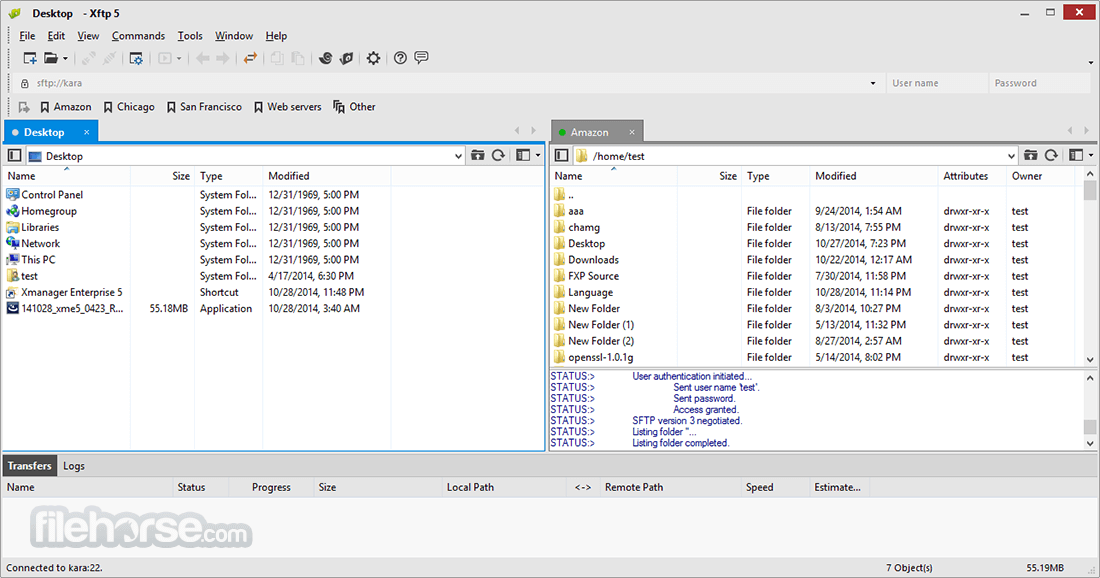
Xftp is packed with powerful features that can maximize user productivity. For example, the Session tab allows users to create and manage multiple sessions within a single app window and direct edit allows editing the contents of a file without downloading files. Users can also decide on the number of simultaneous download and upload connections so that transfer can be done at maximum performance.
Interoperable with Terminal Emulator (Xshell)
The tool can interoperate with terminal emulator tools, Xshell to access the command line interface of FTP/SFTP servers. Users can simply click on the Xshell button on the program and it will start the terminal session from the current connection automatically without the authentication process. It is also possible to open the software sessions from Xshell with a click of a button.
Increase Usability In the Global Business Environment
The app supports Unicode encoding. Files can be shared all over the world regardless of the file name’s language. With the tool’s Unicode encoding, you can rest assured that the file name will display correctly in various languages all in a single window.
Features and Highlights
Synchronized Navigation
Webmasters frequently have to work with multiple hosts that share the same directory structures. It is time-consuming to navigate through each host one at a time. The program introduces the synchronized navigation feature to resolve this issue. You can navigate on one of the hosts and the other hosts will look for the same directory and navigate automatically for you.
Are You Prepared for IPv6? Xftp is Ready
Recently, more and more companies and countries are adopting IPv6. Join the migration to the latest network platform with Version 5’s IPv6 support. Whether you’re using IPv4 and IPv6 simultaneously or are completely on the IPv6 network, the software is ready to meet your needs.
Client Authentication with MIT Kerberos
Kerberos is widely used in today’s enterprise environment where various operating systems are used and centralized user authentication is required. The centralized authentication method of Kerberos provides more secure and convenient user access to the servers. To accommodate enterprise users’ needs, the app Free version includes support for MIT Kerberos authentication.
Keep Xftp Up-to-Date
In today’s fast-paced and ever-changing IT industry, running the most stable and secure software is a must. "We regularly release updates for software which include bug fixes, security patches, and occasionally, new features". New Live Update feature in the tool checks for new updates and notifies users when one is available. Staying up to date is now faster and easier than ever.
Synchronizing
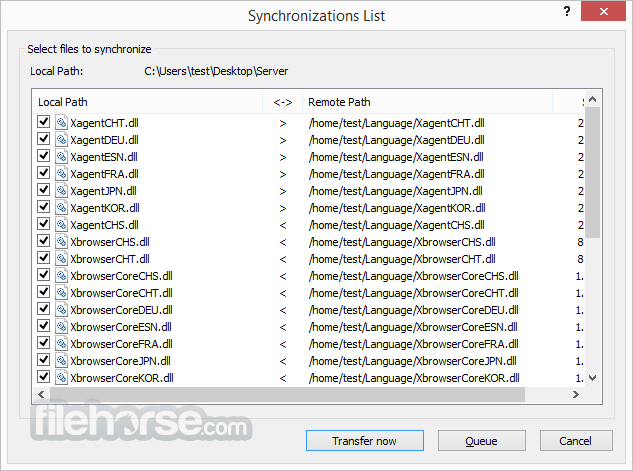
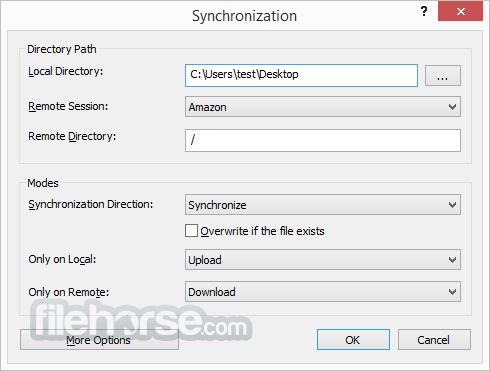
The synchronizing feature in the tool supports synchronizing files and folders from and to the remote with the local folders. Once you are on the remote folder you want to sync, click the Sync button and synchronization will start painlessly.
Multiple panes
The software supports more than 2 panes and each pane can have multiple tabs. You can transfer files to multiple destinations without going through each tab. Also, the "Send to All Remote Session" feature allows you to send files to multiple locations at once.
FXP support
FXP can dramatically reduce the time to take transfer files between the remote servers. FXP eliminates the data routing to local PC transferring data directly between two remote FTP servers.
Open multiple sessions within a single window
The Session tab feature allows users to open multiple sessions within a single app window. All open sessions are accessible via simple Session tab interface and files on different servers can be easily transferred between open sessions. It not only reduces system resource usage but also provides a more organized work environment to increase user productivity.
Use Notepad to directly edit the remote file
The Direct Edit feature allows users to edit the remote files with Windows Notepad directly without downloading the file. Users can increase productivity by eliminating the need for downloading the file for edit and uploading it when done editing. The program also provides an option for users to choose their favorite editors instead of using the default Windows Notepad.
Start a terminal session with the click of a button
The software can interoperate with Xshell, a secure terminal emulator by NetSarang. By clicking an Xshell button, the app starts a terminal session from the open connection without having to go through the authentication process again.
Increase download/upload speed
The Multiple Transfer feature allows making multiple connections to upload/download files faster. This feature can increase the users' productivity by allowing the maximum usage of users’ bandwidth even when there is a download/upload speed limit for each network connection.
Direct Control using Transfer Window Menu
By using the Transfer window menu, the user can easily monitor and manage files in transfer and also manage scheduled transfers for future upload and download transfers.
How to Use
Download Xftp Free Latest Version Why is this app published on FileHorse? (More info)
Xftp Free will save you time and effort when working with remote files. The app is free for home and school use.
Packed with User convenient features to Maximize productivity
Xftp is packed with powerful features that can maximize user productivity. For example, the Session tab allows users to create and manage multiple sessions within a single app window and direct edit allows editing the contents of a file without downloading files. Users can also decide on the number of simultaneous download and upload connections so that transfer can be done at maximum performance.
Interoperable with Terminal Emulator (Xshell)
The tool can interoperate with terminal emulator tools, Xshell to access the command line interface of FTP/SFTP servers. Users can simply click on the Xshell button on the program and it will start the terminal session from the current connection automatically without the authentication process. It is also possible to open the software sessions from Xshell with a click of a button.
Increase Usability In the Global Business Environment
The app supports Unicode encoding. Files can be shared all over the world regardless of the file name’s language. With the tool’s Unicode encoding, you can rest assured that the file name will display correctly in various languages all in a single window.
Features and Highlights
Synchronized Navigation
Webmasters frequently have to work with multiple hosts that share the same directory structures. It is time-consuming to navigate through each host one at a time. The program introduces the synchronized navigation feature to resolve this issue. You can navigate on one of the hosts and the other hosts will look for the same directory and navigate automatically for you.
Are You Prepared for IPv6? Xftp is Ready
Recently, more and more companies and countries are adopting IPv6. Join the migration to the latest network platform with Version 5’s IPv6 support. Whether you’re using IPv4 and IPv6 simultaneously or are completely on the IPv6 network, the software is ready to meet your needs.
Client Authentication with MIT Kerberos
Kerberos is widely used in today’s enterprise environment where various operating systems are used and centralized user authentication is required. The centralized authentication method of Kerberos provides more secure and convenient user access to the servers. To accommodate enterprise users’ needs, the app Free version includes support for MIT Kerberos authentication.
Keep Xftp Up-to-Date
In today’s fast-paced and ever-changing IT industry, running the most stable and secure software is a must. "We regularly release updates for software which include bug fixes, security patches, and occasionally, new features". New Live Update feature in the tool checks for new updates and notifies users when one is available. Staying up to date is now faster and easier than ever.
Synchronizing
The synchronizing feature in the tool supports synchronizing files and folders from and to the remote with the local folders. Once you are on the remote folder you want to sync, click the Sync button and synchronization will start painlessly.
Multiple panes
The software supports more than 2 panes and each pane can have multiple tabs. You can transfer files to multiple destinations without going through each tab. Also, the "Send to All Remote Session" feature allows you to send files to multiple locations at once.
FXP support
FXP can dramatically reduce the time to take transfer files between the remote servers. FXP eliminates the data routing to local PC transferring data directly between two remote FTP servers.
Open multiple sessions within a single window
The Session tab feature allows users to open multiple sessions within a single app window. All open sessions are accessible via simple Session tab interface and files on different servers can be easily transferred between open sessions. It not only reduces system resource usage but also provides a more organized work environment to increase user productivity.
Use Notepad to directly edit the remote file
The Direct Edit feature allows users to edit the remote files with Windows Notepad directly without downloading the file. Users can increase productivity by eliminating the need for downloading the file for edit and uploading it when done editing. The program also provides an option for users to choose their favorite editors instead of using the default Windows Notepad.
Start a terminal session with the click of a button
The software can interoperate with Xshell, a secure terminal emulator by NetSarang. By clicking an Xshell button, the app starts a terminal session from the open connection without having to go through the authentication process again.
Increase download/upload speed
The Multiple Transfer feature allows making multiple connections to upload/download files faster. This feature can increase the users' productivity by allowing the maximum usage of users’ bandwidth even when there is a download/upload speed limit for each network connection.
Direct Control using Transfer Window Menu
By using the Transfer window menu, the user can easily monitor and manage files in transfer and also manage scheduled transfers for future upload and download transfers.
How to Use
- Launch the application and create a new session.
- Enter the server's IP, username, and password.
- Select the protocol (SFTP or FTP) for file transfer.
- Click "Connect" to establish the connection.
- Drag and drop files between local and remote directories.
- Use the toolbar for quick file operations.
- Manage multiple connections using the session manager.
- Adjust settings for security and performance optimization.
- Close the session when file transfers are complete.
- OS: Windows 7, 8, 10, or 11 (32-bit and 64-bit)
- CPU: Intel or AMD processor, 1 GHz or faster
- RAM: Minimum 512 MB (1 GB or more recommended)
- Storage: At least 50 MB of free disk space
- Network: Internet connection for remote access
- User-friendly interface
- Supports multiple protocols
- Secure file transfers
- Multi-session management
- Fast and reliable performance
- Limited advanced features
- No built-in file editor
- Only available for Windows
- Lacks cloud integration
- Requires manual configuration
Download Xftp Free Latest Version Why is this app published on FileHorse? (More info)
##
畫面截圖
- 2026-07-09 Xftp Free 8.0 Build 0099 36.4 MB
- 2026-02-15 Xftp Free 8.0 Build 0095 36.06 MB
- 2025-10-03 Xftp Free 8.0 Build 0086 36.04 MB
- 2025-08-08 Xftp Free 8.0 Build 0084 36.04 MB
- 2025-07-04 Xftp Free 8.0 Build 0082 36.01 MB
- 2025-05-26 Xftp Free 8.0 Build 0074 35.95 MB
- 2025-04-01 Xftp Free 8.0 Build 0068 35.94 MB
- 2025-02-13 Xftp Free 8.0 Build 0066 35.95 MB