⚠ 這是歷史版本頁面 — 查看 Xplorer2 Ultimate 6.3.0.3 (64-bit) 最新版本 →

Xplorer2 Ultimate 6.2.0.1 (32-bit)
v 6.2.0.1 (32-bit)
Windows
商業試用
7.4/10 (27)
- 目前版本6.2.0.1 (32-bit)
- 更新日期2025-07-07
- 檔案大小3.54 MB
- 檔案名稱xplorer2_setup_ult.exe
- 作業系統Windows 7 64 / Windows 8 64 / Windows 10 64 / Windows 11
- 支援語系English
- 授權型式商業試用
- 開發商 ZABKAT
- 軟體分類Windows 軟體 / 檔案傳輸與網路
##
編輯短評
Xplorer2 Ultimate 是一款專為 Windows 設計的桌面檔案管理工具,核心概念是將傳統雙面板檔案總管的效率,與一般使用者熟悉的操作介面結合。它能瀏覽 Windows 檔案總管可存取的各種位置,包括網路磁碟、壓縮資料夾、FTP 與行動裝置等,並提供以萬用字元或檔案屬性為基礎的篩選功能,方便在檔案眾多的資料夾中快速找到需要的內容。這套軟體由 ZABKAT 長期維護,近一年更新相當頻繁,在同類工具中屬於歷史悠久、具備忠實使用者的小眾選擇。
如果你經常需要大量搬移、比對或整理檔案,且覺得 Windows 內建總管功能不足,Xplorer2 Ultimate 會是值得嘗試的替代方案。它比同分類中更熱門的傳輸下載工具(如 Internet Download Manager)定位不同,專注於本機與網路位置的檔案管理,而非下載加速。與其他免費開源雙面板管理器相比,Xplorer2 的介面較為傳統,但功能深度足夠。需要注意的是,此版本為試用版,僅提供英文介面,且僅支援 Windows 平台,使用前需確認這些條件是否符合你的環境。
##
翻譯排程處理中,以下暫以英文原文呈現
軟體介紹
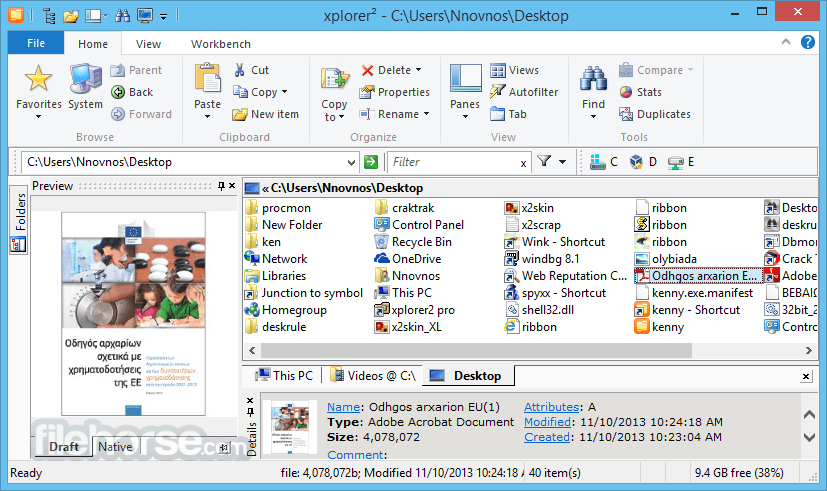
Xplorer2 Ultimate is a desktop file manager for Windows PC combining the simplicity of windows explorer with the speed and efficiency of traditional dual pane orthodox file managers, helping you be productive with your documents, pictures, music, source code, and other files.
Browse folders everywhere windows explorer can access including network, zip folders, web folders, libraries, FTP, digital cameras, mobile phones, etc. Too many documents in a folder? Show only those relevant to your work with a variety of simple wildcards and file property-based filters.
Xplorer2 Ultimate desktop search engine is unrivaled in power, speed, and flexibility.
If you can think of the attributes xplorer² will find your files and highlight the search keywords.
Transfer and delete files using filters and overwrite control, even in deep paths. Create links, junctions, add comments/tags, touch dates, split/join, mass rename, shred. Combine dual-panes with folder tabs and all the usual view modes (thumbnails, details, folder tree, etc). Quick preview of text, office, PDF, pictures, audio, and video files. An internal text editor.
All your namespace extensions, column handlers, thumbnails, virtual folders, icon overlays, info tip popups, WLX/WDX/WCX plugins will work as in windows explorer. Browse fast with bookmarks, breadcrumbs, history, and autocompletion.
Save tons of time with small innovative details (e.g mirror browsing). Execute user commands and scripts on selected files and folders. Improved DOS console.
Whereas many people will get by using Xplorer2 Ultimate professional, the ultimate edition is the best Xplorer 2 money can buy. Here are the main advantages:
Download Xplorer2 Ultimate Latest Version Why is this app published on FileHorse? (More info)
Browse folders everywhere windows explorer can access including network, zip folders, web folders, libraries, FTP, digital cameras, mobile phones, etc. Too many documents in a folder? Show only those relevant to your work with a variety of simple wildcards and file property-based filters.
Xplorer2 Ultimate desktop search engine is unrivaled in power, speed, and flexibility.
If you can think of the attributes xplorer² will find your files and highlight the search keywords.
Transfer and delete files using filters and overwrite control, even in deep paths. Create links, junctions, add comments/tags, touch dates, split/join, mass rename, shred. Combine dual-panes with folder tabs and all the usual view modes (thumbnails, details, folder tree, etc). Quick preview of text, office, PDF, pictures, audio, and video files. An internal text editor.
All your namespace extensions, column handlers, thumbnails, virtual folders, icon overlays, info tip popups, WLX/WDX/WCX plugins will work as in windows explorer. Browse fast with bookmarks, breadcrumbs, history, and autocompletion.
Save tons of time with small innovative details (e.g mirror browsing). Execute user commands and scripts on selected files and folders. Improved DOS console.
Whereas many people will get by using Xplorer2 Ultimate professional, the ultimate edition is the best Xplorer 2 money can buy. Here are the main advantages:
- Portability. You can keep your xplorer² ultimate in a USB stick and have it save the settings in a portable file, without touching the windows registry.
- No installation required. The ultimate version can either be copied to any folder or be run from any removable media.
- Optimized performance. The ultimate version has the edge on xplorer² pro, especially for large scale file operations. It also offers fast search.
- The normal installer included. Unlike the old portable edition, you can install the ultimate xplorer² on your own PC as well as keep it in a USB stick.
- Priority customer support. Get your problems fixed on the fast track.
- You work a lot on other people's computers and you want to keep your tools in a USB stick.
- You want to use xplorer² at work but you don't have enough rights to install programs.
- You are a sysadmin or large network administrator and need a version that is easy to deploy and license, and need the priority support.
- You need to find documents on your desktop fast.
- Clean minimalistic, customizable interface
- Seamless handling of virtual folders (FTP/web folders/zip folders etc)
- Extended file/folder details (mp3 tags, checksum, etc)
- Instant preview of text, graphics and audio/video content
- Find files using hyper filters (e.G. Locate files searching their comments for keywords)
- Detect and cleanup duplicate files
- Manage many folders in dual-pane or using tabs
- Easy folder comparison & synchronization
- Powerful visual filtering and selection engine
- Touch dates, split/merge and shred files
- Mass renaming
- Execute text commands (or dos scripts) on files
- Advanced Ntfs support: hard links, file comments, etc
- Robust filesystem file/folder transfers
- Unicode and text encoding aware
- Export file information as a text for printing etc
- Focus on usability with keyboard shortcuts, histories, autocompletion, etc
- Download and install Xplorer2 Ultimate
- Launch the application from the Start menu
- Navigate files using dual-pane interface
- Use tabs for multiple folder views
- Customize layout and toolbar settings
- Search files with advanced filters
- Use keyboard shortcuts for quick actions
- Manage files with copy, move, and delete options
- Preview files without opening them
- Automate tasks with scripting and macros
- OS: Windows 7, 8, 10, 11 (32-bit or 64-bit)
- Processor: 1 GHz or faster
- RAM: 2 GB or more recommended
- Storage: 50 MB free disk space
- Display: 1024x768 resolution or higher
- Dual-pane interface for better file management
- Advanced search and filtering options
- Supports tabs for multiple folder navigation
- Customizable UI with various themes
- Fast performance with low resource usage
- Outdated interface design
- Limited cloud storage integration
- No built-in file synchronization
- Paid software with no free version
Download Xplorer2 Ultimate Latest Version Why is this app published on FileHorse? (More info)
##
畫面截圖
- 2026-04-12 Xplorer2 Ultimate 6.3.0.3 (32-bit) 3.59 MB
- 2026-04-12 Xplorer2 Ultimate 6.3.0.3 (64-bit) 3.98 MB
- 2026-03-30 Xplorer2 Ultimate 6.3.0.2 (32-bit) 3.58 MB
- 2026-03-30 Xplorer2 Ultimate 6.3.0.2 (64-bit) 3.98 MB
- 2026-03-04 Xplorer2 Ultimate 6.3.0.1 (32-bit) 3.58 MB
- 2026-03-04 Xplorer2 Ultimate 6.3.0.1 (64-bit) 3.98 MB
- 2026-02-18 Xplorer2 Ultimate 6.3.0.0 (32-bit) 3.58 MB
- 2026-02-18 Xplorer2 Ultimate 6.3.0.0 (64-bit) 3.98 MB