⚠ 這是歷史版本頁面 — 查看 5KPlayer 6.11 (32-bit) 最新版本 →

- 目前版本6.3
- 更新日期2020-06-10
- 檔案大小6.93 MB
- 檔案名稱5kplayer.exe
- 作業系統Windows 7 / Windows 8 / Windows 10
- 支援語系English
- 授權型式免費軟體
- 開發商 DearMob, Inc.
- 軟體分類Windows 軟體 / 影片軟體
##
編輯短評
5KPlayer 是一款整合多種影音需求的免費播放器,由 DearMob 開發,主打在單一輕量應用中同時滿足影片播放、線上串流與媒體下載。它支援 HD 到 8K 的高畫質影片,涵蓋 MKV、MP4、AVI 等常見格式,並內建 AirPlay/DLNA 串流與 YouTube 下載功能,甚至還有網路電台。這款 32 位元版本特別針對舊款 Windows 電腦或低規格硬體設計,確保較差的設備也能順暢運作。自 2017 年起持續收錄更新,近期仍維持低頻率維護,評價人數與分數在同類軟體中屬中段班,算是小眾但穩定的選擇。
這套軟體適合需要「一機多用」的使用者,尤其是想同時看高畫質影片、把畫面串流到電視,又偶爾想下載線上影片的人。與 KMPlayer 或 K-Lite Codec Pack 相比,5KPlayer 的優勢在於整合了串流與下載功能,不必另外安裝多套工具;但代價是更新頻率較低,且僅提供英文介面,對不熟悉英文操作的人稍有門檻。授權為免費軟體,Windows 平台適用,安裝前建議留意 32 位元版本與系統的相容性。
##
翻譯排程處理中,以下暫以英文原文呈現
軟體介紹
5KPlayer (32-bit) is a versatile media player designed for Windows 11/10 users seeking a comprehensive solution for video playback, online streaming, and media downloads.
Developed by DearMob, 5KPlayer combines high-quality video playback with AirPlay/DLNA streaming, YouTube download capabilities, and built-in radio streaming—all in one lightweight application.
While it also supports 64-bit systems, the 32-bit version ensures compatibility with older Windows PCs or lower-spec hardware.
Features
HD/4K/5K/8K Video Playback: Supports a wide range of formats including MKV, MP4, AVI, WMV, FLV, and more.
Hardware Acceleration: Utilizes Intel, NVIDIA, and AMD GPU acceleration for smoother playback.
AirPlay & DLNA Wireless Streaming: Streams audio and video to and from compatible devices such as Apple TVs, smart TVs, and mobile devices.
Online Video Downloading: Downloads videos from over 300 sites, including YouTube, Vimeo, Facebook, and Dailymotion.
Audio Playback: Supports MP3, AAC, FLAC, APE, and more.
Internet Radio: Built-in access to internet radio stations.
Snapshot Tool: Capture frames from video playback as image files.
User Interface
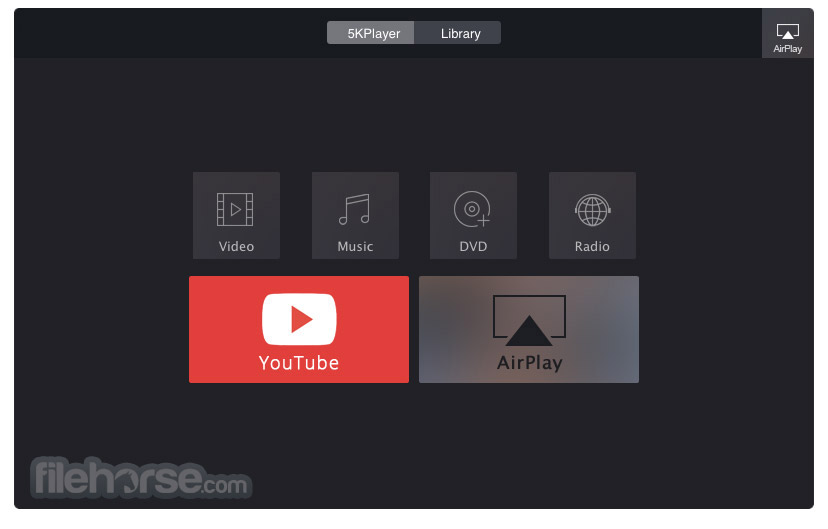
5KPlayer features a clean and minimalist interface with an intuitive layout. The main window is user-friendly, showing primary controls like Play, Download, AirPlay, and Library.
While it doesn’t have a modern aesthetic compared to VLC or PotPlayer, it remains functional and straightforward, especially for novice users.
Installation and Setup
Installing 5KPlayer is simple. The installer is lightweight (under 50 MB) and runs smoothly on Windows 7 through Windows 11. No third-party software is bundled, and setup typically takes less than two minutes.
Upon first launch, users are prompted to register the software with an email (free registration) to unlock all features.
How to Use
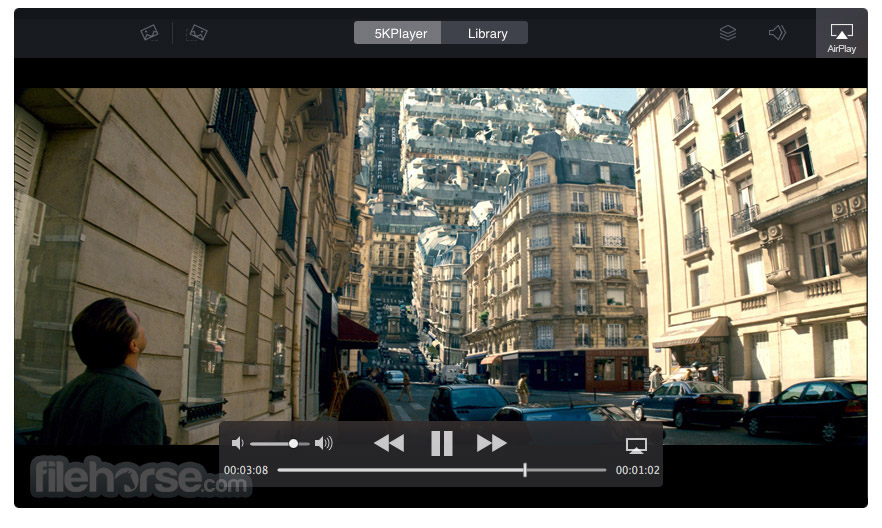
Playing Media: Drag and drop a file or use the open menu to play video/audio files.
Streaming: Enable AirPlay or DLNA via the sidebar, then connect a compatible device on the same network.
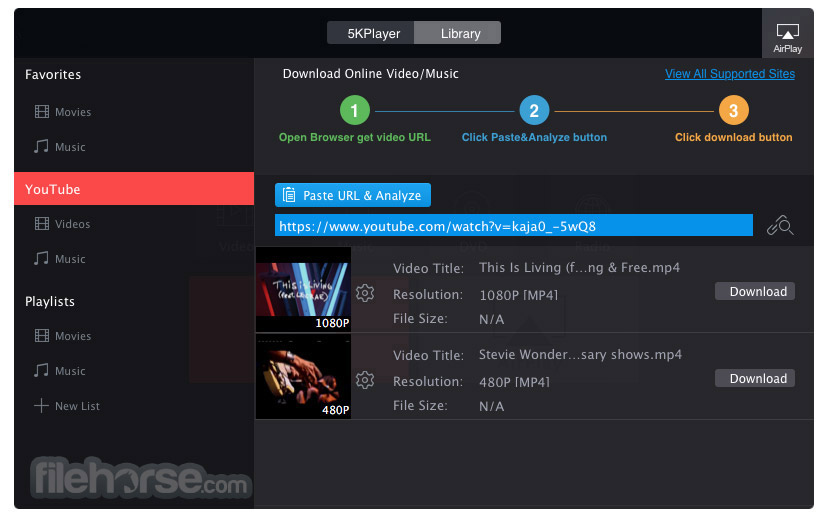
Downloading Videos: Copy a video URL, click the “YouTube” button, paste the link, and click download.
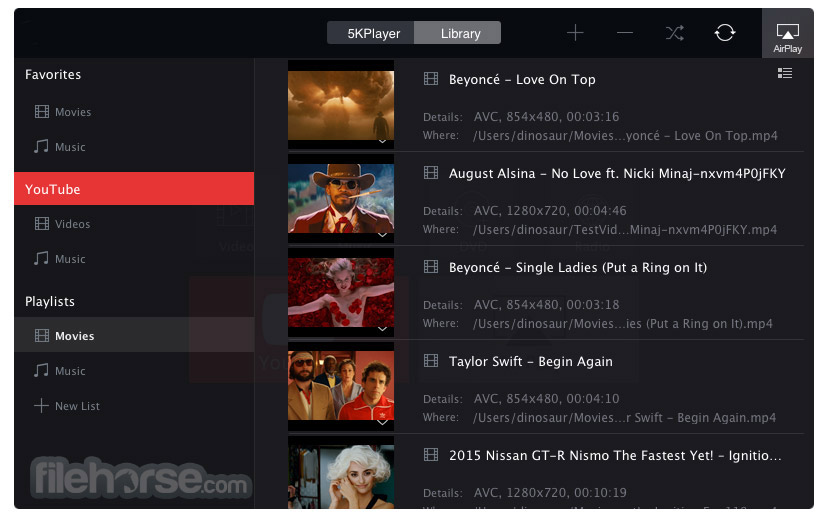
Managing Library: Use the Library tab to organize videos, audio files, and playlists.
Internet Radio: Click the “Radio” tab and select from preset stations or add custom URLs.
FAQs
Is 5KPlayer free to use?
Yes, 5KPlayer is completely free, though registration via email is required.
Can I use 5KPlayer on Windows 10 32-bit?
Yes, the 32-bit version is compatible with Windows 7/8/10/11 (32-bit and 64-bit).
Does 5KPlayer support subtitles?
Yes, it supports external subtitle files like .srt and .ass formats.
Is the YouTube downloader feature legal?
It depends on local laws and YouTube’s terms of service. Use responsibly and only for non-copyrighted content.
How do I enable GPU acceleration?
GPU acceleration is enabled by default but can be managed under Settings > Performance.
Alternatives
VLC Media Player: A popular open-source media player known for its wide format support and extensive customization options.
PotPlayer: A feature-rich media player with support for high-quality playback and advanced customization settings.
KMPlayer: Another versatile media player that offers support for various media formats and additional features like 3D playback.
Plex: A media server software that allows users to organize and stream their media libraries across different devices.
Kodi: An open-source media center software that offers a customizable interface and support for add-ons for additional functionalities.
Pricing
5KPlayer is free to use. No paid version or subscription is currently offered, although the developer does promote other premium software products on their site.
System Requirements
5KPlayer (32-bit) is a solid, all-in-one media player that excels in video playback, wireless streaming, and media downloading. Though the user interface may not be cutting-edge, the software offers excellent functionality for users looking for a free and capable multimedia solution—especially on older or lower-end Windows PCs.
Note: Requires .NET Framework.
Also Available: 5KPlayer (64-bit) and 5KPlayer for Mac
Download 5KPlayer (32-bit) Latest Version Why is this app published on FileHorse? (More info)
Developed by DearMob, 5KPlayer combines high-quality video playback with AirPlay/DLNA streaming, YouTube download capabilities, and built-in radio streaming—all in one lightweight application.
While it also supports 64-bit systems, the 32-bit version ensures compatibility with older Windows PCs or lower-spec hardware.
Features
HD/4K/5K/8K Video Playback: Supports a wide range of formats including MKV, MP4, AVI, WMV, FLV, and more.
Hardware Acceleration: Utilizes Intel, NVIDIA, and AMD GPU acceleration for smoother playback.
AirPlay & DLNA Wireless Streaming: Streams audio and video to and from compatible devices such as Apple TVs, smart TVs, and mobile devices.
Online Video Downloading: Downloads videos from over 300 sites, including YouTube, Vimeo, Facebook, and Dailymotion.
Audio Playback: Supports MP3, AAC, FLAC, APE, and more.
Internet Radio: Built-in access to internet radio stations.
Snapshot Tool: Capture frames from video playback as image files.
User Interface
5KPlayer features a clean and minimalist interface with an intuitive layout. The main window is user-friendly, showing primary controls like Play, Download, AirPlay, and Library.
While it doesn’t have a modern aesthetic compared to VLC or PotPlayer, it remains functional and straightforward, especially for novice users.
Installation and Setup
Installing 5KPlayer is simple. The installer is lightweight (under 50 MB) and runs smoothly on Windows 7 through Windows 11. No third-party software is bundled, and setup typically takes less than two minutes.
Upon first launch, users are prompted to register the software with an email (free registration) to unlock all features.
How to Use
Playing Media: Drag and drop a file or use the open menu to play video/audio files.
Streaming: Enable AirPlay or DLNA via the sidebar, then connect a compatible device on the same network.
Downloading Videos: Copy a video URL, click the “YouTube” button, paste the link, and click download.
Managing Library: Use the Library tab to organize videos, audio files, and playlists.
Internet Radio: Click the “Radio” tab and select from preset stations or add custom URLs.
FAQs
Is 5KPlayer free to use?
Yes, 5KPlayer is completely free, though registration via email is required.
Can I use 5KPlayer on Windows 10 32-bit?
Yes, the 32-bit version is compatible with Windows 7/8/10/11 (32-bit and 64-bit).
Does 5KPlayer support subtitles?
Yes, it supports external subtitle files like .srt and .ass formats.
Is the YouTube downloader feature legal?
It depends on local laws and YouTube’s terms of service. Use responsibly and only for non-copyrighted content.
How do I enable GPU acceleration?
GPU acceleration is enabled by default but can be managed under Settings > Performance.
Alternatives
VLC Media Player: A popular open-source media player known for its wide format support and extensive customization options.
PotPlayer: A feature-rich media player with support for high-quality playback and advanced customization settings.
KMPlayer: Another versatile media player that offers support for various media formats and additional features like 3D playback.
Plex: A media server software that allows users to organize and stream their media libraries across different devices.
Kodi: An open-source media center software that offers a customizable interface and support for add-ons for additional functionalities.
Pricing
5KPlayer is free to use. No paid version or subscription is currently offered, although the developer does promote other premium software products on their site.
System Requirements
- OS: Windows 7/8/10/11 (32-bit)
- CPU: 1 GHz or higher Intel/AMD processor
- RAM: 1 GB or higher
- Storage: 100 MB of free disk space
- Network: Required for streaming and downloading
- High-resolution video support
- Built-in downloader and streamer
- Easy to use and install
- Free with no ads or bloatware
- Interface design is dated
- No advanced video editing tools
- Requires email registration
5KPlayer (32-bit) is a solid, all-in-one media player that excels in video playback, wireless streaming, and media downloading. Though the user interface may not be cutting-edge, the software offers excellent functionality for users looking for a free and capable multimedia solution—especially on older or lower-end Windows PCs.
Note: Requires .NET Framework.
Also Available: 5KPlayer (64-bit) and 5KPlayer for Mac
Download 5KPlayer (32-bit) Latest Version Why is this app published on FileHorse? (More info)
##
畫面截圖
- 2025-11-27 5KPlayer 6.11 (32-bit) 57.7 MB
- 2024-11-22 5KPlayer 6.10 (32-bit) 57.7 MB
- 2021-10-26 5KPlayer 6.9 (32-bit) 57.69 MB
- 2021-04-21 5KPlayer 6.8 (32-bit) 48.63 MB
- 2021-01-27 5KPlayer 6.5 (32-bit) 48.5 MB
- 2020-10-19 5KPlayer 6.4 6.93 MB
- 2020-06-10 5KPlayer 6.3 6.93 MB
- 2020-03-25 5KPlayer 6.2 6.9 MB