⚠ 這是歷史版本頁面 — 查看 ADATA SSD ToolBox 最新版本 →

ADATA SSD ToolBox 3.0.12
v 3.0.12
Windows
免費軟體
7.2/10 (30)
- 目前版本3.0.12
- 更新日期2020-07-17
- 檔案大小1.74 MB
- 檔案名稱ADATA_SSDToolBoxSetup.exe
- 作業系統Windows 10 (64-bit) / Windows 11
- 支援語系English
- 授權型式免費軟體
- 開發商 ADATA Technology
- 軟體分類Windows 軟體 / 系統優化
##
編輯短評
ADATA SSD ToolBox 是威剛科技為自家固態硬碟推出的官方管理工具,主要解決使用者需要掌握硬碟健康狀態、執行診斷與調校的需求。它提供硬碟資訊檢視,包括容量、使用空間、溫度、健康度與壽命,並內建快速與完整兩種診斷模式,可針對磁碟空間或讀取效能進行測試。此外,它也能協助加速 SSD 並延長使用壽命,是 ADATA 硬碟用戶最直接對應的官方工具。此軟體自 2019 年起持續收錄版本,近期仍有更新,屬長期維護狀態;不過在系統優化分類中屬於小眾工具,評價樣本不多,整體評價中上。
這套軟體適合使用 ADATA 固態硬碟的用戶,尤其是想定期檢查硬碟健康、確認壽命或執行簡易診斷的人。與 Rufus、Glary Utilities 等通用型工具相比,它功能單一且僅支援自家產品,但對 ADATA 硬碟的支援最直接,不必擔心第三方工具誤判或缺少對應功能。需要注意的是,軟體僅提供英文介面,且僅支援 Windows 平台,免費授權可安心使用;若你使用的是其他品牌的 SSD,這套工具就派不上用場,建議改用通用型磁碟檢測軟體。
##
翻譯排程處理中,以下暫以英文原文呈現
軟體介紹
ADATA SSD ToolBox provides multiple ways for users to obtain disk information and change settings easily. Additionally, it can speed up your SSD and improve its lifespan.
Monitoring the status and maintaining the performance of ADATA solid-state drives now! Check out!
Features and Highlights
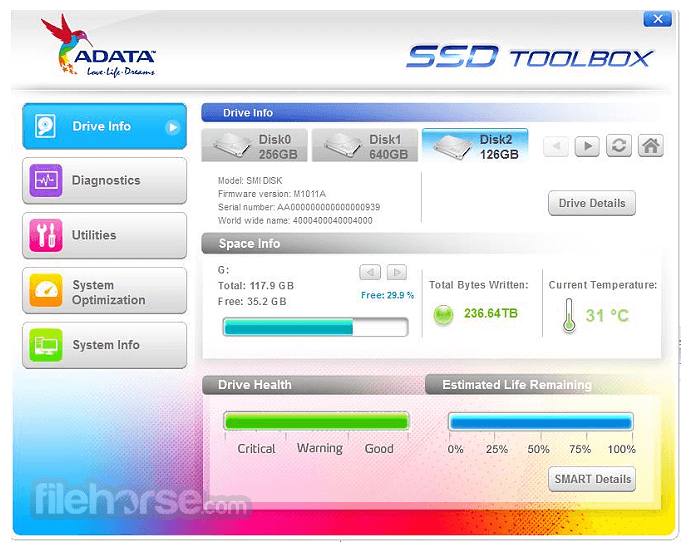
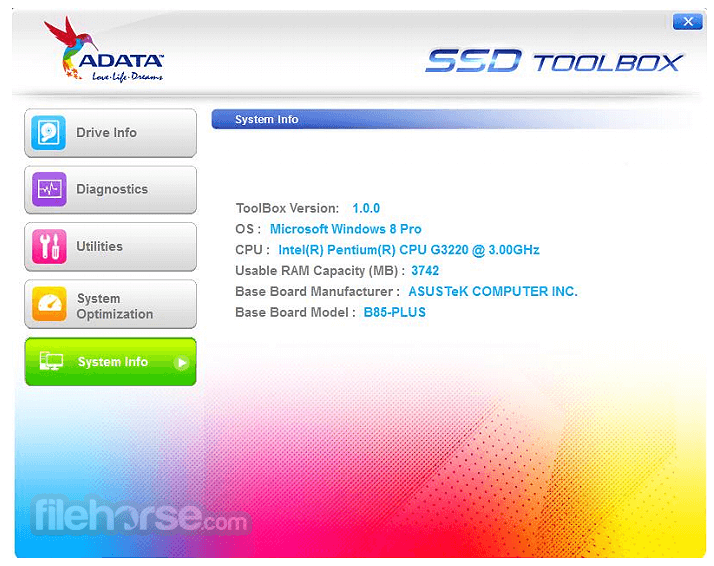
Drive Info
Get assigned drive information, including capacity, used space on a drive, drive temperature, drive health, and the lifespan of the drive.
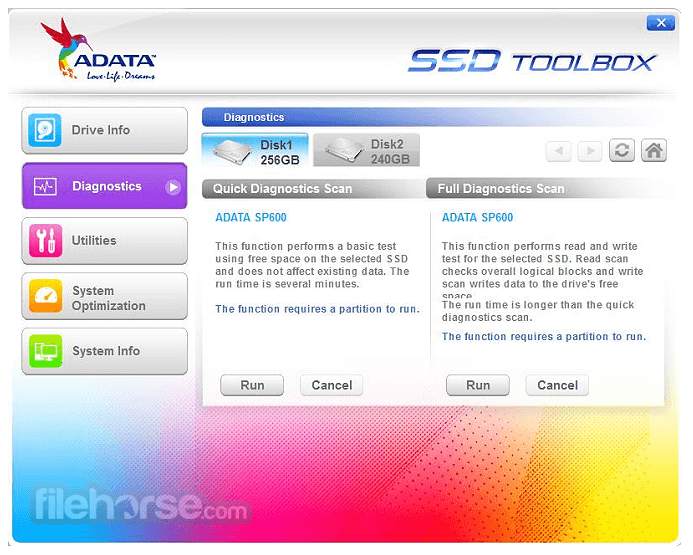
Diagnostics
Two options: Quick Diagnostics, which will run basic tests on the free space of the selected drive, and Full Diagnostics, which runs a reading test on all used space of the selected drive.
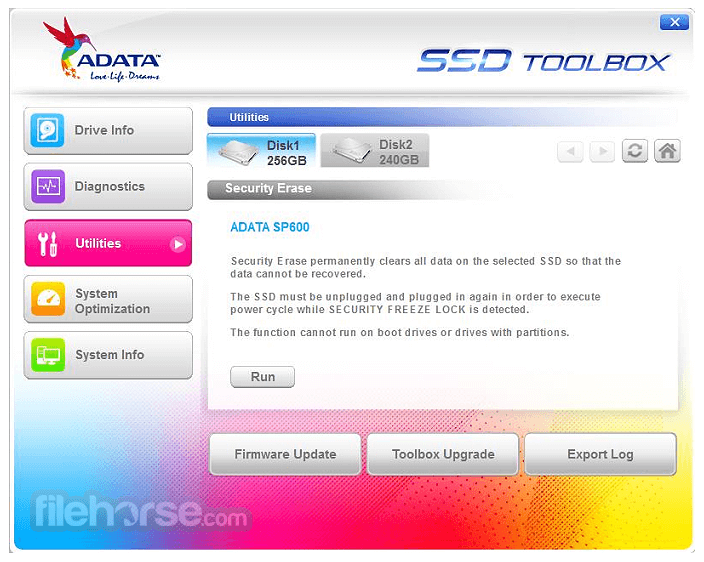
Utilities
SSD utilities include Security Erase, Firmware update, SSD Toolbox upgrade, and export log.
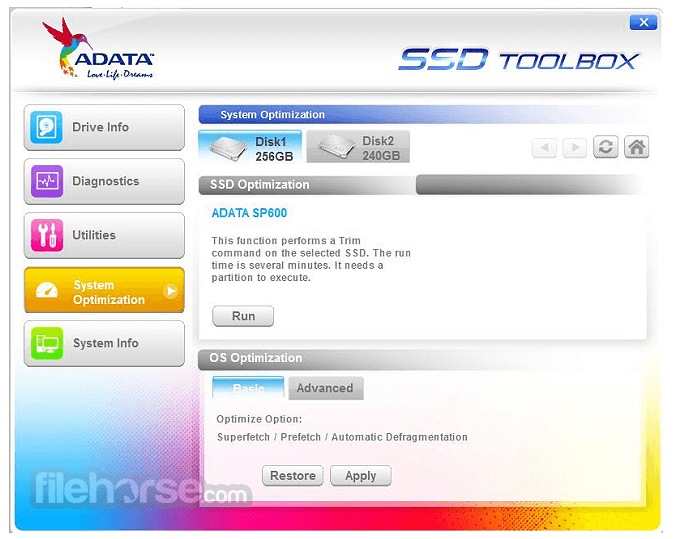
System Optimization
SSD Optimization provides TRIM service on the free space of the drive. OS Optimization provides simple settings for SSD optimization.
System Info
Displays current system information.
ADATA SSD Toolbox Support List:
How to Use
What is the ADATA SSD ToolBox used for?
ADATA SSD ToolBox is a utility developed by ADATA that allows users to monitor SSD health, check drive status, update firmware, and optimize performance.
Does ADATA SSD ToolBox improve SSD performance?
Yes. It includes optimization features such as TRIM commands and system tweaks that help maintain SSD speed and longevity over time.
Is ADATA SSD ToolBox still relevant in 2026?
Yes. In 2026, it remains useful for users with ADATA SSDs who want to monitor drive health, perform maintenance, and ensure optimal performance.
System Requirements
Download ADATA SSD ToolBox Latest Version Why is this app published on FileHorse? (More info)
Monitoring the status and maintaining the performance of ADATA solid-state drives now! Check out!
Features and Highlights
Drive Info
Get assigned drive information, including capacity, used space on a drive, drive temperature, drive health, and the lifespan of the drive.
Diagnostics
Two options: Quick Diagnostics, which will run basic tests on the free space of the selected drive, and Full Diagnostics, which runs a reading test on all used space of the selected drive.
Utilities
SSD utilities include Security Erase, Firmware update, SSD Toolbox upgrade, and export log.
System Optimization
SSD Optimization provides TRIM service on the free space of the drive. OS Optimization provides simple settings for SSD optimization.
System Info
Displays current system information.
ADATA SSD Toolbox Support List:
- Ultimate SU900
- Ultimate SU800
- Ultimate SU700
- XPG SX950U
- XPG SX950
- XPG SX930
- XPG SX910
- XPG SX900
- XPG SX300
- XPG SX6000
- XPG SX6000 Pro
- XPG SX7000
- XPG SX8000
- XPG SX8200
- XPG SX8200 Pro
- XPG SX9000
- XPG GAMMIX S5
- XPG GAMMIX S10
- XPG GAMMIX S11
- XPG GAMMIX S11 Pro
- SU800NS38
- XM21
- SX1000L Server
- S511
- S510
- S396
- Premier Pro SP920
- Premier Pro SP900
- Premier Pro SP800
- Premier Pro SP300
- Premier SP580O
- Premier SP550
- AXNS340E
- AXNS330E
- Premier Pro SP910
- Premier SP610
- IMSS316
- ISSS316
How to Use
- Install the software and launch the application
- Select your ADATA SSD from the device list
- View drive health, temperature, and lifespan info
- Use utilities like secure erase and firmware update
What is the ADATA SSD ToolBox used for?
ADATA SSD ToolBox is a utility developed by ADATA that allows users to monitor SSD health, check drive status, update firmware, and optimize performance.
Does ADATA SSD ToolBox improve SSD performance?
Yes. It includes optimization features such as TRIM commands and system tweaks that help maintain SSD speed and longevity over time.
Is ADATA SSD ToolBox still relevant in 2026?
Yes. In 2026, it remains useful for users with ADATA SSDs who want to monitor drive health, perform maintenance, and ensure optimal performance.
System Requirements
- Windows 7, 8, 8.1, 10, or 11 (32-bit or 64-bit)
- ADATA SSD connected via SATA or PCIe
- Minimum 1 GHz processor
- At least 1 GB RAM
- 100 MB free disk space
- User-friendly and clean interface
- Drive health monitoring features
- Includes secure erase function
- Firmware update support
- Real-time SSD temperature display
- Limited to ADATA SSDs only
- Basic functionality, lacks depth
- No support for RAID configurations
- Occasional update instability
- Minimal diagnostic tools available
Download ADATA SSD ToolBox Latest Version Why is this app published on FileHorse? (More info)
##
畫面截圖
- 2026-04-01 ADATA SSD ToolBox 6.2.3 27.33 MB
- 2024-07-18 ADATA SSD ToolBox 6.2.1 27.32 MB
- 2023-07-19 ADATA SSD ToolBox 5.2.8 22.41 MB
- 2023-04-13 ADATA SSD ToolBox 5.2.7 22.41 MB
- 2022-10-01 ADATA SSD ToolBox 5.0.16 13.81 MB
- 2021-09-24 ADATA SSD ToolBox 4.1.1 2.69 MB
- 2021-02-25 ADATA SSD ToolBox 4.0.2 2.69 MB
- 2021-01-25 ADATA SSD ToolBox 4.0.0 2.69 MB