
- 目前版本Adobe Podcast AI
- 更新日期2025-12-03
- 作業系統Windows 10 / Windows 11
- 支援語系English
- 授權型式未分類
- 開發商 Adobe Inc.
- 軟體分類Windows 軟體 / 音訊軟體
##
翻譯排程處理中,以下暫以英文原文呈現
軟體介紹
Adobe Podcast is a web-based suite of AI-powered audio tools for Windows PCs, designed to streamline the creation of professional-quality podcasts and voiceovers.
Enhance spoken audio with just one click / Record, transcribe, edit, share / Crisp and clear! - SIGN UP NOW!
AI-powered audio services that elevate your voice
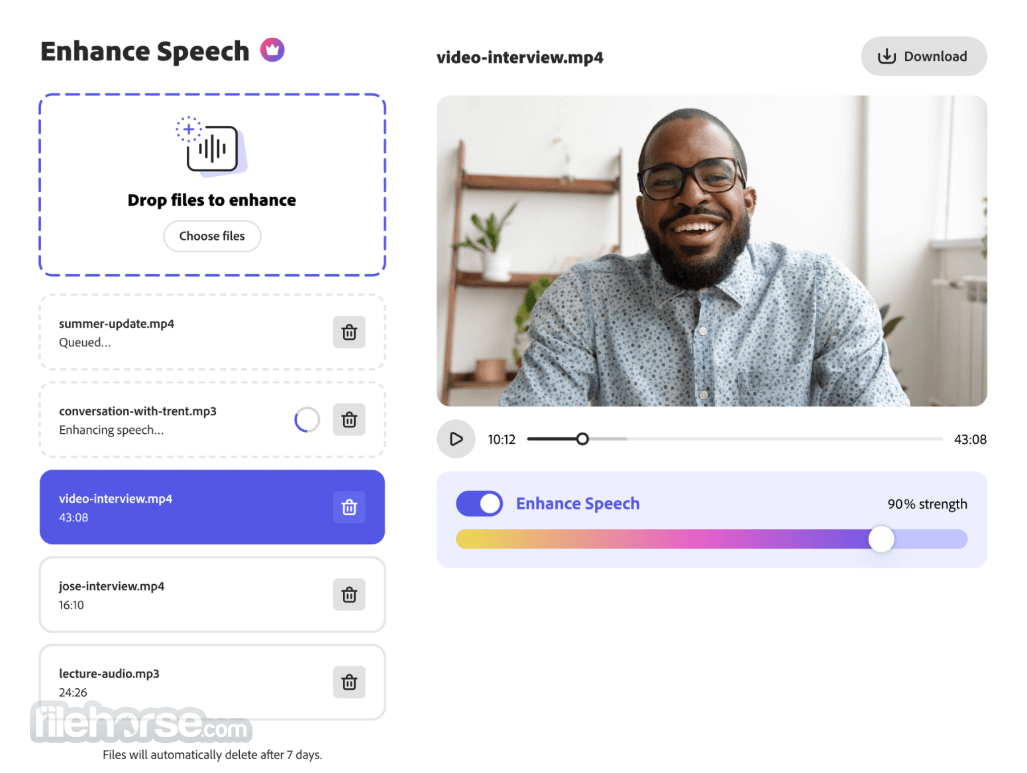
Enhance Speech
Remove noise and echo from voice recordings.
StudioBeta
Record, edit, and enhance in your browser.
Mic Check
Fix microphone issues before recording.
Adobe Podcast AI is a SaaS/WebApp tool designed to elevate the quality of audio recordings, making professional-grade sound accessible to everyone, regardless of technical expertise.
It simplifies the process of creating polished audio through advanced features like voice isolation, noise reduction, and automatic audio enhancement.
Key Features
Advanced Audio Enhancements
Access pre-edited soundtracks, including intros, outros, transitions, and background music tailored for podcasts.
Web-Based Platform
Record, edit, and enhance audio entirely online, with optimal functionality on Google Chrome for desktop.
AI-Powered Tools
Enhance speech for natural sound quality and process files up to 1 GB with up to 4 hours of enhancement per day.
Adobe Express Premium Integration
Offers premium design and content creation tools, enabling creators to produce cohesive podcast visuals and promotional assets.
Enhance spoken audio with just one click / Record, transcribe, edit, share / Crisp and clear! - SIGN UP NOW!
AI-powered audio services that elevate your voice
Enhance Speech
Remove noise and echo from voice recordings.
StudioBeta
Record, edit, and enhance in your browser.
Mic Check
Fix microphone issues before recording.
Adobe Podcast AI is a SaaS/WebApp tool designed to elevate the quality of audio recordings, making professional-grade sound accessible to everyone, regardless of technical expertise.
It simplifies the process of creating polished audio through advanced features like voice isolation, noise reduction, and automatic audio enhancement.
Key Features
Advanced Audio Enhancements
- Noise Reduction & Echo Removal: Automatically clean up audio for improved clarity.
- Enhance Speech: Uses AI to improve voice quality, offering natural and polished sound.
- Mic Check: Evaluates your recording setup to ensure high sound quality without professional equipment.
- Captures audio in 16-bit 48kHz WAV format, preserving quality even with varying internet connections.
- Each participant’s audio is recorded on a separate track for easier editing.
- Intuitive editing options, including the ability to edit audio directly from a transcript. Simply modify the text to make corresponding changes in the audio.
- Automatic transcription for seamless content creation.
Access pre-edited soundtracks, including intros, outros, transitions, and background music tailored for podcasts.
Web-Based Platform
Record, edit, and enhance audio entirely online, with optimal functionality on Google Chrome for desktop.
AI-Powered Tools
Enhance speech for natural sound quality and process files up to 1 GB with up to 4 hours of enhancement per day.
Adobe Express Premium Integration
Offers premium design and content creation tools, enabling creators to produce cohesive podcast visuals and promotional assets.
##
影片介紹
##
畫面截圖
##
更新日誌
Adobe Podcast AI
Smarter AI Audio Cleanup - Enhanced processing now delivers clearer speech, reduced background noise, and more natural vocal tone, especially in difficult recordings.
Improved Mic Check & Voice Leveling - The Mic Check tool now gives more precise guidance and automatically balances voice levels for a polished, consistent sound.
Refined Text-Based Editing - Speech-to-text accuracy has been upgraded, making it easier to cut, rearrange, and edit audio directly through the transcript.
Faster Project Rendering & Export - Export times have been optimized, with improved stability for long multi-track sessions.
UI/UX Enhancements - A more streamlined interface makes editing tools easier to access, supporting smoother workflow and better project navigation.
How It WorksUpload Audio: Start by uploading raw recordings, such as podcasts or interviews. AI Processing: The tool isolates voices, reduces noise, and enhances clarity and balance. Download Final Output: Receive polished, high-quality audio ready for distribution. Benefits
For Beginners: Simplifies audio editing, making it accessible for aspiring podcasters and creators.
For Professionals: Streamlines workflows and ensures consistent, high-quality results.
For Remote Workers: Enhances the clarity of virtual meeting recordings, improving communication.
FAQs
Does Adobe Podcast integrate with other Adobe apps?
Yes, it integrates seamlessly with Adobe Audition, Adobe Premiere Pro, and Adobe Spark, enabling smooth transitions for enhanced editing, production, and promotional workflows.
What can Adobe Podcast AI do?
Adobe Podcast AI is a cloud-based platform that streamlines podcast production. Its features include automatic transcription, AI-powered noise reduction, multi-track recording, and user-friendly editing for professional audio quality.
How do I access Adobe Podcast AI?
Sign up on the official website. Access may be immediate or subject to a waiting list, depending on demand. Adobe prioritizes access for content creators who benefit from its streamlined production tools.
What browsers and devices are compatible?
It works on most major browsers, with Google Chrome offering the best experience on desktops. Mobile access is available, but advanced features like Enhance Speech and multi-track recording are optimized for desktop use.
Can I edit audio directly from the transcript?
Yes, the webapp transcribes audio automatically. You can edit by modifying the text, and changes will sync with the audio in real time.
Pricing
Free plan
Enhance Speech
Enhance Speech
Adobe Podcast AI is designed to empower creators with intuitive tools, advanced automation, and professional-grade features, making podcast production simpler and more efficient than ever.
All recommendations for this excellent AI-powered audio suite from the FileHorse review team.
Also Available: Download Adobe Podcast for Mac
Download Adobe Podcast AI Latest Version Why is this app published on FileHorse? (More info)
Improved Mic Check & Voice Leveling - The Mic Check tool now gives more precise guidance and automatically balances voice levels for a polished, consistent sound.
Refined Text-Based Editing - Speech-to-text accuracy has been upgraded, making it easier to cut, rearrange, and edit audio directly through the transcript.
Faster Project Rendering & Export - Export times have been optimized, with improved stability for long multi-track sessions.
UI/UX Enhancements - A more streamlined interface makes editing tools easier to access, supporting smoother workflow and better project navigation.
How It Works
For Beginners: Simplifies audio editing, making it accessible for aspiring podcasters and creators.
For Professionals: Streamlines workflows and ensures consistent, high-quality results.
For Remote Workers: Enhances the clarity of virtual meeting recordings, improving communication.
FAQs
Does Adobe Podcast integrate with other Adobe apps?
Yes, it integrates seamlessly with Adobe Audition, Adobe Premiere Pro, and Adobe Spark, enabling smooth transitions for enhanced editing, production, and promotional workflows.
What can Adobe Podcast AI do?
Adobe Podcast AI is a cloud-based platform that streamlines podcast production. Its features include automatic transcription, AI-powered noise reduction, multi-track recording, and user-friendly editing for professional audio quality.
How do I access Adobe Podcast AI?
Sign up on the official website. Access may be immediate or subject to a waiting list, depending on demand. Adobe prioritizes access for content creators who benefit from its streamlined production tools.
What browsers and devices are compatible?
It works on most major browsers, with Google Chrome offering the best experience on desktops. Mobile access is available, but advanced features like Enhance Speech and multi-track recording are optimized for desktop use.
Can I edit audio directly from the transcript?
Yes, the webapp transcribes audio automatically. You can edit by modifying the text, and changes will sync with the audio in real time.
Pricing
Free plan
Enhance Speech
- Enhance audio only, no video support
- No bulk processing, upload one at a time
- No strength adjustment
- 30 minutes max duration (up to 500 MB), 1 hour max per day
- Download projects up to 30 minutes, 2 projects per day
- No download of original recordings
- Podcast-branded audiograms
- AI analysis of your microphone setup
Enhance Speech
- Video support for MP4, MOV, and more
- Bulk upload files for enhancement
- Adjust the strength for a more natural sound
- Enhance up to 4 hours a day, files up to 1 GB
- No download limits on Studio projects
- Download original recordings, speaker-separated
- Customize audiograms and captions with themes
- Upload custom backgrounds for audiograms
- AI analysis of your microphone setup
- Free plan.
- Exceptional audio clarity and richness.
- Automatic voice isolation and noise reduction.
- Intuitive and easy to use.
- Adapts to various audio types and settings.
- Quality depends on the initial recording.
- Advanced features may require a subscription.
Adobe Podcast AI is designed to empower creators with intuitive tools, advanced automation, and professional-grade features, making podcast production simpler and more efficient than ever.
All recommendations for this excellent AI-powered audio suite from the FileHorse review team.
Also Available: Download Adobe Podcast for Mac
Download Adobe Podcast AI Latest Version Why is this app published on FileHorse? (More info)