⚠ 這是歷史版本頁面 — 查看 Alien Skin Exposure X7 最新版本 →

- 目前版本4.5.5 (Bundle)
- 更新日期2019-05-22
- 檔案大小472 MB
- 檔案名稱exposure-x4-bundle-4.5.5.88.exe
- 作業系統Windows 7 64 / Windows 8 64 / Windows 10 64 / Windows 11
- 支援語系English
- 授權型式商業試用
- 開發商 Exposure Software, LLC.
- 軟體分類Windows 軟體 / 影像設計
##
編輯短評
Alien Skin Exposure X7 是一套以 RAW 照片編輯與管理為核心的工具,主打讓攝影師在同一個軟體裡完成從匯入、整理、調色到輸出的完整流程。它最鮮明的特色是內建大量傳奇預設集,搭配強大的編輯工具,能快速把 RAW 檔轉化成風格鮮明的作品;同時採用免訂閱的一次性授權模式,在近年訂閱制當道的影像軟體市場中,算是相當有辨識度的選擇。這套軟體自 2019 年收錄以來持續有更新,近一年仍維持維護,不過更新頻率不算高;在評分人數不多的樣本中,使用者評價普遍不錯,屬於攝影社群中口碑扎實、但相對小眾的工具。
這套軟體適合以 RAW 檔拍攝為主的攝影愛好者,尤其是想擺脫月費訂閱、偏好一次買斷的用戶。如果你需要的是「把照片編修得好看」的專注工具,而非 Photoshop 那種包山包海的綜合影像處理,Exposure X7 的取捨在於它把資源集中在照片編輯與整理,操作介面也相對直覺,但少了進階合成、設計或印刷輸出等功能。與 Adobe Photoshop 等主流替代軟體相比,它在整合性與外掛生態上較弱,但換來的是更單純的編輯體驗。要注意的是,官方提供的是試用版,且介面僅有英文,雖然有 Windows 與 macOS 版本,但使用前最好先確認自己對英文介面的接受度。
##
翻譯排程處理中,以下暫以英文原文呈現
軟體介紹
Alien Skin Exposure is the award-winning RAW photo editor and organizer that enables you to create beautiful images and master your workflow. For over a decade, It has helped photographers bring their images to life with unmatched creative tools.
It also offers powerful organizing tools, fast performance, an intuitive design, and a subscription-free approach. It’s the only software you need to handle all your photo editing work.
Note: Alien Skin is now just Exposure X7.
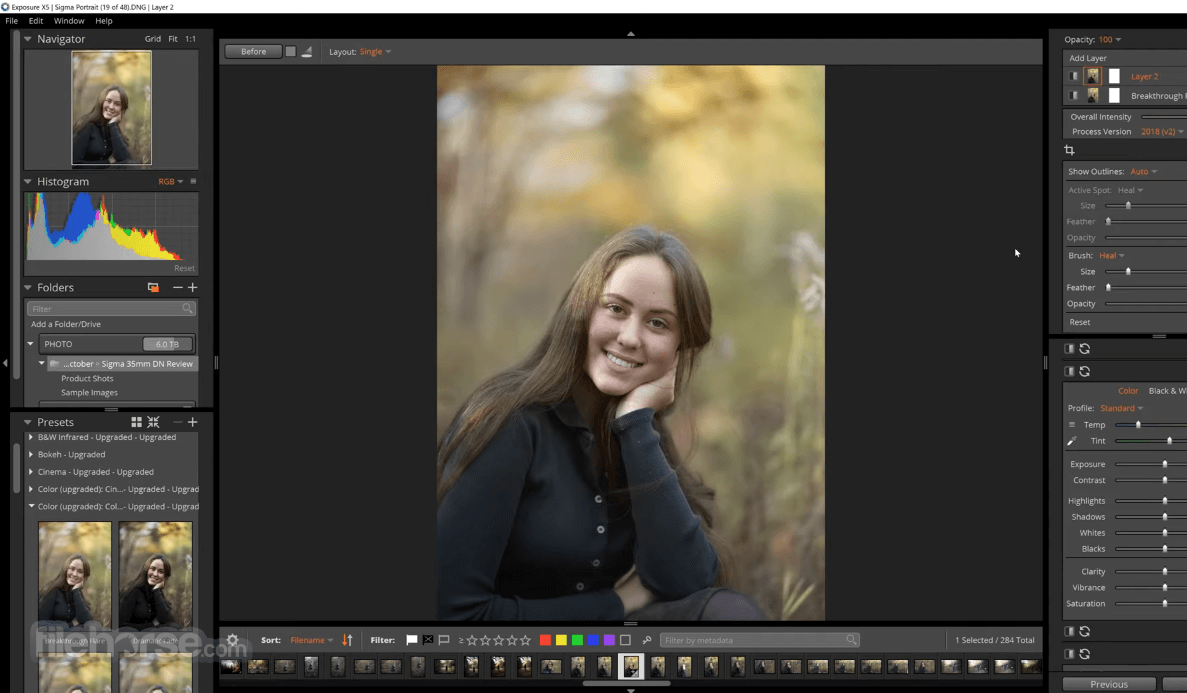
Exposure’s legendary presets and powerful editing tools help you transform your photos and get the most from your RAW files. It has all the non-destructive editing tools you need to create beautiful images.
You’ll find fast retouching tools, powerful and easy to use layering tools, and a variety of gorgeous special effects.
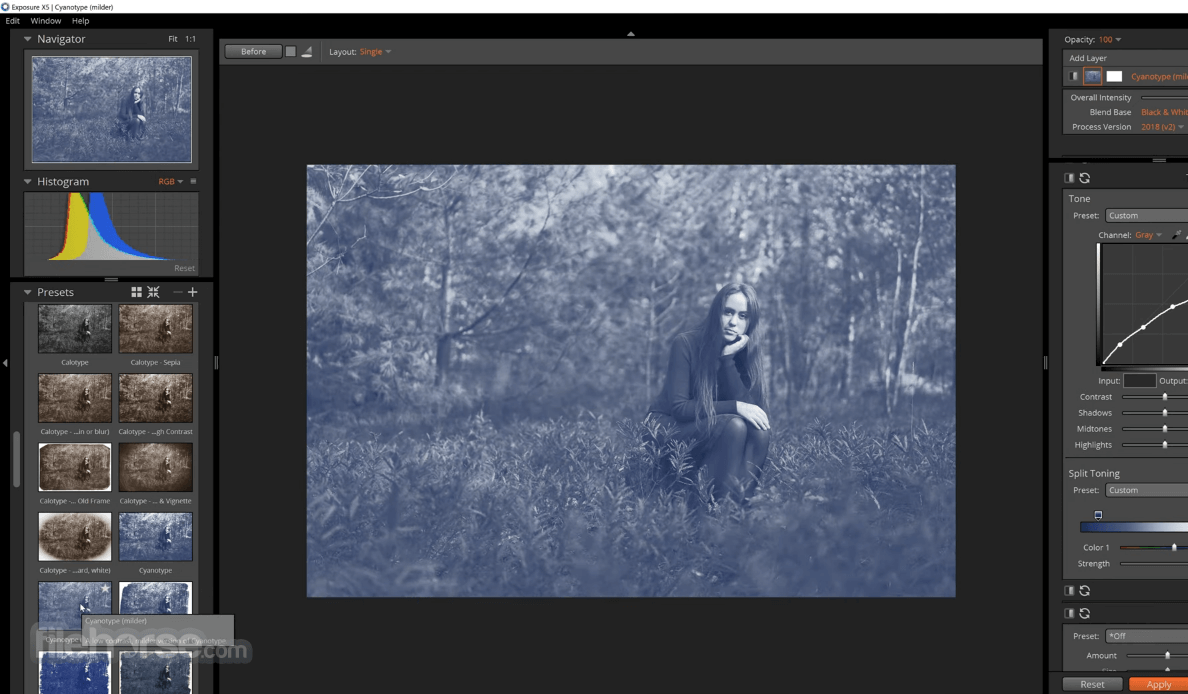
The app is the only photo editor designed from the ground up for accurate film emulation and gorgeous creative photo effects. The unmatched quality of Exposure’s creative tools is why today’s best photographers use the program to achieve their own stunning looks.
It combines outstanding image processing quality, unmatched presets, stunning creative tools and special effects, and powerful photo organizing tools. It packs this power into a customizable interface that is responsive and easy to use, making it the only photo editor and organizer you need.
Features and Highlights
Exceptional Processing
The app’s RAW processing engine provides exceptional quality, making your photos look their best. You’ll find outstanding performance in all the key areas of image processing.
Beautiful Looks
The image editor is legendary for its selection of beautiful customizable presets, which span the entire history of film and beyond. Choose from hundreds of tasteful looks that include authentic color and B&W film presets, then customize them and create your own. You can apply them in a single click, or use Alien Skin for PC the app’s fast layering and advanced brushing tools to seamlessly blend them together.
Uninterrupted Creativity
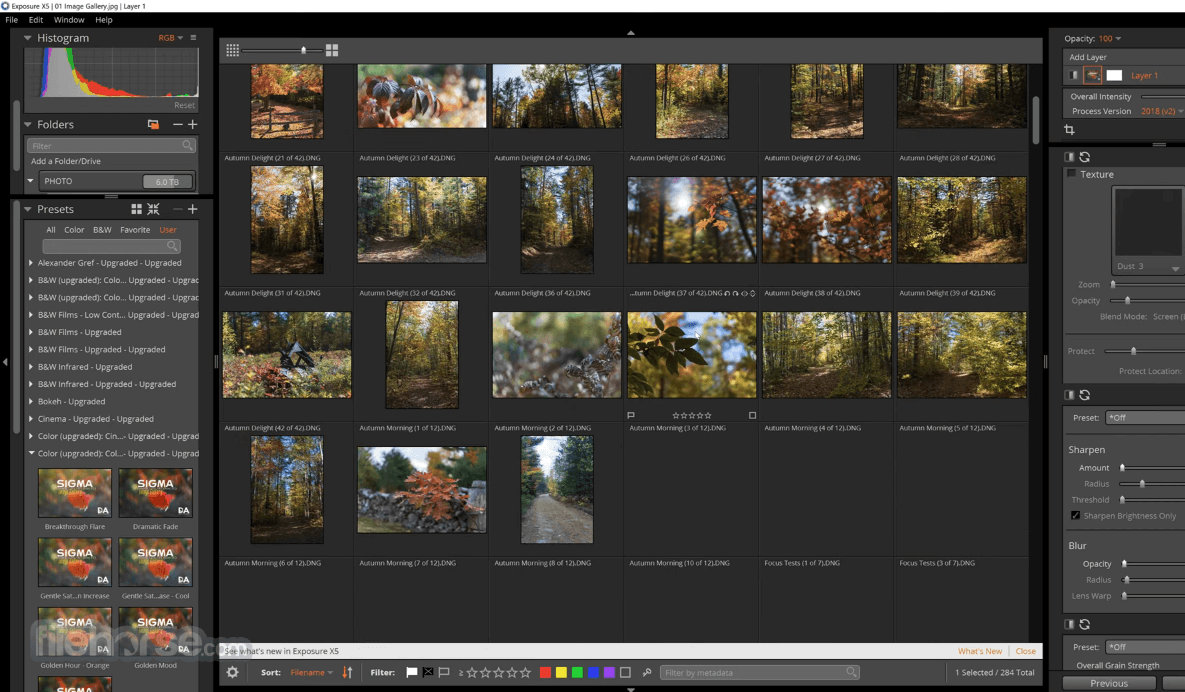
It speeds you into the creative editing zone so you can efficiently create stunning images. Complete all of your work in a single customizable interface, where every tool you need is visible. Use innovative viewing and audition features to quickly cull your images and apply your favorite presets.
Instant Access
The software’s speed enables you to start editing photos quickly. Navigate to your files and begin working immediately. There’s no waiting for slow imports to finish. Use the program’s flexible copy tool to copy images from a camera card, organizing with keywords or collections in one step.
Intuitive Management
It has all the organizing tools you need to easily manage your photo library. Because It uses the same folder structure as your computer and doesn’t use complicated catalogs, you’ll immediately be familiar with using this software to organize your files. Your files are still available to you if you move or rename them outside of the app.
Efficient Categorizing
Keywords, collections, and smart collections, tagging, and ratings help you quickly find your best images and keep your library organized. The app’s robust metadata capabilities help you stay on track by enabling you to categorize your photos at any level of detail you like. Build smart collections that then automatically group photos based on criteria you select.
It stands as the premier image editor tailored for the craft of photography
Boasting professional-grade photo adjustments and an extensive collection of stunning presets, its sleek design ensures a seamless user experience.
With an unparalleled array of creative effects and customizable film looks, you can effortlessly craft breathtaking images. Its robust organizational features streamline workflow and simplify photo library management. Innovative selection tools facilitate precise edits with minimal effort.
Whether used as a standalone application managing your entire photography process or integrated as a plugin for Lightroom and Photoshop, Exposure seamlessly adapts to any workflow.
Pricing
Bundle plan is $171
Exposure provides distortion, vignette, and chromatic aberration correction for many camera lenses.
PROS
Also Available: Download Alien Skin Exposure for Mac
Download Alien Skin Exposure Latest Version Why is this app published on FileHorse? (More info)
It also offers powerful organizing tools, fast performance, an intuitive design, and a subscription-free approach. It’s the only software you need to handle all your photo editing work.
Note: Alien Skin is now just Exposure X7.
Exposure’s legendary presets and powerful editing tools help you transform your photos and get the most from your RAW files. It has all the non-destructive editing tools you need to create beautiful images.
You’ll find fast retouching tools, powerful and easy to use layering tools, and a variety of gorgeous special effects.
The app is the only photo editor designed from the ground up for accurate film emulation and gorgeous creative photo effects. The unmatched quality of Exposure’s creative tools is why today’s best photographers use the program to achieve their own stunning looks.
It combines outstanding image processing quality, unmatched presets, stunning creative tools and special effects, and powerful photo organizing tools. It packs this power into a customizable interface that is responsive and easy to use, making it the only photo editor and organizer you need.
Features and Highlights
Exceptional Processing
The app’s RAW processing engine provides exceptional quality, making your photos look their best. You’ll find outstanding performance in all the key areas of image processing.
Beautiful Looks
The image editor is legendary for its selection of beautiful customizable presets, which span the entire history of film and beyond. Choose from hundreds of tasteful looks that include authentic color and B&W film presets, then customize them and create your own. You can apply them in a single click, or use Alien Skin for PC the app’s fast layering and advanced brushing tools to seamlessly blend them together.
Uninterrupted Creativity
It speeds you into the creative editing zone so you can efficiently create stunning images. Complete all of your work in a single customizable interface, where every tool you need is visible. Use innovative viewing and audition features to quickly cull your images and apply your favorite presets.
Instant Access
The software’s speed enables you to start editing photos quickly. Navigate to your files and begin working immediately. There’s no waiting for slow imports to finish. Use the program’s flexible copy tool to copy images from a camera card, organizing with keywords or collections in one step.
Intuitive Management
It has all the organizing tools you need to easily manage your photo library. Because It uses the same folder structure as your computer and doesn’t use complicated catalogs, you’ll immediately be familiar with using this software to organize your files. Your files are still available to you if you move or rename them outside of the app.
Efficient Categorizing
Keywords, collections, and smart collections, tagging, and ratings help you quickly find your best images and keep your library organized. The app’s robust metadata capabilities help you stay on track by enabling you to categorize your photos at any level of detail you like. Build smart collections that then automatically group photos based on criteria you select.
It stands as the premier image editor tailored for the craft of photography
Boasting professional-grade photo adjustments and an extensive collection of stunning presets, its sleek design ensures a seamless user experience.
With an unparalleled array of creative effects and customizable film looks, you can effortlessly craft breathtaking images. Its robust organizational features streamline workflow and simplify photo library management. Innovative selection tools facilitate precise edits with minimal effort.
Whether used as a standalone application managing your entire photography process or integrated as a plugin for Lightroom and Photoshop, Exposure seamlessly adapts to any workflow.
Pricing
Bundle plan is $171
- Exposure X7 non-destructive RAW photo editor
- Integrated Snap Art natural media
- Integrated Blow Up high-quality photo enlargement
- Exposure X7, Snap Art, and Blow Up plug-ins for Lightroom and Photoshop
- Fast technical support
- 30-day money back guarantee
- No subscription required
- Windows 10 or 11
- 64-bit Windows edition
- Intel Core 2 processor or newer
- Monitor with 1280 x 768 resolution or greater
- 8GB RAM minimum, 16GB recommended
- For GPU support, a recent (2015 or later) OpenCL compatible GPU with 2GB RAM is recommended
Exposure provides distortion, vignette, and chromatic aberration correction for many camera lenses.
PROS
- Exceptional RAW processing.
- Extensive preset selection.
- Fast editing tools.
- Seamless workflow.
- Limited trial version.
- Some features require high system specs.
- Separate purchase for Mac version.
Also Available: Download Alien Skin Exposure for Mac
Download Alien Skin Exposure Latest Version Why is this app published on FileHorse? (More info)
##
影片介紹
##
畫面截圖
- 2026-01-22 Alien Skin Exposure X7 7.2.0.2 467 MB
- 2021-09-29 Alien Skin Exposure X7 7.0.0.58 472 MB
- 2020-10-28 Alien Skin Exposure X6 6.0.1.100 436 MB
- 2020-10-07 Alien Skin Exposure X6 6.0.0.66 469 MB
- 2020-09-03 Alien Skin Exposure X5 5.2.4 443 MB
- 2020-07-10 Alien Skin Exposure X5 5.2.3 443 MB
- 2020-05-01 Alien Skin Exposure X5 5.2.2 443 MB
- 2020-02-20 Alien Skin Exposure X5 5.2.1 441 MB