⚠ 這是歷史版本頁面 — 查看 Apple AirPort Utility 最新版本 →

- 目前版本5.5.3
- 更新日期2011-01-14
- 檔案大小10 MB
- 檔案名稱AirPortSetup.exe
- 作業系統Windows XP / Vista / Windows 7
- 支援語系English
- 授權型式免費軟體
- 開發商 Apple Inc
- 軟體分類Windows 軟體 / 檔案傳輸與網路
##
編輯短評
Apple AirPort Utility 是 Apple 官方推出的無線網路設定工具,主要用來管理 AirPort 基地台,讓你在教室或家中輕鬆建立無線網路,不必拉線就能讓多台電腦與裝置同時上網。它最鮮明的特色是能直接設定 AirPort Express 的雙頻 802.11n 連線,把複雜的網路設定濃縮在單一介面中。這套軟體自推出以來持續獲得維護,更新頻率不算頻繁,在同類工具中屬於小眾但定位明確的選擇,使用者評價普遍中等。
這套工具適合手上擁有 Apple AirPort 系列基地台的使用者,尤其是想在居家或小型教室環境快速架設共享網路的場景。與 Internet Download Manager、uTorrent 等熱門傳輸工具相比,它並非通用下載軟體,而是專注於 Apple 自家硬體的設定與管理,功能範圍相對狹窄。需要注意的是,它僅提供英文介面,且為免費軟體;若你使用的是非 Apple 的基地台,這套工具就派不上用場,得另尋其他通用網路管理方案。
##
翻譯排程處理中,以下暫以英文原文呈現
軟體介紹
When you want to give wireless internet access to other people in your classroom or house, the Apple AirPort Utility makes it easier than ever. It allows you to wirelessly connect multiple devices and computers to the internet.
Basically, without needing any cables, you can create a network and allow all these devices to wirelessly communicate with each other. All you need to do is configure the AirPort software on your computer appropriately.
It allows you to configure and manage the new AirPort Express with simultaneous dual-band 802.11n.
Once your computer is configured, you can establish an AirPort Base Station or gain access to an existing network. The wireless connection that gets established needs to pass through a Base Station that is already online.
It will not create a direct internet connection with your existing ISP (Internet Service Provider). It will simply transfer the connection to all the nearby rooms in your house or classroom.
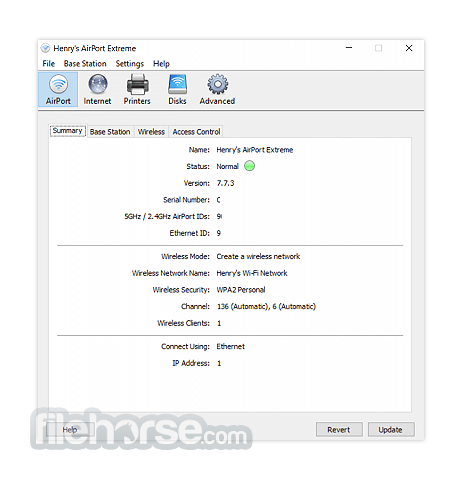
It is very simple to create a wireless network with password protection by using either an AirPort Base Station or Time Capsule. This network will give internet access to all kinds of wireless devices in the nearby rooms, including smartphones, laptops, tablets, and regular desktop computers.
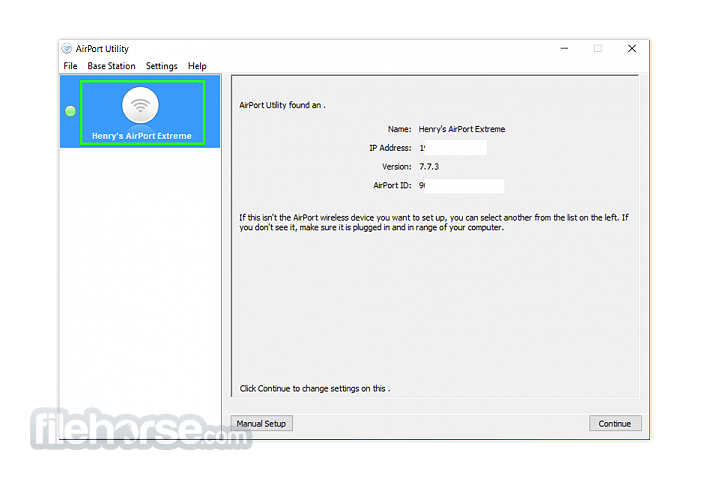
Do not worry about having to set up AirPort Express or AirPort Base Station because the software will handle all of this automatically. It will even perform the configuration of your network. This means the base station just needs to be plugged in. After that, all the stations that are available will be listed in the main interface.
If you are familiar with routers, these Base Stations work kind of like them. You just connect the cables and then let the network be configured automatically by the application. As for Time Capsule, this refers to the combination of a gateway router and a wireless device. This makes its configuration very easy too.
Overall, the most dependable application for giving wireless internet access to other devices is Apple AirPort Utility. Every device in your home can establish a connection to your wireless network. An external cable doesn’t even need to be used.
Main Features
It features a clean and user-friendly interface, consistent with Apple's design philosophy.
The layout is intuitive, making it easy for both novice and experienced users to navigate through various settings and options.
Installation and Setup
Installing this tool is straightforward and typically comes pre-installed on macOS devices. For Windows users, the software can be downloaded from the Apple website and installed like any other Windows application.
The setup wizard guides users through the process of configuring their AirPort base stations and Wi-Fi networks step by step.
How to Use
Launch the app on your PC/laptop. Follow the on-screen instructions to set up a new base station or manage an existing one. Customize network settings according to your preferences, such as network name, password, and security protocols. Monitor network activity and connected devices using the intuitive interface. Perform network diagnostics if any issues arise and troubleshoot accordingly. FAQs
Can I use AirPort Utility with non-Apple routers?
No, the tool is designed specifically for managing Apple's AirPort Wi-Fi routers.
Does AirPort Utility work on Windows PCs?
Yes, the program is compatible with Windows 11, 10, 8, or 7 and can be downloaded from the Apple website.
Can I access AirPort Utility remotely?
Yes, you can access AirPort Utility remotely using the iOS app or through iCloud if you have remote management enabled.
Is AirPort Utility compatible with older AirPort base stations?
Yes, it supports both current and older generations of AirPort base stations.
Can I set up a guest network with AirPort Utility?
Yes, it allows you to create a separate guest network with limited access for visitors.
Alternatives
Google WiFi - Offers similar features for managing Wi-Fi networks, including network setup, device management, and network diagnostics.
NETGEAR Genie - Provides tools for managing NETGEAR routers and network devices with features like remote access and parental controls.
ASUS Router App - Designed for managing ASUS routers, this app offers network setup, device management, and security features.
TP-Link Tether - Allows users to manage TP-Link routers and extenders, offering network setup and device management capabilities.
Pricing
The program is available for FREE and can be downloaded from the Apple website for both macOS and Windows platforms.
PROS
Download Apple AirPort Utility for PC Latest Version Why is this app published on FileHorse? (More info)
Basically, without needing any cables, you can create a network and allow all these devices to wirelessly communicate with each other. All you need to do is configure the AirPort software on your computer appropriately.
It allows you to configure and manage the new AirPort Express with simultaneous dual-band 802.11n.
Once your computer is configured, you can establish an AirPort Base Station or gain access to an existing network. The wireless connection that gets established needs to pass through a Base Station that is already online.
It will not create a direct internet connection with your existing ISP (Internet Service Provider). It will simply transfer the connection to all the nearby rooms in your house or classroom.
It is very simple to create a wireless network with password protection by using either an AirPort Base Station or Time Capsule. This network will give internet access to all kinds of wireless devices in the nearby rooms, including smartphones, laptops, tablets, and regular desktop computers.
Do not worry about having to set up AirPort Express or AirPort Base Station because the software will handle all of this automatically. It will even perform the configuration of your network. This means the base station just needs to be plugged in. After that, all the stations that are available will be listed in the main interface.
If you are familiar with routers, these Base Stations work kind of like them. You just connect the cables and then let the network be configured automatically by the application. As for Time Capsule, this refers to the combination of a gateway router and a wireless device. This makes its configuration very easy too.
Overall, the most dependable application for giving wireless internet access to other devices is Apple AirPort Utility. Every device in your home can establish a connection to your wireless network. An external cable doesn’t even need to be used.
Main Features
- Network Setup: Easily set up and configure AirPort base stations and Wi-Fi networks.
- Device Management: Manage connected devices, such as printers, external hard drives, and network-attached storage (NAS) devices.
- Network Diagnostics: Perform diagnostics to troubleshoot network issues and optimize performance.
- Guest Network: Set up a separate guest network with restricted access for visitors.
- Security: Implement security measures like password protection and network encryption to safeguard your network.
It features a clean and user-friendly interface, consistent with Apple's design philosophy.
The layout is intuitive, making it easy for both novice and experienced users to navigate through various settings and options.
Installation and Setup
Installing this tool is straightforward and typically comes pre-installed on macOS devices. For Windows users, the software can be downloaded from the Apple website and installed like any other Windows application.
The setup wizard guides users through the process of configuring their AirPort base stations and Wi-Fi networks step by step.
How to Use
Can I use AirPort Utility with non-Apple routers?
No, the tool is designed specifically for managing Apple's AirPort Wi-Fi routers.
Does AirPort Utility work on Windows PCs?
Yes, the program is compatible with Windows 11, 10, 8, or 7 and can be downloaded from the Apple website.
Can I access AirPort Utility remotely?
Yes, you can access AirPort Utility remotely using the iOS app or through iCloud if you have remote management enabled.
Is AirPort Utility compatible with older AirPort base stations?
Yes, it supports both current and older generations of AirPort base stations.
Can I set up a guest network with AirPort Utility?
Yes, it allows you to create a separate guest network with limited access for visitors.
Alternatives
Google WiFi - Offers similar features for managing Wi-Fi networks, including network setup, device management, and network diagnostics.
NETGEAR Genie - Provides tools for managing NETGEAR routers and network devices with features like remote access and parental controls.
ASUS Router App - Designed for managing ASUS routers, this app offers network setup, device management, and security features.
TP-Link Tether - Allows users to manage TP-Link routers and extenders, offering network setup and device management capabilities.
Pricing
The program is available for FREE and can be downloaded from the Apple website for both macOS and Windows platforms.
PROS
- Intuitive user interface
- Comprehensive network management features
- Seamless integration with Apple's ecosystem
- Remote management capabilities
- Free to download and use
- Limited compatibility with non-Apple routers
- Not as feature-rich as some third-party router management software
- It's been a long time since there was an update on the official website
Download Apple AirPort Utility for PC Latest Version Why is this app published on FileHorse? (More info)
##
畫面截圖
- 2026-02-17 Apple AirPort Utility 5.6.1 10 MB
- 2011-01-14 Apple AirPort Utility 5.5.3 10 MB
- 2009-06-03 Apple AirPort Utility 5.4.2 10.9 MB
- 2009-03-03 Apple AirPort Utility 5.4.1 10.9 MB
- 2008-06-11 Apple AirPort Utility 5.3.2 10.3 MB
- 2008-03-11 Apple AirPort Utility 5.3.1 10.3 MB