⚠ 這是歷史版本頁面 — 查看 Ashampoo Burning Studio 最新版本 →

Ashampoo Burning Studio 22.0.8
v 22.0.8
Windows
商業試用
7.82/10 (111)
- 目前版本22.0.8
- 更新日期2021-06-10
- 檔案大小176 MB
- 檔案名稱ashampoo_burning_studio_22_22.0.8_sm.exe
- 作業系統Windows 10 / Windows 11
- 支援語系English
- 授權型式商業試用
- 開發商 Ashampoo
- 軟體分類Windows 軟體 / 光碟藍光
##
編輯短評
Ashampoo Burning Studio 是一套老牌的 Windows 燒錄工具,主打「直覺操作就能做出專業成果」:從帶動畫選單的影片 DVD、自製封面的音樂 CD,到密碼保護的資料備份,甚至把照片變成幻燈片、將 CD 收藏轉存到硬碟,都能在幾個點擊內完成。它的介面設計相當緊湊,功能卻很完整,是同類工具中評價中上的選擇;雖然收錄的版本不多,但近一年仍有更新,代表開發商持續維護,並非放生狀態。
這套軟體適合需要偶爾燒錄光碟、又不想花時間研究複雜設定的使用者,尤其是想製作有選單的影片光碟或個人化音樂 CD 的人。與 Nero Burning ROM 或 DVD Shrink 等替代方案相比,Ashampoo 的優勢在於介面更親切、功能整合度高,但它是試用版軟體,且目前僅提供英文介面,沒有中文版;平台限定 Windows,使用前需留意授權與語系限制,若習慣中文操作環境,可能要考慮其他選項。
##
翻譯排程處理中,以下暫以英文原文呈現
軟體介紹
Ashampoo Burning Studio is everything you asked for. Discover the easy way to achieve professional results with an incredible intuitive, compact, yet immensely powerful Ashampoo Burning application.
Video DVDs with fully animated menus, music CDs with individually designed covers, password-protected data backups and so much more just a few mouse clicks away.
Turn your photos into slideshows, add music and comments, or save your CD collection to your hard disk. Burning Studio takes full advantage of your PC's capabilities to make the most out of your movies, photos, and songs.
What`s New
Benefits
Features and Highlights
A Major Audiobook Offensive
It has received overwhelming success with its audiobook module, and it is grateful for the support. Now, it's taking things up a notch by introducing even more impressive features! One common annoyance with audiobooks and audioplays is the abrupt switching between tracks mid-sentence. While dedicated players may not have this issue, it can be a major inconvenience when dealing with MP3s and other formats.
More Audiobook Goodness
Audiobooks, podcasts, and audioplays continue to captivate audiences, and the app is here to help users make the most of them. Many audioplays are divided into numerous smaller files, often for easier marketing on platforms like Spotify.
Windows 11 Compatibility and Attention to Detail
Ashampoo® Burning Studio is fully compatible with Windows 11, while also supporting Windows 7, 8, and 10 as expected. It has introduced a new handy quick rip feature that allows users to extract audio from CDs swiftly and effortlessly, without requiring manual input.
Ready for H.265-HEVC!
Codecs are the backbone of multimedia projects, and the program now introduces a new star in its lineup: H.265, also known as HEVC (High-Efficiency Video Coding). This codec provides the same level of quality while achieving 50% higher data compression rates compared to its predecessor.
Lightning-Fast Feature Access
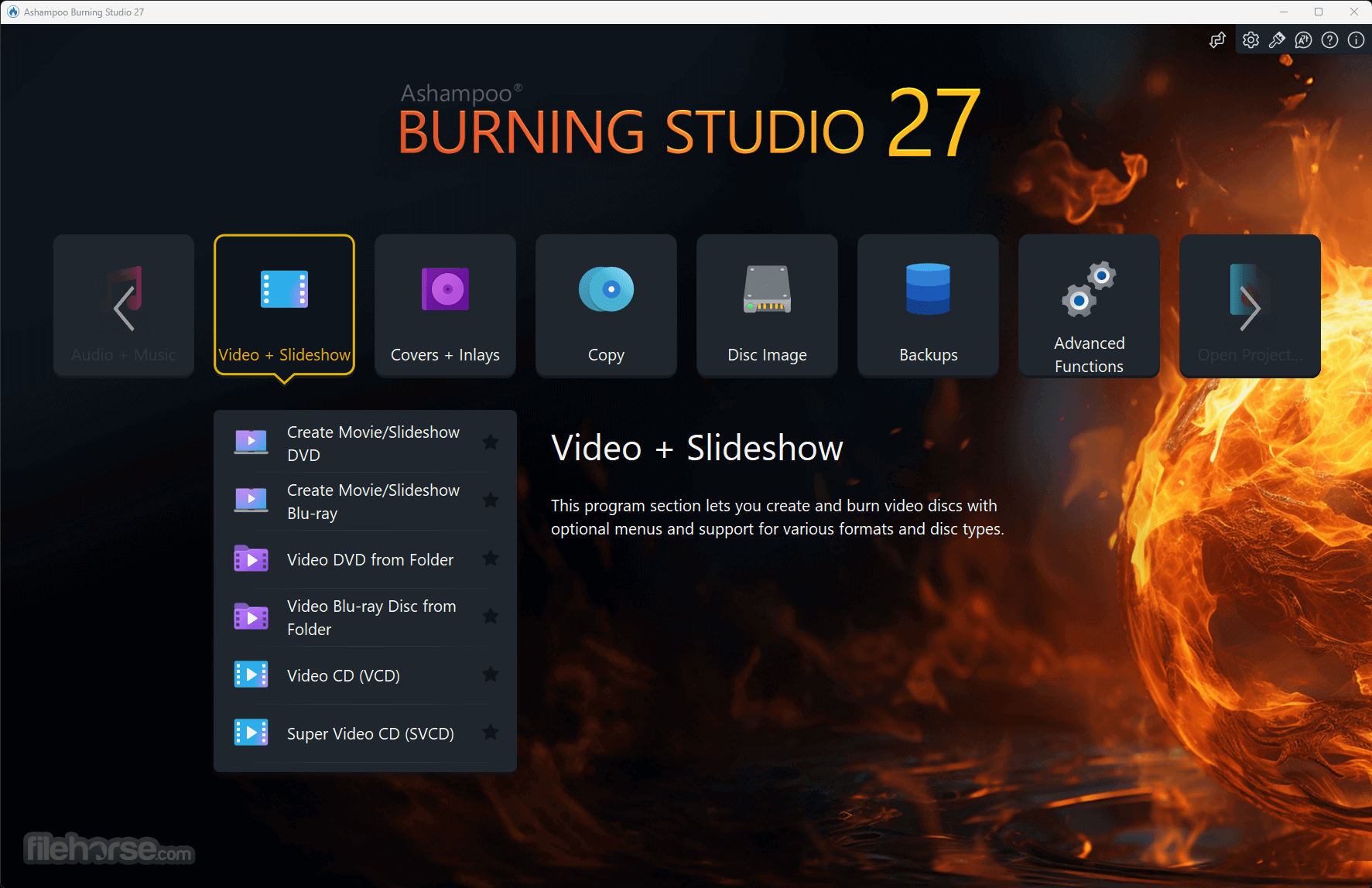
Burning Studio has garnered a large following due to its clear menu structure and quick-access options. But it's not stopping there—things can get even faster! Users can now select their favorite module and create a desktop shortcut for instant access.
More Comfortable Music Ripping with Covers, Metadata, and More
Disc ripping has always been a comfortable and straightforward process with Burning Studio. The program automatically recognizes CD contents and retrieves relevant metadata and cover artwork.
Product Maintenance that Matters
The field of information technology is in a constant state of change, with evolving operating systems, file formats, and hardware. That's why the app has updated and revamped the core foundations. It has meticulously examined, reviewed, and fine-tuned burning and conversion procedures to ensure perfection.
Create Your Own Movies and Slideshows with Ease
With Burning Studio, users' creativity knows no bounds. They can effortlessly cut movies, add intros and outros with just a few clicks, and instantly rotate misaligned videos. Subtitles are available to help deliver the message, and users can choose from ready-made themes or create their own custom graphics for that polished touch.
The Best Plan for Secure Backups
Do users rely on cloud storage for their files? How about keeping their data at home and burning it onto CD, DVD, or Blu-ray? Burning Studio's convenient backup plans do the heavy lifting. Backing up important data locally is now easier than ever, and the program can even remind users when the next backup is due.
The Perfect Sound for Music and Audiobooks in Your Car
When burning discs for the car radio, choosing the right format is crucial. Otherwise, users risk losing the song order or ending up with a disc that won't play at all. The new Burning Studio solves this problem once and for all! With over 1800 presets and profiles for common car radios, users' discs will work seamlessly on any device.
The Simple Way to Rip CDs and Burn Audio Files
Need to extract audio from music CDs? The intelligent disc ripping feature in the app can accomplish this task in a matter of minutes. The program automatically recognizes the artist and genre, eliminating the need for manual input. Users can convert audio CDs into high-quality audio files with meaningful file names, selecting from various formats.
The Fast Path to Finished Movie Projects
It provides a shortcut to success for every project. When time is of the essence, it only takes a few clicks to combine images and videos with suitable music and create movies. There's no need for lengthy menu navigation or additional manual work. If desired, users can manually adjust image transitions and display durations for that extra touch of personalization.
The Perfect Format for Every Movie!
Creating and burning movies with a PC is one of Ashampoo® Burning Studio's greatest strengths. To ensure compatibility with retail players, movies need to be converted into suitable formats. Burning Studio has users covered with support for MPEG4, H.265, AAC, as well as sound formats like MP3, WMA, OGG, and more.
Recover Data from Surface-Damaged Discs with Scratch Protection
The proven scratch protection technology safeguards data. Scratches on disc surfaces can render them unreadable, resulting in irrecoverable files. Ashampoo Burning Studio eliminates the fear of scratches by distributing multiple copies of data across the disc and including an emergency recovery tool.
Effortless Processing of Disc Images
Working with disk images in formats such as ISO, CUE/BIN, or the program's own ASHDISC is a common practice for professionals. It provides seamless support for all these formats. Users can create, copy, burn, and browse disk images effortlessly, with the added convenience of a built-in preview for images. Creating disk images is a breeze, saving time and effort.
Create Stunning Covers and Artwork for Discs
Designing covers and inlays has always been a standout feature of Burning Studio. The intuitive start menu sets users on the right path, allowing them to select their favorite images instantly. The import feature helps analyze the disc and automatically downloads the required metadata from the internet, creating a suitable tracklist if necessary.
FAQ
Q: Can Ashampoo Burning Studio burn Blu-ray discs?
A: Yes, it supports burning data, audio, and video to Blu-ray discs.
Q: Can I create backup copies of my DVDs with this software?
A: Yes, it allows you to create direct copies of your DVDs, preserving the original data and structure.
Q: Does the software offer disc labeling and cover design features?
A: Yes, it provides integrated tools for designing and printing disc labels, covers, and booklets.
Q: Can I burn video files with subtitles using this software?
A: Absolutely. It enables you to burn video files with embedded subtitles or add external subtitle files to your video discs.
How to Use
British English, Bulgarian, Catalan, Chinese (simplified), Chinese (traditional), Czech, Danish, Dutch, English, Finnish, French, German, Greek, Hungarian, Italian, Korean, Latvian, Norwegian, Norwegian Nynorsk, Polish, Portuguese, Portuguese (Brazilian), Rumanian, Russian, Serbian, Slovakian, Slovenian, Spanish, Spanish (Argentina), Turkish.
System Requirements
Operating System:
Windows® 11, Windows® 10 / Note: Systems with ARM processors are not supported.
Software:
Microsoft .NET Framework 4.5
RAM:
2 GB
Hard Drive Space:
DirectX 9 Hardware Pixelshader v2.0, minimum 128 MB RAM
Sound Card:
Any standard sound card (on-board or USB)
Other:
An Internet connection is required to activate the program. The program license is verified repeatedly at regular intervals.
Alternatives
Nero Burning ROM - Industrys leading CD, DVD and Blu-ray disc burning software
BurnAware Free - Free burning software and various CD, DVD, Blu-ray tools
CDBurnerXP - A powerful burning software with many features!
Express Burn - Burn your videos, music, photos, and other files to CD, DVD, and Blu-ray
PROS
Ashampoo Burning Studio is a reliable and feature-rich disc burning software that caters to a wide range of user needs. Whether you want to burn data, create audio CDs, or make backup copies of your discs, this software provides the necessary tools in an intuitive and user-friendly package.
While some advanced features may require a learning curve, the overall experience is smooth and efficient. With its competitive pricing and regular updates, the program is a great choice for anyone seeking a versatile disc burning solution.
Note: 10-day trial (can be extended with 30 additional days for free).
Download Ashampoo Burning Studio Latest Version Why is this app published on FileHorse? (More info)
Video DVDs with fully animated menus, music CDs with individually designed covers, password-protected data backups and so much more just a few mouse clicks away.
Turn your photos into slideshows, add music and comments, or save your CD collection to your hard disk. Burning Studio takes full advantage of your PC's capabilities to make the most out of your movies, photos, and songs.
What`s New
- Professional-grade ripping with sample rates up to 48 kHz (e.g., WAV)
- New AAC audio format support for ripping
- Optional disc ejection after ripping
- Improved CD database for more accurate results across all modules
- Intelligent audiobook detection, even for multi-part files
- New interface design with light and dark skins
- Enhanced stability and security for reliable results every time
Benefits
- Fully compatible with Windows 11
- Optimized for the latest hardware and software
- Offers both light and dark skins for a fresh look
- Includes a comprehensive audiobook module
- Convenient "Best-of" feature for quick source switching
- Increased project versatility with intermediate buffering
- Improved cover search functionality
- Significantly enhanced car radio support
- Effortlessly burn, copy, and backup data
- Create, edit, and burn high-quality movies
- Transform your photo memories into beautiful slideshows
- Design and burn audio discs with customized covers
- Utilize the modern H.265 decoder for stunning video quality
- Intelligent backup plans for reliable data protection
- Well-organized tracks in the optimal format for your car radio
Features and Highlights
A Major Audiobook Offensive
It has received overwhelming success with its audiobook module, and it is grateful for the support. Now, it's taking things up a notch by introducing even more impressive features! One common annoyance with audiobooks and audioplays is the abrupt switching between tracks mid-sentence. While dedicated players may not have this issue, it can be a major inconvenience when dealing with MP3s and other formats.
More Audiobook Goodness
Audiobooks, podcasts, and audioplays continue to captivate audiences, and the app is here to help users make the most of them. Many audioplays are divided into numerous smaller files, often for easier marketing on platforms like Spotify.
Windows 11 Compatibility and Attention to Detail
Ashampoo® Burning Studio is fully compatible with Windows 11, while also supporting Windows 7, 8, and 10 as expected. It has introduced a new handy quick rip feature that allows users to extract audio from CDs swiftly and effortlessly, without requiring manual input.
Ready for H.265-HEVC!
Codecs are the backbone of multimedia projects, and the program now introduces a new star in its lineup: H.265, also known as HEVC (High-Efficiency Video Coding). This codec provides the same level of quality while achieving 50% higher data compression rates compared to its predecessor.
Lightning-Fast Feature Access
Burning Studio has garnered a large following due to its clear menu structure and quick-access options. But it's not stopping there—things can get even faster! Users can now select their favorite module and create a desktop shortcut for instant access.
More Comfortable Music Ripping with Covers, Metadata, and More
Disc ripping has always been a comfortable and straightforward process with Burning Studio. The program automatically recognizes CD contents and retrieves relevant metadata and cover artwork.
Product Maintenance that Matters
The field of information technology is in a constant state of change, with evolving operating systems, file formats, and hardware. That's why the app has updated and revamped the core foundations. It has meticulously examined, reviewed, and fine-tuned burning and conversion procedures to ensure perfection.
Create Your Own Movies and Slideshows with Ease
With Burning Studio, users' creativity knows no bounds. They can effortlessly cut movies, add intros and outros with just a few clicks, and instantly rotate misaligned videos. Subtitles are available to help deliver the message, and users can choose from ready-made themes or create their own custom graphics for that polished touch.
The Best Plan for Secure Backups
Do users rely on cloud storage for their files? How about keeping their data at home and burning it onto CD, DVD, or Blu-ray? Burning Studio's convenient backup plans do the heavy lifting. Backing up important data locally is now easier than ever, and the program can even remind users when the next backup is due.
The Perfect Sound for Music and Audiobooks in Your Car
When burning discs for the car radio, choosing the right format is crucial. Otherwise, users risk losing the song order or ending up with a disc that won't play at all. The new Burning Studio solves this problem once and for all! With over 1800 presets and profiles for common car radios, users' discs will work seamlessly on any device.
The Simple Way to Rip CDs and Burn Audio Files
Need to extract audio from music CDs? The intelligent disc ripping feature in the app can accomplish this task in a matter of minutes. The program automatically recognizes the artist and genre, eliminating the need for manual input. Users can convert audio CDs into high-quality audio files with meaningful file names, selecting from various formats.
The Fast Path to Finished Movie Projects
It provides a shortcut to success for every project. When time is of the essence, it only takes a few clicks to combine images and videos with suitable music and create movies. There's no need for lengthy menu navigation or additional manual work. If desired, users can manually adjust image transitions and display durations for that extra touch of personalization.
The Perfect Format for Every Movie!
Creating and burning movies with a PC is one of Ashampoo® Burning Studio's greatest strengths. To ensure compatibility with retail players, movies need to be converted into suitable formats. Burning Studio has users covered with support for MPEG4, H.265, AAC, as well as sound formats like MP3, WMA, OGG, and more.
Recover Data from Surface-Damaged Discs with Scratch Protection
The proven scratch protection technology safeguards data. Scratches on disc surfaces can render them unreadable, resulting in irrecoverable files. Ashampoo Burning Studio eliminates the fear of scratches by distributing multiple copies of data across the disc and including an emergency recovery tool.
Effortless Processing of Disc Images
Working with disk images in formats such as ISO, CUE/BIN, or the program's own ASHDISC is a common practice for professionals. It provides seamless support for all these formats. Users can create, copy, burn, and browse disk images effortlessly, with the added convenience of a built-in preview for images. Creating disk images is a breeze, saving time and effort.
Create Stunning Covers and Artwork for Discs
Designing covers and inlays has always been a standout feature of Burning Studio. The intuitive start menu sets users on the right path, allowing them to select their favorite images instantly. The import feature helps analyze the disc and automatically downloads the required metadata from the internet, creating a suitable tracklist if necessary.
FAQ
Q: Can Ashampoo Burning Studio burn Blu-ray discs?
A: Yes, it supports burning data, audio, and video to Blu-ray discs.
Q: Can I create backup copies of my DVDs with this software?
A: Yes, it allows you to create direct copies of your DVDs, preserving the original data and structure.
Q: Does the software offer disc labeling and cover design features?
A: Yes, it provides integrated tools for designing and printing disc labels, covers, and booklets.
Q: Can I burn video files with subtitles using this software?
A: Absolutely. It enables you to burn video files with embedded subtitles or add external subtitle files to your video discs.
How to Use
- Select Task – Choose from options like burning data, music, videos, or creating backups.
- Add Files – Click “Add” to select files or folders you want to burn.
- Choose Disc Type – Select CD, DVD, or Blu-ray based on your needs.
- Customize Settings – Adjust burning speed, file format, and disc label if needed.
- Preview & Confirm – Review selected files and settings before proceeding.
- Start Burning – Click "Burn" to begin writing data onto the disc.
- Verify & Eject – Once done, verify the burn and eject the disc.
- Save Project – Optionally, save the project for future use.
- Close Program – Exit the software when finished.
British English, Bulgarian, Catalan, Chinese (simplified), Chinese (traditional), Czech, Danish, Dutch, English, Finnish, French, German, Greek, Hungarian, Italian, Korean, Latvian, Norwegian, Norwegian Nynorsk, Polish, Portuguese, Portuguese (Brazilian), Rumanian, Russian, Serbian, Slovakian, Slovenian, Spanish, Spanish (Argentina), Turkish.
System Requirements
Operating System:
Windows® 11, Windows® 10 / Note: Systems with ARM processors are not supported.
Software:
Microsoft .NET Framework 4.5
RAM:
2 GB
Hard Drive Space:
- 250 MB for installation
- Up to 9 GB for temporary files (DVD)
- 25/50 GB for temporary files (Blu-ray)
- 100 GB for temporary files (Blu-ray XL)
DirectX 9 Hardware Pixelshader v2.0, minimum 128 MB RAM
Sound Card:
Any standard sound card (on-board or USB)
Other:
An Internet connection is required to activate the program. The program license is verified repeatedly at regular intervals.
Alternatives
Nero Burning ROM - Industrys leading CD, DVD and Blu-ray disc burning software
BurnAware Free - Free burning software and various CD, DVD, Blu-ray tools
CDBurnerXP - A powerful burning software with many features!
Express Burn - Burn your videos, music, photos, and other files to CD, DVD, and Blu-ray
PROS
- Comprehensive disc burning features for data, audio, video, and more.
- Intuitive and user-friendly interface.
- Support for a wide range of disc formats and devices.
- Backup and restore functionality to protect valuable data.
- Additional tools for disc labeling and cover design.
- Some advanced features may be overwhelming for novice users.
- Limited support for non-Windows operating systems.
Ashampoo Burning Studio is a reliable and feature-rich disc burning software that caters to a wide range of user needs. Whether you want to burn data, create audio CDs, or make backup copies of your discs, this software provides the necessary tools in an intuitive and user-friendly package.
While some advanced features may require a learning curve, the overall experience is smooth and efficient. With its competitive pricing and regular updates, the program is a great choice for anyone seeking a versatile disc burning solution.
Note: 10-day trial (can be extended with 30 additional days for free).
Download Ashampoo Burning Studio Latest Version Why is this app published on FileHorse? (More info)
##
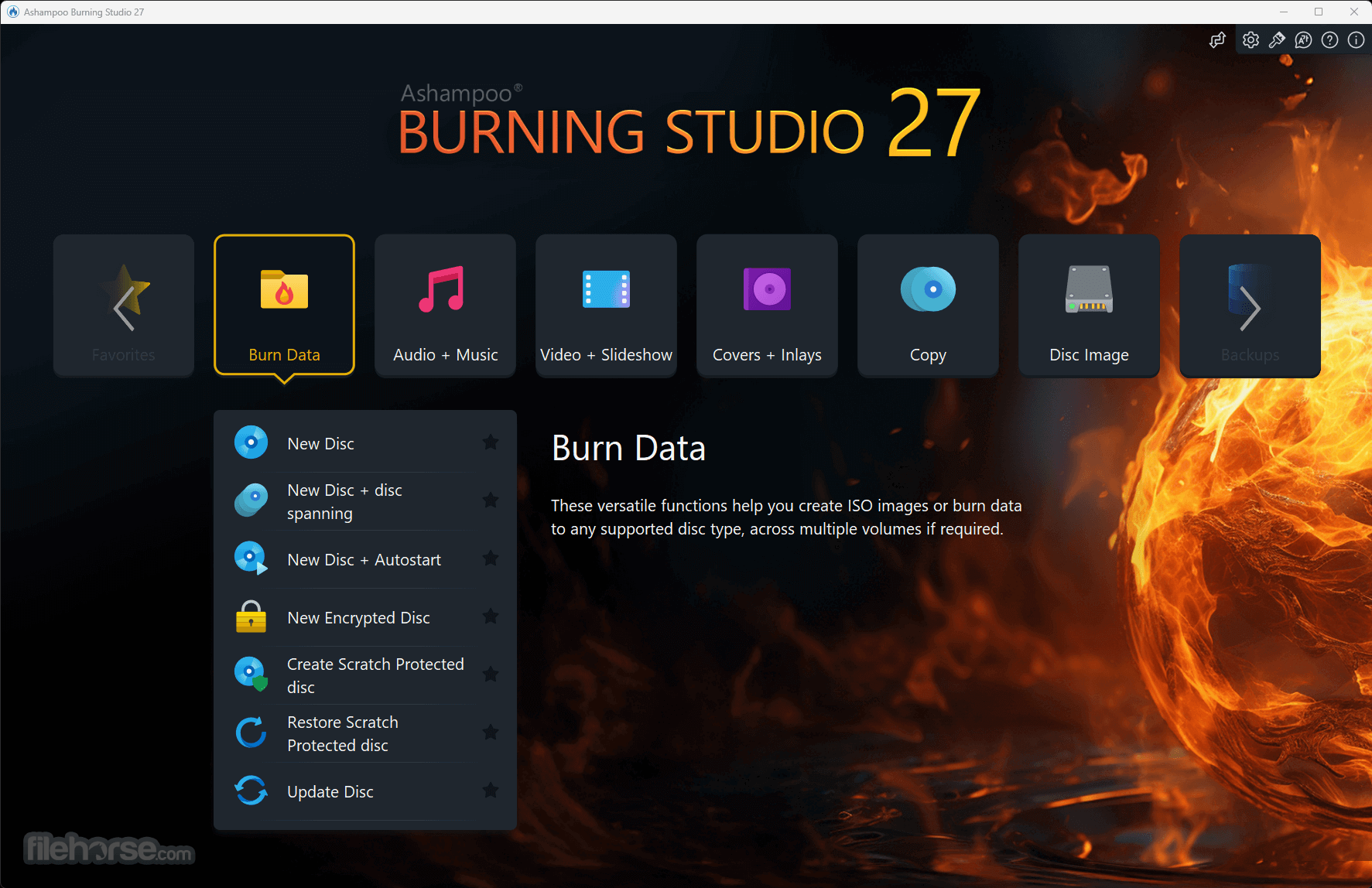
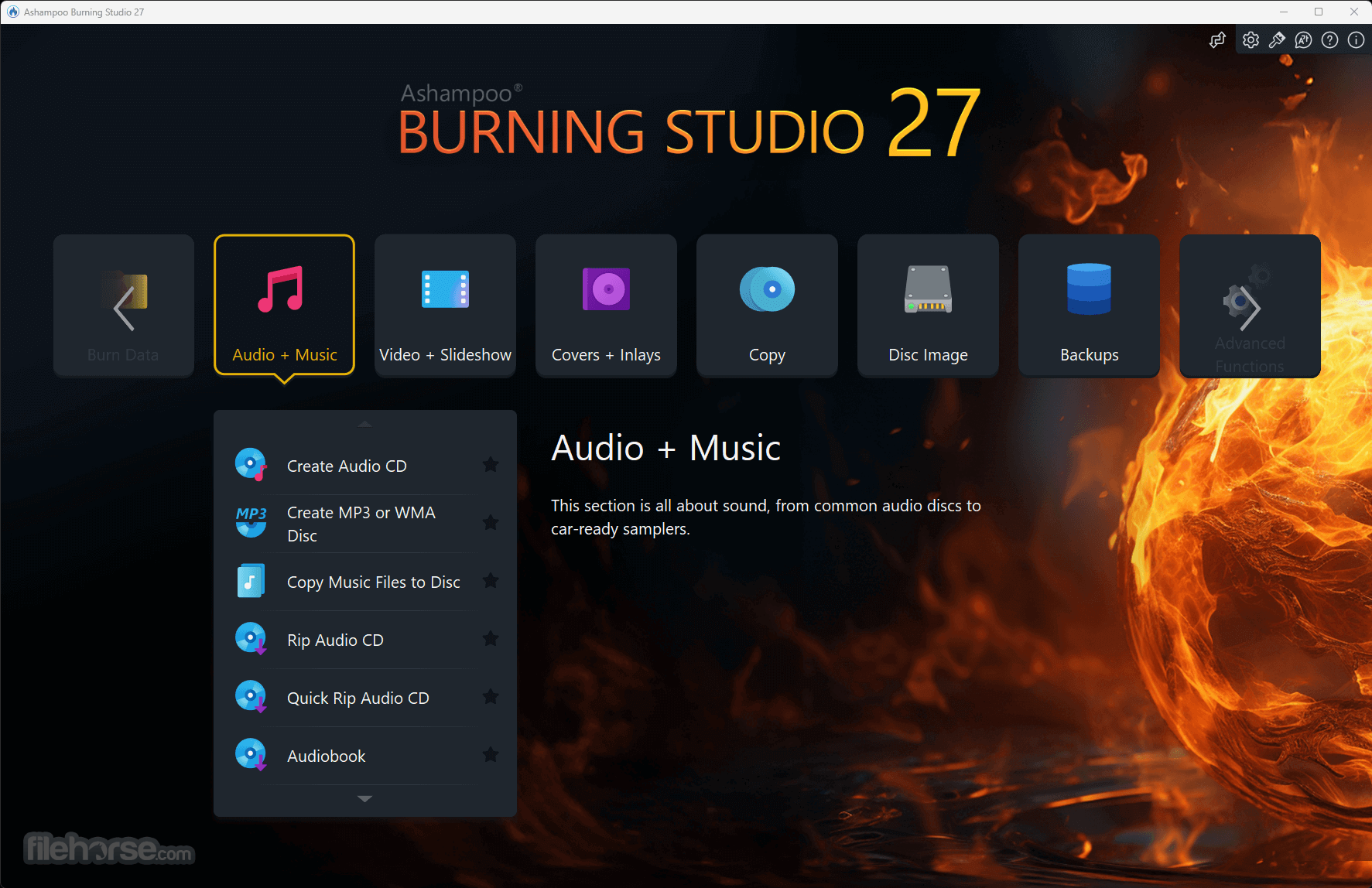
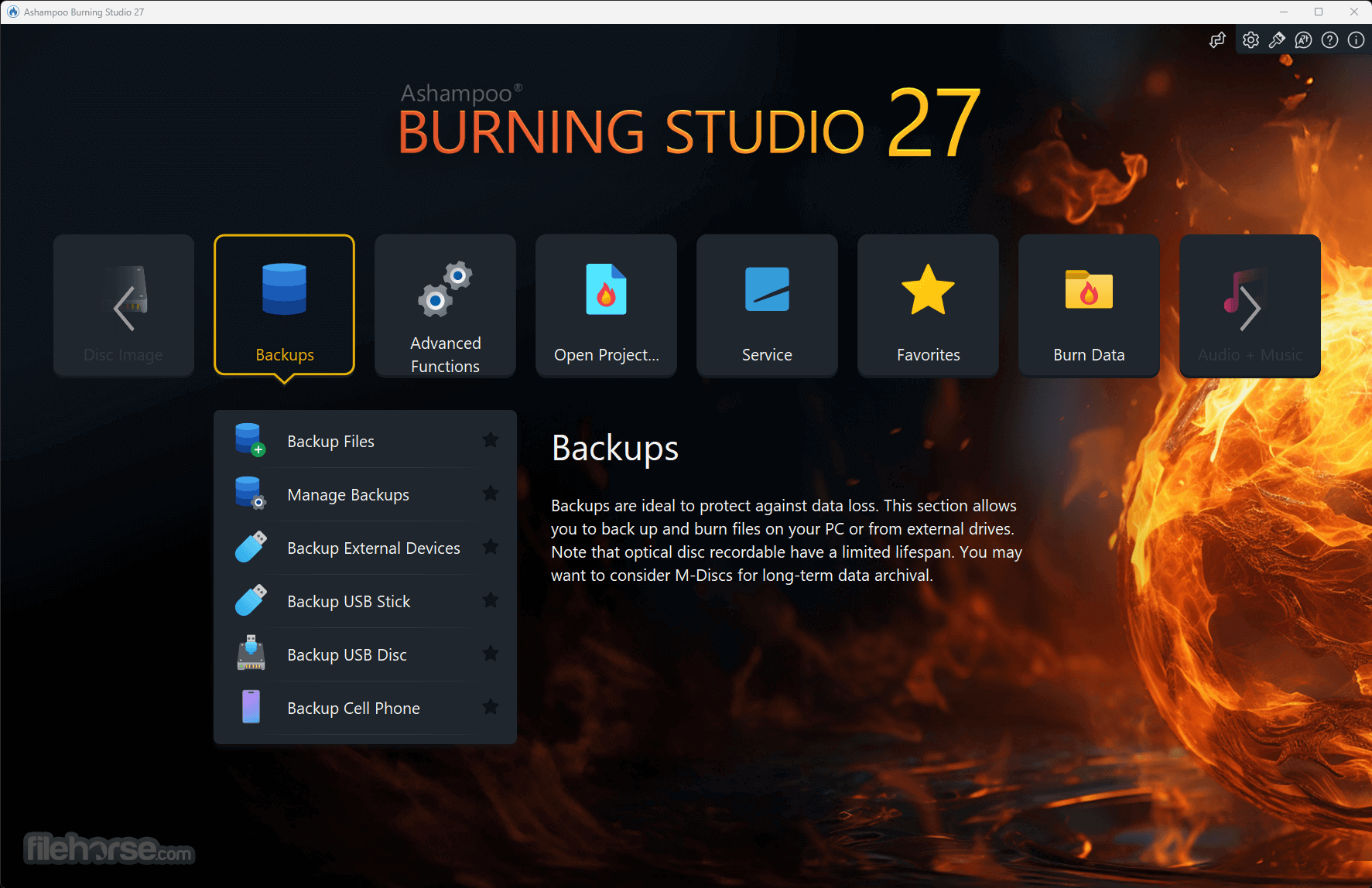
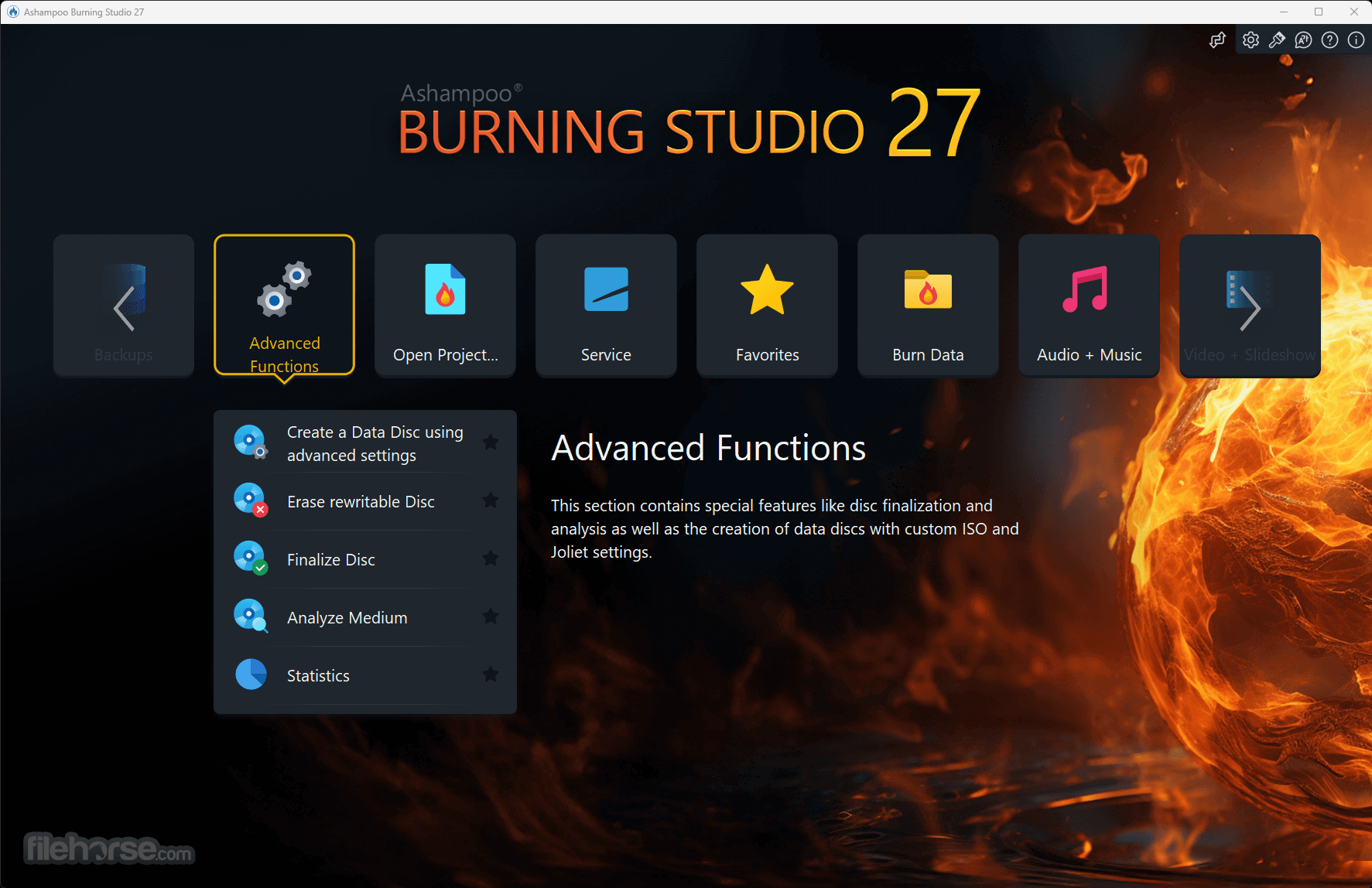
畫面截圖
- 2026-04-28 Ashampoo Burning Studio 27.0.2 332 MB
- 2021-06-10 Ashampoo Burning Studio 22.0.8 176 MB