⚠ 這是歷史版本頁面 — 查看 ASUS Live Update 最新版本 →

ASUS Live Update 3.4.4
v 3.4.4
Windows
免費軟體
7.8/10 (53)
- 目前版本3.4.4
- 更新日期2017-05-12
- 檔案大小9.13 MB
- 檔案名稱LiveUpdate_Win10_64_VER344.zip
- 作業系統Windows 10 (64-bit)
- 支援語系English
- 授權型式免費軟體
- 開發商 Asus
- 軟體分類Windows 軟體 / 驅動程式
##
編輯短評
ASUS Live Update 是華碩官方推出的驅動程式與系統管理工具,主要為華碩筆電與主機板用戶設計。它會自動連線至華碩官方資料庫,掃描目前系統中已安裝的驅動程式,並比對是否有更新版本可供下載,省去使用者自行上網尋找驅動的麻煩。這套工具最具辨識度的特色,就是與華碩硬體的高度整合,能精準對應自家裝置的驅動需求。軟體自多年前收錄以來持續維護,更新頻率不算頻繁但穩定,在同類工具中屬於華碩用戶的官方首選,使用者評價普遍不錯,雖非大眾熱門工具,但在華碩生態圈內有一定地位。
這套軟體最適合華碩筆電或主機板用戶,尤其是對驅動程式版本不熟悉、希望以自動化方式保持系統穩定的使用者。當你遇到硬體效能異常、周邊裝置無法正常運作,或單純想確認驅動是否過舊時,它就能派上用場。與 Intel、Realtek 等通用驅動工具相比,ASUS Live Update 的優勢在於官方直接對應華碩硬體,但缺點是僅支援華碩產品,且介面只有英文,對不習慣英文介面的使用者稍有門檻。軟體為免費授權,僅提供 Windows 平台版本,安裝前建議確認裝置是否在官方支援清單內。
##
翻譯排程處理中,以下暫以英文原文呈現
軟體介紹
ASUS Live Update is a system and driver management utility that aims to provide users who own ASUS systems (most notably laptop users) with a utility that will automatically scan official online ASUS database and perform a lookup for newer versions of drivers than those which are installed on your current version of Windows.
Because drivers are incredibly important software packages that define the way how your OS can interact with various hardware components, having the latest and most stable drivers installed represents one of the key ways of not only ensuring the fastest performance on your PC, but also the first step toward making your system stable, error-free and reliable.
Laptops and pre-made PCs almost always come with some sort of driver utility preinstalled on their OS, but the majority of users prefer to de-clutter their boot sequence and free up valuable resources for their primary applications.
Those systems are then left static, without the ability to automatically detect the arrival of new driver packages that introduce new functionality features (such as expanded feature set of audio processing chips) or stability fixes, which can potentially reduce their usefulness and reliability.
In the worst-case scenario, bad drivers can in some situations lead to serious OS instability, data loss on your storage drives, or in extreme situations extreme overheating of your CPU/GPU due to processing load or fan misconfiguration.
Features and Highlights
Since ASUS Live Update aims to provide high-quality service in an unobtrusive way, its installation package comes at below 5MB in size, which ensures that the app can be installed quickly, not take much space on your local storage, and also not require a lot of processing or memory resources once it is activated.
After installation is finished, it is highly recommended to run the app immediately and let it scan your PC once and contact online ASUS servers to see if new drivers are available.
The best possible usage scenario includes leaving the app running in the background constantly.
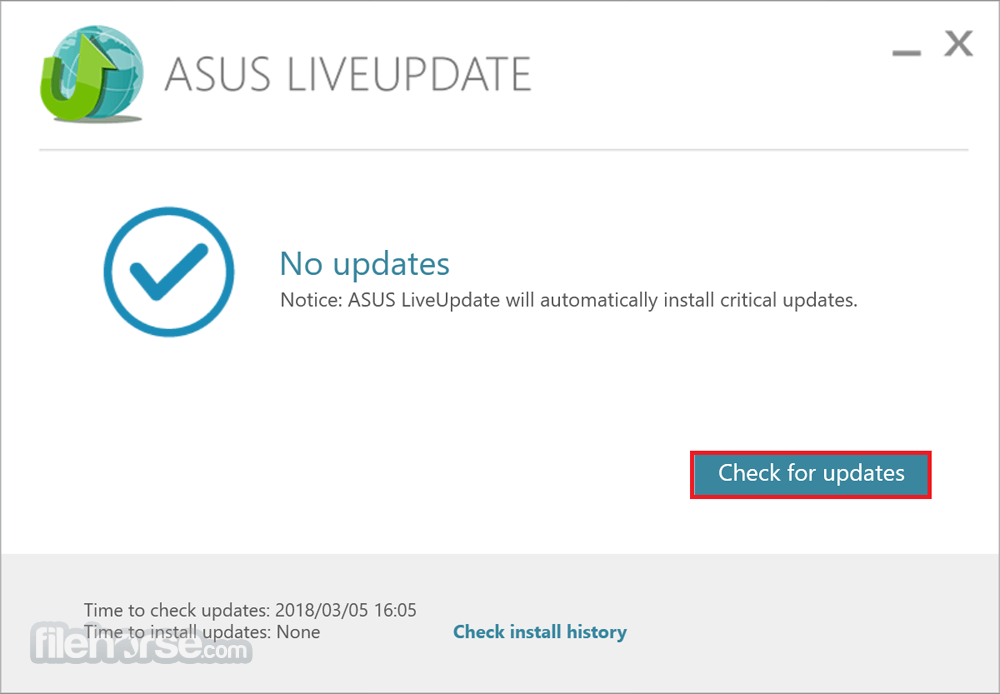
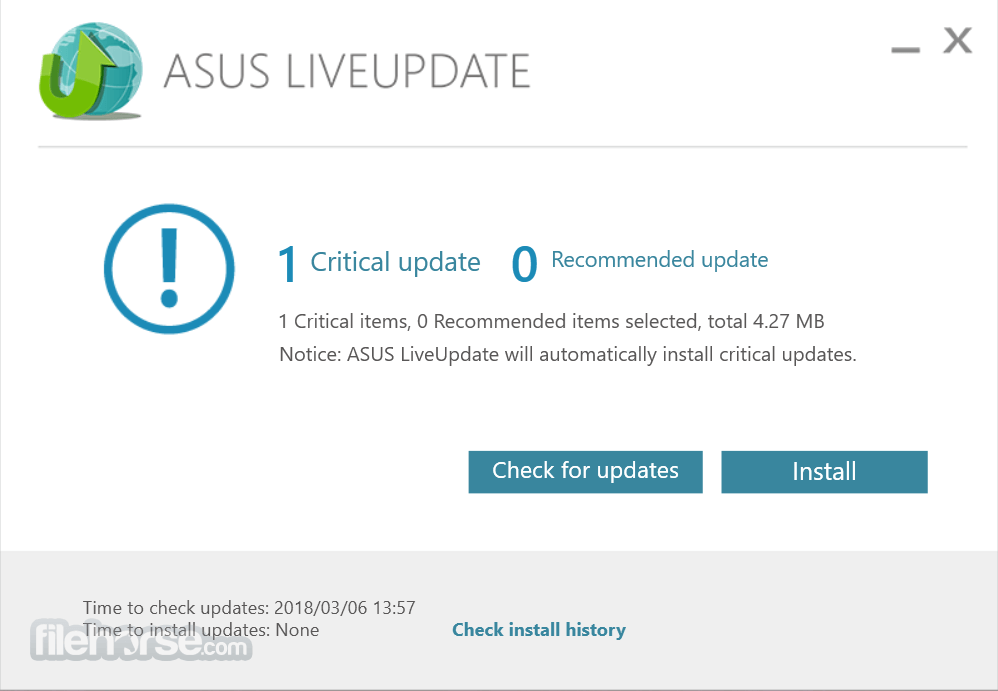
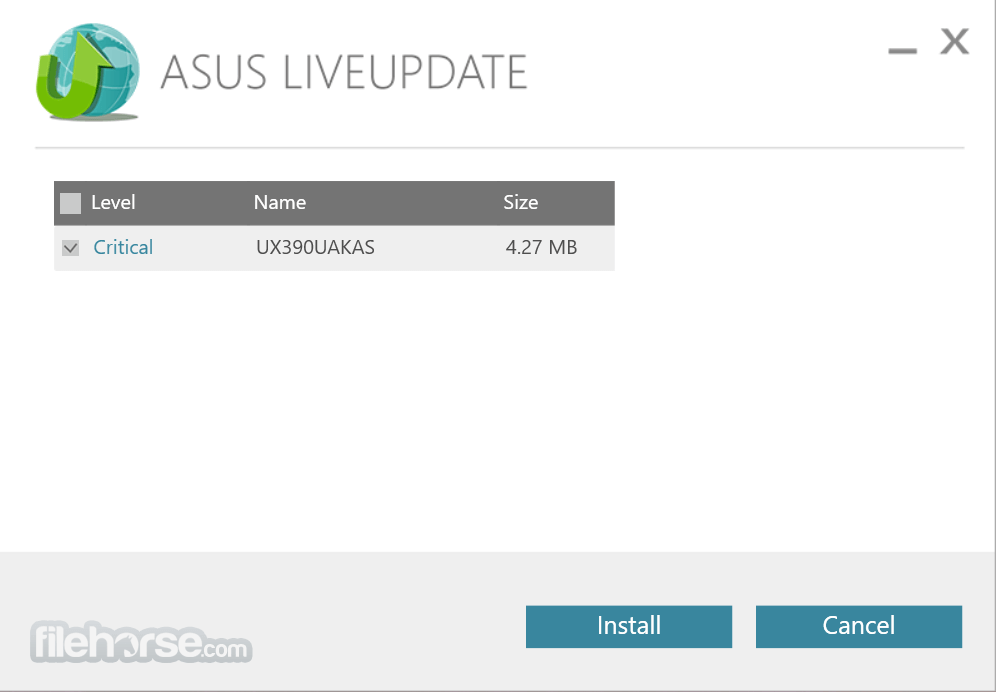
The user interface of ASUS Live Update is so simplistic that it even does not feature the main window. All that it needs are a small icon that will find its home in your taskbar near your system clock.
By clicking on it you can initiate instant update check or set up an automatic schedule that will scan for new drivers in defined periods (daily, every three days, weekly, every second week, monthly, or every three months).
How to download the latest version of ASUS Live Update?
Go to the ASUS Official Website and click Search. Take UX580GD as an example. Enter the model name in the Search bar and press the Enter key on the keyboard. Click [Driver &Tools]. Choose [Windows 11 or Windows 10 64-bit]. Find [ASUS Live Update] in [Utilities], click [Download] and install it after the download is complete. PROS
Download ASUS Live Update Latest Version Why is this app published on FileHorse? (More info)
Because drivers are incredibly important software packages that define the way how your OS can interact with various hardware components, having the latest and most stable drivers installed represents one of the key ways of not only ensuring the fastest performance on your PC, but also the first step toward making your system stable, error-free and reliable.
Laptops and pre-made PCs almost always come with some sort of driver utility preinstalled on their OS, but the majority of users prefer to de-clutter their boot sequence and free up valuable resources for their primary applications.
Those systems are then left static, without the ability to automatically detect the arrival of new driver packages that introduce new functionality features (such as expanded feature set of audio processing chips) or stability fixes, which can potentially reduce their usefulness and reliability.
In the worst-case scenario, bad drivers can in some situations lead to serious OS instability, data loss on your storage drives, or in extreme situations extreme overheating of your CPU/GPU due to processing load or fan misconfiguration.
Features and Highlights
- Unobtrusive driver updater for users of ASUS hardware.
- Lightweight and fast operation.
- Optimized for use on laptops.
- Set custom update intervals, ranging from daily to every third month.
- Available on Windows 7, 8, 10 and 11, both 32-bit and 64-bit.
- 100% FREE!
Since ASUS Live Update aims to provide high-quality service in an unobtrusive way, its installation package comes at below 5MB in size, which ensures that the app can be installed quickly, not take much space on your local storage, and also not require a lot of processing or memory resources once it is activated.
After installation is finished, it is highly recommended to run the app immediately and let it scan your PC once and contact online ASUS servers to see if new drivers are available.
The best possible usage scenario includes leaving the app running in the background constantly.
The user interface of ASUS Live Update is so simplistic that it even does not feature the main window. All that it needs are a small icon that will find its home in your taskbar near your system clock.
By clicking on it you can initiate instant update check or set up an automatic schedule that will scan for new drivers in defined periods (daily, every three days, weekly, every second week, monthly, or every three months).
How to download the latest version of ASUS Live Update?
- Automatic BIOS Updates
- User-Friendly Interface
- Quick Installation Process
- Real-time Notifications
- Support for Various Models
- Limited Customization Options
- Requires Internet Connection
- No Offline Update Support
Download ASUS Live Update Latest Version Why is this app published on FileHorse? (More info)
##
影片介紹
##
畫面截圖
- 2025-10-02 ASUS Live Update 3.6.8 11.25 MB
- 2018-07-08 ASUS Live Update 3.5.2 6.56 MB
- 2017-05-12 ASUS Live Update 3.4.4 9.13 MB
- 2009-08-07 ASUS Live Update 2.5.9 1.19 MB