⚠ 這是歷史版本頁面 — 查看 Audials One 最新版本 →

Audials One 2021.0.220.0
v 2021.0.220.0
Windows
試用版
6.2/10 (40)
- 目前版本2021.0.220.0
- 更新日期2021-08-10
- 檔案大小96.8 MB
- 檔案名稱AudialsOne-Setup.exe
- 作業系統Windows 7 / Windows 8 / Windows 10 / Windows 11
- 支援語系English
- 授權型式試用版
- 開發商 Audials AG
- 軟體分類Windows 軟體 / 音訊軟體
##
編輯短評
Audials One 是一套多媒體整合工具,主要解決想從各大串流平台錄製音樂、播客、電影與廣播節目的需求。它同時具備內容管理、格式轉換與播放功能,讓使用者能建立自己的多媒體資料庫。最有辨識度的特色是能與主流串流服務相容,並以合法方式繞過 DRM 保護,這點與多數同類軟體明顯不同。就維護與受歡迎程度而言,它仍持續更新,但評價中等、使用者樣本數不多,在同類工具中並非主流首選。
這套軟體適合訂閱多個串流服務、想離線保存喜愛內容的使用者,尤其是音樂收藏者。與 iTunes 或 Virtual DJ 等替代軟體相比,Audials One 的強項在於錄製與下載功能,而非播放介面或混音編輯,取捨上需留意。它僅提供 Windows 平台與英文介面,採用試用版授權,使用前需確認自己的串流服務訂閱狀態,以及對英文操作介面的熟悉度。
##
翻譯排程處理中,以下暫以英文原文呈現
軟體介紹
Audials One is a multimedia suite that enables users to record and download music, podcasts, movies, TV shows, and radio streams from various platforms.
It integrates tools for content management, conversion, and playback, making it a go-to choice for anyone wanting to build a personal multimedia library.
The Audials One for PC software’s compatibility with streaming services and its ability to bypass DRM restrictions (legally) set it apart from competitors.
Key Features
Music Recording: Record music from Spotify, Amazon Music, Deezer, and other streaming platforms with high quality and tags intact.
Video Streaming Recorder: Save movies, TV shows, and videos from platforms like Netflix, Amazon Prime Video, YouTube, and Hulu.
Radio and Podcasts: Access thousands of radio stations and a vast library of podcasts.
Media Conversion: Convert files into multiple formats for compatibility with different devices.
Content Organization: Built-in tools to manage, tag, and organize downloaded content.
Batch Download: Download entire playlists, albums, or series in one go.
Editing Tools: Trim, cut, and edit audio and video files within the software.
Cloud Integration: Seamless synchronization with cloud services like Google Drive and Dropbox.
A suitable AI for everything
Audials offers a wide range of AI models for video enhancement that are tailored to different needs:
Increasing Resolution
Castor – an AI model that enhances colors in videos. On monitors and televisions with HDR support, you will experience entertainment with unparalleled color brilliance.
User Interface
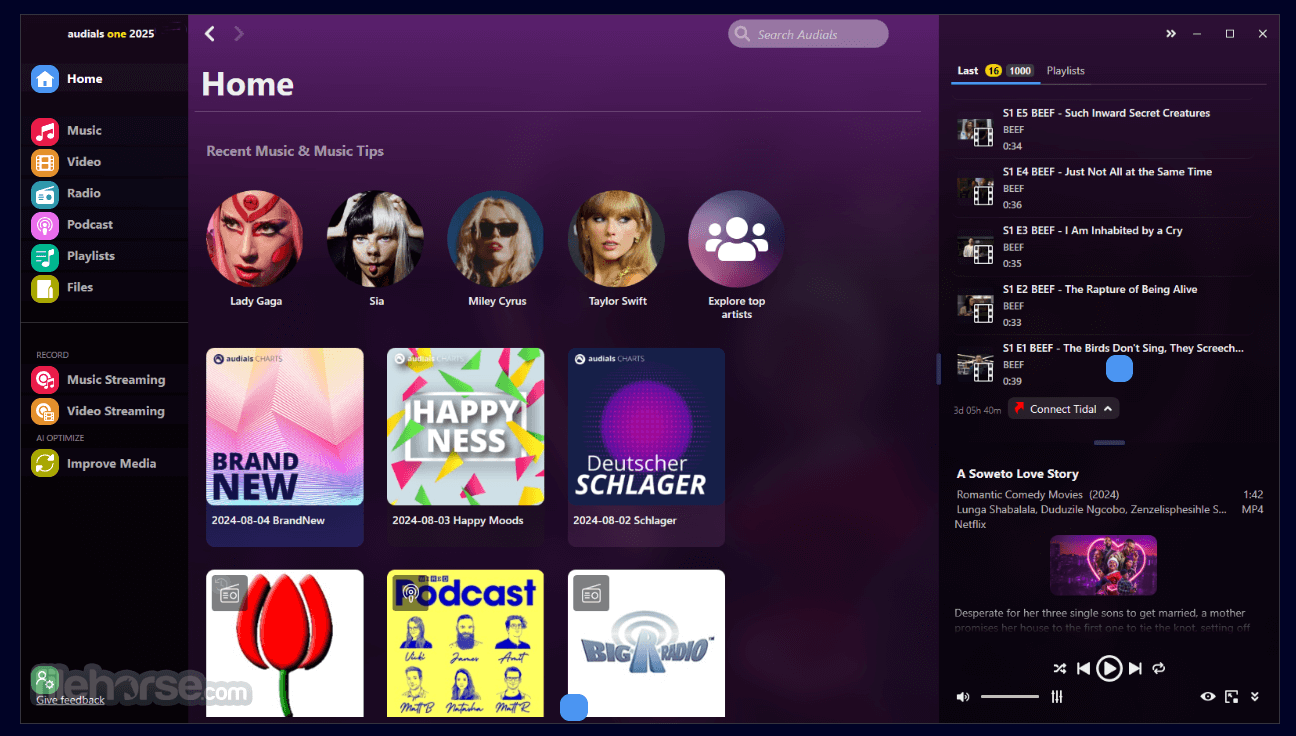
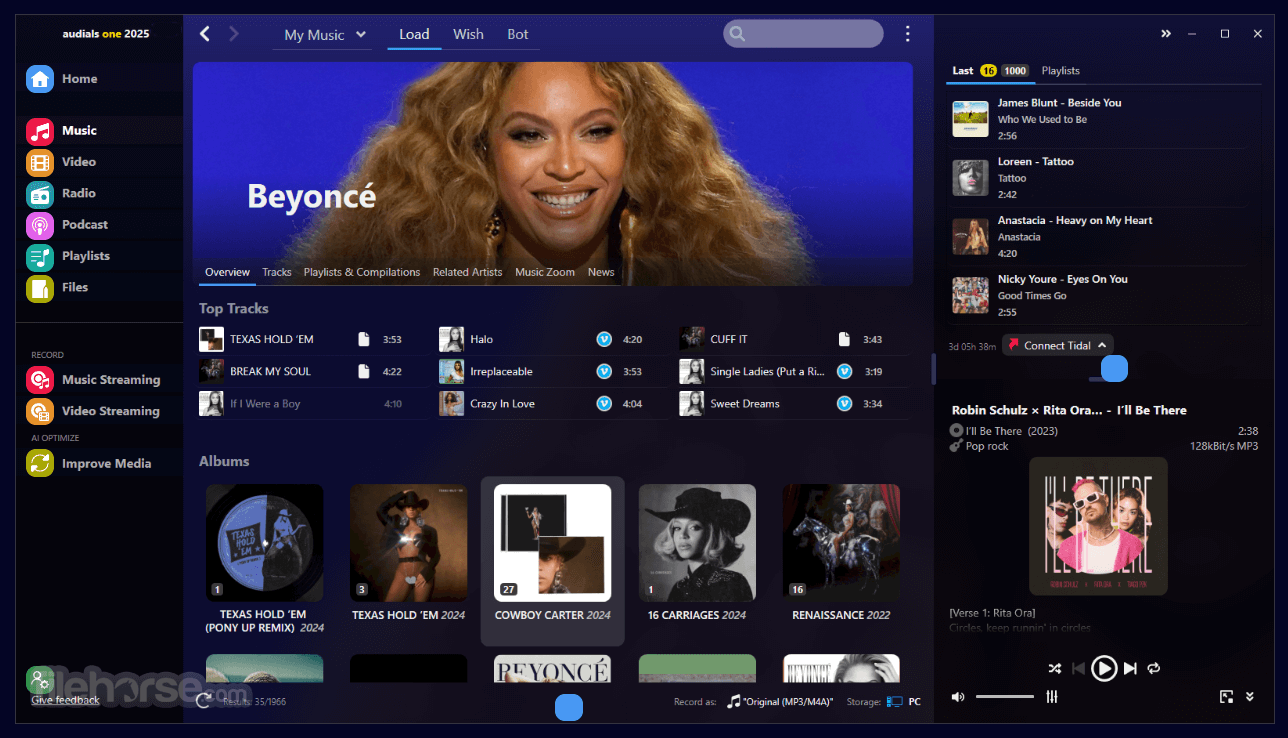
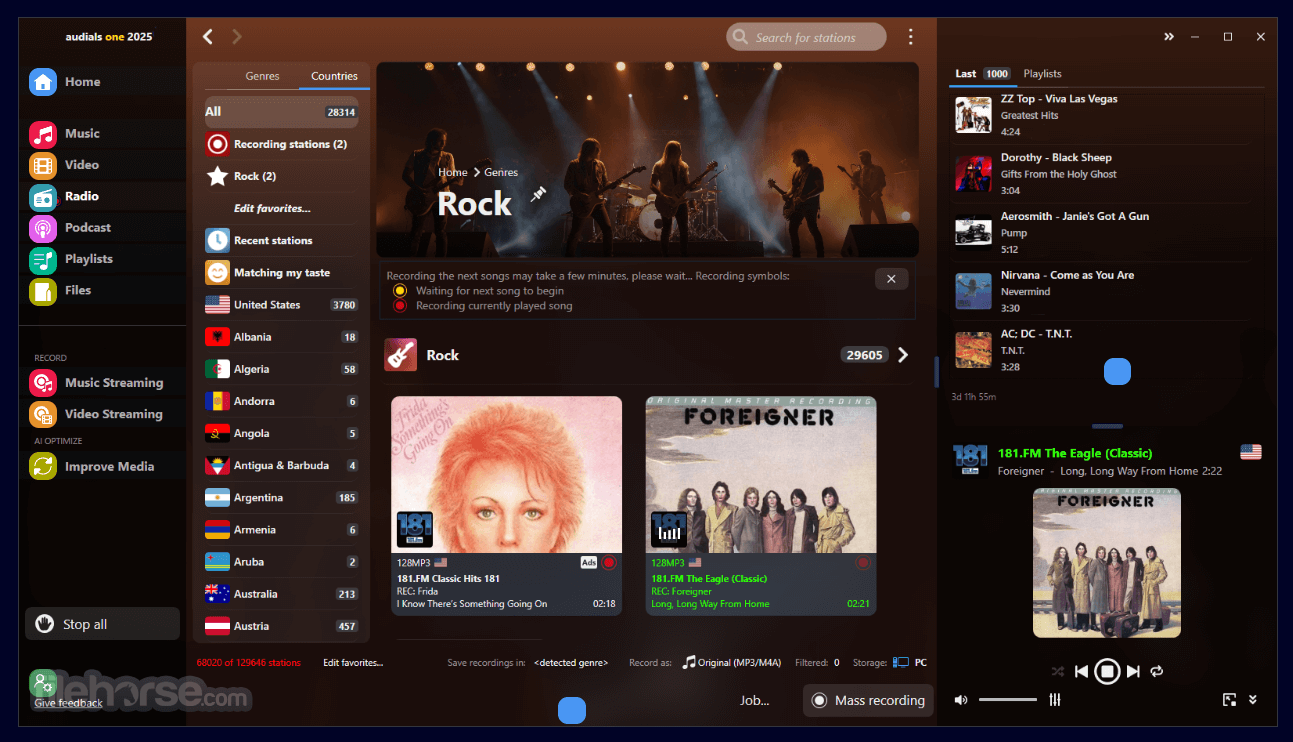
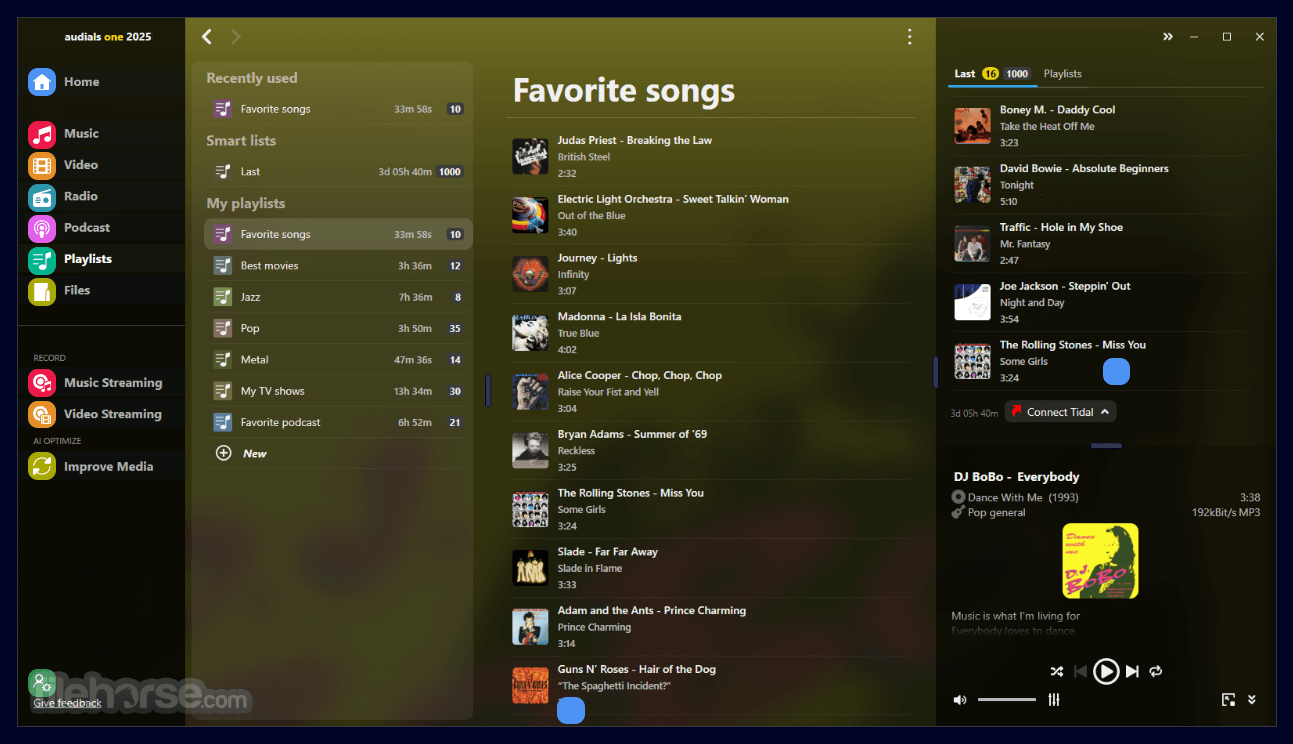
It features a clean, modern desktop interface with intuitive navigation.
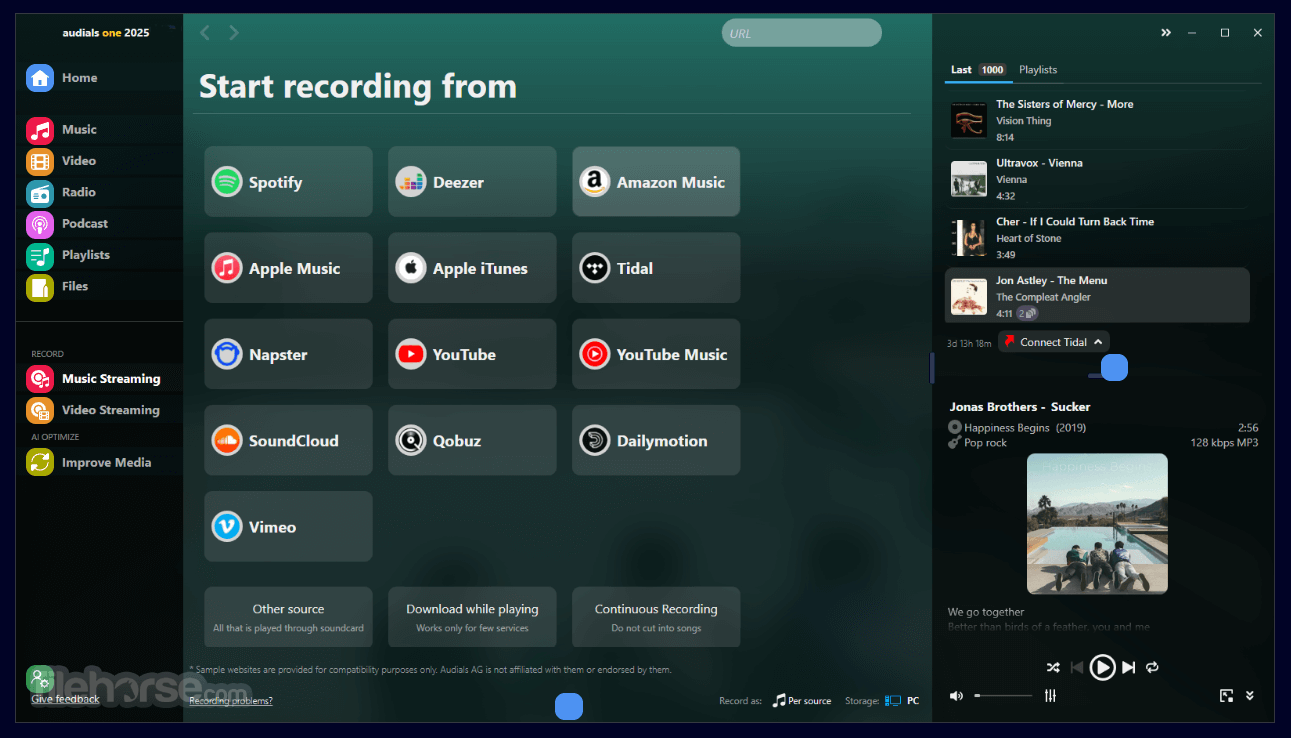
The dashboard organizes features into distinct categories such as Music, Video, Radio, and Podcasts.
Tooltips and guides are available to assist new users. The color-coded layout enhances usability, making it easy to locate and use various tools.
Installation and Setup
Download: Visit the official website or FileHorse.com and download the installation file.
Install: Follow the step-by-step instructions provided by the installer. Choose optional components during setup.
Activate: Enter the license key or use the trial version.
Configure: Set up preferences like output folders, quality settings, and language options.
The process takes about 10 minutes, and the software runs smoothly on modern PCs.
How to Use
Music Recording:
Select the streaming service you want to record from.
Play the song or playlist, and Audials will automatically capture and save it.
Files are tagged with album art, artist, and other metadata.
Video Recording:
Choose the video service (e.g., Netflix).
Play the content, and Audials will record it in real time.
Save recordings in formats like MP4, AVI, or MKV.
Radio and Podcasts:
Browse the library or search for specific stations or podcasts.
Click to stream live or download episodes for offline listening.
Conversion:
Drag and drop files into the conversion tool.
Select the desired format and quality settings.
Start the conversion and save the output.
Content Management:
Use the built-in organizer to sort files by genre, artist, or date.
Sync your library with cloud services or external devices.
FAQ
Can Audials One record in high definition?
Yes, it can record audio in up to 320 kbps and video in resolutions up to 4K, depending on the source.
Is it legal to use Audials One?
The app adheres to fair use principles and records content for personal use. However, users should ensure compliance with local copyright laws.
Does it support Mac?
Audials One is primarily a Windows application. Mac users can use virtualization software or alternatives like Audials Music Zoom.
Can I use it offline?
Yes, downloaded and converted content can be accessed offline. However, the software requires an internet connection for updates and online functionalities.
How much storage space does it require?
The installation requires about 1 GB of free disk space. Additional storage depends on the volume of downloaded content.
Alternatives
StreamFab: A versatile video downloader that allows users to save streaming content from various platforms for offline viewing.
XSplit Broadcaster: A powerful live streaming and video recording software tailored for content creators, gamers, and professionals.
ScreenPal: An intuitive screen recording and video editing tool for creating tutorials, presentations, and video content.
OBS Studio: A free and open-source software for video recording and live streaming with extensive customization options and support for plugins.
Streamlabs OBS: A version of OBS Studio that integrates with the Streamlabs platform.
Camtasia: A professional screen recording and video editing software designed for creating engaging instructional videos and tutorials.
Replay Media Catcher: A simpler alternative for capturing video and audio streams.
Allavsoft: Batch Download Video, Music and Subtitles from 1000+ websites.
Streaming Audio Recorder: A program for recording audio from various online and offline sources, with additional features like editing and format conversion.
Pricing
Subscription: $39.90 per year, including updates.
Lifetime License: $79.90 for perpetual use (updates require additional payment).
Frequent promotions and discounts are available on the official website.
System Requirements
Audials One is a feature-rich multimedia tool that caters to a wide range of user needs. Whether you’re a music aficionado, a podcast enthusiast, or a movie collector, this software provides a seamless way to capture, manage, and enjoy content.
While it’s primarily geared towards Windows users, its versatility and robust feature set make it worth the investment for anyone looking to build their multimedia library. Despite minor drawbacks like its real-time recording limitation, it remains one of the most comprehensive tools on the market.
Note: Limited functionality in the demo version.
Download Audials One Latest Version Why is this app published on FileHorse? (More info)
It integrates tools for content management, conversion, and playback, making it a go-to choice for anyone wanting to build a personal multimedia library.
The Audials One for PC software’s compatibility with streaming services and its ability to bypass DRM restrictions (legally) set it apart from competitors.
Key Features
Music Recording: Record music from Spotify, Amazon Music, Deezer, and other streaming platforms with high quality and tags intact.
Video Streaming Recorder: Save movies, TV shows, and videos from platforms like Netflix, Amazon Prime Video, YouTube, and Hulu.
Radio and Podcasts: Access thousands of radio stations and a vast library of podcasts.
Media Conversion: Convert files into multiple formats for compatibility with different devices.
Content Organization: Built-in tools to manage, tag, and organize downloaded content.
Batch Download: Download entire playlists, albums, or series in one go.
Editing Tools: Trim, cut, and edit audio and video files within the software.
Cloud Integration: Seamless synchronization with cloud services like Google Drive and Dropbox.
A suitable AI for everything
Audials offers a wide range of AI models for video enhancement that are tailored to different needs:
Increasing Resolution
- Vega Fast – a classic video enhancer that delivers results in the shortest possible time.
- Vega HQ – a more powerful version of Vega Fast that delivers even better results with twice the computing time.
- Polaris – a very powerful AI that specializes in noise reduction and upscaling in particular.
- Sirius – the most powerful AI model from Audials! It produces very natural-looking images with impressive sharpness, but also takes the longest to calculate.
- Antares – a strong and fast model that shines especially for comics and anime, but can also significantly improve feature films.
- Rigel – This model has been massively trained with comics and anime, so it can enhance them brilliantly. If you give it feature films, it tends to create a comic version of them.
- Deneb – one of our fastest! It tries to stay close to the original. Similar to Sirius, but not quite as strong. But many times faster.
- Pollux – This model not only tries to improve the video, but also to make the world more beautiful. Faces are freed from impurities, surfaces are smoothed, dirt is removed. Everything becomes more beautiful and radiant (even if not always quite as realistic).
- Lynx – performs well when adding frames – but limited to 2x.
- Cepheus – faster and more powerful.
- Arcturus – the most powerful frame interpolator from Audials. Takes the longest to calculate, but it’s worth it!
Castor – an AI model that enhances colors in videos. On monitors and televisions with HDR support, you will experience entertainment with unparalleled color brilliance.
User Interface
It features a clean, modern desktop interface with intuitive navigation.
The dashboard organizes features into distinct categories such as Music, Video, Radio, and Podcasts.
Tooltips and guides are available to assist new users. The color-coded layout enhances usability, making it easy to locate and use various tools.
Installation and Setup
Download: Visit the official website or FileHorse.com and download the installation file.
Install: Follow the step-by-step instructions provided by the installer. Choose optional components during setup.
Activate: Enter the license key or use the trial version.
Configure: Set up preferences like output folders, quality settings, and language options.
The process takes about 10 minutes, and the software runs smoothly on modern PCs.
How to Use
Music Recording:
Select the streaming service you want to record from.
Play the song or playlist, and Audials will automatically capture and save it.
Files are tagged with album art, artist, and other metadata.
Video Recording:
Choose the video service (e.g., Netflix).
Play the content, and Audials will record it in real time.
Save recordings in formats like MP4, AVI, or MKV.
Radio and Podcasts:
Browse the library or search for specific stations or podcasts.
Click to stream live or download episodes for offline listening.
Conversion:
Drag and drop files into the conversion tool.
Select the desired format and quality settings.
Start the conversion and save the output.
Content Management:
Use the built-in organizer to sort files by genre, artist, or date.
Sync your library with cloud services or external devices.
FAQ
Can Audials One record in high definition?
Yes, it can record audio in up to 320 kbps and video in resolutions up to 4K, depending on the source.
Is it legal to use Audials One?
The app adheres to fair use principles and records content for personal use. However, users should ensure compliance with local copyright laws.
Does it support Mac?
Audials One is primarily a Windows application. Mac users can use virtualization software or alternatives like Audials Music Zoom.
Can I use it offline?
Yes, downloaded and converted content can be accessed offline. However, the software requires an internet connection for updates and online functionalities.
How much storage space does it require?
The installation requires about 1 GB of free disk space. Additional storage depends on the volume of downloaded content.
Alternatives
StreamFab: A versatile video downloader that allows users to save streaming content from various platforms for offline viewing.
XSplit Broadcaster: A powerful live streaming and video recording software tailored for content creators, gamers, and professionals.
ScreenPal: An intuitive screen recording and video editing tool for creating tutorials, presentations, and video content.
OBS Studio: A free and open-source software for video recording and live streaming with extensive customization options and support for plugins.
Streamlabs OBS: A version of OBS Studio that integrates with the Streamlabs platform.
Camtasia: A professional screen recording and video editing software designed for creating engaging instructional videos and tutorials.
Replay Media Catcher: A simpler alternative for capturing video and audio streams.
Allavsoft: Batch Download Video, Music and Subtitles from 1000+ websites.
Streaming Audio Recorder: A program for recording audio from various online and offline sources, with additional features like editing and format conversion.
Pricing
Subscription: $39.90 per year, including updates.
Lifetime License: $79.90 for perpetual use (updates require additional payment).
Frequent promotions and discounts are available on the official website.
System Requirements
- Operating System: Windows 10/11/8/7 (64-bit recommended).
- Processor: Dual-core CPU or better.
- Memory: 2 GB RAM minimum (4 GB recommended).
- Storage: 1 GB for installation, additional space for downloads.
- Internet: Required for streaming and updates.
- Comprehensive multimedia tools.
- High-quality recording and conversion.
- User-friendly interface.
- Broad compatibility with streaming platforms.
- Cloud integration and batch processing.
- Limited to Windows.
- Real-time recording can be time-consuming.
- Advanced features may have a learning curve for beginners.
Audials One is a feature-rich multimedia tool that caters to a wide range of user needs. Whether you’re a music aficionado, a podcast enthusiast, or a movie collector, this software provides a seamless way to capture, manage, and enjoy content.
While it’s primarily geared towards Windows users, its versatility and robust feature set make it worth the investment for anyone looking to build their multimedia library. Despite minor drawbacks like its real-time recording limitation, it remains one of the most comprehensive tools on the market.
Note: Limited functionality in the demo version.
Download Audials One Latest Version Why is this app published on FileHorse? (More info)
##
畫面截圖
- 2026-06-16 Audials One 2026.1.23.0 252 MB
- 2025-07-30 Audials One 2025.3.1.0 209 MB
- 2024-08-06 Audials One 2024.1.64.0 201 MB
- 2023-05-25 Audials One 2023.0.229.0 103 MB
- 2022-08-29 Audials One 2022.0.243.0 113 MB
- 2021-08-10 Audials One 2021.0.220.0 96.8 MB
- 2020-08-18 Audials One 2020.2.52.0 156 MB
- 2019-08-19 Audials One 2019.0.12000.0 142 MB