⚠ 這是歷史版本頁面 — 查看 BlueSoleil 最新版本 →

BlueSoleil 10.0.492.1
v 10.0.492.1
Windows
試用版
7.2/10 (229)
- 目前版本10.0.492.1
- 更新日期2015-07-31
- 檔案大小140.68 MB
- 檔案名稱IVT_BlueSoleil_10.0.496.1.zip
- 作業系統Windows XP / Vista / Windows 7 / Windows 8
- 支援語系English
- 授權型式試用版
- 開發商 IVT Corporation
- 軟體分類Windows 軟體 / 驅動程式
##
編輯短評
BlueSoleil 是一套老牌的 Windows 藍牙管理工具,主要負責讓電腦與手機、耳機、喇叭、滑鼠、鍵盤等藍牙裝置快速配對與傳輸檔案。它的辨識度在於介面直覺,過去在藍牙驅動尚未內建的年代是許多人的首選,目前仍支援藍牙 4.0 並相容於 Windows 8/8.1/10。不過這套軟體已不再積極開發,官方沒有推出重大更新,屬於「穩定但停滯」的狀態;在驅動程式分類中,它的評價人數不少,整體評價算是中等偏上,但並非主流首選。
這套軟體適合還在用舊版 Windows、且系統內建藍牙功能不完整的使用者,尤其是需要頻繁傳檔或連接多種藍牙周邊的場合。相較於 Windows 內建的藍牙支援或 DirectX、Realtek 等驅動,BlueSoleil 提供更集中的管理介面,但因為停止更新,遇到新硬體或藍牙 5.0 以上裝置可能會有相容性問題。它提供的是試用版,僅支援英文介面,使用前需留意授權限制;若你只是偶爾連一次耳機,內建功能或許更省事,但若需要進階的裝置管理,這套仍可一試。
##
翻譯排程處理中,以下暫以英文原文呈現
軟體介紹
BlueSoleil is a professional Windows-based Bluetooth application, supporting Bluetooth 4.0 and being Windows 8/8.1/10 compatible, having an optimized performance based on previous the tool versions.
The tool is a Bluetooth management and file transfer utility designed for Windows-based computers. It is known for its ability to seamlessly connect and manage Bluetooth devices, such as smartphones, headsets, speakers, mice, keyboards, and more.
Note: BlueSoleil is no longer under active development and does not receive major updates.
This software streamlines the process of pairing and sharing data between your PC and Bluetooth-enabled devices.
BlueSoleil for Windows 11/10 is one of the most popular professional Windows-based Bluetooth applications, developed by IVT with great innovation and independence.
The program is able to fulfill the demands of integrating a diverse array of Bluetooth-enabled digital devices, such as mobile phones, headsets, printers, keyboards, and so on. You can also establish networks and exchange data with other Bluetooth-enabled computers.
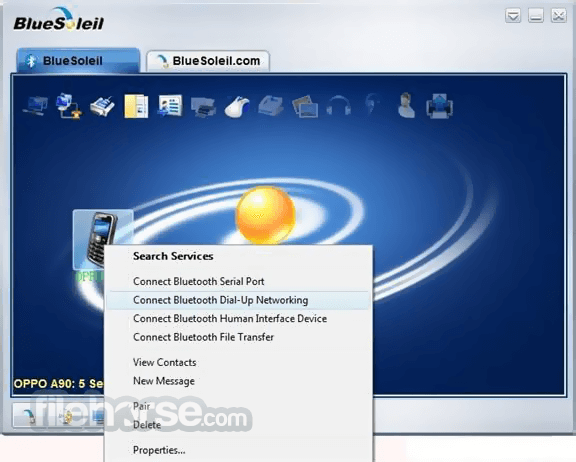
Aren’t you tired of tangling wires? Itpresents a new wireless Bluetooth experience. You can view and manage your contacts on your mobile phone from the computer and backup your contacts wirelessly via the tool.
You can easily type long messages directly from the app's message dialogue. You can transfer files, photos, music, videos, and any other data wirelessly.
Meanwhile, you are able to connect with other people via Blue Soleil. It is a worthwhile and user-friendly tool that you can share with your family and friends.
Highlights
User-Friendly Interface: It boasts an intuitive user interface that makes it easy for users of all levels to navigate and utilize its features.
Device Management: Easily connect and manage various Bluetooth devices, including audio devices, smartphones, and peripherals.
File Transfer: Share files between your PC and Bluetooth devices with a simple drag-and-drop interface.
Wireless Audio: Enjoy high-quality wireless audio streaming between your PC and Bluetooth headphones or speakers.
Contact Synchronization: Sync your smartphone's contacts with your PC effortlessly.
Message Management: View and send SMS messages directly from your computer.
Bluetooth Dongle Support: It supports a wide range of Bluetooth dongles, ensuring compatibility with various hardware configurations.
Installation and Setup
Is BlueSoleil compatible with my Windows version?
The program is compatible with Windows XP, Vista, 7, 8, 10, or 11, both 32-bit and 64-bit editions.
Can I transfer files between my PC and smartphone using BlueSoleil?
Yes, it allows you to transfer files between your PC and Bluetooth-enabled smartphone effortlessly.
Does BlueSoleil support multiple Bluetooth devices simultaneously?
Yes, it can handle multiple connected Bluetooth devices simultaneously.
Can I use BlueSoleil with third-party Bluetooth dongles?
Yes, it supports various Bluetooth dongles, but using a compatible IVT Corporation dongle is recommended for the best experience.
Does BlueSoleil work with Bluetooth 5.0 devices?
Yes, the utility is compatible with Bluetooth 5.0 devices, offering improved speed and range.
Alternatives
Bluetooth Driver Installer - A free alternative that helps fix Bluetooth driver-related issues on your PC.
WIDCOMM Bluetooth Software - A Bluetooth management software that comes pre-installed on some PCs with built-in Bluetooth adapters.
Pricing
It offers various pricing plans, including a FREE TRIAL version with limited features. The full version comes in different editions, with pricing starting from $27.99.
System Requirements
BlueSoleil is a robust Bluetooth management software that simplifies the process of connecting and sharing files between your PC and Bluetooth-enabled devices. With its user-friendly interface and a wide range of features, it's a valuable tool for users seeking efficient Bluetooth connectivity.
While the free trial version offers a taste of its capabilities, the full version, though somewhat expensive, unlocks its true potential. If you rely on Bluetooth connectivity regularly, BlueSoleil is a worthy investment to enhance your experience and streamline your workflow.
Note: 30-day trial version.
Download BlueSoleil Latest Version Why is this app published on FileHorse? (More info)
The tool is a Bluetooth management and file transfer utility designed for Windows-based computers. It is known for its ability to seamlessly connect and manage Bluetooth devices, such as smartphones, headsets, speakers, mice, keyboards, and more.
Note: BlueSoleil is no longer under active development and does not receive major updates.
This software streamlines the process of pairing and sharing data between your PC and Bluetooth-enabled devices.
BlueSoleil for Windows 11/10 is one of the most popular professional Windows-based Bluetooth applications, developed by IVT with great innovation and independence.
The program is able to fulfill the demands of integrating a diverse array of Bluetooth-enabled digital devices, such as mobile phones, headsets, printers, keyboards, and so on. You can also establish networks and exchange data with other Bluetooth-enabled computers.
Aren’t you tired of tangling wires? Itpresents a new wireless Bluetooth experience. You can view and manage your contacts on your mobile phone from the computer and backup your contacts wirelessly via the tool.
You can easily type long messages directly from the app's message dialogue. You can transfer files, photos, music, videos, and any other data wirelessly.
Meanwhile, you are able to connect with other people via Blue Soleil. It is a worthwhile and user-friendly tool that you can share with your family and friends.
Highlights
- Support VoIP;
- Transfer files from/to mobile phones;
- Call your contacts though Skype with Bluetooth headset.
- Wireless access Internet anywhere, anytime, even while moving.
- Listen to music stored in the PC using a Bluetooth wireless headset anywhere in the range.
- Push pictures from a Bluetooth Digital Camera to the PC without any cable connection.
- Print a file using a Bluetooth printer even in another room without any cable connection.
- Use a Bluetooth wireless keyboard and mouse to control the PC.
- Exchange or synchronize personal information, name cards, etc with other laptops, PDAs, or mobile phones;
- Support Windows multi-user.
- Being Windows 8/8.1, Windows 10/11 compatible
- Supports Bluetooth 4.0 and 5.0 (profiles such as Find Me, Proximity, Health Thermometer, Heart Rate, HID OVER GATT)
- Supporting dual-mode dongles
- Having enhanced sound quality of A2DP and SCO
- Having improved the performance of Multi-Profiles
- Supports most Symbian S40/S60, Windows Mobile, MTK mobile phones, and mobile phones that provide PBAP service.
- Backup/recover contacts in your Bluetooth-enabled mobile phone to/from a computer
- View contacts in your Bluetooth-enabled mobile phone on a computer
- Edit/delete/upload contacts
- PBAP Profile supported
- Send messages to multiple people from your computer
- View/backup/delete messages in your Bluetooth-enabled mobile phones
User-Friendly Interface: It boasts an intuitive user interface that makes it easy for users of all levels to navigate and utilize its features.
Device Management: Easily connect and manage various Bluetooth devices, including audio devices, smartphones, and peripherals.
File Transfer: Share files between your PC and Bluetooth devices with a simple drag-and-drop interface.
Wireless Audio: Enjoy high-quality wireless audio streaming between your PC and Bluetooth headphones or speakers.
Contact Synchronization: Sync your smartphone's contacts with your PC effortlessly.
Message Management: View and send SMS messages directly from your computer.
Bluetooth Dongle Support: It supports a wide range of Bluetooth dongles, ensuring compatibility with various hardware configurations.
Installation and Setup
- Download the software from the official website or FileHorse.
- Run the installation executable file and follow the on-screen instructions.
- Once installed, launch the software.
- Open the tool.
- Turn on your Bluetooth device and ensure it's in pairing mode.
- Click the "Search for devices" button within the program.
- Select the desired device from the list of discovered devices.
- Click "Pair" to establish a connection.
Is BlueSoleil compatible with my Windows version?
The program is compatible with Windows XP, Vista, 7, 8, 10, or 11, both 32-bit and 64-bit editions.
Can I transfer files between my PC and smartphone using BlueSoleil?
Yes, it allows you to transfer files between your PC and Bluetooth-enabled smartphone effortlessly.
Does BlueSoleil support multiple Bluetooth devices simultaneously?
Yes, it can handle multiple connected Bluetooth devices simultaneously.
Can I use BlueSoleil with third-party Bluetooth dongles?
Yes, it supports various Bluetooth dongles, but using a compatible IVT Corporation dongle is recommended for the best experience.
Does BlueSoleil work with Bluetooth 5.0 devices?
Yes, the utility is compatible with Bluetooth 5.0 devices, offering improved speed and range.
Alternatives
Bluetooth Driver Installer - A free alternative that helps fix Bluetooth driver-related issues on your PC.
WIDCOMM Bluetooth Software - A Bluetooth management software that comes pre-installed on some PCs with built-in Bluetooth adapters.
Pricing
It offers various pricing plans, including a FREE TRIAL version with limited features. The full version comes in different editions, with pricing starting from $27.99.
System Requirements
- Operating System: Windows XP, Vista, 7, 8, 10, or 11 (32-bit or 64-bit)
- CPU: 600MHz or higher
- RAM: 128MB or more
- Bluetooth dongle (recommended for the best experience)
- Intuitive and user-friendly interface.
- Efficient device management and file transfer.
- Support for various Bluetooth devices and dongles.
- Seamless synchronization with smartphones.
- Reliable and stable Bluetooth connectivity.
- It's been a long time since there was an update on the official website.
- Limited functionality in the FREE trial version.
- Paid versions might be considered pricey for some users.
BlueSoleil is a robust Bluetooth management software that simplifies the process of connecting and sharing files between your PC and Bluetooth-enabled devices. With its user-friendly interface and a wide range of features, it's a valuable tool for users seeking efficient Bluetooth connectivity.
While the free trial version offers a taste of its capabilities, the full version, though somewhat expensive, unlocks its true potential. If you rely on Bluetooth connectivity regularly, BlueSoleil is a worthy investment to enhance your experience and streamline your workflow.
Note: 30-day trial version.
Download BlueSoleil Latest Version Why is this app published on FileHorse? (More info)
##
畫面截圖
- 2026-02-13 BlueSoleil 10.0.498.0 140.58 MB
- 2018-02-21 BlueSoleil 10.0.497.0 140.49 MB
- 2015-07-31 BlueSoleil 10.0.492.1 140.68 MB