⚠ 這是歷史版本頁面 — 查看 Cemu - Wii U Emulator 最新版本 →

Cemu - Wii U Emulator 2.4
v 2.4
Windows
免費軟體
7.54/10 (62)
- 目前版本2.4
- 更新日期2024-11-29
- 檔案大小25 MB
- 檔案名稱cemu-2.4-windows-x64.zip
- 作業系統Windows 7 64 / Windows 8 64 / Windows 10 64 / Windows 11
- 支援語系English
- 授權型式免費軟體
- 開發商 Cemu Team
- 軟體分類Windows 軟體 / 遊戲
##
編輯短評
Cemu 是一款專注於在 Windows 上執行 Wii U 遊戲的模擬器,從 2015 年推出至今持續演進,已成為同類工具中的主流首選。它解決了 Wii U 主機已停產、玩家難以回味獨佔遊戲的痛點,最鮮明的特色是能將原本 720p 的畫面提升到高解析度輸出,並支援紋理強化、反鋸齒等畫質增強,同時透過多執行緒最佳化讓遊戲跑得更順暢,也保留了 mod 修改的彈性。開發團隊長期維護,更新雖不頻繁但穩定,整體評價普遍不錯。
這套軟體適合想在高畫質下重溫《薩爾達傳說:曠野之息》等 Wii U 獨佔作品的玩家,或是不想為了少數遊戲添購主機的 PC 使用者。與同分類的 Android 模擬器(如 SmartGaGa、BlueStacks)相比,Cemu 是唯一專注 Wii U 平台的選擇,沒有直接替代品,取捨在於它僅支援 Windows 且介面為英文,對不熟悉模擬器設定的新手稍有門檻。軟體本身免費,但使用前需留意自備遊戲檔案的合法性,以及電腦硬體是否足以應付高解析度渲染的需求。
##
翻譯排程處理中,以下暫以英文原文呈現
軟體介紹
Cemu - Wii U Emulator is a highly advanced emulator designed to run Nintendo Wii U games on Windows PCs.
Since its initial release in 2015, it has evolved into a powerful tool for playing Wii U-exclusive titles with enhanced graphics, improved performance, and modding capabilities.
Cemu for PC enables users to enjoy their favorite Wii U games in high definition, with resolutions exceeding the console’s native 720p output.
Key Features
User Interface
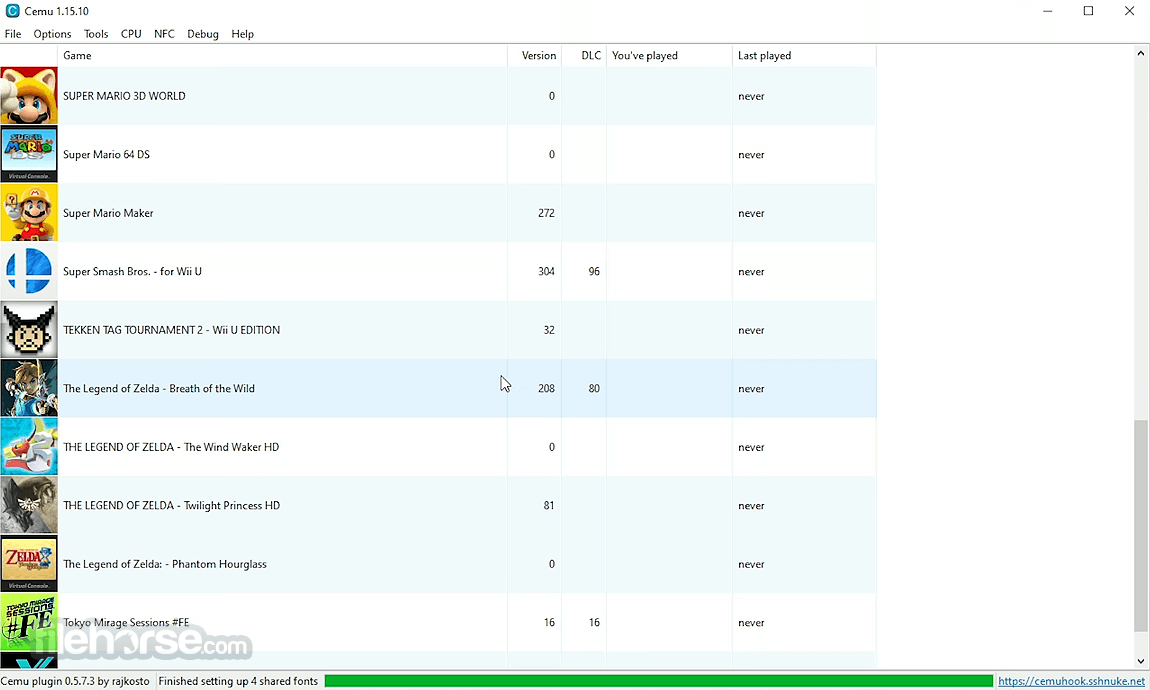
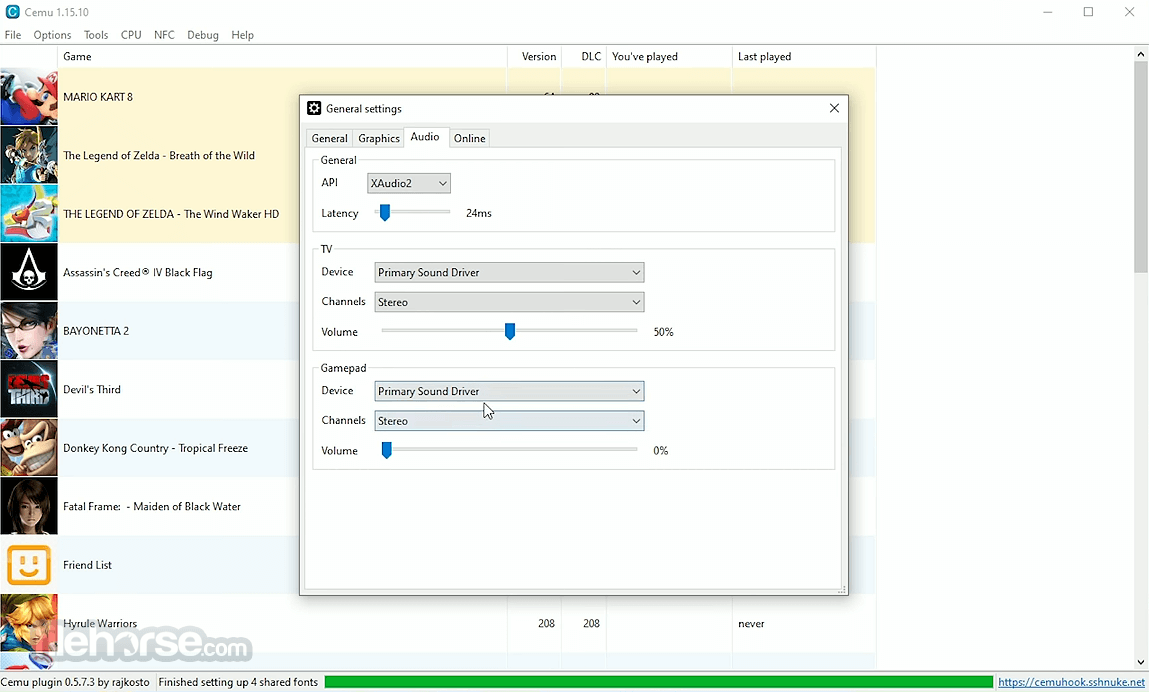
Cemu features a straightforward, user-friendly interface. The main window provides options for loading games, configuring settings, and adjusting graphics preferences.
Tabs such as File, Options, Tools, and Debug allow users to customize their experience, making it accessible even for beginners.
Installation and Setup
FAQs
Is Cemu legal?
Yes, this program is legal, but downloading Wii U game ROMs without owning the original copy is not. You should dump games from your own Wii U console.
Can Cemu run all Wii U games?
Not all games are fully compatible, but the majority of popular titles run smoothly with proper configuration.
Does Cemu support online multiplayer?
Some online features work through CemuHook, but official Nintendo services are mostly unavailable.
What hardware is needed for Cemu?
A high-performance CPU (preferably Intel or AMD Ryzen) and a dedicated GPU (NVIDIA or AMD) are recommended for smooth gameplay.
Can I use a keyboard and mouse?
Yes, but for the best experience, using a controller is advised.
Does sound work?
Yes, but some sound effects and filters are not yet supported. Certain games may have sudden loud noises.
Is online functionality supported?
Very limited. Only applications with basic network functions and no server authentication, such as the Wii U web browser and some homebrew apps, may work.
Will Cemu support platforms other than Windows?
Multi-platform support is planned, but development priorities come first. Work on ports will begin after other core improvements.
Why is Cemu slow, and will performance improve?
This software is already highly optimized, and future improvements will be minor. Emulation requires high-performance hardware, with CPU single-core speed and RAM being the most important factors.
What are game profiles?
Game profiles are configuration files for individual games. They are stored in the gameProfiles folder and allow advanced settings, some of which are not available through the Cemu GUI.
Alternatives
Dolphin Emulator – Runs Nintendo GameCube and Wii games on PC.
Yuzu – A Switch emulator with high compatibility.
RPCS3 – PlayStation 3 emulator for high-end PCs.
Xenia – Xbox 360 emulator in active development.
PCSX2 – PlayStation 2 emulator with a large game library.
Pricing
This tool is completely FREE and open to public downloads. However, it previously offered a Patreon-supported early access model for beta builds.
System Requirements
Cemu is a must-have for gamers who want to experience Wii U titles on a PC with superior performance and graphics. Although it requires some setup, the emulator delivers an outstanding experience, making it the best choice for Wii U emulation.
With active development and strong community support, it continues to improve, offering gamers a reliable way to play their favorite Nintendo games on Windows.
Download Cemu - Wii U Emulator Latest Version Why is this app published on FileHorse? (More info)
Since its initial release in 2015, it has evolved into a powerful tool for playing Wii U-exclusive titles with enhanced graphics, improved performance, and modding capabilities.
Cemu for PC enables users to enjoy their favorite Wii U games in high definition, with resolutions exceeding the console’s native 720p output.
Key Features
- High-Definition Graphics – Supports resolutions up to 4K with enhanced textures, anti-aliasing, and anisotropic filtering.
- Performance Optimization – Uses multi-threaded CPU emulation for smooth gameplay on high-end PCs.
- Game Compatibility – A wide range of Wii U games are supported, including titles like The Legend of Zelda: Breath of the Wild and Super Mario 3D World.
- Controller Support – Compatible with various input devices, including Xbox, PlayStation, and Wii U Pro controllers.
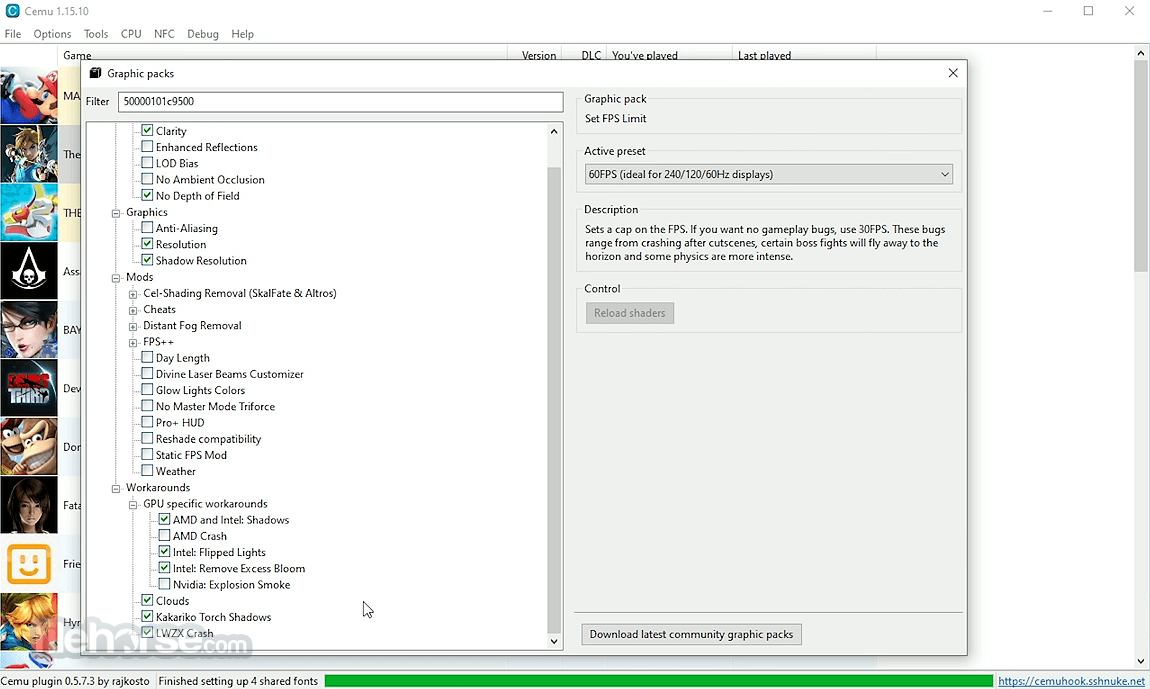
- Modding and Customization – Supports graphic packs, mods, and cheats for customized gameplay.
- Online Multiplayer – Limited online play using network services like CemuHook.
- Improved Stability: Fixed crashes when exporting saves with Unicode paths and addressed issues in DS Virtual Console titles
- Debugger Enhancements: Added right-click context menu in the PPC debugger and resolved smaller debugging issues
- Better Device Support: Switched to the libusb backend for improved HID/USB device compatibility on Windows
- Vulkan Optimizations: Reduced memory usage and improved stability by lowering sampler object creation
- Performance Improvements: Enhanced index data caching in Vulkan for slight performance gains in some games
- Bug Fixes: Corrected shader dumping path issues and ensured proper behavior of interpreter mode via command line
User Interface
Cemu features a straightforward, user-friendly interface. The main window provides options for loading games, configuring settings, and adjusting graphics preferences.
Tabs such as File, Options, Tools, and Debug allow users to customize their experience, making it accessible even for beginners.
Installation and Setup
- Download the App – Obtain the latest version from the official website or FileHorse.
- Extract Files – Unzip the downloaded file to a preferred directory.
- Install Graphics Packs – Optional but recommended for better visuals and performance.
- Configure Controls – Set up input mapping for controllers or keyboard.
- Load Wii U Firmware and Games – Required for proper game functionality.
- Adjust Graphics and Performance Settings – Optimize settings based on your PC hardware.
- Launch this tool and open a Wii U game ROM.
- Configure game-specific settings for the best performance.
- Use graphic packs to enhance visuals or apply mods.
- Save and load game states using the emulator’s built-in tools.
- Connect controllers for an authentic console experience.
FAQs
Is Cemu legal?
Yes, this program is legal, but downloading Wii U game ROMs without owning the original copy is not. You should dump games from your own Wii U console.
Can Cemu run all Wii U games?
Not all games are fully compatible, but the majority of popular titles run smoothly with proper configuration.
Does Cemu support online multiplayer?
Some online features work through CemuHook, but official Nintendo services are mostly unavailable.
What hardware is needed for Cemu?
A high-performance CPU (preferably Intel or AMD Ryzen) and a dedicated GPU (NVIDIA or AMD) are recommended for smooth gameplay.
Can I use a keyboard and mouse?
Yes, but for the best experience, using a controller is advised.
Does sound work?
Yes, but some sound effects and filters are not yet supported. Certain games may have sudden loud noises.
Is online functionality supported?
Very limited. Only applications with basic network functions and no server authentication, such as the Wii U web browser and some homebrew apps, may work.
Will Cemu support platforms other than Windows?
Multi-platform support is planned, but development priorities come first. Work on ports will begin after other core improvements.
Why is Cemu slow, and will performance improve?
This software is already highly optimized, and future improvements will be minor. Emulation requires high-performance hardware, with CPU single-core speed and RAM being the most important factors.
What are game profiles?
Game profiles are configuration files for individual games. They are stored in the gameProfiles folder and allow advanced settings, some of which are not available through the Cemu GUI.
Alternatives
Dolphin Emulator – Runs Nintendo GameCube and Wii games on PC.
Yuzu – A Switch emulator with high compatibility.
RPCS3 – PlayStation 3 emulator for high-end PCs.
Xenia – Xbox 360 emulator in active development.
PCSX2 – PlayStation 2 emulator with a large game library.
Pricing
This tool is completely FREE and open to public downloads. However, it previously offered a Patreon-supported early access model for beta builds.
System Requirements
- Operating System: Windows 11, 10, 8, or 7 (64-bit)
- Processor: Intel i5/i7 or AMD Ryzen 5/7 (quad-core or higher)
- RAM: 8GB minimum (16GB recommended)
- Graphics Card: NVIDIA GTX 970 or AMD equivalent for optimal performance
- Storage: SSD recommended for faster game loading times
- High compatibility with many Wii U games
- Stunning 4K graphics and performance enhancements
- Customization through graphic packs and mods
- Controller support for an authentic gaming experience
- Regular updates from developers
- Requires a powerful PC for smooth performance
- Setup can be complex for beginners
- Some games still have graphical glitches or performance issues
- Limited online functionality
- Lack of official support and updates
Cemu is a must-have for gamers who want to experience Wii U titles on a PC with superior performance and graphics. Although it requires some setup, the emulator delivers an outstanding experience, making it the best choice for Wii U emulation.
With active development and strong community support, it continues to improve, offering gamers a reliable way to play their favorite Nintendo games on Windows.
Download Cemu - Wii U Emulator Latest Version Why is this app published on FileHorse? (More info)
##
畫面截圖
- 2026-04-06 Cemu - Wii U Emulator 2.6 25.2 MB
- 2025-02-01 Cemu - Wii U Emulator 2.5 25.1 MB
- 2024-11-29 Cemu - Wii U Emulator 2.4 25 MB
- 2024-11-02 Cemu - Wii U Emulator 2.3 25 MB
- 2024-09-08 Cemu - Wii U Emulator 2.2 25 MB
- 2024-08-26 Cemu - Wii U Emulator 2.1 25 MB
- 2022-02-12 Cemu - Wii U Emulator 1.26.2 23.8 MB
- 2021-10-25 Cemu - Wii U Emulator 1.25.6 23.9 MB