⚠ 這是歷史版本頁面 — 查看 ChanSort 最新版本 →

ChanSort 2025-01-15
v 2025-01-15
Windows
開源軟體
7.56/10 (61)
- 目前版本2025-01-15
- 更新日期2025-01-29
- 檔案大小33.8 MB
- 檔案名稱ChanSort_2025-01-15.zip
- 作業系統Windows 7 / Windows 8 / Windows 10 / Windows 11
- 支援語系English
- 授權型式開源軟體
- 開發商 Horst Beham
- 軟體分類Windows 軟體 / 影片軟體
##
編輯短評
ChanSort 是一款在 Windows 上執行的開源工具,專門解決電視頻道排序的麻煩事。多數現代電視都能把頻道清單透過 USB 隨身碟匯出,而這套軟體就是讓你在電腦上直接編輯這份清單,再匯回電視。它支援 Hisense、Samsung、LG、Panasonic、Toshiba 以及 Linux VDR 專案的多種機型,最明顯的特色是提供多種排序操作方式,包括直接輸入數字、上下移動、拖曳,甚至雙擊就能調整,也能一次選取多個頻道批次編輯,或參考另一份既有清單來套用相同順序。開發者持續維護,近一年仍有更新,在同類工具中算是小眾但口碑穩定的選擇。
這套軟體適合對電視頻道順序有特定堅持的人,例如家中長輩習慣特定排列、或是有大量頻道需要整理的使用者。相較於 KMPlayer 或 K-Lite Codec Pack 這類播放或解碼工具,ChanSort 的定位完全不同,它不做播放,而是專注在頻道清單的管理,因此沒有直接替代品。使用前要注意它僅提供英文介面,且需要電視本身支援 USB 匯出頻道清單才能發揮作用;授權為開源軟體,可以免費下載使用,但操作上需要一些基本概念,對不熟悉電腦檔案管理的使用者來說,初期可能稍有門檻。
##
翻譯排程處理中,以下暫以英文原文呈現
軟體介紹
ChanSort is a PC/Windows utility that allows you to reorder your TV's channel list. Most modern TVs can transfer channel lists via a USB stick, which you can plug into your PC.
ChanSort supports various models from Hisense, Samsung, LG, Panasonic, Toshiba, and the Linux VDR project.
Features and Highlights
Most of this app was written without support from TV manufacturers or access to any official documentation about the file formats. It is solely based on analyzing existing data files and trial and error.
There is a chance of unwanted side effects or even damage to your TV, as reported in 2 cases.
How to Use
What is ChanSort used for?
ChanSort is a utility that allows users to edit and reorder channel lists from televisions on a computer. It supports many TV brands and lets users sort channels, rename them, delete unwanted entries, and organize favorites more easily than using the TV remote.
Which TVs are supported by ChanSort?
ChanSort supports channel lists from many popular TV manufacturers, including Samsung, LG, Sony, Panasonic, Philips, and others. Compatibility depends on the specific TV model and firmware.
Is ChanSort still relevant in 2026?
Yes. ChanSort continues to be used in 2026 because many televisions still export channel lists to USB drives, allowing users to edit them on a PC and then import the updated list back to the TV.
System Requirements
Download ChanSort Latest Version Why is this app published on FileHorse? (More info)
ChanSort supports various models from Hisense, Samsung, LG, Panasonic, Toshiba, and the Linux VDR project.
Features and Highlights
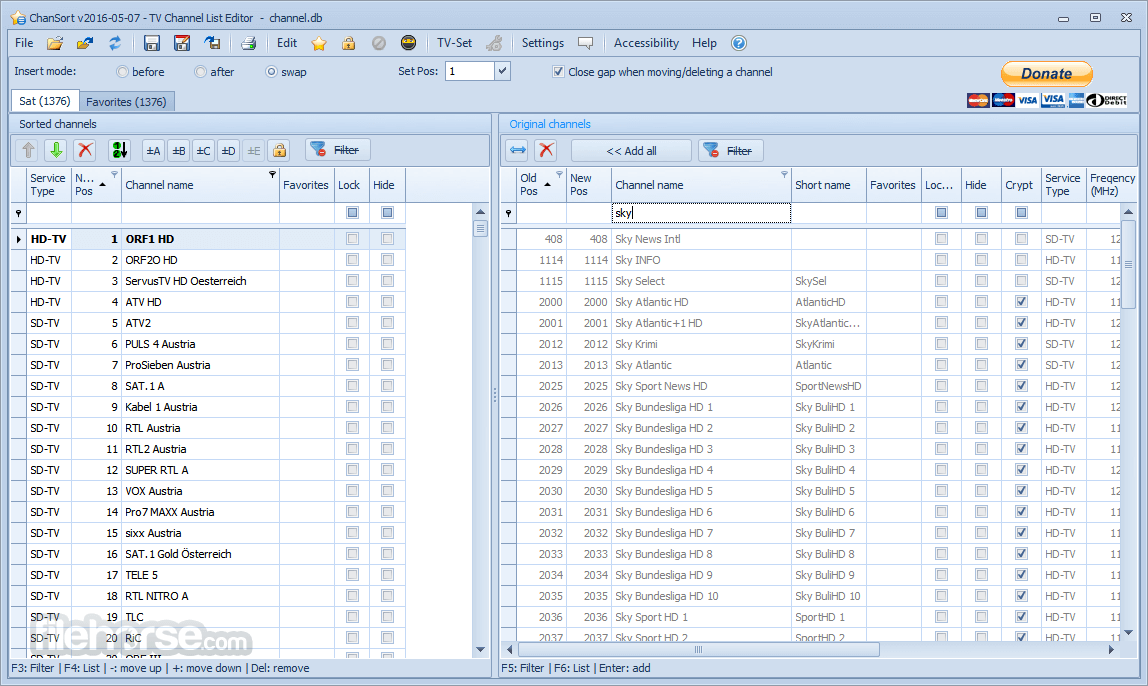
- Reorder channels with ease using direct number changes, move up/down controls, drag-and-drop functionality, or double-clicking
- Use an existing channel list as a reference to replicate the same channel order
- Edit multiple channels simultaneously with multi-selection support
- View channels in a single-list mode, displaying assigned channels first, followed by unassigned ones
- Compare changes with a side-by-side view showing the new/sorted list alongside the original/complete list (similar to a playlist vs. library layout)
- Rename or delete channels as needed
- Manage additional channel settings, including favorites, parental lock, skip when zapping, and channel hiding
- User interface available in multiple languages: English, German, Spanish, Turkish, Portuguese, Russian, and Romanian
- Full Unicode support for channel names, including Latin, Cyrillic, Greek, and more!
Most of this app was written without support from TV manufacturers or access to any official documentation about the file formats. It is solely based on analyzing existing data files and trial and error.
There is a chance of unwanted side effects or even damage to your TV, as reported in 2 cases.
How to Use
- Unzip the downloaded file to a folder
- Launch ChanSort.exe (no installation needed)
- Connect your TV USB with the channel list file
- Load the channel list file in ChanSort
- Sort, rename, or delete channels as needed
- Save the modified file back to the USB
- Plug the USB back into the TV and import the list
What is ChanSort used for?
ChanSort is a utility that allows users to edit and reorder channel lists from televisions on a computer. It supports many TV brands and lets users sort channels, rename them, delete unwanted entries, and organize favorites more easily than using the TV remote.
Which TVs are supported by ChanSort?
ChanSort supports channel lists from many popular TV manufacturers, including Samsung, LG, Sony, Panasonic, Philips, and others. Compatibility depends on the specific TV model and firmware.
Is ChanSort still relevant in 2026?
Yes. ChanSort continues to be used in 2026 because many televisions still export channel lists to USB drives, allowing users to edit them on a PC and then import the updated list back to the TV.
System Requirements
- OS: Windows 7, 8, 10, or 11
- CPU: 1 GHz or faster processor
- RAM: 512 MB or more
- Disk Space: 50 MB free space
- .NET Framework: Version 4.8 or later
- USB port for importing/exporting TV files
- Supports many TV brands
- No installation required
- Drag-and-drop channel sorting
- Regularly updated software
- Easy to back up and restore
- No built-in help guide
- Limited undo functionality
- May not support all models
- Only works with exported files
Download ChanSort Latest Version Why is this app published on FileHorse? (More info)
##
畫面截圖
- 2026-03-11 ChanSort 2025-03-08 33.8 MB
- 2025-01-29 ChanSort 2025-01-15 33.8 MB
- 2024-10-15 ChanSort 2024-10-15 33.8 MB
- 2024-10-03 ChanSort 2024-10-02 33.8 MB
- 2024-10-01 ChanSort 2024-10-01 33.8 MB
- 2024-08-19 ChanSort 2024-08-18 33.9 MB
- 2024-04-20 ChanSort 2024-04-20 33.9 MB
- 2024-02-26 ChanSort 2024-02-25 33.9 MB