⚠ 這是歷史版本頁面 — 查看 CherryPlayer 最新版本 →

- 目前版本3.4.1
- 更新日期2025-06-02
- 檔案大小50.6 MB
- 檔案名稱CherryPlayer-3.4.1-setup.exe
- 作業系統Windows 7 / Windows 8 / Windows 10 / Windows 11
- 支援語系English
- 授權型式免費軟體
- 開發商 CherryPlayer Team
- 軟體分類Windows 軟體 / 影片軟體
##
編輯短評
CherryPlayer 是一款結合本地播放與串流播放的 Windows 多媒體播放器,能處理影片、音樂、網路電台與直播內容。它的最大特色是將桌面播放器的便利性和線上串流的即時性整合在一起,省去切換不同程式的麻煩。不過這款軟體已停止更新,開發團隊不再維護,屬於小眾工具,雖然評價普遍不錯,但使用者數量不多。
適合需要同時觀看本地影片和線上直播、聽網路電台的用戶,尤其偏好單一介面操作的人。與 KMPlayer 或 K-Lite Codec Pack 等熱門替代品相比,CherryPlayer 的串流整合是優勢,但因為停止更新,可能無法支援最新的影音格式或串流協定。軟體為免費授權,僅提供英文介面,使用前需留意。
##
翻譯排程處理中,以下暫以英文原文呈現
軟體介紹
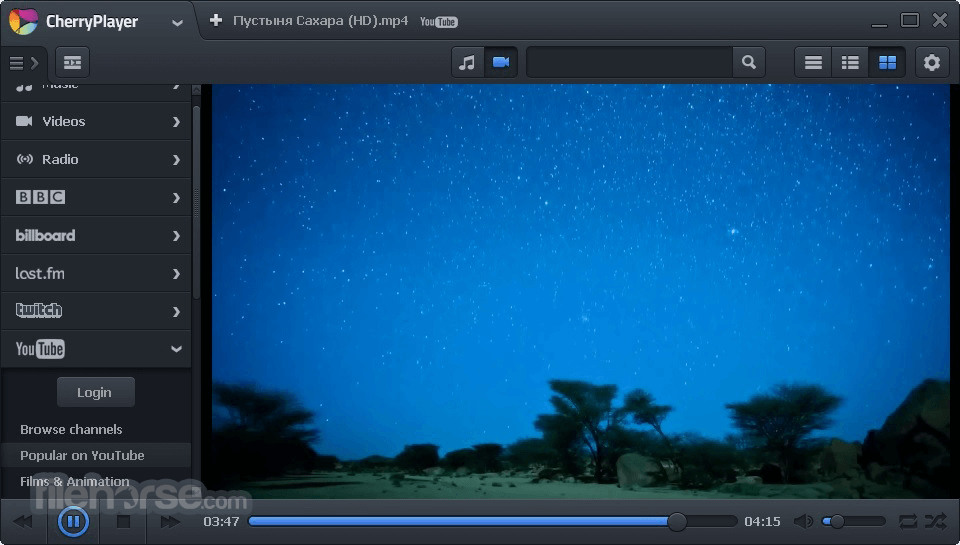
CherryPlayer is a unique multimedia player that combines all the benefits and advantages of a desktop player and the ability to play almost all types of streaming multimedia, such as video, audio, radio, and live broadcasts.
Note: This app is discontinued.
CherryPlayer is a versatile media player software designed for Windows PCs. It aims to provide users with a comprehensive multimedia experience by supporting various audio and video formats, online streaming services, and internet radio stations.
With this program, users can seamlessly access and enjoy their favorite music, movies, TV shows, and radio stations, all within a single application.
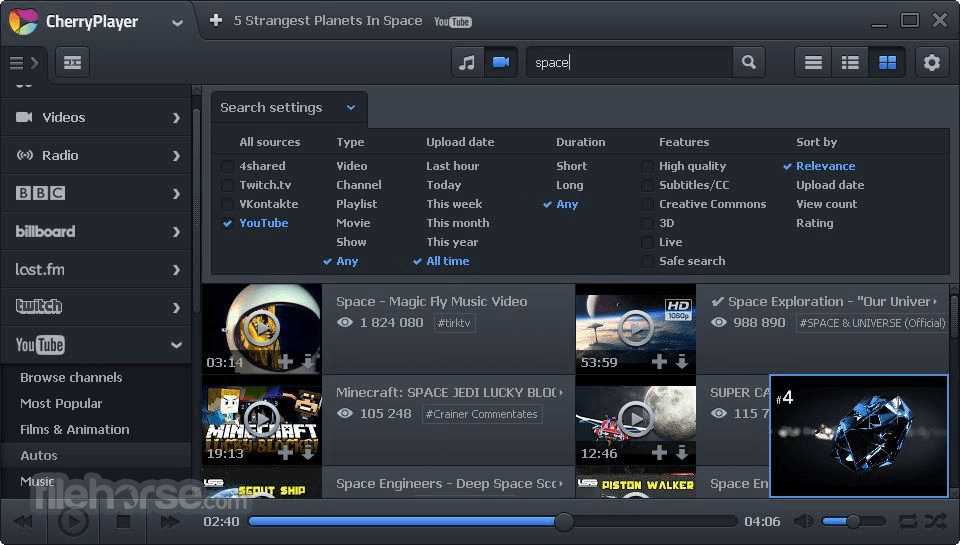
It supports YouTube, downloading from YouTube, logging in to a YouTube account, the most popular YouTube channels, and playlists.
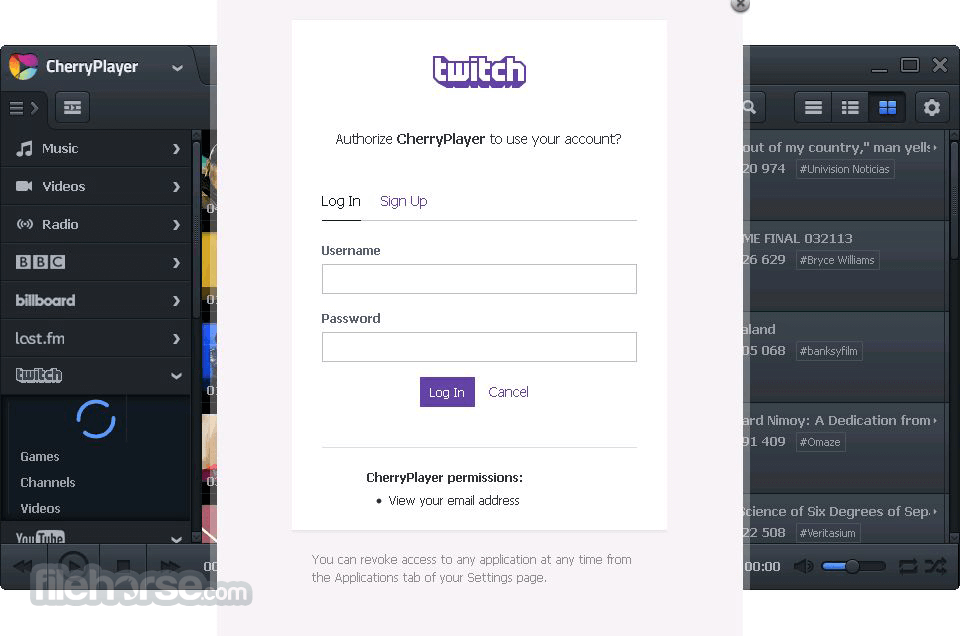
All the Twitch.tv videos, channels, and games are available in Cherry Player. Also, you can log in to your Twitch.tv account via the player.
It supports almost all kinds of online radio. Due to the streaming platform of SHOUTcast, you can enjoy thousands of online radio stations that are sorted for your convenience by themes and countries.
The largest world providers of music singles charts, BBC Radio 1, Billboard, and Last.fm are available in the app. From a single place in a few clicks, you can be in the latest music trends of the planet.
Did you know that almost all the videos and movies you ever watched or heard about are available on YouTube? Learn how to watch movies online with CherryPlayer right now.
All the music of the world is available for you with the Video Player and huge stores like SoundCloud, 4shared, VKontakte.
Highlights
Wide Format Support: It supports a wide range of audio and video formats, including MP3, AAC, FLAC, AVI, MP4, MKV, and more, ensuring compatibility with virtually any media file you encounter.
Online Streaming: Users can stream music and videos from popular online platforms such as YouTube, SoundCloud, and VK, directly within the interface, eliminating the need to switch between multiple apps or browser tabs.
Internet Radio: It offers access to thousands of internet radio stations from around the world, allowing users to discover and listen to music across various genres and regions.
Playlist Management: The software enables users to create and manage playlists effortlessly, organizing their media library according to personal preferences and moods.
Customizable Interface: It features a user-friendly interface that can be customized with different skins and themes, allowing users to personalize their media playback experience.
Installation and Setup
Installing the utility is straightforward and can be completed in just a few clicks. Users can download the installation package from the official website or trusted sources, such as FileHorse.
Once downloaded, simply run the installer and follow the on-screen instructions to install the software on your PC. After installation, it will prompt users to set their preferences for media playback and online streaming services, ensuring a personalized experience from the start.
How to Use
Using this software is intuitive, even for first-time users. To get started, simply launch the application and use the navigation menu to browse through your music, videos, or radio stations.
You can search for specific media files or explore curated playlists and recommendations. To play a file, double-click on it, or select it and click the play button. It also allows users to create and manage playlists, adjust playback settings, and customize the interface to their liking.
FAQs
Is CherryPlayer FREE to use?
Yes, CherryPlayer is available for free with no subscription fees or hidden costs.
Does CherryPlayer support streaming from Spotify or Apple Music?
No, it does not currently support streaming from Spotify or Apple Music due to licensing restrictions.
Can I download videos from YouTube using this app?
No, it does not offer a built-in feature for downloading videos from YouTube or other streaming platforms.
Is CherryPlayer available for Mac or Linux?
No, the player is currently only available for Windows PCs.
Does CherryPlayer have mobile apps for Android or iOS?
No, CherryPlayer is designed specifically for desktop computers/laptops and does not have mobile versions available.
Alternatives
Some alternatives to this app include VLC Media Player, KMPlayer, Winamp, AIMP and foobar2000.
Each of these alternatives offers similar features for media playback and management, but may vary in terms of interface design, format support, and additional functionalities.
System Requirements
Overall, it offers a feature-rich multimedia experience for Windows users, combining support for various audio and video formats with seamless access to online streaming services and internet radio stations. Its intuitive interface, playlist management capabilities, and customization options make it a compelling choice for anyone looking for a versatile media player that doesn't cost a dime.
While it may have some limitations in terms of platform availability and certain advanced features, CherryPlayer remains a solid option for enjoying your favorite music, movies, and more on your PC.
Note: Please note that to run the player, you need to install Microsoft Visual C++ 2013 Redistributable Package (x86).
Download CherryPlayer Latest Version Why is this app published on FileHorse? (More info)
Note: This app is discontinued.
CherryPlayer is a versatile media player software designed for Windows PCs. It aims to provide users with a comprehensive multimedia experience by supporting various audio and video formats, online streaming services, and internet radio stations.
With this program, users can seamlessly access and enjoy their favorite music, movies, TV shows, and radio stations, all within a single application.
It supports YouTube, downloading from YouTube, logging in to a YouTube account, the most popular YouTube channels, and playlists.
All the Twitch.tv videos, channels, and games are available in Cherry Player. Also, you can log in to your Twitch.tv account via the player.
It supports almost all kinds of online radio. Due to the streaming platform of SHOUTcast, you can enjoy thousands of online radio stations that are sorted for your convenience by themes and countries.
The largest world providers of music singles charts, BBC Radio 1, Billboard, and Last.fm are available in the app. From a single place in a few clicks, you can be in the latest music trends of the planet.
Did you know that almost all the videos and movies you ever watched or heard about are available on YouTube? Learn how to watch movies online with CherryPlayer right now.
All the music of the world is available for you with the Video Player and huge stores like SoundCloud, 4shared, VKontakte.
Highlights
- Support of almost all the file formats and codecs, live streaming, IPTV.
- Free, quick, and easy to use.
- Search and play music and video from YouTube, Twitch, 4shared, SoundCloud, Zaycev.net, and VK.
- Log in to YouTube, Twitch, and VK accounts.
- Built-in playlists of YouTube and Twitch video services.
- Built-in music charts of BBC Radio, Billboard, and Last.fm.
- Built-in SHOUTcast radio service and radio stations sorted by country.
- Built-in codecs.
Wide Format Support: It supports a wide range of audio and video formats, including MP3, AAC, FLAC, AVI, MP4, MKV, and more, ensuring compatibility with virtually any media file you encounter.
Online Streaming: Users can stream music and videos from popular online platforms such as YouTube, SoundCloud, and VK, directly within the interface, eliminating the need to switch between multiple apps or browser tabs.
Internet Radio: It offers access to thousands of internet radio stations from around the world, allowing users to discover and listen to music across various genres and regions.
Playlist Management: The software enables users to create and manage playlists effortlessly, organizing their media library according to personal preferences and moods.
Customizable Interface: It features a user-friendly interface that can be customized with different skins and themes, allowing users to personalize their media playback experience.
Installation and Setup
Installing the utility is straightforward and can be completed in just a few clicks. Users can download the installation package from the official website or trusted sources, such as FileHorse.
Once downloaded, simply run the installer and follow the on-screen instructions to install the software on your PC. After installation, it will prompt users to set their preferences for media playback and online streaming services, ensuring a personalized experience from the start.
How to Use
Using this software is intuitive, even for first-time users. To get started, simply launch the application and use the navigation menu to browse through your music, videos, or radio stations.
You can search for specific media files or explore curated playlists and recommendations. To play a file, double-click on it, or select it and click the play button. It also allows users to create and manage playlists, adjust playback settings, and customize the interface to their liking.
FAQs
Is CherryPlayer FREE to use?
Yes, CherryPlayer is available for free with no subscription fees or hidden costs.
Does CherryPlayer support streaming from Spotify or Apple Music?
No, it does not currently support streaming from Spotify or Apple Music due to licensing restrictions.
Can I download videos from YouTube using this app?
No, it does not offer a built-in feature for downloading videos from YouTube or other streaming platforms.
Is CherryPlayer available for Mac or Linux?
No, the player is currently only available for Windows PCs.
Does CherryPlayer have mobile apps for Android or iOS?
No, CherryPlayer is designed specifically for desktop computers/laptops and does not have mobile versions available.
Alternatives
Some alternatives to this app include VLC Media Player, KMPlayer, Winamp, AIMP and foobar2000.
Each of these alternatives offers similar features for media playback and management, but may vary in terms of interface design, format support, and additional functionalities.
System Requirements
- Windows 11, 10, 8 or 7
- 1 GHz processor or faster
- 512 MB RAM or more
- 100 MB of available hard disk space
- Wide format support for audio and video files
- Seamless integration with online streaming services
- Access to thousands of internet radio stations
- User-friendly interface with customization options
- Free to use with no subscription fees
- This application has been discontinued
- Limited availability on platforms other than Windows
- Lack of support for downloading videos from streaming platforms
- No built-in support for streaming from Spotify or Apple Music
Overall, it offers a feature-rich multimedia experience for Windows users, combining support for various audio and video formats with seamless access to online streaming services and internet radio stations. Its intuitive interface, playlist management capabilities, and customization options make it a compelling choice for anyone looking for a versatile media player that doesn't cost a dime.
While it may have some limitations in terms of platform availability and certain advanced features, CherryPlayer remains a solid option for enjoying your favorite music, movies, and more on your PC.
Note: Please note that to run the player, you need to install Microsoft Visual C++ 2013 Redistributable Package (x86).
Download CherryPlayer Latest Version Why is this app published on FileHorse? (More info)
##
畫面截圖
- 2026-08-10 CherryPlayer 3.4.3 50.6 MB
- 2025-07-02 CherryPlayer 3.4.2 50.6 MB
- 2025-06-02 CherryPlayer 3.4.1 50.6 MB
- 2025-05-10 CherryPlayer 3.4.0 53.7 MB
- 2021-08-25 CherryPlayer 3.3.2 26.5 MB
- 2021-08-14 CherryPlayer 3.3.1 26.2 MB
- 2021-07-31 CherryPlayer 3.3.0 24.2 MB
- 2021-01-21 CherryPlayer 3.2.4 23 MB