⚠ 這是歷史版本頁面 — 查看 ChromaCam 最新版本 →

- 目前版本4.0.3.0
- 更新日期2022-11-03
- 檔案大小449.17 MB
- 檔案名稱ChromaCam-4.0.3.0.exe
- 作業系統Windows 7 / Windows 8 / Windows 10 / Windows 11
- 支援語系English
- 授權型式試用版
- 開發商 Personify Inc
- 軟體分類Windows 軟體 / 社群通訊
##
編輯短評
ChromaCam 是一款讓普通網路攝影機也能做到去背效果的 Windows 桌面工具,透過電腦視覺與機器學習技術,不需實體綠幕就能將人物從背景中分離。它本身不是通訊軟體,而是作為虛擬攝影機,在 Skype、Zoom、Webex、Google Chat 等視訊會議軟體,以及 OBS、XSplit 等直播程式中被選用,即可即時替換背景。開發商 Personify 持續維護這套工具,近年更新頻率穩定,在同類工具中屬於評價不錯的熱門選擇。
這套軟體適合需要頻繁參與視訊會議、卻沒有專業攝影棚環境的使用者,尤其對遠距工作者、線上教學者或直播主來說,能快速提升畫面專業度。與其他去背軟體相比,ChromaCam 的優勢在於免去實體綠幕的硬體成本,但相對地,去背效果會受光線、衣物顏色與背景複雜度影響,未必能達到專業等級的完美邊緣。需留意的是,它提供的是試用版授權,且介面僅有英文,Windows 與 macOS 皆有對應版本,下載前可先確認是否符合自身需求。
##
翻譯排程處理中,以下暫以英文原文呈現
軟體介紹
ChromaCam is a Windows desktop application that works with a standard webcam and all leading video chat apps such as Skype, Webex, Zoom, Google Chat, and broadcast apps such as OBS and XSplit.
Simply choose ChromaCam as the camera within the app settings and let the magic happen.
ChromaCam is brought to you by Personify, a company developing innovative immersive video technologies using computer vision and machine learning.
What is the Chroma key?
Chroma key compositing, or chroma keying, is a visual effects/post-production technique for compositing (layering) two images or video streams together based on color hues (chroma range).
Features and Highlights
Supports all 2D webcams (e.g. Logitech C922, Brio, Brio Stream…).
Pricing
ChromaCam Lite (Free):
Also Available: Download ChromaCam for Mac
Download ChromaCam Latest Version Why is this app published on FileHorse? (More info)
Simply choose ChromaCam as the camera within the app settings and let the magic happen.
ChromaCam is brought to you by Personify, a company developing innovative immersive video technologies using computer vision and machine learning.
What is the Chroma key?
Chroma key compositing, or chroma keying, is a visual effects/post-production technique for compositing (layering) two images or video streams together based on color hues (chroma range).
Features and Highlights
- Remove your background without a green screen
- Blur your background for a more focused
- Make an impact with immersive presentations
Supports all 2D webcams (e.g. Logitech C922, Brio, Brio Stream…).
Pricing
ChromaCam Lite (Free):
- Free version available
- Includes avatar trials
- Virtual green screen feature
- Displays ChromaCam watermark
- Limited background blur
- Offers standard image backgrounds
- Frame rate is capped (FPS limit)
- Basic video background support
- Compatible with Windows & macOS
- Supports custom 3D avatars
- Includes streamer effects
- Enables video backgrounds
- Twitch Bot integration
- Full background blur
- Custom backgrounds and logos
- PowerPoint slide support
- Works with any video conferencing tool
- Compatible with Windows & macOS
- Requires Apple M1 chip or Intel 6th gen+ processor
- Easy Background Removal
- Works with Most Video Apps
- No Green Screen Needed
- Adjustable Blur & Filters
- Lightweight and User-Friendly
- Free Version is Very Limited
- Occasional Background Glitches
- Requires Good Lighting
- Performance May Lag on Low-End PCs
- Limited Customization Options
Also Available: Download ChromaCam for Mac
Download ChromaCam Latest Version Why is this app published on FileHorse? (More info)
##
畫面截圖
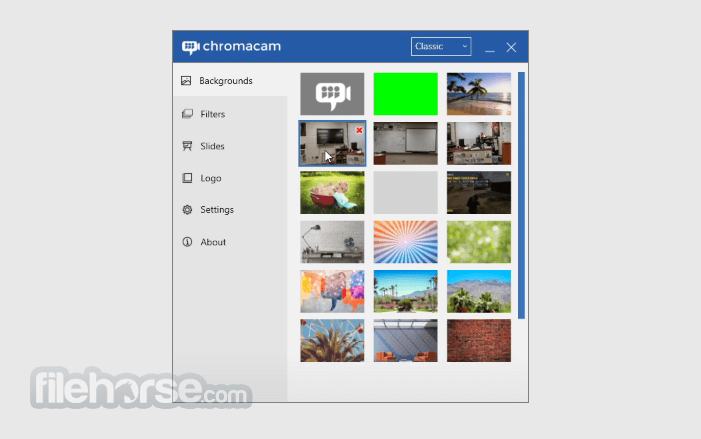
- 2026-05-08 ChromaCam 4.0.14.0 237.81 MB
- 2025-10-02 ChromaCam 4.0.13.0 237.7 MB
- 2025-04-26 ChromaCam 4.0.12.0 237.49 MB
- 2024-06-28 ChromaCam 4.0.10.0 233.67 MB
- 2024-05-09 ChromaCam 4.0.9.0 233.67 MB
- 2023-12-14 ChromaCam 4.0.8.0 233.66 MB
- 2023-07-21 ChromaCam 4.0.7.0 226.83 MB
- 2023-07-06 ChromaCam 4.0.6.0 226.61 MB