
Complete Internet Repair 5.0.1.3808
v 5.0.1.3808- 目前版本5.0.1.3808
- 更新日期2017-12-07
- 檔案大小2.22MB
- 檔案名稱ComIntRep_3808_Setup.exe
- 作業系統Windows 7 / Windows 8 / Windows 10 / Windows 11
- 支援語系English
- 授權型式開源軟體
- 開發商 Rizonesoft
- 軟體分類Windows 軟體 / 檔案傳輸與網路
編輯短評
Complete Internet Repair 是一款免費的開源網路修復工具,專門處理各種莫名其妙的連線異常,例如移除惡意軟體後網路失效、安裝或解除安裝 VPN、防火牆後連線中斷等狀況。它最大的特色是將多種修復動作整合在單一介面,使用者可勾選需要的項目後一次執行,省去逐一手動調整系統設定的麻煩。這套軟體自推出以來持續獲得維護,更新頻率不算頻繁,但開發者仍會不定期釋出修正;在同類工具中屬於小眾但口碑穩定的選擇,評分人數不多,整體評價中上。
這款工具適合具備基本電腦操作概念、遇到網路問題卻不想立刻重灌系統的使用者。當你嘗試過重開機、檢查數據機仍無法解決連線異常,且問題可能與近期安裝或移除的軟體有關時,它就能派上用場。與 Internet Download Manager、uTorrent 等專注於下載或傳輸的工具不同,Complete Internet Repair 的定位是「修復」而非「加速」,因此兩者用途不衝突。需注意的是,它僅提供英文介面,且無法處理硬體故障或 ISP 端的問題;軟體為開源授權,可免費使用,但使用前建議先建立系統還原點,以備不時之需。
軟體介紹
對全球許多人來說,沒有網路的生活已經變得不可能。持續連上 Twitter 或 Facebook 等社群網路、網路服務徹底改變了我們聯絡朋友、做生意、存取知識庫以及享受無數娛樂來源的方式,讓網路成為各年齡層不可或缺的工具。
然而,這種廣泛的吸引力也吸引了許多缺乏足夠知識與專業來管理網路連線穩定性的 PC 使用者。當網路連線中斷時,解決方法要不是花大錢請技術人員,更糟的是,在不知道自己的操作會讓網路狀況變好還是變壞的情況下,嘗試手動修復問題。
只要簡單按一個按鈕,你就能掃描你的網路設定,包括許多網路專家才知道的深度功能,解決連線問題,並提供一個簡單的方式來監控未來的連線狀態,讓你的網路連線能 24/7 妥善維護。
功能與亮點
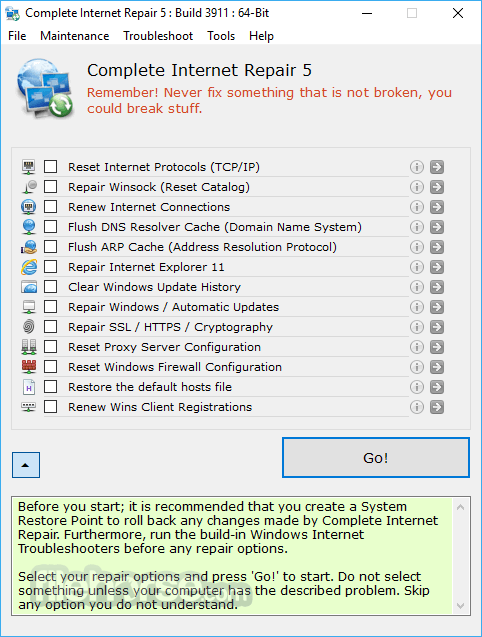
Complete Internet Repair 提供你一個易於使用的介面,分為四個分頁 – 檔案、維護、疑難排解與工具。
基本畫面會展示主要的診斷清單,列出所有可能影響網路連線穩定性的獨立網路設定,每個網路項目的詳細說明,以及一個「開始!」按鈕,用來啟動完整的診斷測試。
值得一提的是,Complete Internet Repair 只能處理你 PC 上可能出現的網路問題。它無法處理由你的 ISP(網際網路服務供應商)管轄的軟體或硬體故障。
以下是 Complete Internet Repair 最常修復的常見問題清單:
- 因解除安裝惡意軟體(如廣告軟體、間諜軟體、病毒、蠕蟲、木馬等)而導致的網際網路或區域網路連線問題。
- 解除安裝各種會改變網路的應用程式(如防火牆、VPN、防毒套件及其他網路程式)後出現的網際網路連線問題。
- 「連線受限或無法連線」的訊息問題。
- 無法存取特定網站,或所有網站。
- 無法存取安全網站(例如網路銀行、商業網站等)。
- DNS 查詢問題。
- 影響網路的登錄檔錯誤。
- Windows Update 問題。
- Proxy 伺服器問題。
- 與網路相關的彈出視窗。
- 瀏覽器當機。
- 路由器/數據機管理受限的問題,包括更新 IP 位址或解決 DHCP 錯誤。
研究顯示,將近 40% 的網際網路連線問題是由你的 ISP 或數據機/路由器的錯誤設定所造成,這通常可以透過重置設備或聯絡 ISP 來解決。
使用方法
- 以系統管理員身分執行 – 開啟程式,並確保以系統管理員權限執行,以獲得完整功能。
- 選擇要修復的問題 – 從選項中選擇,例如重設網際網路通訊協定(TCP/IP)、修復 Winsock、重設防火牆設定等。
- 點擊「開始」 – 選取必要的修復項目後,點擊「開始」按鈕開始修復程序。
- 等待程序完成 – 工具會自動嘗試修復所選的問題。
- 重新啟動電腦 – 完成後,重新啟動電腦以套用修復。
- 檢查連線 – 測試你的網際網路連線,確認問題是否已解決。
- 如有需要,再次嘗試 – 如果問題仍然存在,再次執行工具,並選取其他修復選項。
- 謹慎使用 – 如果不確定,請避免不必要的修復;只修復已知的問題。
- 備份設定 – 在進行變更前,建議先備份重要的網路設定。
Complete Internet Repair 有什麼用途?
Complete Internet Repair 是一款疑難排解工具,旨在修復 Windows 系統上常見的網路與網際網路連線問題。它可以重設 TCP/IP 設定、修復 Winsock、清除 DNS 快取,以及還原其他與網路相關的元件。
何時應該使用 Complete Internet Repair?
當電腦無法正常連上網際網路、瀏覽器無法載入網頁,或網路設定因惡意軟體、錯誤設定或軟體衝突而損壞時,通常會使用此工具。
Complete Internet Repair 在 2026 年仍然有用嗎?
是的。在 2026 年,它仍然可以協助診斷和修復常見的 Windows 網路問題,尤其是當內建的疑難排解工具無法解決問題時。
優點
- 全面的網際網路問題修復工具
- 使用者友善、直觀的介面
- 可攜式,無需安裝
- 免費使用,無隱藏費用
- 定期更新以確保可靠性
- 對進階網路問題的支援有限
- 無法修復實體硬體故障
- 不適合複雜的企業網路
- 某些修復後可能需要重新啟動
- 疑難排解的文件說明有限
- 缺乏官方支援與更新
下載 Complete Internet Repair 最新版本 為什麼這個應用程式會發佈在 FileHorse 上?(更多資訊)
畫面截圖
更新日誌
5.0.1.3808Complete Internet Repair is a free Open Source Power Tool to repair internet connections and get you up and running in no time. Please note that it is unable to repair hardware faults or get your ISP up and running or not yet. In short; Complete Internet Repair will attempt to repair your internet connection.
Complete Internet Repair might help (no promises) if you are experiencing any of the following problems:
- Internet or network problem after removing adware, spyware, virus, worm, Trojan horse, etc.
- Loss network connection after installing/uninstalling VPN, firewall or other networking programs.
- Unable to access any website or can only access some websites.
- Pop-up error window with network related problem description.
- No network connectivity due to registry errors.
- DNS lookup problem.
- Fail to renew the network adapter’s IP address or other DHCP errors.
- Network connectivity issue with limited or no connections message.
- Windows update does not work.
- You are having problems connecting to secured websites (ex. Banking).
- Internet Explorer stopped working or crashes all the time.
- Sticky proxy server settings.
With any repair utility, you will need to remember two golden rules. Firstly; Do not try to repair something that is not broken, you might break it. Secondly; the utility cannot repair it all, it is not like the all-seeing and all-knowing Oracle, and it cannot anticipate each and every situation, but this all said; Complete Internet Repair should be able to help with most of your internet issues.
- 2026-03-12 Complete Internet Repair 11.1.3.6518 4.42 MB
- 2023-11-01 Complete Internet Repair 11.1.3.6508 3.78 MB
- 2023-08-28 Complete Internet Repair 9.1.3.6120 3.49 MB
- 2023-05-25 Complete Internet Repair 9.1.3.6099 3.49 MB
- 2022-11-01 Complete Internet Repair 9.0.3.6088 3.49 MB
- 2022-10-03 Complete Internet Repair 9.0.3.6022 3.49 MB
- 2022-09-05 Complete Internet Repair 9.0.0.5601 3.48 MB
- 2021-06-13 Complete Internet Repair 8.2.3.5362 3.47 MB