CrystalDiskMark Portable 9.0.2
v 9.0.2
Windows
免費軟體
8/10 (10)
- 目前版本9.0.2
- 更新日期2026-02-17
- 檔案大小3.08 MB
- 檔案名稱CrystalDiskMarkPortable_9.0.2.paf.exe
- 作業系統Windows 7 / Windows 8 / Windows 10 / Windows 11
- 支援語系English
- 授權型式免費軟體
- 開發商 Hiyohiyo (Crystal Dew World)
- 軟體分類Windows 軟體 / 系統優化
##
翻譯排程處理中,以下暫以英文原文呈現
軟體介紹
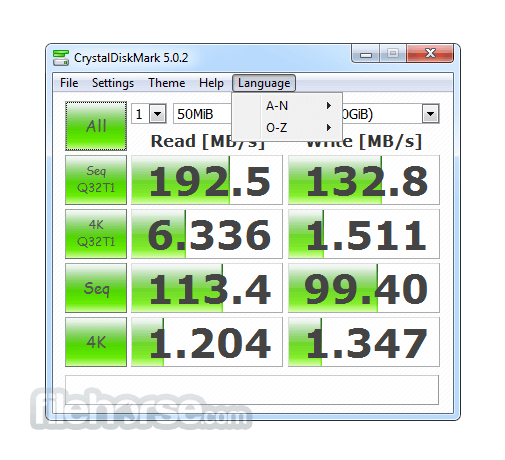
CrystalDiskMark Portable is designed to quickly test the performance of your hard drives. Currently, the program allows us to measure sequential and random read/write speeds. Crystal Disk Mark Portable puts up a decent performance and it serves its purpose very well.
Features and Highlights
Why the result differ from other benchmark software?
The result depends on Test File Size, Test File Position, Fragmentation, ID (PATA)/SATA/RAID/SCSI controller and CPU speed, etc.
Failed benchmark test
It may not enough privilege to create a test file. Please run Crystal Disk Mark Portable as administrative privileges.
How to fix CrystalDiskMark’s UI bug
If zip edition does not work fine, please check security: unblock option and extract zip file again. If you run FixUI.bat including a zip file, it may work fine. I would like you to use the installer edition or store edition.
Alternatives
HD Tune Pro: HD Tune is a comprehensive disk utility that includes benchmarking, health monitoring, and error scanning functionalities, providing a holistic approach to disk management.
ATTO Disk Benchmark: Similar to this app, ATTO Disk Benchmark is another popular disk benchmarking tool that offers detailed insights into storage performance.
AS SSD Benchmark: AS SSD Benchmark is specifically tailored for SSD benchmarking, offering specialized tests to evaluate SSD performance and endurance.
System Requirements
The app is compatible with Windows operating systems including Windows 7, 8, 10 or 11. The software has minimal system requirements and can run on most modern PC configurations.
PROS
Download CrystalDiskMark Portable Latest Version Why is this app published on FileHorse? (More info)
Features and Highlights
- Measure sequential reads/writes speed
- Measure random 512KB, 4KB, 4KB (Queue Depth=32) reads/writes speed
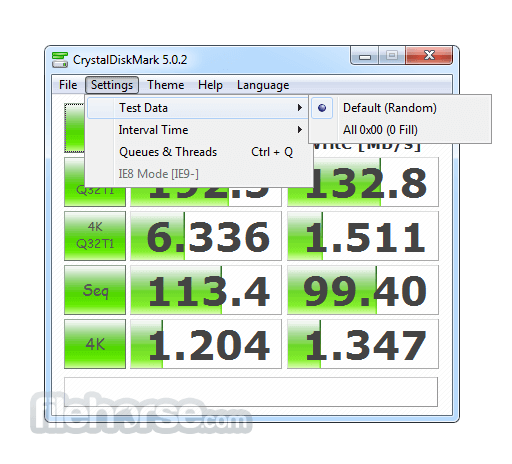
- Select test data (Random, 0Fill, 1Fill)
- Theme support
- Multi-Language support
- it may shorten SSD/USB Memory life.
- Benchmark result is NOT compatible between different major version.
- “MB/s” means 1,000,000 byte/sec.
- The result depends on Test File Size, Test File Position, Fragmentation, IDE(PATA)/SATA/RAID/SCSI/NVMe controller and CPU speed etc…
- A part of SSDs depend on test data(random, 0fill).
- If you execute CrystalDiskMark with Administrator rights, it does not show Network Drive. If you would like to measure Network Drive, please run as w/o Administrator rights. UAC Dialog: YES -> w/ Administrator Rights, NO -> w/o Administrator Rights
- 1GiB = 1024MiB = 1024x1024KiB = 1024x1024x1024B
- 1GB = 1000MB = 1000x1000KB = 1000x1000x1000B
Why the result differ from other benchmark software?
The result depends on Test File Size, Test File Position, Fragmentation, ID (PATA)/SATA/RAID/SCSI controller and CPU speed, etc.
Failed benchmark test
It may not enough privilege to create a test file. Please run Crystal Disk Mark Portable as administrative privileges.
How to fix CrystalDiskMark’s UI bug
If zip edition does not work fine, please check security: unblock option and extract zip file again. If you run FixUI.bat including a zip file, it may work fine. I would like you to use the installer edition or store edition.
Alternatives
HD Tune Pro: HD Tune is a comprehensive disk utility that includes benchmarking, health monitoring, and error scanning functionalities, providing a holistic approach to disk management.
ATTO Disk Benchmark: Similar to this app, ATTO Disk Benchmark is another popular disk benchmarking tool that offers detailed insights into storage performance.
AS SSD Benchmark: AS SSD Benchmark is specifically tailored for SSD benchmarking, offering specialized tests to evaluate SSD performance and endurance.
System Requirements
The app is compatible with Windows operating systems including Windows 7, 8, 10 or 11. The software has minimal system requirements and can run on most modern PC configurations.
PROS
- Lightweight and easy-to-use interface
- Multiple test modes for comprehensive benchmarking
- Detailed results for accurate performance evaluation
- Portable version for on-the-go use
- Free to download and use
- Limited platform support (Windows only)
- Lacks advanced features found in enterprise-grade benchmarking tools
Download CrystalDiskMark Portable Latest Version Why is this app published on FileHorse? (More info)
##
畫面截圖