⚠ 這是歷史版本頁面 — 查看 DVD Drive Repair 最新版本 →

DVD Drive Repair 8.1.3.1155
v 8.1.3.1155
Windows
開源軟體
7.4/10 (60)
- 目前版本8.1.3.1155
- 更新日期2021-03-11
- 檔案大小2.96 MB
- 檔案名稱DVDRepair_1155_Setup.exe
- 作業系統Windows 7 / Windows 8 / Windows 10 / Windows 11
- 支援語系English
- 授權型式開源軟體
- 開發商 Rizonesoft
- 軟體分類Windows 軟體 / 光碟藍光
##
編輯短評
DVD Drive Repair 是一款專門處理光碟機「無故消失」問題的 Windows 系統修復工具。當作業系統因為登錄檔錯亂、系統檔案設定異常,或惡意程式干擾而無法正確顯示光碟機時,它能協助你將光碟機重新帶回硬體清單中,讓依賴光碟機運作的應用程式恢復正常。這款工具由 Rizonesoft 開發,屬於開源軟體,目前仍持續維護中,在同類工具中算是小眾但評價普遍不錯的選擇。
這套軟體適合遇到光碟機突然從「我的電腦」中消失、但實體裝置並未故障的使用者,尤其是嘗試過重新安裝驅動程式仍無法解決問題的人。與 DAEMON Tools Lite 或 Nero Burning ROM 這類功能更全面的光碟工具相比,DVD Drive Repair 專注在單一修復任務上,操作相對單純,但功能也較為侷限。需要注意的是,軟體僅提供英文介面,且為免安裝的開源工具,使用前建議先建立系統還原點,以備不時之需。
##
翻譯排程處理中,以下暫以英文原文呈現
軟體介紹
DVD Drive Repair is a useful system utility tool that can help you restore the visibility of your DVD drive when your OS is unable to properly show it.
By doing this, you can not only regain control over the DVD drive that has suddenly gone missing, but you can also regain the functionality of the various applications that require the use of that drive.
From time to time, various software issues can cause your DVD Drive to become missing from your hardware list. This can happen either because of some misconfiguration in your system files or the Windows registry, or because of an intentional attack by malicious software such as viruses.
Instead of being forced to manually reinstall your entire Windows or restore a previously made system backup, DVD Drive Repair can help you to gain access to your DVD Drive without any hassle or lost time. Simply install it, follow the on-screen instructions, and your Windows will detect your functioning DVD drive in mere seconds.
Main Features
Installation and Use
After a brief installation, you are presented with the option to run the DVD Drive Repair immediately after installation is finished.
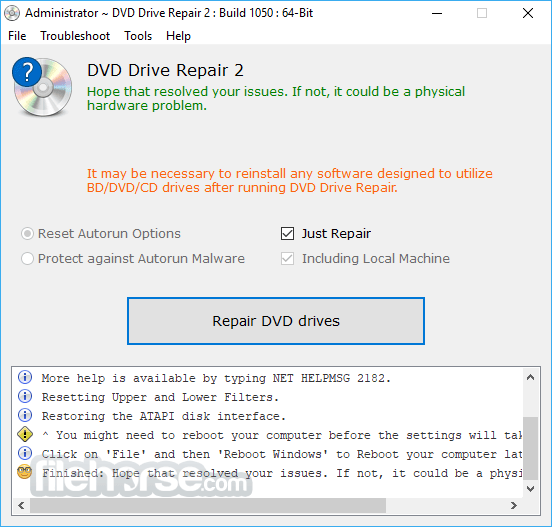
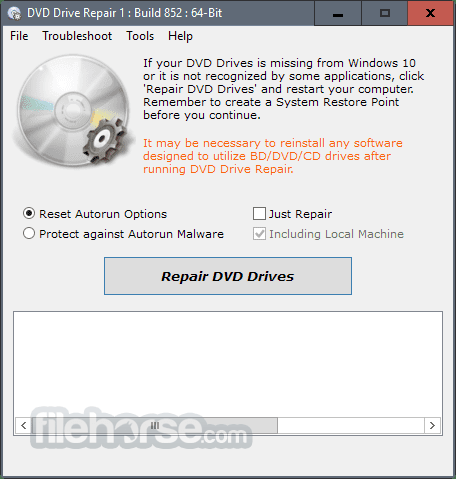
The app interface is focused on simplicity and ease of use, with a single easy-to-control interface that features a large command button for detecting and restoring the DVD drive, a few secondary options, and a text diagnostic listing at the bottom describing the taken steps and recommendations for how to finish the procedure.
The entire process of restoring your DVD drive lasts just a few seconds and includes detecting your DVD drivers, checking Registry configurations, resetting various OS states, and restoring your ATAPI disk interface.
After this procedure is done, the app will recommend that you restart your computer so that some of its changes can take effect. You can restart your computer manually or via a built-in command inside the app itself.
In addition to the restoration feature, the tool can also perform a few more security tweaks that will make your computer safer against malicious software.
It can reset your Autorun options for your CD/DVD/USB drives, and can even completely block the Autorun feature for external storage drives.
Preventing Autorun will not completely protect your computer against viruses, but it will provide the first line of defense against the software that tries to automatically load into your OS whenever you load an unknown CD/DVD or USB storage drive.
FAQs
What is DVD Drive Repair, and what problems can it fix?
DVD Drive Repair is a small utility that helps restore a DVD or CD drive when Windows stops detecting it or when applications fail to recognize it properly. It repairs common registry and driver issues that can cause the drive to disappear, making it useful when the hardware is fine but the system configuration is disrupted.
Is the program safe to use, and why do some antiviruses flag it?
The tool is considered safe by its developer and is described as 100% clean, but some antivirus programs may flag it because it performs low-level system operations that resemble suspicious behavior. These warnings are typically false positives, and the software does not contain malware or harmful components.
Do I need to prepare anything before running the repair process?
It’s recommended to create a System Restore point before using the tool so you can easily revert changes if needed, and updating the DVD drive’s firmware beforehand can help ensure the best results. These precautions help protect your system in case the underlying issue is more complex than a simple configuration error.
What should I do if the repair doesn’t solve the problem?
If the tool doesn’t fix the issue, you can use the built-in Device Manager shortcut to remove CD/DVD entries and then rescan for hardware changes to force Windows to reinstall the drivers. If the drive still isn’t detected after rebooting, the problem may be related to failing hardware rather than software configuration.
PROS
DVD DriveRepair is a lightweight, open-source, and completely free system utility application that can save you the hassle of reinstalling your entire Windows operating system in the event of your DVD drive becoming not being recognized by the OS.
For users who don’t have access to an internet connection, it can also be run from a portable hard drive. While this tool is reliable and fast, we still recommend creating a System Restore Point before using it.
Download DVD Drive Repair Latest Version Why is this app published on FileHorse? (More info)
By doing this, you can not only regain control over the DVD drive that has suddenly gone missing, but you can also regain the functionality of the various applications that require the use of that drive.
From time to time, various software issues can cause your DVD Drive to become missing from your hardware list. This can happen either because of some misconfiguration in your system files or the Windows registry, or because of an intentional attack by malicious software such as viruses.
Instead of being forced to manually reinstall your entire Windows or restore a previously made system backup, DVD Drive Repair can help you to gain access to your DVD Drive without any hassle or lost time. Simply install it, follow the on-screen instructions, and your Windows will detect your functioning DVD drive in mere seconds.
Main Features
- Restores Missing DVD Drives: Recovers DVD drives missing from Windows due to system or hardware issues without requiring Windows reinstallation.
- Avoids Time-Consuming Solutions: Helps avoid reinstalling Windows or restoring to previous versions, saving time and effort.
- Simple Interface: Provides a user-friendly interface with one-click repair functionality, eliminating the need for registry edits or complex configurations.
- Firmware Update Option: Allows users to easily update device firmware, which may resolve certain DVD drive issues.
- System Restore Point Creation: Includes a direct option to create a System Restore Point for added security before repairs.
- Autorun Reset and Protection: Resets Autorun settings and protects against Autorun malware on removable drives by disabling the Autorun feature.
- Driver Reinstallation Assistance: Offers guided steps to uninstall and reinstall DVD/CD-ROM drivers and IDE ATA/ATAPI controllers.
- Portable Version Available: Includes a portable version that can run directly from an external drive, without modifying system settings.
- Translation Support: Provides support for multiple languages through a simple translation process, allowing users to translate the software into their native language.
- Source Code Access: Available as open-source software on GitHub, allowing users to view, modify, and contribute to its development.
Installation and Use
After a brief installation, you are presented with the option to run the DVD Drive Repair immediately after installation is finished.
The app interface is focused on simplicity and ease of use, with a single easy-to-control interface that features a large command button for detecting and restoring the DVD drive, a few secondary options, and a text diagnostic listing at the bottom describing the taken steps and recommendations for how to finish the procedure.
The entire process of restoring your DVD drive lasts just a few seconds and includes detecting your DVD drivers, checking Registry configurations, resetting various OS states, and restoring your ATAPI disk interface.
After this procedure is done, the app will recommend that you restart your computer so that some of its changes can take effect. You can restart your computer manually or via a built-in command inside the app itself.
In addition to the restoration feature, the tool can also perform a few more security tweaks that will make your computer safer against malicious software.
It can reset your Autorun options for your CD/DVD/USB drives, and can even completely block the Autorun feature for external storage drives.
Preventing Autorun will not completely protect your computer against viruses, but it will provide the first line of defense against the software that tries to automatically load into your OS whenever you load an unknown CD/DVD or USB storage drive.
FAQs
What is DVD Drive Repair, and what problems can it fix?
DVD Drive Repair is a small utility that helps restore a DVD or CD drive when Windows stops detecting it or when applications fail to recognize it properly. It repairs common registry and driver issues that can cause the drive to disappear, making it useful when the hardware is fine but the system configuration is disrupted.
Is the program safe to use, and why do some antiviruses flag it?
The tool is considered safe by its developer and is described as 100% clean, but some antivirus programs may flag it because it performs low-level system operations that resemble suspicious behavior. These warnings are typically false positives, and the software does not contain malware or harmful components.
Do I need to prepare anything before running the repair process?
It’s recommended to create a System Restore point before using the tool so you can easily revert changes if needed, and updating the DVD drive’s firmware beforehand can help ensure the best results. These precautions help protect your system in case the underlying issue is more complex than a simple configuration error.
What should I do if the repair doesn’t solve the problem?
If the tool doesn’t fix the issue, you can use the built-in Device Manager shortcut to remove CD/DVD entries and then rescan for hardware changes to force Windows to reinstall the drivers. If the drive still isn’t detected after rebooting, the problem may be related to failing hardware rather than software configuration.
PROS
- Easy-to-use interface for quick repairs
- Fixes common DVD drive issues effectively
- Lightweight and fast installation
- No internet required for main functions
- Freeware with no hidden costs
- Limited advanced troubleshooting features
- May not fix hardware-related issues
- Basic interface lacks visual appeal
- No automatic updates available
- Minimal customer support options
- Lack of official support and updates
DVD DriveRepair is a lightweight, open-source, and completely free system utility application that can save you the hassle of reinstalling your entire Windows operating system in the event of your DVD drive becoming not being recognized by the OS.
For users who don’t have access to an internet connection, it can also be run from a portable hard drive. While this tool is reliable and fast, we still recommend creating a System Restore Point before using it.
Download DVD Drive Repair Latest Version Why is this app published on FileHorse? (More info)
##
畫面截圖
- 2025-11-17 DVD Drive Repair 11.2.3.2920 3.34 MB
- 2023-09-29 DVD Drive Repair 9.2.3.2899 3.35 MB
- 2023-09-17 DVD Drive Repair 9.2.3.2886 3.06 MB
- 2023-08-28 DVD Drive Repair 9.1.3.2085 3.06 MB
- 2023-08-03 DVD Drive Repair 9.1.3.2053 3.06 MB
- 2023-05-25 DVD Drive Repair 9.1.3.2031 3.06 MB
- 2022-11-01 DVD Drive Repair 9.0.3.2020 3.05 MB
- 2022-09-05 DVD Drive Repair 9.0.0.1805 3.05 MB