⚠ 這是歷史版本頁面 — 查看 Easy Dark Mode 最新版本 →

- 目前版本1.4.1.9
- 更新日期2022-10-25
- 檔案大小307.2 KB
- 檔案名稱easydark.exe
- 作業系統Windows 10 (32-bit) / Windows 10 (64-bit)
- 支援語系English
- 授權型式免費軟體
- 開發商 Peter Panisz
- 軟體分類Windows 軟體 / 桌面強化
##
編輯短評
Easy Dark Mode 是一款專為 Windows 10 與 Windows 11 設計的免費小工具,核心用途是解決系統內建深色/淺色模式切換步驟繁瑣的問題。預設情況下,使用者得鑽進設定選單好幾層才能調整外觀模式,而這套軟體會在系統匣放一個圖示,點一下就能立即切換,省去多餘操作。它由 Peter Panisz 開發,屬於持續維護中的輕量工具,在同類軟體中算是小眾但評價普遍不錯的選擇。
這款軟體適合經常在明亮與昏暗環境間切換使用電腦的人,例如辦公室與家中光線差異大的使用者,或偏好依時段手動調整介面色調的用戶。與其他功能更繁雜的桌面強化工具相比,它勝在單純、免安裝負擔,但相對地功能也較單一,僅提供快速切換與基本設定。需要注意的是,它僅支援英文介面,且只適用於 Windows 平台,若你習慣中文操作介面,使用前得稍微適應一下。
##
翻譯排程處理中,以下暫以英文原文呈現
軟體介紹
Easy Dark Mode is a useful utility software that facilitates the setup of Light and Dark desktop display modes available in Windows 10 and Windows 11 and enables quick switching between them.
In Windows 11/10, the required settings can be accessed through several steps by default, which is usually inconvenient and slows down your work. With Easy Dark Mode app, you can switch between Light and Dark modes with a single click.
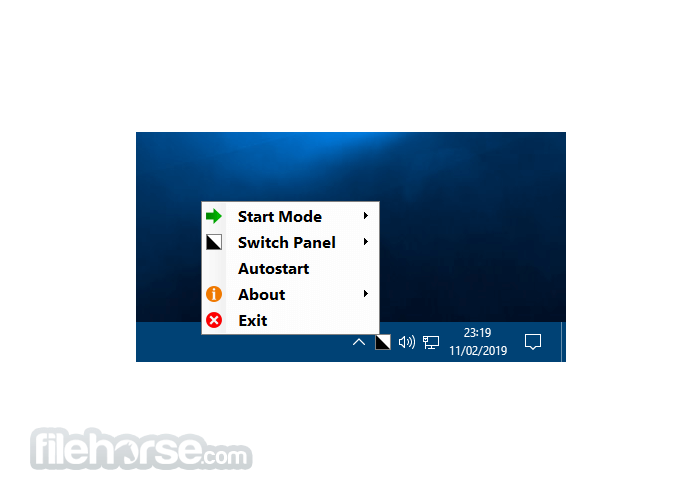
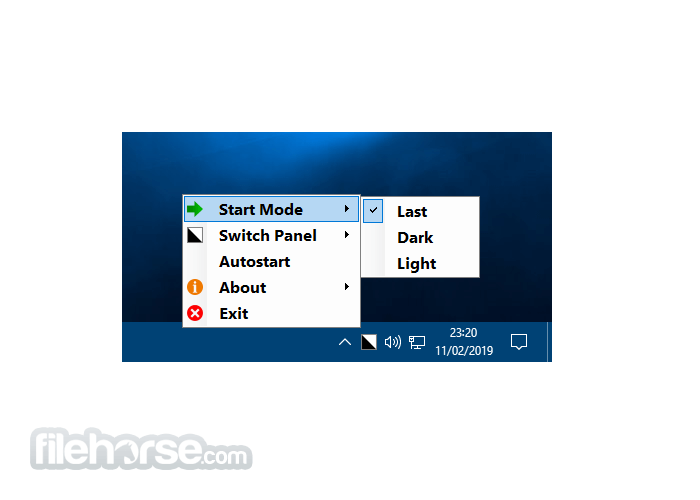
After opening it, the program places an icon in the system tray. If you click on the icon, it switches between Light/Dark mode. You can also access the application’s settings through the icon.
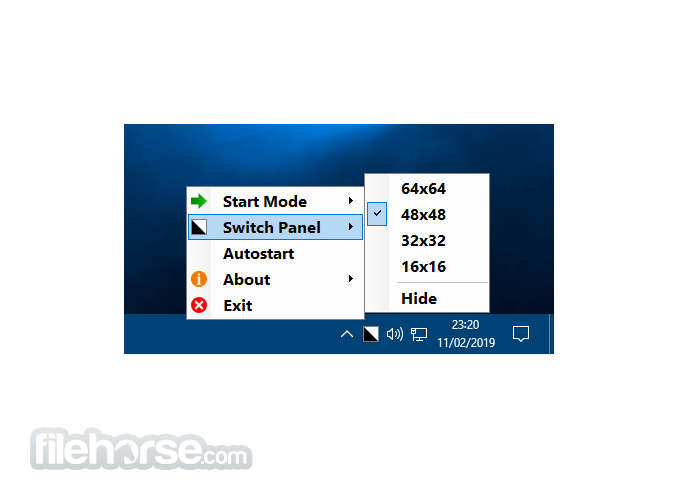
A desktop icon of optional size can also be displayed. In this case, you can switch modes and change settings there, too.
Features and Highlights
What is Easy Dark Mode used for?
Easy Dark Mode is a small Windows utility that allows users to quickly switch between Light Mode and Dark Mode in Windows. Instead of navigating through system settings, you can toggle the theme directly from a desktop shortcut or system tray icon.
Does Easy Dark Mode modify system files?
No. Easy Dark Mode does not permanently modify or hack Windows system files. It simply automates the built-in Windows theme switching feature, making the process faster and more convenient.
Is Easy Dark Mode safe to use?
Yes, when downloaded from the official WinTools website or FileHorse, Easy Dark Mode is safe to use. It is a lightweight tool that runs without intrusive background processes. As always, users should download it only from the official source to ensure authenticity.
PROS
Download Easy Dark Mode Latest Version Why is this app published on FileHorse? (More info)
In Windows 11/10, the required settings can be accessed through several steps by default, which is usually inconvenient and slows down your work. With Easy Dark Mode app, you can switch between Light and Dark modes with a single click.
After opening it, the program places an icon in the system tray. If you click on the icon, it switches between Light/Dark mode. You can also access the application’s settings through the icon.
A desktop icon of optional size can also be displayed. In this case, you can switch modes and change settings there, too.
Features and Highlights
- Enables quick switching between Light and Dark display modes in Windows 10/Windows 11.
- Selectable Hotkey.
- Fully supports Google Chrome Dark Mode (from version 74).
- Fully supports Firefox Dark Mode (from version 63).
- It doesn’t require installation.
- AutoStart mode can be set (it can start with the operating system).
- Free to use.
- Supports Windows 10 version 1803 and newer operating systems (Windows 11 is supported).
What is Easy Dark Mode used for?
Easy Dark Mode is a small Windows utility that allows users to quickly switch between Light Mode and Dark Mode in Windows. Instead of navigating through system settings, you can toggle the theme directly from a desktop shortcut or system tray icon.
Does Easy Dark Mode modify system files?
No. Easy Dark Mode does not permanently modify or hack Windows system files. It simply automates the built-in Windows theme switching feature, making the process faster and more convenient.
Is Easy Dark Mode safe to use?
Yes, when downloaded from the official WinTools website or FileHorse, Easy Dark Mode is safe to use. It is a lightweight tool that runs without intrusive background processes. As always, users should download it only from the official source to ensure authenticity.
PROS
- Quick Light/Dark mode switching.
- Simple, single-click operation.
- Optional hotkey for faster access.
- No installation needed.
- Free and supports Windows 10/11.
- Limited to Windows only.
- Basic customization options.
- Relies on the system tray for access.
- The desktop icon option may clutter.
- AutoStart requires manual setup.
Download Easy Dark Mode Latest Version Why is this app published on FileHorse? (More info)
##
畫面截圖
- 2026-02-17 Easy Dark Mode 2.0.0.2 1.17 MB
- 2025-01-16 Easy Dark Mode 2.0.0.1 1.14 MB
- 2025-01-12 Easy Dark Mode 2.0.0.0 1.12 MB
- 2023-03-04 Easy Dark Mode 1.4.2.11 331.91 KB
- 2023-02-27 Easy Dark Mode 1.4.2.10 332.83 KB
- 2022-10-25 Easy Dark Mode 1.4.1.9 307.2 KB
- 2021-07-30 Easy Dark Mode 1.4.0.8 263.38 KB
- 2020-01-30 Easy Dark Mode 1.3.1.7 262.85 KB