- 目前版本4.6.7
- 更新日期2025-11-20
- 檔案大小5.5 MB
- 檔案名稱ESU_4.6.7.exe
- 作業系統Windows 7 / Windows 8 / Windows 10 / Windows 11
- 支援語系English
- 授權型式免費軟體
- 開發商 Epson America, Inc.
- 軟體分類Windows 軟體 / 驅動程式
##
翻譯排程處理中,以下暫以英文原文呈現
軟體介紹
Epson Software Updater allows you to update Epson software for Windows PC as well as download 3rd party applications.
Note: Your Epson product must be turned on and connected to a computer with Internet access.
How to update your product's firmware in Windows using this software
Do one of the following to open Epson Software Updater:
What is Epson Software Updater for?
Epson Software Updater is used to check for new Epson software, firmware updates, and user manuals via the internet and install them automatically.
Which operating systems support Epson Software Updater?
It works on Windows and macOS, but Windows Server operating systems are not supported.
How do I start Epson Software Updater on my computer?
On Windows, you go to Start → Epson Software → Epson Software Updater, or click the printer icon in your taskbar and choose “Software Update”; on Mac, you open Applications → Epson Software → Epson Software Updater.
PROS
Download Epson Software Updater Latest Version Why is this app published on FileHorse? (More info)
Note: Your Epson product must be turned on and connected to a computer with Internet access.
How to update your product's firmware in Windows using this software
Do one of the following to open Epson Software Updater:
- Windows 11/10: Click the Start icon and select Epson Software > Epson Software Updater.
- Windows 8.x: Navigate to the Apps screen and select Epson Software > Epson Software Updater.
- Windows (other versions): Click the Start icon and select All Programs or Programs > Epson Software > Epson Software Updater.
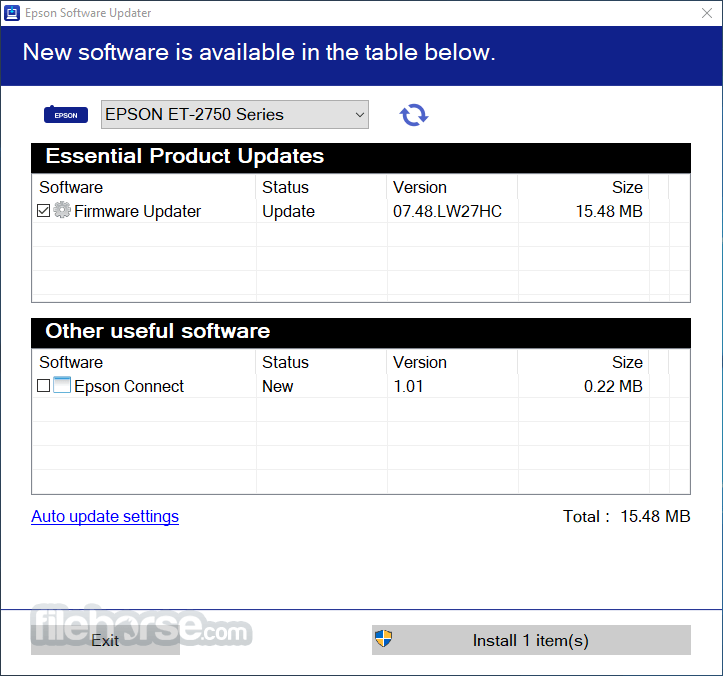
- Select your model from the list, if necessary.
- Select Firmware Updater by checking the box next to it. (Epson recommends installing all Essential Product Updates.)
- Click the Install item(s) button.
- If you see a message asking “Do you want to allow this app to make changes to your device?”, select Yes.
- Select Agree and click the OK button.
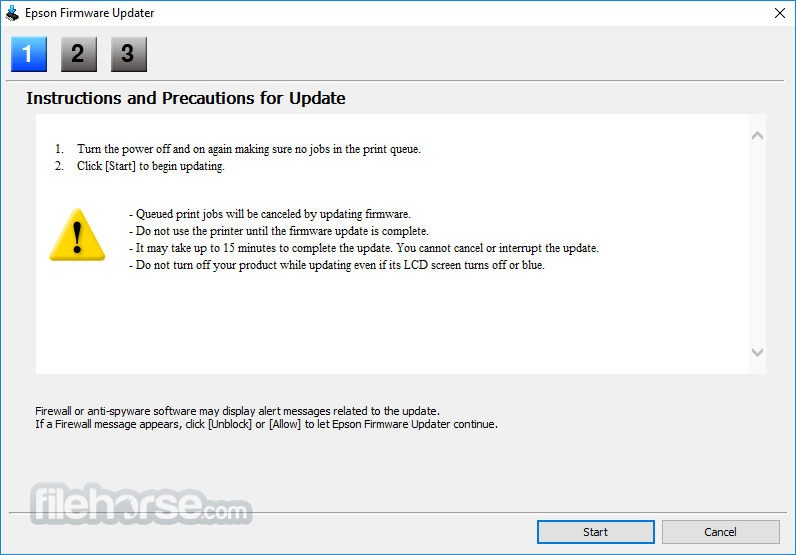
- When you see the Epson Firmware Updater screen, click the Start button.
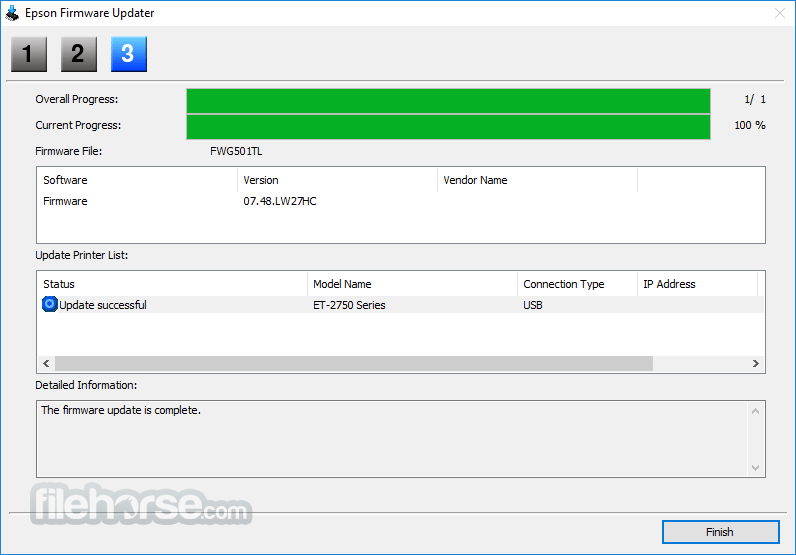
- When the firmware update is complete, click the Finish button.
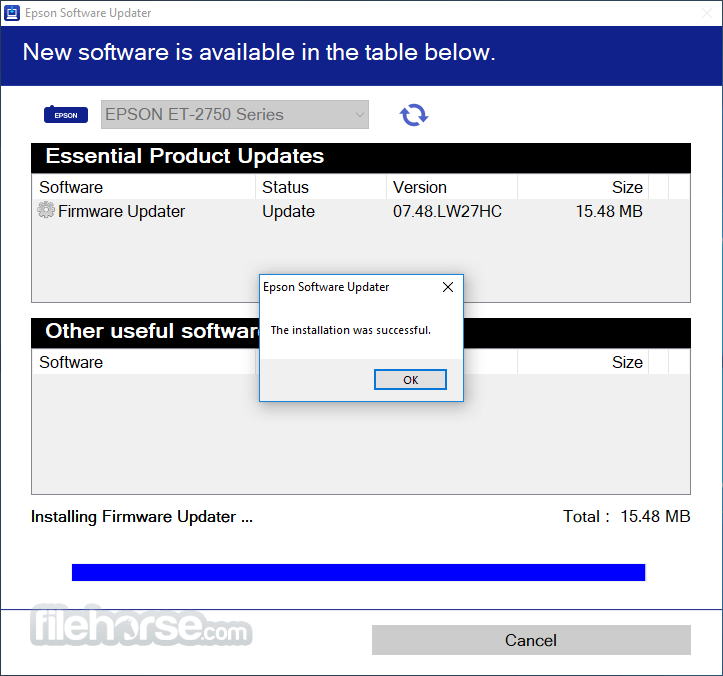
- When you see a completion message, click the OK button and close this utility.
- Wait for the firmware update to complete before using the printer.
- Do not unplug the power cable or turn off your printer while the firmware is updating. If your printer has an LCD screen, do not turn the printer off even if the screen turns blue or turns off.
- The printer will restart on its own once the update has completed. If your printer has an LCD screen, it will show the home screen after restarting.
What is Epson Software Updater for?
Epson Software Updater is used to check for new Epson software, firmware updates, and user manuals via the internet and install them automatically.
Which operating systems support Epson Software Updater?
It works on Windows and macOS, but Windows Server operating systems are not supported.
How do I start Epson Software Updater on my computer?
On Windows, you go to Start → Epson Software → Epson Software Updater, or click the printer icon in your taskbar and choose “Software Update”; on Mac, you open Applications → Epson Software → Epson Software Updater.
PROS
- Automatic Driver Updates
- Easy Firmware Management
- Supports Multiple Devices
- User-Friendly Interface
- Customizable Update Options
- Limited OS Compatibility
- May Install Unwanted Software
- Slow Download Speeds
Download Epson Software Updater Latest Version Why is this app published on FileHorse? (More info)
##
畫面截圖