
- 目前版本2.0.18
- 更新日期2025-12-23
- 檔案大小1.48 MB
- 檔案名稱ePSXe2018.zip
- 作業系統Windows 7 / Windows 8 / Windows 10 / Windows 11
- 支援語系English
- 授權型式免費軟體
- 開發商 ePSXe Team
- 軟體分類Windows 軟體 / 遊戲
##
編輯短評
ePSXe 是一款知名的 PlayStation (PS1) 模擬器,旨在讓使用者能在電腦或行動裝置上重溫經典的 PSX 與 PSOne 遊戲。它以卓越的相容性與效能著稱,功能豐富且在玩家社群中評價普遍不錯,是目前同類工具中的主流首選之一。此外,該軟體持續有更新紀錄,顯示其維護狀況良好,讓想找回懷舊遊戲體驗的使用者能穩定地運行經典作品。
這款軟體適合熱衷於復古遊戲的玩家,在想要於 Windows 等平台體驗 PS1 經典大作時非常實用。相較於其他 Android 模擬器,ePSXe 專注於 PlayStation 硬體模擬,提供更純粹的主機遊戲體驗。使用者在下載前需留意,此軟體為免費軟體且僅支援英文介面。對於追求高效能與高相容性的玩家來說,它是相當可靠的選擇。
##
翻譯排程處理中,以下暫以英文原文呈現
軟體介紹
ePSXe is a popular and highly regarded emulator software that allows users to play PlayStation (PS1) games on their Windows, Mac, Linux, or Android devices.
Developed by ePSXe Software S.L., this emulator has gained a strong reputation for its compatibility, performance, and feature-rich capabilities, making it a go-to choice for gamers who want to relive the nostalgic moments of their favorite PlayStation classics.
ePSXe is a PlayStation emulator catering to PSX and PSOne games, and is a mobile adaptation of the renowned PC emulator. With the program, PS gaming enthusiasts can enjoy exceptional compatibility, boasting a success rate of over 99%, along with impressive speed and accurate sound reproduction.
This emulator is thoughtfully designed for smartphones and tablets, accommodating 1-4 players and even offering an entertaining split-screen mode for two players.
Furthermore, it supports OpenGL HD graphics enhancements, thanks to the Peopsxgl Plugin, offers cheat code support, and ensures compatibility with save states and memory cards from the PC version.
Key Features
High Compatibility
It boasts a high level of compatibility with a vast library of PS1 games, ensuring that users can play their favorite titles without major issues.
Enhanced Graphics
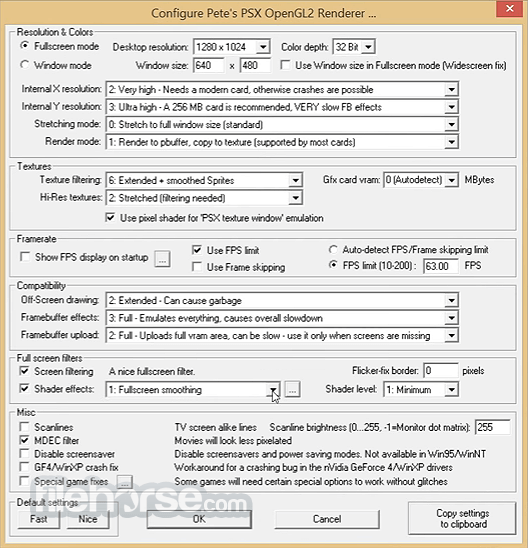
The emulator supports various rendering modes, including OpenGL and software rendering, allowing users to choose the best graphics settings for their system and preferences.
High-Resolution Graphics
It enables players to upscale the resolution of their games, providing sharper and more detailed visuals than the original PlayStation.
Controller Support
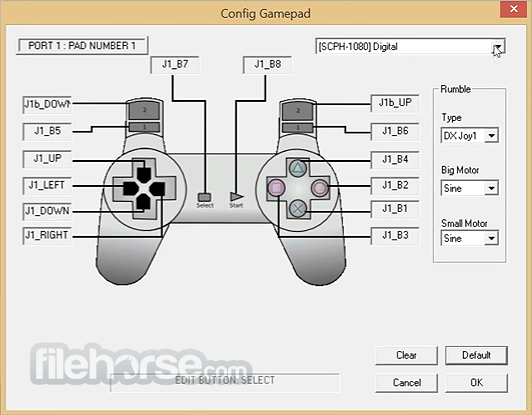
The software supports a variety of input devices, including game controllers, keyboard, and mouse, allowing users to customize their controls for a seamless gaming experience.
Save States
It allows users to create and load save states at any point in the game, making it easy to save progress and revisit challenging sections.
Cheat Codes
Gamers can use cheat codes to modify their gameplay experience, adding an extra layer of fun and experimentation.
Multiplayer Support
Users can play multiplayer games with friends over a local network or via an internet connection, thanks to ePSXe's multiplayer capabilities.
Auto-Save and Auto-Load
The emulator automatically saves and loads games, eliminating the need for manual saving.
User Interface
The program features a clean and intuitive user interface.
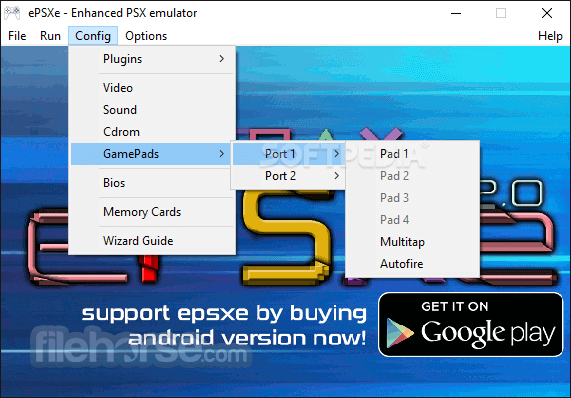
Upon launching the application, users are presented with a straightforward menu that allows them to load games, configure settings, manage memory cards, and access additional features.
The UI prioritizes ease of use, making it accessible to both novice and experienced gamers.
Installation and Setup
Launch the emulator and load a game image file (commonly referred to as an ISO or BIN file). Configure the emulator's settings to optimize performance and graphics. Customize controller inputs to match your preferred layout. Start the game and enjoy your PlayStation Classic.
FAQs
Where can I download ePSXe?
You can download the app from the official website or FileHorse.
Do I need a PlayStation BIOS to use ePSXe?
Yes, it requires a PlayStation BIOS file for proper functionality. Users are responsible for obtaining this BIOS file legally.
Can I use my gamepad with ePSXe?
Yes, it supports a variety of game controllers, and you can configure your controller settings within the emulator.
Is ePSXe available for mobile devices?
Yes, this app is available for Android devices, providing a portable PlayStation gaming experience.
What are the system requirements for ePSXe?
The system requirements vary depending on the platform, but generally, the app is not resource-intensive and can run on most modern systems.
Alternatives
If you are looking for an excellent alternative to this product, we recommend RetroArch, an all-in-one tool for game emulators, game engines, and media players.
System Requirements
It stands as a top-tier emulator for reliving the PlayStation 1 era, offering a feature-rich experience that caters to both casual and hardcore gamers. Its high compatibility, customizable graphics settings, and support for various controllers make it a go-to choice for those seeking to play their favorite PS1 titles on modern platforms.
While the requirement for a PlayStation BIOS may be a minor hurdle, the emulator's overall performance and feature set more than make up for it. Whether you're a seasoned retro gamer or a newcomer looking to explore classic PlayStation games, ePSXe is a solid choice that delivers an authentic and enjoyable gaming experience.
Download ePSXe Latest Version Why is this app published on FileHorse? (More info)
Developed by ePSXe Software S.L., this emulator has gained a strong reputation for its compatibility, performance, and feature-rich capabilities, making it a go-to choice for gamers who want to relive the nostalgic moments of their favorite PlayStation classics.
ePSXe is a PlayStation emulator catering to PSX and PSOne games, and is a mobile adaptation of the renowned PC emulator. With the program, PS gaming enthusiasts can enjoy exceptional compatibility, boasting a success rate of over 99%, along with impressive speed and accurate sound reproduction.
This emulator is thoughtfully designed for smartphones and tablets, accommodating 1-4 players and even offering an entertaining split-screen mode for two players.
- Save state
- Dual shock emulation
- Sub-channel reading
- Ppf patching
- Command-line switches
Furthermore, it supports OpenGL HD graphics enhancements, thanks to the Peopsxgl Plugin, offers cheat code support, and ensures compatibility with save states and memory cards from the PC version.
Key Features
High Compatibility
It boasts a high level of compatibility with a vast library of PS1 games, ensuring that users can play their favorite titles without major issues.
Enhanced Graphics
The emulator supports various rendering modes, including OpenGL and software rendering, allowing users to choose the best graphics settings for their system and preferences.
High-Resolution Graphics
It enables players to upscale the resolution of their games, providing sharper and more detailed visuals than the original PlayStation.
Controller Support
The software supports a variety of input devices, including game controllers, keyboard, and mouse, allowing users to customize their controls for a seamless gaming experience.
Save States
It allows users to create and load save states at any point in the game, making it easy to save progress and revisit challenging sections.
Cheat Codes
Gamers can use cheat codes to modify their gameplay experience, adding an extra layer of fun and experimentation.
Multiplayer Support
Users can play multiplayer games with friends over a local network or via an internet connection, thanks to ePSXe's multiplayer capabilities.
Auto-Save and Auto-Load
The emulator automatically saves and loads games, eliminating the need for manual saving.
User Interface
The program features a clean and intuitive user interface.
Upon launching the application, users are presented with a straightforward menu that allows them to load games, configure settings, manage memory cards, and access additional features.
The UI prioritizes ease of use, making it accessible to both novice and experienced gamers.
Installation and Setup
- Download the installer from the official website or FileHorse.
- Run the installer and follow the on-screen instructions to complete the installation.
- After installation, users will need to locate and provide a BIOS file (which can be legally acquired from their own PlayStation console) for the emulator to function properly.
- Once the BIOS is set up, users can configure their preferences, including graphics settings and controller mappings, to suit their needs.
FAQs
Where can I download ePSXe?
You can download the app from the official website or FileHorse.
Do I need a PlayStation BIOS to use ePSXe?
Yes, it requires a PlayStation BIOS file for proper functionality. Users are responsible for obtaining this BIOS file legally.
Can I use my gamepad with ePSXe?
Yes, it supports a variety of game controllers, and you can configure your controller settings within the emulator.
Is ePSXe available for mobile devices?
Yes, this app is available for Android devices, providing a portable PlayStation gaming experience.
What are the system requirements for ePSXe?
The system requirements vary depending on the platform, but generally, the app is not resource-intensive and can run on most modern systems.
Alternatives
If you are looking for an excellent alternative to this product, we recommend RetroArch, an all-in-one tool for game emulators, game engines, and media players.
System Requirements
- OS: Windows 7/8/10/11
- CPU: 2.0 GHz dual-core processor
- RAM: 1 GB
- Graphics: DirectX 9.0c-compatible GPU
- Storage: 50 MB free space
- High compatibility with PS1 games.
- Enhanced graphics options for improved visuals.
- Support for cheat codes and save states.
- Multiplayer capabilities for local and online gaming.
- User-friendly interface for ease of use.
- This product is not being developed actively anymore.
- The need to provide a PlayStation BIOS file.
- Some users may experience occasional compatibility issues with specific games.
It stands as a top-tier emulator for reliving the PlayStation 1 era, offering a feature-rich experience that caters to both casual and hardcore gamers. Its high compatibility, customizable graphics settings, and support for various controllers make it a go-to choice for those seeking to play their favorite PS1 titles on modern platforms.
While the requirement for a PlayStation BIOS may be a minor hurdle, the emulator's overall performance and feature set more than make up for it. Whether you're a seasoned retro gamer or a newcomer looking to explore classic PlayStation games, ePSXe is a solid choice that delivers an authentic and enjoyable gaming experience.
Download ePSXe Latest Version Why is this app published on FileHorse? (More info)
##
畫面截圖
- 2025-12-23 ePSXe 2.0.18 1.48 MB
- 2016-07-04 ePSXe 2.0.5 1.32 MB