⚠ 這是歷史版本頁面 — 查看 Equalizer APO 1.4.2 (32-bit) 最新版本 →

Equalizer APO 1.2.1 (32-bit)
v 1.2.1 (32-bit)
Windows
開源軟體
8.22/10 (86)
- 目前版本1.2.1 (32-bit)
- 更新日期2019-06-10
- 檔案大小6.86 MB
- 檔案名稱EqualizerAPO32-1.2.exe
- 作業系統Windows 7 / Windows 8 / Windows 10 / Windows 11
- 支援語系English
- 授權型式開源軟體
- 開發商 Equalizer APO Team
- 軟體分類Windows 軟體 / 音訊軟體
##
編輯短評
Equalizer APO 是一款專為 Windows 設計的開源音訊等化器,透過系統層級的 Audio Processing Object 架構,讓使用者對所有輸出裝置(包含內建喇叭、外接喇叭、耳機等)套用即時等化與音效處理。它提供圖形化介面與豐富的濾波器選項,能有效改善電腦音質,是許多玩家調整聲音表現的熱門工具。開發團隊持續維護,更新頻率雖不算密集,但評價普遍不錯,在同類工具中屬於主流首選之一。
這套軟體適合對音質有要求、想細部調整聲音頻率響應的使用者,無論是聽音樂、看影片或玩遊戲,都能透過自訂曲線獲得更理想的聽感。與 Virtual DJ、iTunes 等播放軟體不同,Equalizer APO 作用於整個系統,不限定單一應用程式,因此更為全面。不過它僅提供英文介面,且需要具備基本的音訊概念才能發揮完整功能;授權為開源免費,但僅支援 Windows 平台,使用前需留意相容性。
##
翻譯排程處理中,以下暫以英文原文呈現
軟體介紹
Equalizer APO (Audio Processing Object) is a free and open-source software equalizer for Windows operating systems. It is a powerful audio processing tool that allows users to apply real-time audio equalization and effects to their audio output.
It can be particularly useful for improving the audio quality of your computer's sound system, whether it's built-in speakers, external speakers, headphones, or any other audio output device.
Here is an overview of some of the key features and aspects of Equalizer APO 32bit:
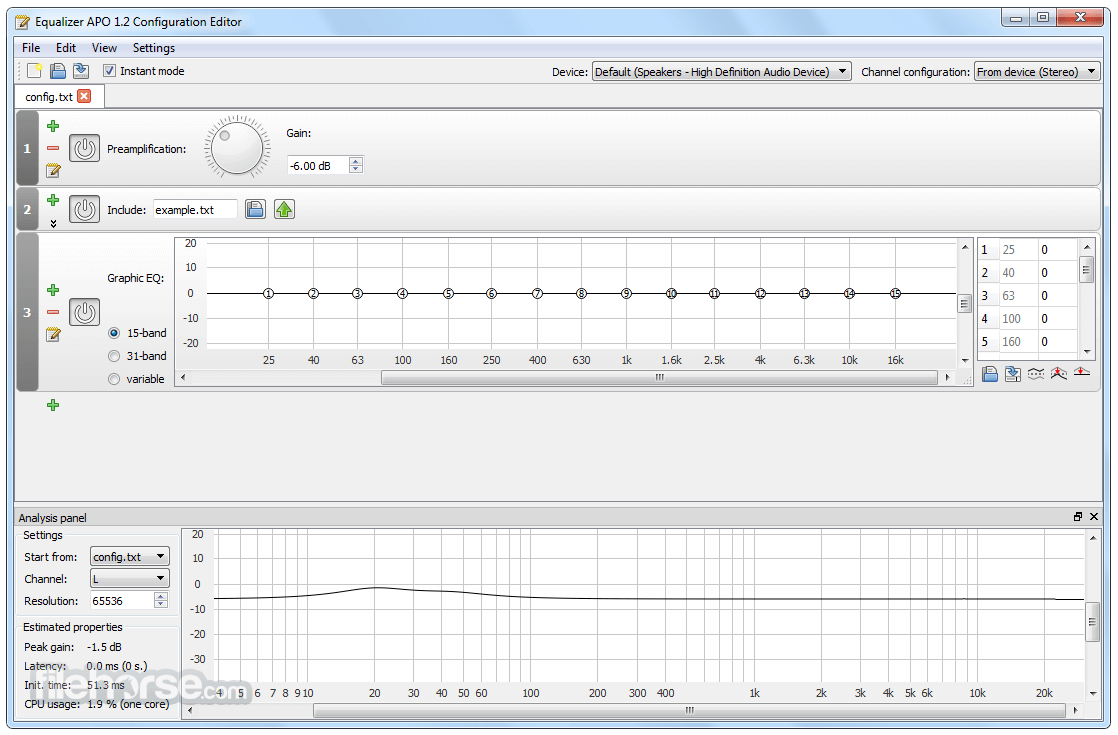
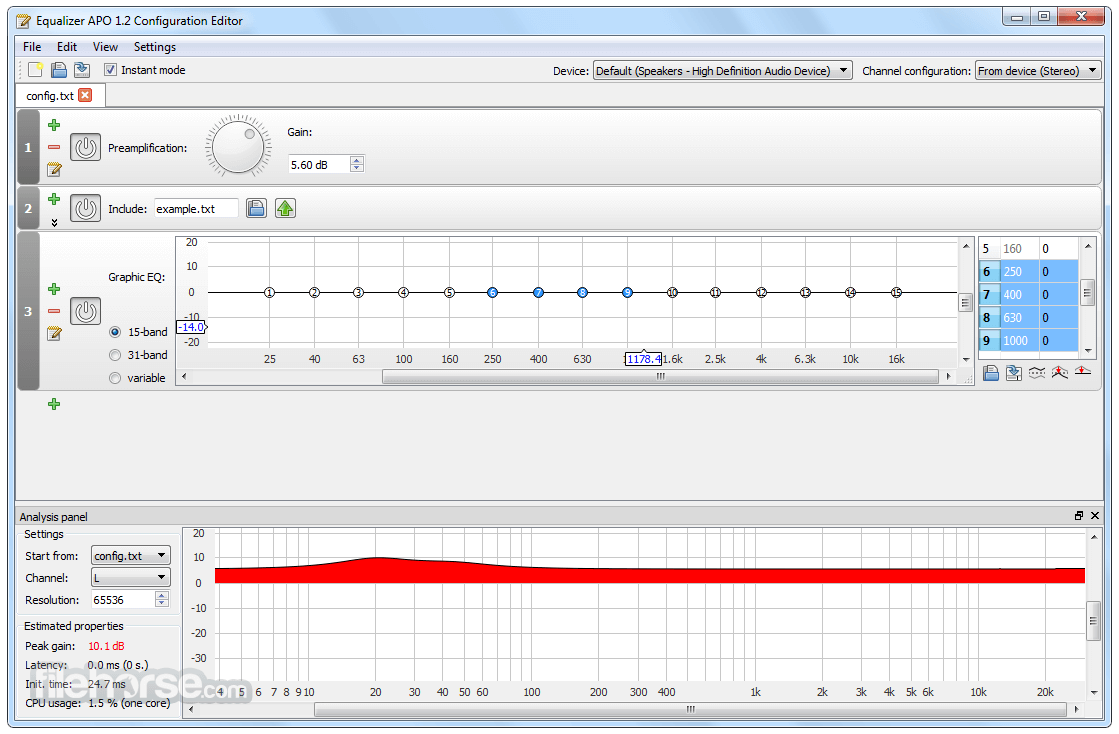
Real-time Equalization: It provides a graphical user interface (GUI) and a system-wide parametric equalizer that allows you to adjust the frequency response of your audio output in real time. This means you can customize the sound to your preference by boosting or cutting specific frequency bands to enhance bass, treble, or any other aspect of the audio.
Compatibility: It works with most audio playback applications and can be used with various audio sources, including media players, web browsers, games, and system sounds. It operates at the system level, which means it can affect all audio output from your computer.
Graphical User Interface: It comes with a user-friendly GUI called "Peace Equalizer GUI" that makes it easier to configure and fine-tune your equalization settings. The GUI provides a visual representation of the frequency response curve and allows you to create and save multiple profiles for different audio setups or purposes.
Extensible: It supports various audio processing plugins and can be extended with additional VST (Virtual Studio Technology) plugins for more advanced audio processing and effects.
Low Latency: The app is designed to introduce minimal latency, ensuring that audio processing does not result in noticeable delays, which can be important for real-time audio applications like gaming or live streaming.
Configuration File: It stores its configuration in a text-based configuration file, making it possible for advanced users to manually edit settings and create custom configurations if desired.
Open Source: Equalizer APO is open-source software, which means it is free to use, and its source code is available for inspection and modification by the community. This openness has led to the development of various third-party GUIs and extensions.
What’s New
Download and install the app:
Voicemeeter - Voicemeeter is a virtual audio mixer that provides a GUI for audio routing, mixing, and equalization.
FxSound - Boost the sound quality of your music with FxSound Enhancer powered by DFX.
Boom 3D - The Best System-Wide Volume Booster & Equalizer Software For PC.
SteelSeries GG - GameSense & Customization Software for the Best Gaming Experience.
Nahimic - The best audio experience, it contains audio effects and microphone effects!
Pricing
The audio app is completely FREE and open-source, making it an excellent choice for those on a budget or who prefer community-driven software.
System Requirements
Equalizer APO is relatively lightweight and should run on most Windows systems without issues. The basic requirements include a Windows operating system (Windows 7 or later) and compatible audio output devices.
PROS
It's important to note that while the app can be a powerful tool for audio enthusiasts and those looking to improve their audio experience, it may require some technical knowledge to set up and configure properly.
Additionally, using it incorrectly or excessively can potentially degrade audio quality, so it's important to adjust the settings carefully and consider the capabilities of your audio hardware. If you're willing to invest the time to learn its configuration or prefer third-party GUI frontends, Equalizer APO is a powerful and free solution for achieving the perfect audio balance on your Windows PC.
Also Available: Equalizer APO (64-bit)
Download Equalizer APO (32-bit) Latest Version Why is this app published on FileHorse? (More info)
It can be particularly useful for improving the audio quality of your computer's sound system, whether it's built-in speakers, external speakers, headphones, or any other audio output device.
Here is an overview of some of the key features and aspects of Equalizer APO 32bit:
Real-time Equalization: It provides a graphical user interface (GUI) and a system-wide parametric equalizer that allows you to adjust the frequency response of your audio output in real time. This means you can customize the sound to your preference by boosting or cutting specific frequency bands to enhance bass, treble, or any other aspect of the audio.
Compatibility: It works with most audio playback applications and can be used with various audio sources, including media players, web browsers, games, and system sounds. It operates at the system level, which means it can affect all audio output from your computer.
Graphical User Interface: It comes with a user-friendly GUI called "Peace Equalizer GUI" that makes it easier to configure and fine-tune your equalization settings. The GUI provides a visual representation of the frequency response curve and allows you to create and save multiple profiles for different audio setups or purposes.
Extensible: It supports various audio processing plugins and can be extended with additional VST (Virtual Studio Technology) plugins for more advanced audio processing and effects.
Low Latency: The app is designed to introduce minimal latency, ensuring that audio processing does not result in noticeable delays, which can be important for real-time audio applications like gaming or live streaming.
Configuration File: It stores its configuration in a text-based configuration file, making it possible for advanced users to manually edit settings and create custom configurations if desired.
Open Source: Equalizer APO is open-source software, which means it is free to use, and its source code is available for inspection and modification by the community. This openness has led to the development of various third-party GUIs and extensions.
What’s New
- Improved Bluetooth Compatibility: Fixed issues with GraphicEQ and Convolution commands not working properly on Windows 11 Bluetooth devices
- Better Stability on Older CPUs: Resolved crashes caused by missing AVX support when loading FFTW, especially in the Configuration Editor
- Enhanced Device Detection: Fixed Voicemeeter Banana detection so all outputs now appear correctly in the device selector
- New Language Support: Added French and Simplified Chinese translations contributed by the community
- General Fixes: Additional improvements for overall reliability and smoother performance
Download and install the app:
- Visit the official website or FileHorse
- Download the installer that matches your system architecture (32-bit or 64-bit).
- Run the installer and follow the on-screen instructions.
- During installation, you'll be prompted to select the audio devices for which you want to enable Equalizer APO. Make sure to select the devices you wish to apply equalization to.
- It doesn't have a graphical user interface (GUI). Instead, it relies on a text-based configuration file. The main configuration file is typically located at: C:\Program Files\EqualizerAPO\config\config.txt.
- You can edit this configuration file using a text editor like Notepad.
- Open the config.txt file in a text editor.
- Scroll down to the section labeled "GraphicEQ" or "ParametricEQ," depending on your preference.
- To adjust the graphic equalizer settings, you can modify the values under the "GraphicEQ" section. You'll see frequency bands and their corresponding gain values. You can change the gain values to boost or cut specific frequency ranges.
- To use a parametric equalizer, modify the values under the "ParametricEQ" section. You'll specify parameters like center frequency, bandwidth (Q), and gain for each filter. You can add or edit filters as needed to shape the audio output.
- After making the desired changes to the configuration file, save it.
- To apply the equalization settings, you'll need to restart your computer or restart the audio service. To restart the audio service, open the Windows Services application (services.msc), locate "APO Equalizer," and restart it.
- Play audio content (music, videos, etc.) to test the equalization settings. Make adjustments as needed in the configuration file until you achieve the desired audio quality.
- It also allows you to configure additional settings, such as pre-amplification, volume control, and more. These settings can be found in the config.txt file as well.
Voicemeeter - Voicemeeter is a virtual audio mixer that provides a GUI for audio routing, mixing, and equalization.
FxSound - Boost the sound quality of your music with FxSound Enhancer powered by DFX.
Boom 3D - The Best System-Wide Volume Booster & Equalizer Software For PC.
SteelSeries GG - GameSense & Customization Software for the Best Gaming Experience.
Nahimic - The best audio experience, it contains audio effects and microphone effects!
Pricing
The audio app is completely FREE and open-source, making it an excellent choice for those on a budget or who prefer community-driven software.
System Requirements
Equalizer APO is relatively lightweight and should run on most Windows systems without issues. The basic requirements include a Windows operating system (Windows 7 or later) and compatible audio output devices.
PROS
- Powerful system-wide audio equalization.
- Parametric equalizer with unlimited filters.
- Real-time preview and low latency.
- Supports VST plugins.
- Open-source and free to use.
- This application has been discontinued. An unofficial website, equalizerapo.com, has appeared, but its safety and security are questionable.
- Lacks a graphical user interface (GUI) by default.
- Configuration can be challenging for beginners.
- Third-party GUI frontends are needed for a more user-friendly experience.
It's important to note that while the app can be a powerful tool for audio enthusiasts and those looking to improve their audio experience, it may require some technical knowledge to set up and configure properly.
Additionally, using it incorrectly or excessively can potentially degrade audio quality, so it's important to adjust the settings carefully and consider the capabilities of your audio hardware. If you're willing to invest the time to learn its configuration or prefer third-party GUI frontends, Equalizer APO is a powerful and free solution for achieving the perfect audio balance on your Windows PC.
Also Available: Equalizer APO (64-bit)
Download Equalizer APO (32-bit) Latest Version Why is this app published on FileHorse? (More info)
##
畫面截圖
- 2026-04-06 Equalizer APO 1.4.2 (32-bit) 9.81 MB
- 2024-09-02 Equalizer APO 1.4 (32-bit) 8.18 MB
- 2024-02-03 Equalizer APO 1.3.2 (32-bit) 7.26 MB
- 2024-01-27 Equalizer APO 1.3.1 (32-bit) 7.26 MB
- 2022-05-23 Equalizer APO 1.3 (32-bit) 7.25 MB
- 2019-06-10 Equalizer APO 1.2.1 (32-bit) 6.86 MB
- 2017-07-19 Equalizer APO 1.2 (32-bit) 6.86 MB
- 2016-08-21 Equalizer APO 1.1.2 (32-bit) 6.57 MB