⚠ 這是歷史版本頁面 — 查看 Exact Audio Copy 最新版本 →

- 目前版本1.6
- 更新日期2020-11-11
- 檔案大小4.85 MB
- 檔案名稱eac-1.6.exe
- 作業系統Windows XP / Vista / Windows 7 / Windows 8 / Windows 10
- 支援語系English
- 授權型式免費軟體
- 開發商 Andre Wiethoff
- 軟體分類Windows 軟體 / 音訊軟體
##
編輯短評
Exact Audio Copy 是一款由 Andre Wiethoff 開發的數位音訊擷取工具,自 1990 年代末推出以來,一直以極高的精確度著稱,專門用於將音樂 CD 轉成高保真音軌,能有效處理刮傷光碟可能造成的失真。其最顯著特色是採用精確的讀取與校正機制,確保擷取結果忠於原音。不過,這款軟體目前已停止更新,使用者評價中等,屬於小眾但經典的工具。
適合對音質有嚴格要求的用戶,例如要將 CD 轉成無損格式保存的音樂收藏者。與其他音訊擷取軟體相比,EAC 的優勢在於精確度,但操作介面較為複雜,且因停止更新,可能無法支援最新的光碟機或作業系統。它僅提供英文介面,且僅支援 Windows 平台,免費使用。若需要更現代化的功能,可考慮其他仍在活躍更新的替代軟體。
##
翻譯排程處理中,以下暫以英文原文呈現
軟體介紹
Exact Audio Copy (EAC) is a renowned digital audio extraction app developed by Andre Wiethoff. Launched in the late 1990s, EAC has stood the test of time as a premier tool for ripping audio CDs with unparalleled accuracy.
Note: This utility is discontinued.
It's specifically designed to ensure precise and high-fidelity extraction of audio tracks from CDs, aiming to reproduce the original audio content faithfully.
With other audio grabbers, you usually need to listen to every grabbed wave because they only do jitter correction. Scratched CDs read on CD-ROM drives often produce distortions.
But listening to every extracted audio track is a waste of time. Exact Audio Copy for PC conquers these problems by making use of several technologies like multi-reading with verify and AccurateRip.
Highlights
Installing this tool is a straightforward process. Users can download the software from the official website or reputable software repositories (like FileHorse.com).
The installation wizard guides users through the setup process, allowing them to customize installation options according to their preferences.
How to Use
FAQs
Does Exact Audio Copy support batch processing?
Yes, it allows users to rip multiple CDs consecutively by queuing them in the extraction list.
Can I customize the naming format for ripped audio files?
Users have full control over the naming convention of extracted audio files, including track numbers, titles, and artist names.
Does the EAC tool support CD-Text extraction?
Yes, it can extract CD-Text information if it's available on the source CD.
Can I use Exact Audio Copy to create audio compilations from multiple CDs?
Certainly, it supports the creation of audio compilations by combining tracks from different CDs using cue sheets.
What`s New
In the latest update (version 1.8), a bug has been addressed that previously affected fresh installations on new machines - specifically, the app failed to retrieve metadata due to a missing email address. This release fixes that issue, ensuring smoother setup and functionality right from the start.
System Requirements
The tool is compatible with Windows operating systems, including Windows 7, 8, 10, or 11.
The software has modest system requirements and can run smoothly on most modern PCs.
PROS
Download Exact Audio Copy Latest Version Why is this app published on FileHorse? (More info)
Note: This utility is discontinued.
It's specifically designed to ensure precise and high-fidelity extraction of audio tracks from CDs, aiming to reproduce the original audio content faithfully.
With other audio grabbers, you usually need to listen to every grabbed wave because they only do jitter correction. Scratched CDs read on CD-ROM drives often produce distortions.
But listening to every extracted audio track is a waste of time. Exact Audio Copy for PC conquers these problems by making use of several technologies like multi-reading with verify and AccurateRip.
Highlights
- All kinds of CD and DVD drives are supported (including USB, Firewire, SATA, and SCSI drives).
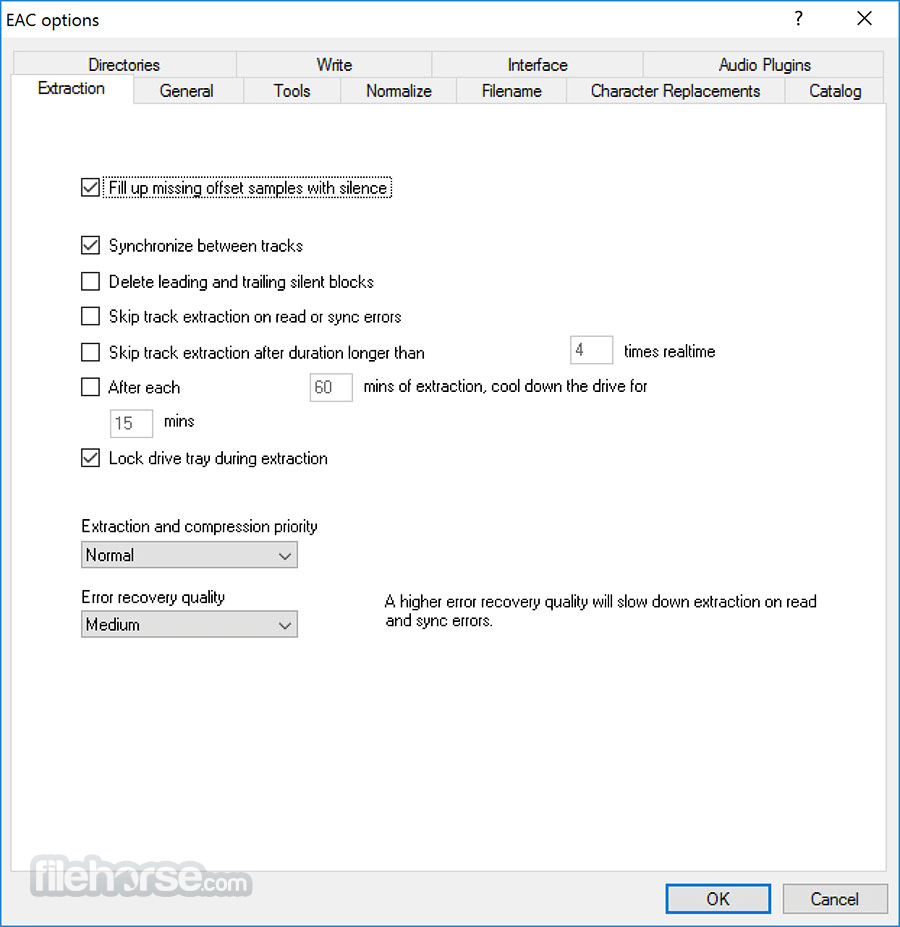
- A secure, fast, and burst extraction method is selectable. Fast extraction should run at the same speed as other grabbers with jitter correction, but it is probably not exact anymore. Burst mode just grabs the audio data without any synchronization.
- EAC can copy ranges of music data, not only tracks.
- Volume normalization of extracted audio to a given percentage.
- Compression offset support for exact compression/decompression.
- Automatic creation of CUE sheets for Burnnn, Feurio, Nero, or even EAC, which can include all gaps, indices, track attributes, UPC, and ISRC, and also CD-Text for an exact copy.
- Synchronizing between tracks for non-accurate stream drives.
- Record and loop record functions for recording from LP, radio, etc.
- Catalog extraction function (e.g., first 20 seconds of a track).
- CD-Write support for some drives (internally and using CDRDAO).
- Small WAV editor with the following functionality: delete, trim, normalize, pad, glitch removal, pop detection, interpolation of ranges, noise reduction, fade in/out, undo (and much more).
- Accurate Audio Ripping: It employs advanced error detection and correction algorithms to extract audio tracks from CDs with utmost precision.
- Secure Mode: This feature performs multiple read passes to verify and correct any errors encountered during the ripping process, ensuring a flawless extraction.
- Metadata Retrieval: It automatically fetches metadata such as track titles, artist names, and album information from online databases like Freedb and CDDB.
- Compression Options: Users can choose from various audio formats and encoding options, including WAV, FLAC, MP3, and more, catering to different preferences and requirements.
- Cue Sheet Support: It supports cue sheets, allowing users to preserve the original CD structure and track information when ripping audio.
Installing this tool is a straightforward process. Users can download the software from the official website or reputable software repositories (like FileHorse.com).
The installation wizard guides users through the setup process, allowing them to customize installation options according to their preferences.
How to Use
- Launch the program.
- Insert the audio CD you wish to rip into your CD/DVD drive.
- It automatically detects the inserted disc and retrieves relevant metadata.
- Choose your preferred extraction method (e.g., Secure Mode).
- Select output format and encoding options.
- Click on the "Extract" button to initiate the ripping process.
- Once the extraction is complete, the ripped audio tracks are saved to the specified destination folder.
FAQs
Does Exact Audio Copy support batch processing?
Yes, it allows users to rip multiple CDs consecutively by queuing them in the extraction list.
Can I customize the naming format for ripped audio files?
Users have full control over the naming convention of extracted audio files, including track numbers, titles, and artist names.
Does the EAC tool support CD-Text extraction?
Yes, it can extract CD-Text information if it's available on the source CD.
Can I use Exact Audio Copy to create audio compilations from multiple CDs?
Certainly, it supports the creation of audio compilations by combining tracks from different CDs using cue sheets.
What`s New
In the latest update (version 1.8), a bug has been addressed that previously affected fresh installations on new machines - specifically, the app failed to retrieve metadata due to a missing email address. This release fixes that issue, ensuring smoother setup and functionality right from the start.
System Requirements
The tool is compatible with Windows operating systems, including Windows 7, 8, 10, or 11.
The software has modest system requirements and can run smoothly on most modern PCs.
PROS
- Unmatched accuracy in audio extraction
- Secure mode for error-free ripping
- Wide range of supported audio formats
- Lightweight and free of charge
- Regular updates and ongoing development
- This product is not developed actively anymore
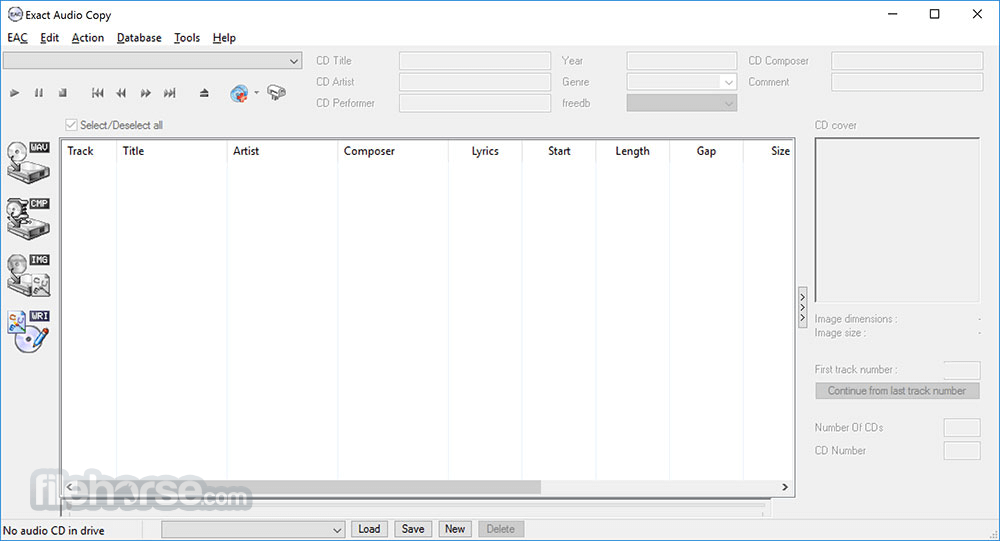
- Outdated user interface
- Steep learning curve for beginners
- Limited to the Windows platform
Download Exact Audio Copy Latest Version Why is this app published on FileHorse? (More info)
##
畫面截圖
- 2026-08-13 Exact Audio Copy 1.8 5.2 MB
- 2024-07-14 Exact Audio Copy 1.7 5.23 MB
- 2020-11-11 Exact Audio Copy 1.6 4.85 MB
- 2020-02-24 Exact Audio Copy 1.5 4.87 MB
- 2020-02-07 Exact Audio Copy 1.4 4.9 MB
- 2016-09-05 Exact Audio Copy 1.3 4.84 MB