⚠ 這是歷史版本頁面 — 查看 Far Manager 3.0 Build 6699 (64-bit) 最新版本 →

Far Manager 3.0 Build 6600 (64-bit)
v 6600 (64-bit)
Windows
開源軟體
7.08/10 (36)
- 目前版本6600 (64-bit)
- 更新日期2025-11-26
- 檔案大小14.1 MB
- 檔案名稱Far30b6600.x64.20251124.msi
- 作業系統Windows 7 64 / Windows 8 64 / Windows 10 64 / Windows 11
- 支援語系English
- 授權型式開源軟體
- 開發商 Eugene Roshal
- 軟體分類Windows 軟體 / 檔案傳輸與網路
##
編輯短評
Far Manager 是由 RAR 壓縮格式開發者 Eugene Roshal 打造的檔案管理工具,以文字模式運作,提供雙面板介面與命令列操作,能快速完成檢視、編輯、複製、重新命名等檔案與資料夾管理動作。它最鮮明的特色是高度依賴鍵盤操作,對熟悉命令列的使用者來說效率極高;這款開源軟體目前仍持續活躍更新,近一年來釋出多次版本,顯示維護相當積極,不過在檔案管理同類工具中屬於小眾選擇,評價人數不多但普遍不錯。
這套軟體適合習慣鍵盤快捷鍵、常在遠端伺服器或低資源環境工作的使用者,尤其需要大量批次處理檔案時,它的效率會比圖形介面工具更突出。與 Internet Download Manager、uTorrent 等偏重下載或傳輸的熱門工具相比,Far Manager 定位在純粹的檔案管理,功能取向不同,取捨在於它沒有圖形拖曳介面,學習曲線較陡。軟體為開源授權、免安裝即可使用,但僅提供英文介面,且目前沒有官方中文版,對不熟悉英文操作介面的人來說需要多花時間適應。
##
翻譯排程處理中,以下暫以英文原文呈現
軟體介紹
Far Manager 64-bit is a program for managing files and archives in Windows operating systems. It works in text mode and provides a simple and intuitive interface for performing most of the necessary actions:
This tool offers a rich set of features, making it a versatile choice for both novice and advanced users who need efficient file manipulation capabilities.
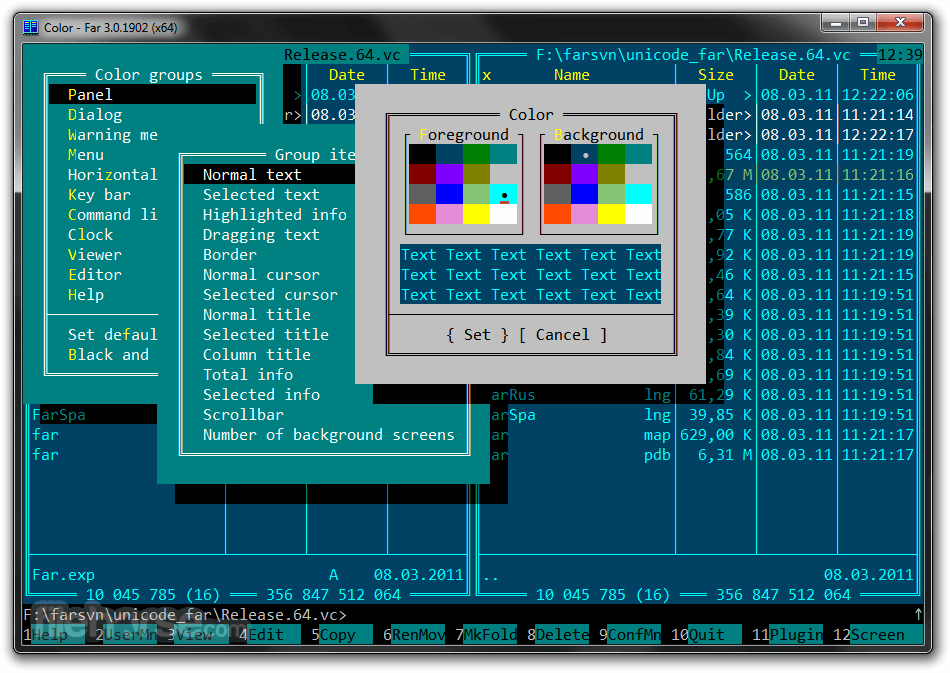
Far Manager has a multi-language, easily configurable interface. File system navigation is made easier through the use of color highlighting and sort groups.
The functionality of Far Manager 64-bit is greatly extended by external DLL modules — plugins (made possible by a special set of interfaces — the Plugins API). For example: archive support, FTP client, temporary panel, and network browser are all implemented as plugins included in the standard distribution of Far.
Features
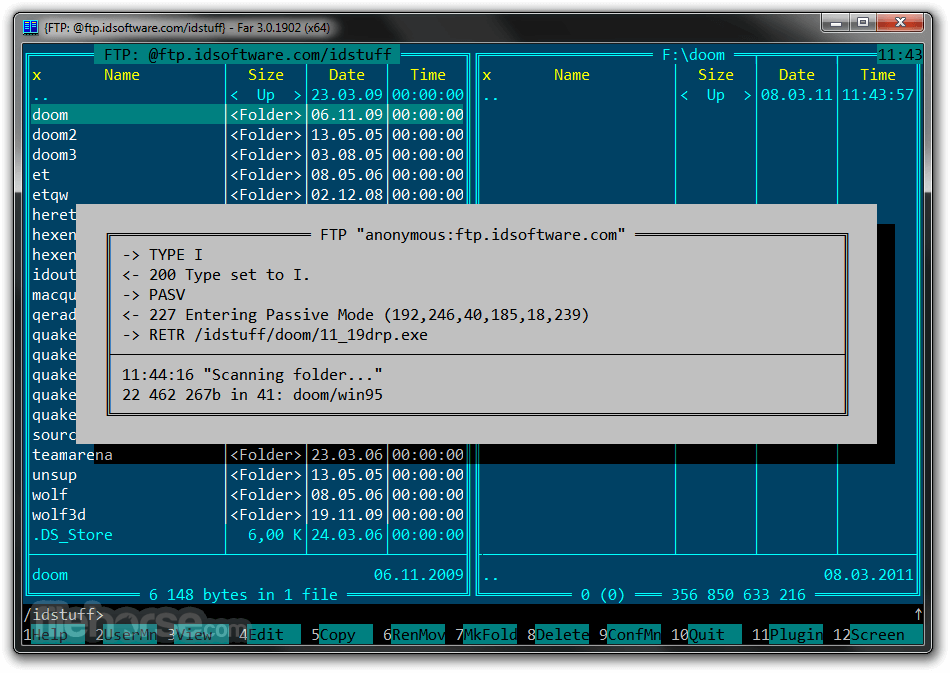
User Interface: A dual-panel layout that allows users to view and manage files and directories efficiently. Each panel can display a different location, making it easy to move files between directories.
Plugin Support: Extensive plugin support allows users to extend the functionality of this app. Plugins can be used for tasks like network browsing, FTP management, text editing, and more.
Archive Handling: Built-in support for handling various archive formats such as ZIP, RAR, and TAR. Users can easily extract, create, and manage archives directly within Far Manager.
Customization: Highly customizable, allowing users to change the appearance, key bindings, and behavior of the software to suit their preferences.
Macro System: An advanced macro system enables users to automate repetitive tasks, enhancing productivity.
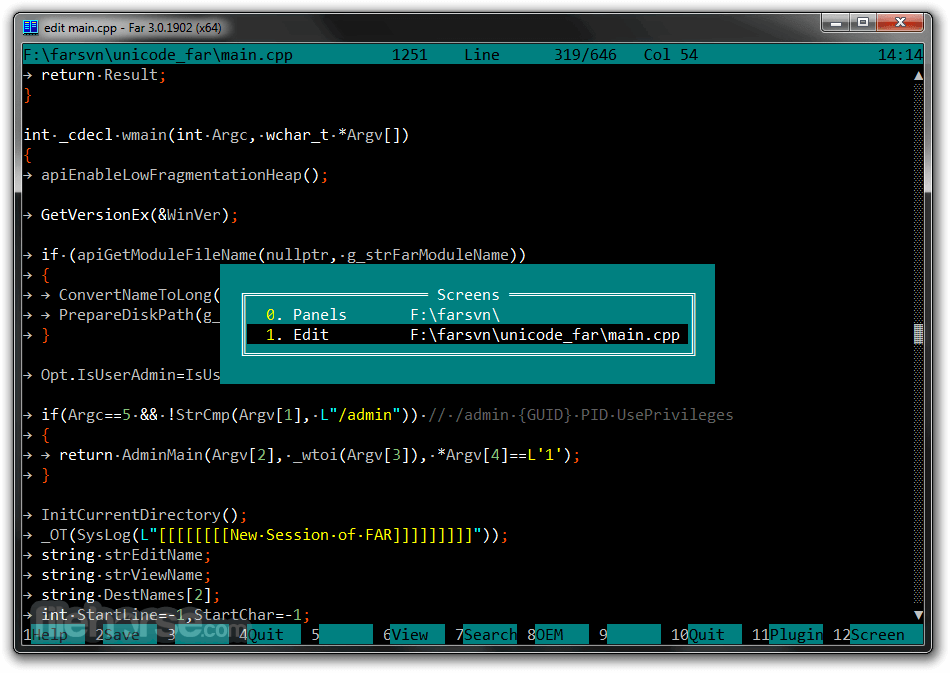
Text Editing: A built-in text editor with syntax highlighting, useful for editing configuration files or simple programming tasks.
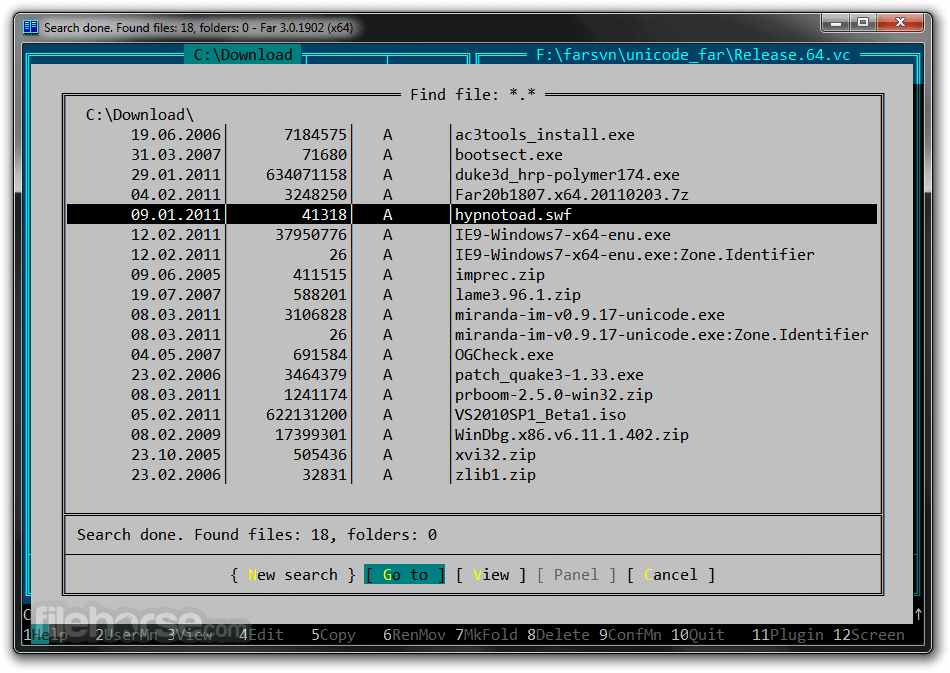
File Search: Powerful file search capabilities, including the ability to search within archives and using regular expressions.
Multi-language Support: It supports multiple languages, making it accessible to a broader audience.
User Interface
Far Manager's user interface is based on a text-mode design, reminiscent of DOS applications. It features a dual-panel layout where each panel can independently navigate the file system. This layout is particularly useful for tasks such as comparing directories, copying files, and organizing data.
The interface may appear outdated to some users, but it is highly functional and efficient once mastered. Navigation is primarily done through keyboard shortcuts, which are customizable, allowing users to set up the environment to their liking.
Installation and Setup
How do I install plugins in Far Manager?
Download the plugin files and place them in the "Plugins" directory within the Far Manager installation folder. Then, restart Far Manager and activate the plugin from the Plugins menu (Alt+Shift+F11).
Can I customize keyboard shortcuts?
Yes, you can customize keyboard shortcuts by editing the "KeyMacros" configuration file located in the app directory. This allows you to set up shortcuts that suit your workflow.
How do I search for files within archives?
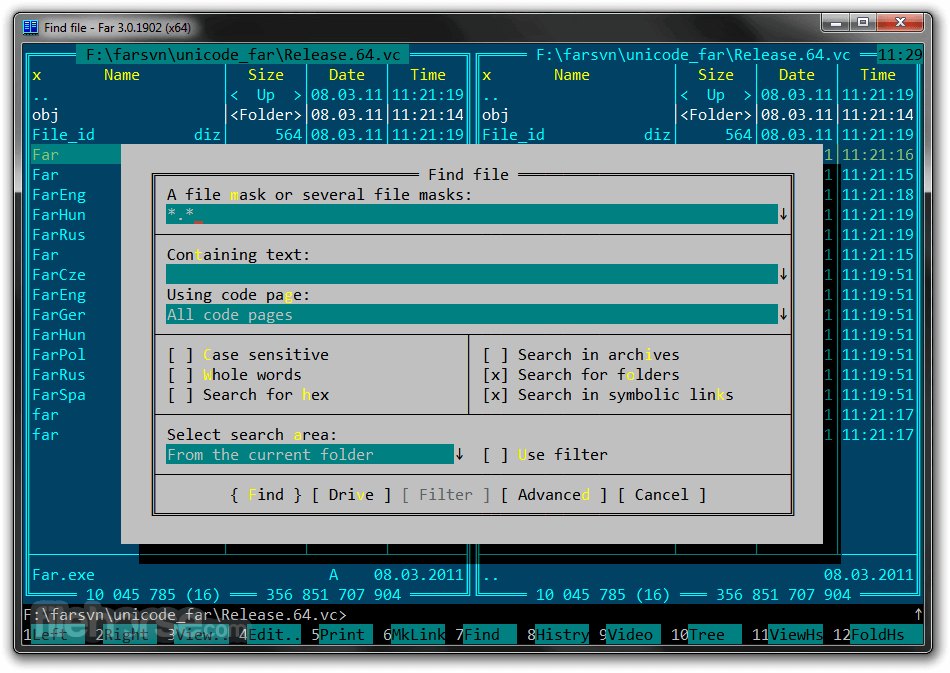
Use the Alt+F7 search dialog and enable the option to search within archives. It supports searching through various archive formats like ZIP, RAR, and TAR.
Is there a way to transfer files over a network?
Yes, you can use network-related plugins, such as the FTP plugin, to connect and transfer files over a network. Access these plugins from the Plugins menu (Alt+Shift+F11).
How do I update Far Manager to the latest version?
Download the latest version from the official website and run the installer. During installation, choose the option to update your existing installation to preserve your settings and configurations.
Alternatives
Total Commander - A popular file manager with a dual-pane interface and extensive plugin support.
FreeCommander - Easy-to-use alternative to the standard Windows file manager.
Directory Opus - A powerful and customizable file manager with a rich set of features. It provides a modern interface and advanced functionality, making it suitable for power users.
Multi Commander - An free, cross-platform file manager inspired by Total Commander. It offers a dual-pane layout, plugin support, and extensive customization options.
Q-Dir - A lightweight file manager with a unique four-pane layout. It offers basic file management features and is suitable for users looking for a simple yet functional tool.
SpeedCommander - File manager and displays files and folders using two-pane layout.
XYplorer: XYplorer is a feature-rich file manager for Windows with tabbed browsing and a customizable interface.
Pricing
Far Manager is free and open-source software, distributed under the GNU General Public License (GPL). Users can download, use, and modify the software without any cost.
Contributions to the development and maintenance of the project are welcome, and users can support the project through donations.
System Requirements
Download Far Manager Latest Version Why is this app published on FileHorse? (More info)
- Viewing files and directories
- Editing, copying and renaming files
- And many other actions
This tool offers a rich set of features, making it a versatile choice for both novice and advanced users who need efficient file manipulation capabilities.
Far Manager has a multi-language, easily configurable interface. File system navigation is made easier through the use of color highlighting and sort groups.
The functionality of Far Manager 64-bit is greatly extended by external DLL modules — plugins (made possible by a special set of interfaces — the Plugins API). For example: archive support, FTP client, temporary panel, and network browser are all implemented as plugins included in the standard distribution of Far.
Features
User Interface: A dual-panel layout that allows users to view and manage files and directories efficiently. Each panel can display a different location, making it easy to move files between directories.
Plugin Support: Extensive plugin support allows users to extend the functionality of this app. Plugins can be used for tasks like network browsing, FTP management, text editing, and more.
Archive Handling: Built-in support for handling various archive formats such as ZIP, RAR, and TAR. Users can easily extract, create, and manage archives directly within Far Manager.
Customization: Highly customizable, allowing users to change the appearance, key bindings, and behavior of the software to suit their preferences.
Macro System: An advanced macro system enables users to automate repetitive tasks, enhancing productivity.
Text Editing: A built-in text editor with syntax highlighting, useful for editing configuration files or simple programming tasks.
File Search: Powerful file search capabilities, including the ability to search within archives and using regular expressions.
Multi-language Support: It supports multiple languages, making it accessible to a broader audience.
User Interface
Far Manager's user interface is based on a text-mode design, reminiscent of DOS applications. It features a dual-panel layout where each panel can independently navigate the file system. This layout is particularly useful for tasks such as comparing directories, copying files, and organizing data.
The interface may appear outdated to some users, but it is highly functional and efficient once mastered. Navigation is primarily done through keyboard shortcuts, which are customizable, allowing users to set up the environment to their liking.
Installation and Setup
- Download: Visit the official website or FileHorse.com and download the installer for the latest version.
- Run Installer: Launch the downloaded file and follow the on-screen instructions. The installation process is quick and does not require any advanced configuration.
- Initial Setup: Upon first launch, it will prompt you to configure some basic settings, such as the preferred language and keyboard layout.
- Visit the official website.
- Download the installer file that matches your system architecture (32-bit or 64-bit).
- Launch the installer and follow the prompts.
- Select installation directory and choose additional components if required.
- Complete the installation and launch this program.
- Configure initial settings, including language and keyboard layout.
- Navigating Directories: Use the arrow keys to navigate through directories and files. The Tab key switches between the two panels.
- File Operations: Common operations like copying (F5), moving (F6), and deleting (F8) files are performed using function keys.
- Viewing and Editing Files: Press F3 to view a file and F4 to edit it using the built-in text editor.
- Searching for Files: Use Alt+F7 to open the search dialog, allowing you to find files based on various criteria.
- Using Plugins: Access the plugin menu with Alt+Shift+F11 to enable and configure plugins.
- Open the app and navigate to the directory containing the files you wish to manage.
- Select files using the Insert key or the spacebar.
- Perform operations such as copying (F5), moving (F6), or deleting (F8) the selected files.
- Use plugins to extend functionality, such as connecting to an FTP server or managing archives.
How do I install plugins in Far Manager?
Download the plugin files and place them in the "Plugins" directory within the Far Manager installation folder. Then, restart Far Manager and activate the plugin from the Plugins menu (Alt+Shift+F11).
Can I customize keyboard shortcuts?
Yes, you can customize keyboard shortcuts by editing the "KeyMacros" configuration file located in the app directory. This allows you to set up shortcuts that suit your workflow.
How do I search for files within archives?
Use the Alt+F7 search dialog and enable the option to search within archives. It supports searching through various archive formats like ZIP, RAR, and TAR.
Is there a way to transfer files over a network?
Yes, you can use network-related plugins, such as the FTP plugin, to connect and transfer files over a network. Access these plugins from the Plugins menu (Alt+Shift+F11).
How do I update Far Manager to the latest version?
Download the latest version from the official website and run the installer. During installation, choose the option to update your existing installation to preserve your settings and configurations.
Alternatives
Total Commander - A popular file manager with a dual-pane interface and extensive plugin support.
FreeCommander - Easy-to-use alternative to the standard Windows file manager.
Directory Opus - A powerful and customizable file manager with a rich set of features. It provides a modern interface and advanced functionality, making it suitable for power users.
Multi Commander - An free, cross-platform file manager inspired by Total Commander. It offers a dual-pane layout, plugin support, and extensive customization options.
Q-Dir - A lightweight file manager with a unique four-pane layout. It offers basic file management features and is suitable for users looking for a simple yet functional tool.
SpeedCommander - File manager and displays files and folders using two-pane layout.
XYplorer: XYplorer is a feature-rich file manager for Windows with tabbed browsing and a customizable interface.
Pricing
Far Manager is free and open-source software, distributed under the GNU General Public License (GPL). Users can download, use, and modify the software without any cost.
Contributions to the development and maintenance of the project are welcome, and users can support the project through donations.
System Requirements
- Operating System: Windows 7/8/10/11
- Processor: Intel Pentium or compatible
- Memory: 512 MB RAM
- Storage: 50 MB of free disk space
- Display: VGA or higher resolution
- Lightweight and fast
- Highly customizable
- Extensive plugin support
- Powerful macro system
- Free and open-source
- Text-based interface may not appeal to all users
- Steeper learning curve compared to GUI-based file managers
- Limited support for non-Windows platforms
Download Far Manager Latest Version Why is this app published on FileHorse? (More info)
##
畫面截圖
- 2026-06-15 Far Manager 3.0 Build 6699 (32-bit) 13.2 MB
- 2026-06-15 Far Manager 3.0 Build 6699 (64-bit) 14.1 MB
- 2026-03-24 Far Manager 3.0 Build 6666 (32-bit) 14.2 MB
- 2026-03-24 Far Manager 3.0 Build 6666 (64-bit) 14.2 MB
- 2026-02-13 Far Manager 3.0 Build 6644 (32-bit) 12.9 MB
- 2026-02-13 Far Manager 3.0 Build 6644 (64-bit) 14.2 MB
- 2025-11-26 Far Manager 3.0 Build 6600 (32-bit) 12.9 MB
- 2025-11-26 Far Manager 3.0 Build 6600 (64-bit) 14.1 MB