
- 目前版本3.3.3300
- 更新日期2026-02-20
- 檔案大小128 MB
- 檔案名稱ganttproject-3.3.3300.exe
- 作業系統Windows 7 / Windows 8 / Windows 10 / Windows 11
- 支援語系English
- 授權型式開源軟體
- 開發商 GanttProject.org
- 軟體分類Windows 軟體 / 辦公商務
##
編輯短評
GanttProject 是一套以甘特圖為核心的專案排程軟體,採用 Java 開發,可在 Windows 與 macOS 上執行。它主要協助使用者規劃時程、分配資源並追蹤進度,最鮮明的特色就是直覺的甘特圖介面,能一眼看清任務時間軸與相依關係。這套軟體屬於開源專案,更新頻率不算高,但仍有持續維護;在辦公商務分類中屬於小眾但穩定的選擇,評價普遍不錯,只是評分樣本數不多。
它適合個人或小型團隊,尤其是需要輕量級專案管理工具、又不想被商業軟體綁住的使用者。支援匯入匯出 MS Project、HTML、PDF 與試算表格式,方便與其他工具銜接。相較於 Microsoft Office 等商業方案,GanttProject 免費且開放原始碼,但功能較為精簡,介面僅提供英文,沒有中文版,使用前需留意語系門檻。授權為開源軟體,可自由下載使用。
##
軟體介紹
GanttProject 是一款以 Java 撰寫的專案排程應用程式,具備甘特圖、資源管理、行事曆、匯入/匯出(MS Project、HTML、PDF 檔案、試算表)等功能。
這是一款跨平台的桌面程式,用於專案管理與排程。
GanttProject 是一套全方位的專案管理工具,旨在協助使用者規劃、排程與管理各種規模與複雜度的專案。
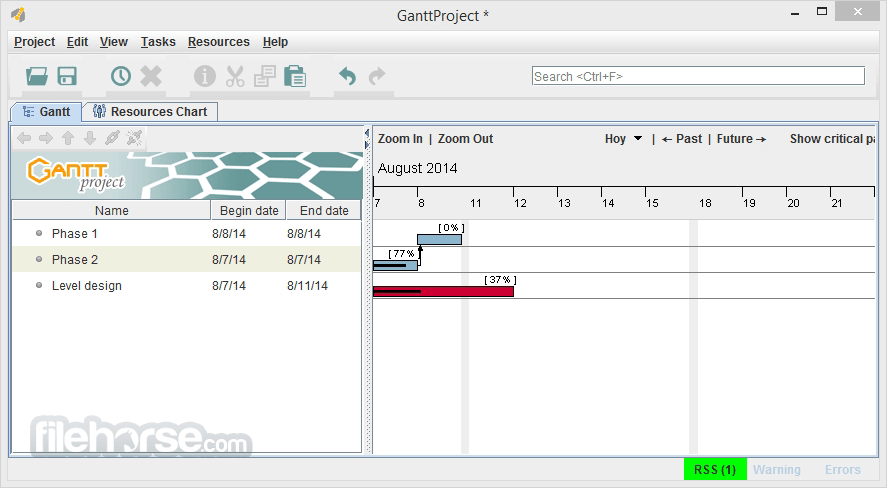
這款 PC 軟體特別以其直覺的甘特圖介面聞名,讓使用者能有效率地視覺化專案時程、分配資源,並追蹤進度。
每週有數千人下載。使用者遍及全球各大洲近 200 個國家,使用超過 25 種語言!
甘特圖
建立任務與里程碑。除了開始日期與工期外,每個任務都可以設定優先順序、成本、2.7 版新增的色彩與填滿樣式、文字備註,以及使用者自訂欄位。以工作分解結構組織任務,這是一個階層式樹狀結構,其中較低層級任務的進度、日期或成本會彙總到較高層級。
摘要任務可以收合,以隱藏目前不重要的任務。在任務之間繪製相依限制,例如「當 Y 完成時開始 X」,GanttProject 會負責強制執行這些限制。您可以加入延遲時間,或使用其他類型的限制。建立基準線,以便將目前專案狀態與先前的計畫進行比較。可從甘特圖產生唯讀的 PERT 圖。
資源圖
建立人力資源,包含基本聯絡資訊、薪資費率、2.7 版新增的角色。以不同的角色與指派單位,將資源指派到任務上。監控任務指派,並查看資源何時超載或閒置。
匯出
產生 PDF 報告,內含摘要、必要的任務與資源資訊,以及向量圖表影像。可從個別圖表產生 PNG/JPEG 影像並列印。匯出為 CSV,以便在試算表應用程式中分析資料。也支援從 CSV 匯入。Microsoft Project 的匯入與匯出應盡可能順暢。
協作
使用支援鎖定的 WebDAV 伺服器,讓多人同時處理同一個專案。使用可將雲端磁碟掛載到本機檔案系統的雲端儲存服務,將專案儲存在雲端。在區域網路中,GanttProject 會盡力防止並行寫入。
主要功能
這是一款跨平台的桌面程式,用於專案管理與排程。
GanttProject 是一套全方位的專案管理工具,旨在協助使用者規劃、排程與管理各種規模與複雜度的專案。
這款 PC 軟體特別以其直覺的甘特圖介面聞名,讓使用者能有效率地視覺化專案時程、分配資源,並追蹤進度。
每週有數千人下載。使用者遍及全球各大洲近 200 個國家,使用超過 25 種語言!
甘特圖
建立任務與里程碑。除了開始日期與工期外,每個任務都可以設定優先順序、成本、2.7 版新增的色彩與填滿樣式、文字備註,以及使用者自訂欄位。以工作分解結構組織任務,這是一個階層式樹狀結構,其中較低層級任務的進度、日期或成本會彙總到較高層級。
摘要任務可以收合,以隱藏目前不重要的任務。在任務之間繪製相依限制,例如「當 Y 完成時開始 X」,GanttProject 會負責強制執行這些限制。您可以加入延遲時間,或使用其他類型的限制。建立基準線,以便將目前專案狀態與先前的計畫進行比較。可從甘特圖產生唯讀的 PERT 圖。
資源圖
建立人力資源,包含基本聯絡資訊、薪資費率、2.7 版新增的角色。以不同的角色與指派單位,將資源指派到任務上。監控任務指派,並查看資源何時超載或閒置。
匯出
產生 PDF 報告,內含摘要、必要的任務與資源資訊,以及向量圖表影像。可從個別圖表產生 PNG/JPEG 影像並列印。匯出為 CSV,以便在試算表應用程式中分析資料。也支援從 CSV 匯入。Microsoft Project 的匯入與匯出應盡可能順暢。
協作
使用支援鎖定的 WebDAV 伺服器,讓多人同時處理同一個專案。使用可將雲端磁碟掛載到本機檔案系統的雲端儲存服務,將專案儲存在雲端。在區域網路中,GanttProject 會盡力防止並行寫入。
主要功能
- 甘特圖:建立並自訂專案時程、設定相依性,以及管理任務工期。
- 資源管理:將人員、設備與物料等資源分配給任務。
- 任務階層:將任務組織成子任務與階層結構,以獲得更好的專案架構。
- 里程碑追蹤:設定並監控專案里程碑,以評估進度與成果。
- 協作工具:分享專案檔案、指派任務給團隊成員,並進行即時協作。
- 報告:產生關於專案進度、資源分配與時程的完整報告。
- 匯出選項:以多種格式匯出專案資料,包括 PDF、CSV 與 HTML,便於分享與分析。
##
畫面截圖
##
更新日誌
3.3.3300- Calculated Columns: Custom task table columns now support SQL-based expressions, allowing automatic calculation of values directly within the project view.
- Project-Relative Week Numbers: Added an option to display week numbers relative to the project start date instead of the calendar year.
- Native Apple Silicon Support: GanttProject now runs natively on Apple Silicon (M-series) Macs, delivering improved performance and better startup reliability.
- Usability Improvements & Bug Fixes: Various stability enhancements and refinements to improve overall user experience.
It boasts a clean and intuitive user interface, with the Gantt chart taking center stage.
Navigation is straightforward, with tabs and menus logically arranged for easy access to features and functions
Customization options allow users to tailor the interface to their preferences, ensuring a comfortable and efficient user experience.
Installation and Setup
Installing this program is a breeze, with a simple download-and-install process. The software is available for Windows, macOS, and Linux platforms, catering to a wide range of users.
Upon installation, users are guided through a setup wizard to configure basic preferences and project settings, making the onboarding process seamless.
How to Use
- Create a New Project: Start by creating a new project and defining its parameters, such as start date, duration, and project name.
- Add Tasks: Populate your project by adding tasks to the Gantt chart, specifying their duration, dependencies, and resources.
- Customize Gantt Chart: Customize the Gantt chart to suit your project requirements, adjusting timelines, colors, and formatting as needed.
- Allocate Resources: Assign resources to tasks, ensuring efficient utilization and allocation of personnel, equipment, and materials.
- Track Progress: Monitor project progress by updating task statuses, marking milestones, and tracking resource usage.
- Generate Reports: Generate comprehensive reports to analyze project performance, identify bottlenecks, and make informed decisions.
Is GanttProject for PC FREE to use?
Yes, GanttProject is an open-source software distributed under the GNU General Public License (GPL) and is free to download and use.
Can I import projects from other project management software?
It supports importing projects from Microsoft Project XML files, making it easy to migrate existing projects.
Does GanttProject support collaboration features?
Yes, it offers collaboration tools such as file sharing and task assignment, facilitating teamwork and communication among project stakeholders.
Can I export GanttProject projects to other formats?
Absolutely, it provides export options for various formats, including PDF, CSV, and HTML, allowing users to share project data with stakeholders or integrate it with other tools.
What are the system requirements for running GanttProject?
The software is lightweight and can run on most modern computers. It is compatible with Windows (7, 8, 1,0 or 11), macOS, and Linux operating systems.
Alternatives
Trello - A visual task management platform that uses boards, lists, and cards to organize projects and collaborate with teams in a simple, flexible way.
Asana - A collaborative work management tool that helps teams plan, track, and manage tasks, projects, and workflows with timelines and automation features.
Wrike - A cloud-based project management solution offering task tracking, team collaboration, reporting tools, and customizable workflows for businesses.
ClickUp - An all-in-one productivity and project management platform that combines task management, docs, goals, time tracking, and automation in a highly customizable workspace.
Pricing
The software is completely FREE to download and use, making it an attractive option for individuals and organizations with budget constraints.
System Requirements
- Operating System: Windows (7, 8, 10, 11)
- Processor: 1 GHz or faster
- RAM: 512 MB
- Disk Space: 40 MB
- Free and open-source
- Intuitive Gantt chart interface
- Resource management capabilities
- Collaboration tools
- Cross-platform compatibility
- Lacks advanced features compared to paid alternatives
- Limited support options
- Steeper learning curve for complex projects
All in all, it offers a robust project management solution for users seeking a free and versatile tool to plan, schedule, and track projects effectively. With its intuitive interface, comprehensive feature set, and cross-platform compatibility, GanttProject is a valuable asset for individuals, teams, and organizations looking to streamline their project management processes without breaking the bank.
While it may not have all the bells and whistles of premium software, its affordability and accessibility make it a compelling choice for project managers and teams across various industries.
Also Available: Download GanttProject for Mac
Download GanttProject Latest Version Why is this app published on FileHorse? (More info)
- 2026-02-20 GanttProject 3.3.3300 128 MB
- 2022-08-18 GanttProject 3.2.3240 114 MB
- 2021-05-18 GanttProject 3.1.3100 109 MB
- 2020-04-24 GanttProject 2.8.11 17.9 MB
- 2019-01-31 GanttProject 2.8.10 17.8 MB
- 2018-08-22 GanttProject 2.8.9 17.8 MB
- 2018-05-23 GanttProject 2.8.8 15.7 MB
- 2018-04-20 GanttProject 2.8.7 13.9 MB