Gigabyte Fast Boot 24.0418.1
v 24.0418.1
Windows
免費軟體
7.3/10 (17)
- 目前版本24.0418.1
- 更新日期2025-06-27
- 檔案大小7.99 MB
- 檔案名稱mb_utility_fast_boot_B24.0418.1.zip
- 作業系統Windows 10 (64-bit) / Windows 11
- 支援語系English
- 授權型式免費軟體
- 開發商 Gigabyte Technology
- 軟體分類Windows 軟體 / 系統優化
##
翻譯排程處理中,以下暫以英文原文呈現
軟體介紹
Gigabyte Fast Boot is a lightweight utility that can be downloaded and become accessible from inside the GIGABYTE APP Center, the latest unified system utility application created by Gigabyte.
The APP Center offers users of all knowledge levels easy access to the system utility tools that are separated into downloadable modules, enabling them to download, install and access the modules that they are really interested in.
This approach reduces clutter, provides a unified user interface, promotes user customization, and allows both novices and seasoned enthusiasts with the expanding set of tools that get regular individual updates.
As of early 2025, the APP Center features the following downloadable modules – System Tweaking (Easy Tune, System Information Viewer, and Fast Boot), Networking/Personal Cloud (Cloud Station, LAN Optimizer, and CFOS Speed Internet Accelerator Software), Backup and Security (Smart Recovery 2, Smart TimeLock and USB Blocker) and Convenience (Game Controller, @BIOS and EZ Setup).
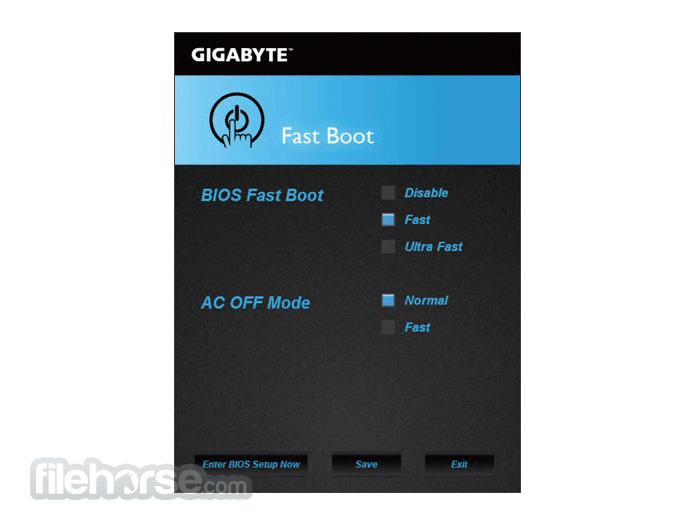
Gigabyte Fast Boot consists of a single interface window that features configuration options for enabling fast boot of your PC (Disable, Fast, and Ultra Fast) and enabling fast boot using AC OFF Mode. If activated, this option will flip the toggle that is available in your BIOS settings, enabling your PC to speed up the boot sequence and more quickly start loading Windows OS. Simply put, this small app allows you to skip visiting BIOS to activate or deactivate this feature.
While this option is supported by the majority of modern Gigabyte motherboards, users need to be aware of the limitations of this system. When the fast boot is activated, BIOS will skip the standard procedure of detecting all the plugged accessories of your motherboard, saving numerous seconds during each boot. However, if your hardware configuration gets changed or some accessory becomes damaged and unresponsive, the Fast Boot option may lead to boot errors.
More Apps from Gigabyte
Gigabyte App Center
Check related updates, download the latest apps, Gigabyte drivers and BIOS!
Gigabyte Easy Tune
Fine-tune your PC settings or adjust system and memory clocks and voltages
PROS
Note: Please install the APP Center first before installing this utility.
Download Gigabyte Fast Boot Latest Version Why is this app published on FileHorse? (More info)
The APP Center offers users of all knowledge levels easy access to the system utility tools that are separated into downloadable modules, enabling them to download, install and access the modules that they are really interested in.
This approach reduces clutter, provides a unified user interface, promotes user customization, and allows both novices and seasoned enthusiasts with the expanding set of tools that get regular individual updates.
As of early 2025, the APP Center features the following downloadable modules – System Tweaking (Easy Tune, System Information Viewer, and Fast Boot), Networking/Personal Cloud (Cloud Station, LAN Optimizer, and CFOS Speed Internet Accelerator Software), Backup and Security (Smart Recovery 2, Smart TimeLock and USB Blocker) and Convenience (Game Controller, @BIOS and EZ Setup).
Gigabyte Fast Boot consists of a single interface window that features configuration options for enabling fast boot of your PC (Disable, Fast, and Ultra Fast) and enabling fast boot using AC OFF Mode. If activated, this option will flip the toggle that is available in your BIOS settings, enabling your PC to speed up the boot sequence and more quickly start loading Windows OS. Simply put, this small app allows you to skip visiting BIOS to activate or deactivate this feature.
While this option is supported by the majority of modern Gigabyte motherboards, users need to be aware of the limitations of this system. When the fast boot is activated, BIOS will skip the standard procedure of detecting all the plugged accessories of your motherboard, saving numerous seconds during each boot. However, if your hardware configuration gets changed or some accessory becomes damaged and unresponsive, the Fast Boot option may lead to boot errors.
More Apps from Gigabyte
Gigabyte App Center
Check related updates, download the latest apps, Gigabyte drivers and BIOS!
Gigabyte Easy Tune
Fine-tune your PC settings or adjust system and memory clocks and voltages
PROS
- Quick Boot Times: Significantly reduces the time it takes for your system to boot up.
- Easy to Use: Simple interface for enabling and configuring the fast boot settings.
- Improved Efficiency: Helps streamline the boot process by bypassing some of the initial hardware checks.
- Compatibility: Works well with Gigabyte motherboards and systems.
- Limited Troubleshooting: Makes it more difficult to access BIOS/UEFI settings during boot, which can complicate troubleshooting.
- Compatibility Issues: May not work seamlessly with all hardware configurations and peripheral devices.
- Potential Stability Problems: In rare cases, can cause instability or boot issues, especially after hardware changes.
Note: Please install the APP Center first before installing this utility.
Download Gigabyte Fast Boot Latest Version Why is this app published on FileHorse? (More info)
##
畫面截圖