⚠ 這是歷史版本頁面 — 查看 GoPro MAX Exporter 最新版本 →

GoPro MAX Exporter 1.6.28
v 1.6.28
Windows
免費軟體
8.4/10 (22)
- 目前版本1.6.28
- 更新日期2019-10-22
- 檔案大小1.86 MB
- 檔案名稱GoProMAXExporter_1.6.28.AppxBundle
- 作業系統Windows 10 (32-bit) / Windows 10 (64-bit)
- 支援語系English
- 授權型式免費軟體
- 開發商 GoPro, Inc.
- 軟體分類Windows 軟體 / 影片軟體
##
編輯短評
GoPro MAX Exporter 是專為 GoPro MAX 360 度相機使用者設計的免費 PC 工具,主要解決這類相機拍攝的原始檔案難以直接匯入一般剪輯軟體的問題。它能將影片匯出成標準的球面 MP4 格式,並提供多種解析度與編碼選項,還支援地平線校正這類實用功能。這套軟體由原廠持續維護,但更新頻率不算高,在同類工具中屬於小眾選擇,評價普遍不錯,只是評分人數不多。
如果你手邊有 GoPro MAX 相機,又想把 360 度素材轉成能順暢剪輯、上傳社群的格式,這套工具就是官方提供的正規途徑。與 KMPlayer 或 K-Lite 這類通用播放或編碼工具相比,它功能單一、只服務特定機型,但勝在針對性強、操作直接。軟體為免費授權,僅支援 Windows 平台,介面只有英文,使用前需留意語系與系統相容性。
##
翻譯排程處理中,以下暫以英文原文呈現
軟體介紹
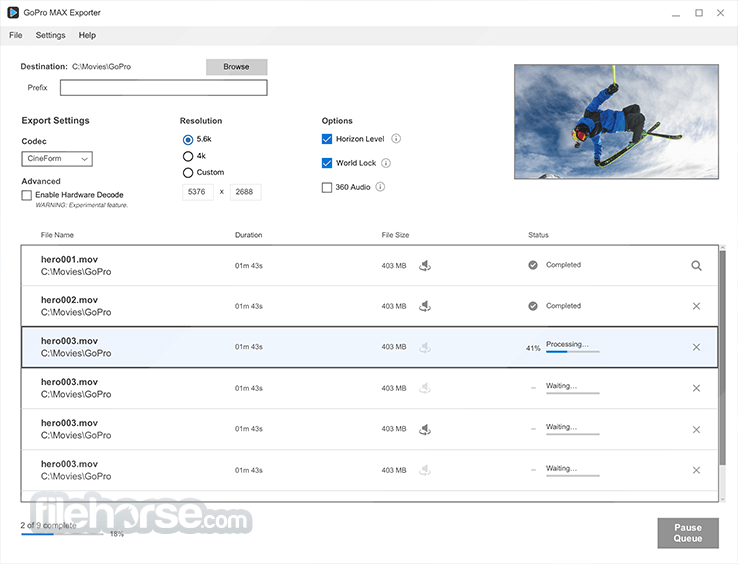
With GoPro MAX Exporter you can easily export standard spherical .mp4 files that play nicely with some of your favorite editing programs and can be shared on social.
Choose from a range of resolutions (5.6K, 4K, custom) and codecs (CineForm, HEVC, H.264), play with game-changing features like horizon leveling, and take your footage to the max.
GoPro MAX Exporter is a PC software designed specifically for GoPro MAX camera users. This app facilitates the seamless transfer, management, and export of media content captured with the GoPro MAX 360-degree camera.
It streamlines the process of editing and sharing your immersive video and photo experiences.
Highlights
360-Degree Media Export: It allows you to export your 360-degree photos and videos in various formats, making it easy to share your content on social media platforms or edit it in your preferred video editing software.
Media Management: The software offers tools for organizing and managing your GoPro MAX media library. You can tag and categorize your files for easy retrieval.
360-Degree Editing: Edit your 360-degree videos directly within the software. You can trim, splice, add text, and apply filters to enhance your footage.
Stitching and Stitch Overlays: Seamlessly stitch together MAX photos and videos and overlay them for a complete 360-degree experience.
Export Customization: Customize your export settings, including resolution, frame rate, and format, to ensure your content looks its best when shared.
Easy Sharing: Easily share your 360-degree content to popular social media platforms or save it to your local storage.
User Interface
The user interface of the tool is intuitive and user-friendly. It features a clean design with a straightforward menu structure.
The primary workspace allows you to preview and edit your media content, while the toolbar provides easy access to export options and editing tools
Overall, the interface is designed to be user-friendly, even for those new to 360-degree content editing.
How to UseImport Media: Connect your GoPro MAX camera to your PC, and the software will automatically detect your device. You can then import media files from your camera. Edit Media: Use the built-in editing tools to trim, stitch, overlay, and enhance your 360-degree content. Customize Export Settings: Choose your preferred export settings, including resolution and format. Export and Share: Click the export button to save your edited content to your computer or share it directly on social media. FAQs
Is GoPro MAX Exporter compatible with Windows and macOS?
Yes, the program is compatible with both Windows and macOS operating systems.
Can I edit 360-degree content within the software?
Yes, you can edit 360-degree videos and photos within the program. It offers trimming, stitching, overlay, and other editing tools.
What export formats are supported?
It supports various export formats, including MP4 and JPEG, with customizable settings for resolution and frame rate.
Can I organize my media library with this software?
Yes, you can organize your GoPro MAX media library by tagging and categorizing your files for easy retrieval.
Is GoPro MAX Exporter a FREE software?
GoPro MAX Exporter is available for FREE as part of GoPro's software ecosystem.
Alternatives
While GoPro MAX Exporter is tailored for GoPro MAX users, there are alternative software options for editing and exporting 360-degree content, including Adobe Premiere Pro and CyberLink PowerDirector.
However, the app is a dedicated solution designed to simplify the editing and exporting process for GoPro MAX users.
Pricing
The app is available for free, making it an attractive choice for GoPro MAX camera owners who want a seamless editing and exporting experience without additional costs.
System Requirements
GoPro MAX Exporter is a valuable addition to the GoPro MAX camera ecosystem, offering a straightforward and user-friendly solution for editing and exporting 360-degree content. It streamlines the process of managing, editing, and sharing your immersive media experiences.
While it may not replace professional video editing software, it caters specifically to GoPro MAX users and provides essential tools for enhancing and sharing their content. Plus, the fact that it's available for free makes it an even more appealing choice for GoPro enthusiasts.
If you own a GoPro MAX camera and want a hassle-free way to edit and export your 360-degree content, GoPro MAX Exporter is a worthwhile software to have in your toolkit.
Note: Requires Graphics cards that support HEVC decoding and at least 6GB RAM and GoPro MAX.
Download GoPro MAX Exporter Latest Version Why is this app published on FileHorse? (More info)
Choose from a range of resolutions (5.6K, 4K, custom) and codecs (CineForm, HEVC, H.264), play with game-changing features like horizon leveling, and take your footage to the max.
GoPro MAX Exporter is a PC software designed specifically for GoPro MAX camera users. This app facilitates the seamless transfer, management, and export of media content captured with the GoPro MAX 360-degree camera.
It streamlines the process of editing and sharing your immersive video and photo experiences.
Highlights
- Export MP4 Files: Export your 360 videos as spherical .mp4 files that are compatible with select editing software and ready to be shared on social.
- Convert 360 Videos: Choose from a range of resolutions (5.6K, 4K, custom) and codecs (CineForm, HEVC, H.264).
- Horizon Leveling: Adjust the horizon in your videos to keep it level, whether you’re getting sideways, running, or doing backflips.
- World Lock: Set the orientation of your 360 videos and minimize rotation in your footage
- Batch Export: Create a queue to export multiple files all at once
360-Degree Media Export: It allows you to export your 360-degree photos and videos in various formats, making it easy to share your content on social media platforms or edit it in your preferred video editing software.
Media Management: The software offers tools for organizing and managing your GoPro MAX media library. You can tag and categorize your files for easy retrieval.
360-Degree Editing: Edit your 360-degree videos directly within the software. You can trim, splice, add text, and apply filters to enhance your footage.
Stitching and Stitch Overlays: Seamlessly stitch together MAX photos and videos and overlay them for a complete 360-degree experience.
Export Customization: Customize your export settings, including resolution, frame rate, and format, to ensure your content looks its best when shared.
Easy Sharing: Easily share your 360-degree content to popular social media platforms or save it to your local storage.
User Interface
The user interface of the tool is intuitive and user-friendly. It features a clean design with a straightforward menu structure.
The primary workspace allows you to preview and edit your media content, while the toolbar provides easy access to export options and editing tools
Overall, the interface is designed to be user-friendly, even for those new to 360-degree content editing.
How to Use
Is GoPro MAX Exporter compatible with Windows and macOS?
Yes, the program is compatible with both Windows and macOS operating systems.
Can I edit 360-degree content within the software?
Yes, you can edit 360-degree videos and photos within the program. It offers trimming, stitching, overlay, and other editing tools.
What export formats are supported?
It supports various export formats, including MP4 and JPEG, with customizable settings for resolution and frame rate.
Can I organize my media library with this software?
Yes, you can organize your GoPro MAX media library by tagging and categorizing your files for easy retrieval.
Is GoPro MAX Exporter a FREE software?
GoPro MAX Exporter is available for FREE as part of GoPro's software ecosystem.
Alternatives
While GoPro MAX Exporter is tailored for GoPro MAX users, there are alternative software options for editing and exporting 360-degree content, including Adobe Premiere Pro and CyberLink PowerDirector.
However, the app is a dedicated solution designed to simplify the editing and exporting process for GoPro MAX users.
Pricing
The app is available for free, making it an attractive choice for GoPro MAX camera owners who want a seamless editing and exporting experience without additional costs.
System Requirements
- Windows 11/10
- 64-bit processor
- 8GB RAM (16GB recommended for 4K editing)
- 1GB of available hard-disk space for installation
- Graphics card with DirectX 11 support
- User-friendly interface.
- Free to use.
- Dedicated to GoPro MAX camera users.
- Simplifies 360-degree content editing and exporting.
- Customizable export settings.
- Lack of new updates
- Limited to GoPro MAX camera users.
- Basic editing features compared to professional video editing software.
- May require additional editing software for advanced effects.
GoPro MAX Exporter is a valuable addition to the GoPro MAX camera ecosystem, offering a straightforward and user-friendly solution for editing and exporting 360-degree content. It streamlines the process of managing, editing, and sharing your immersive media experiences.
While it may not replace professional video editing software, it caters specifically to GoPro MAX users and provides essential tools for enhancing and sharing their content. Plus, the fact that it's available for free makes it an even more appealing choice for GoPro enthusiasts.
If you own a GoPro MAX camera and want a hassle-free way to edit and export your 360-degree content, GoPro MAX Exporter is a worthwhile software to have in your toolkit.
Note: Requires Graphics cards that support HEVC decoding and at least 6GB RAM and GoPro MAX.
Download GoPro MAX Exporter Latest Version Why is this app published on FileHorse? (More info)
##
畫面截圖
- 2025-11-20 GoPro MAX Exporter 1.9.4 2.33 MB
- 2019-12-04 GoPro MAX Exporter 1.9.3 2.33 MB
- 2019-11-26 GoPro MAX Exporter 1.9.2 2.33 MB
- 2019-11-04 GoPro MAX Exporter 1.9.1 1.92 MB
- 2019-10-22 GoPro MAX Exporter 1.6.28 1.86 MB
- 2019-10-22 GoPro MAX Exporter 1.9.0 1.86 MB