⚠ 這是歷史版本頁面 — 查看 iCareFone for WhatsApp Transfer 最新版本 →

- 目前版本4.1.1
- 更新日期2022-07-18
- 檔案大小119.72 MB
- 檔案名稱whatsapp-transfer.exe
- 作業系統Windows 7 / Windows 8 / Windows 10 / Windows 11
- 支援語系English
- 授權型式試用版
- 開發商 Tenorshare
- 軟體分類Windows 軟體 / 手機工具
##
編輯短評
iCareFone for WhatsApp Transfer 是 Tenorshare 推出的手機資料轉移工具,專門處理 WhatsApp 與 WhatsApp Business 的訊息、影片、圖片等附檔,能在 Android 與 iOS 之間雙向搬移,也支援同系統互轉。它最特別的地方是提供一鍵備份與還原,除了 WhatsApp 之外,也能備份 Kik、LINE、Viber、WeChat(僅限 iOS),對同時使用多款通訊軟體的人來說相當方便。這套工具收錄至今已有一段時間,但近一年沒有更新,評價樣本數不多,屬於手機工具分類中的小眾選擇。
如果你正要換手機、或從 Android 跳槽到 iPhone,又不想失去 WhatsApp 的對話紀錄,這套軟體會是值得考慮的選項。與 3uTools、Odin3 這類偏系統刷機的工具不同,它專注在通訊軟體資料遷移,操作門檻較低,但相對地功能範圍也較窄。要注意的是它採試用版授權,且介面僅有英文,使用前最好先確認是否支援你目前的裝置系統版本。若你只需要單向備份,也可以先試用再決定是否付費。
##
翻譯排程處理中,以下暫以英文原文呈現
軟體介紹
Tenorshare iCareFone for WhatsApp Transfer supports to transfer of WhatsApp and WhatsApp Business messages and attachments, including videos, images, and files between Android & iOS, Android & Android, and iOS & iOS without any limitations. (Latest iOS 26 included).
Compatible with the latest iOS 26/18, Android 16/15, and iPhone 17/16/Plus/Pro/Pro Max.
Tenorshare iCareFone Transfer enables you to recover deleted WhatsApp messages or WhatsApp Business chats to your iOS and Android devices. The 100% success rate ensures you will not be bothered by the trouble of losing data in your work or daily life.
Whether you need to save WhatsApp or WhatsApp Business chats, contacts, photos, or other data, you can use iCareFone for WhatsApp Transfer Software to export them as files for viewing.
The messages and links can be exported as HTML. All your data can be exported optionally, saving you time from the very beginning.
Does iCareFone for WhatsApp backup & restore other social apps like Kik, Line, Viber, and WeChat? 100% for sure. It supports backup of these apps free of charge and restores backups from iOS to iOS with high efficiency. No worries anymore since you changed to new iOS devices.
How to Use
Supported Devices
iPhone 17 and iPhone 16/Plus/Pro/Pro Max, iPhone 15/Plus/Pro/Pro Max, iPhone 14/Plus/Pro/Pro Max, iPhone 13/13 Pro(Max), iPhone 13 mini, iPhone 12/12 Pro(Max), iPhone 12 mini, iPhone SE(2nd), iPhone 11/11 Pro(Max), iPhone XS(Max), iPhone XR/X, iPhone 8 Plus/ 8, iPhone 7 Red, iPhone 7 Plus/7, iPhone SE, iPhone 6s Plus, iPhone 6s, iPhone 6 Plus, iPhone 6, and all models of iPhone.
All models of iPad Air(4th Gen), iPad mini, iPad Pro, and iPad.
Samsung Galaxy S24/S23/S22/S21/S20/S10, Huawei P40, OPPO, LG, and other 5000+ Android devices.
The latest Windows 11 and Windows 10 are supported.
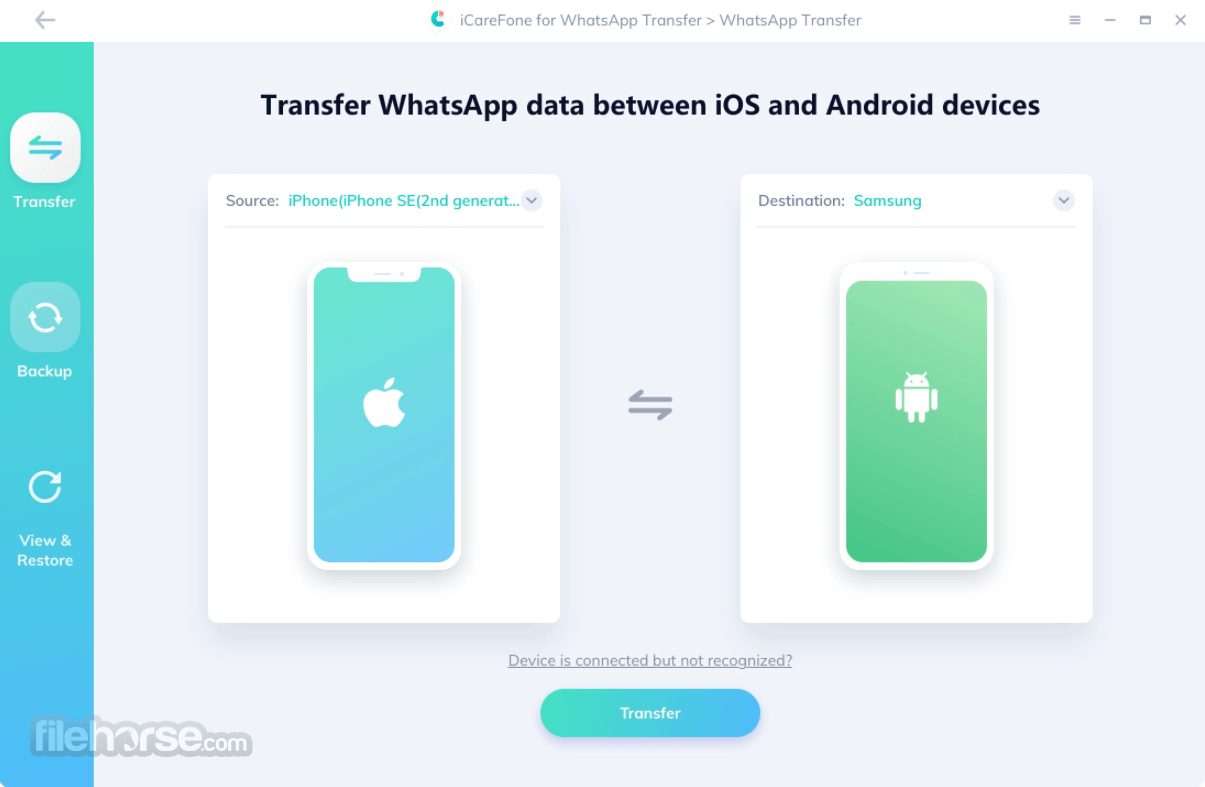
How to transfer WhatsApp messages from iPhone to Android?
1. One-click transfer with the Tenorshare iCareFone Transfer app
2. Transfer WhatsApp messages using Email
3. Transfer WhatsApp messages using Chat Backup
4. Transfer WhatsApp messages using the WazzapMigrator App
FAQ
Is iCareFone Transfer free?
It offers a free backup and preview option for iOS users. This covers data from iOS WhatsApp, WhatsApp Business, Kik, and Viber.
How do I restore my WhatsApp chat backup?
To restore WhatsApp chat history, follow these steps:
Can you merge WhatsApp chats?
Yes, iCareFone Transfer allows you to merge old and new WhatsApp data, supporting transfers from Android to iOS.
Pricing
Lifetime License - $49.95
Alternatives
Mobitrix WhatsApp Transfer - helps users securely transfer WhatsApp data between Android and iPhone without data loss. It supports chats, media, and attachments, and also offers backup and restore features.
EaseUS ChatTrans - a WhatsApp transfer tool that enables easy migration of chats and attachments between iOS and Android devices. It also includes options for backing up and restoring WhatsApp data on a computer.
MobileTrans by Wondershare - a comprehensive data transfer tool that supports WhatsApp and other app data migration between phones. It works across iOS and Android and also includes backup, restore, and phone-to-phone transfer features.
Supported Computers
OS
Windows 11/10/8.1/8/7
CPU
Win: 1GHz or above (32-bit or 64-bit)
RAM
512MB and above of RAM (1024MB recommended for optimal performance)
Hard Disk Space
200MB or more of free space available on the device
PROS
Also Available: Download iCareFone for WhatsApp Transfer for Mac
Download iCareFone for WhatsApp Transfer Latest Version Why is this app published on FileHorse? (More info)
Compatible with the latest iOS 26/18, Android 16/15, and iPhone 17/16/Plus/Pro/Pro Max.
- Easily transfer WhatsApp & WhatsApp Business between Android & iOS.
- 1-click to backup or restore WhatsApp/WhatsApp Business (iOS & Android) and Kik/LINE/Viber/WeChat (only for iOS).
- Export Backup of WhatsApp & WhatsApp Business messages and links to HTML.
- Latest iOS/iPadOS 18 and Android 16 compatible.
Tenorshare iCareFone Transfer enables you to recover deleted WhatsApp messages or WhatsApp Business chats to your iOS and Android devices. The 100% success rate ensures you will not be bothered by the trouble of losing data in your work or daily life.
Whether you need to save WhatsApp or WhatsApp Business chats, contacts, photos, or other data, you can use iCareFone for WhatsApp Transfer Software to export them as files for viewing.
The messages and links can be exported as HTML. All your data can be exported optionally, saving you time from the very beginning.
Does iCareFone for WhatsApp backup & restore other social apps like Kik, Line, Viber, and WeChat? 100% for sure. It supports backup of these apps free of charge and restores backups from iOS to iOS with high efficiency. No worries anymore since you changed to new iOS devices.
How to Use
- Step 1: Download iCareFone for WhatsApp Transfer. Connect iPhone and Android to the computer and then click 'Transfer'.
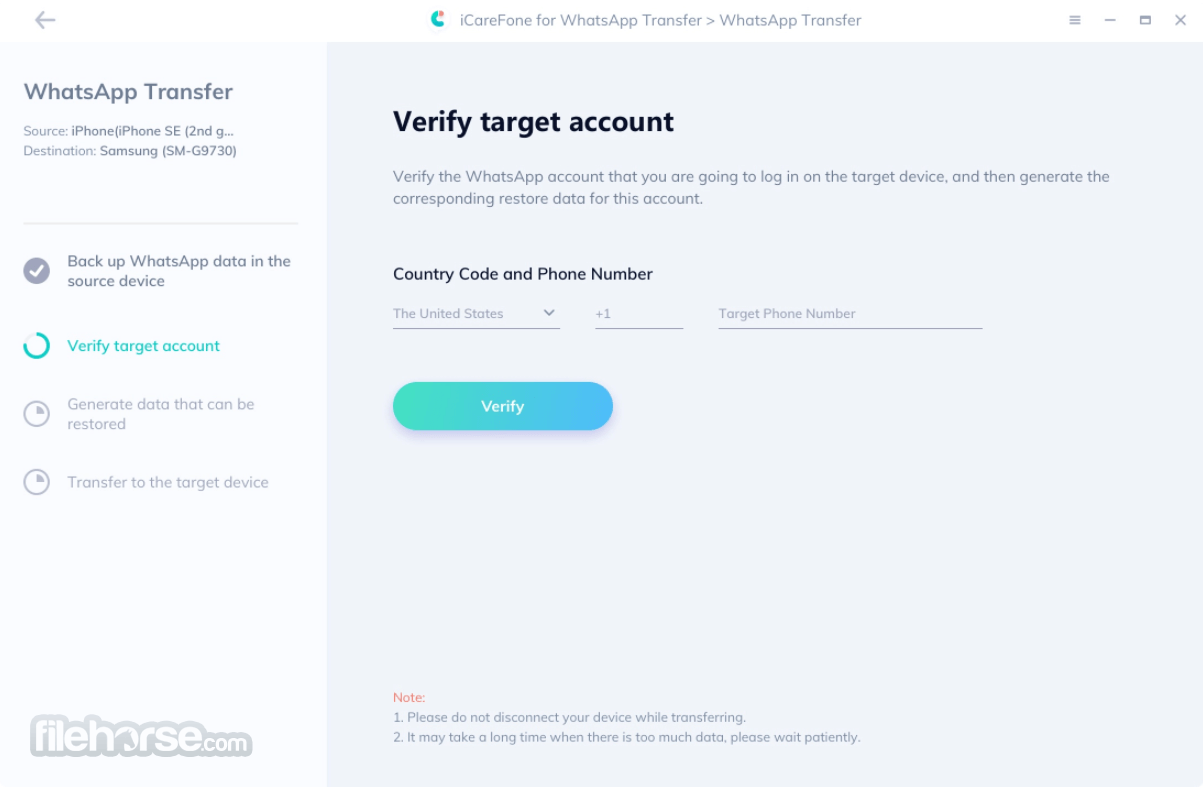
- Step 2: Verify Target Account. Please verify the target device by entering the country code and phone number, and then click 'Verify'.
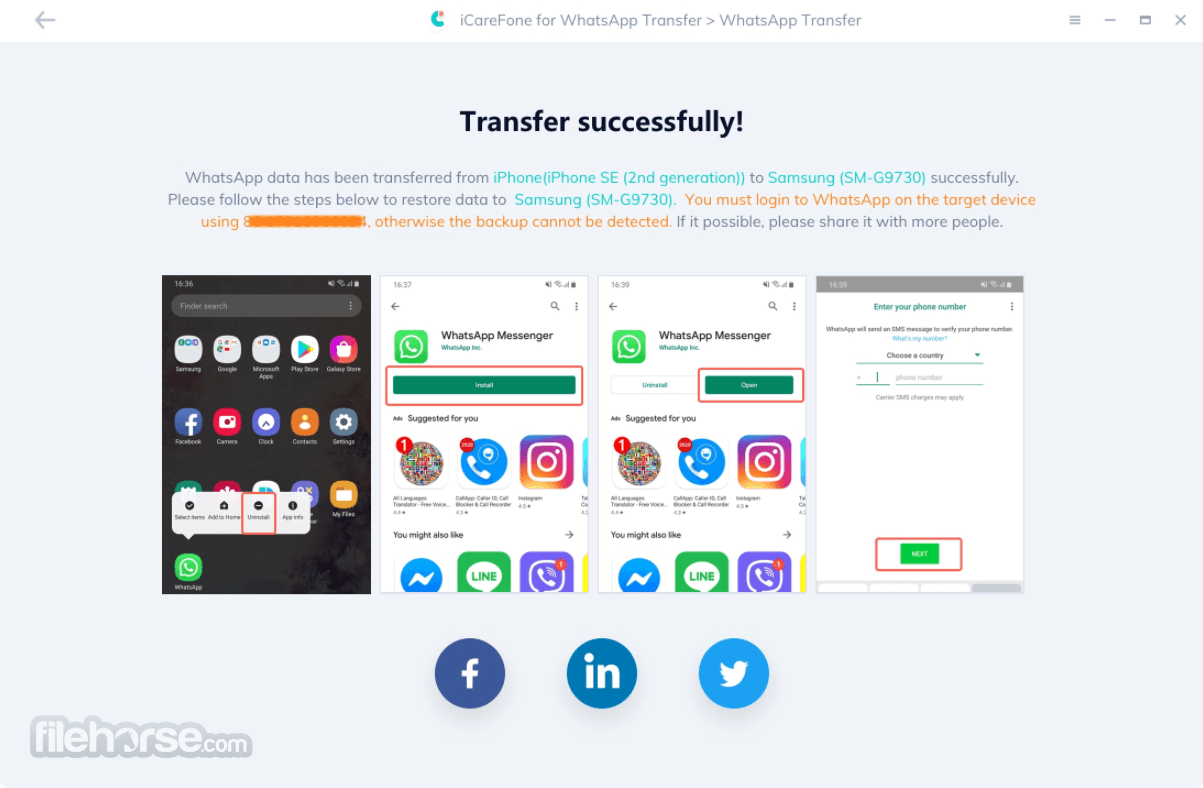
- Step 3: Transfer Successfully. After generating data for the target device. Your WhatsApp data has been transferred successfully.
Supported Devices
iPhone 17 and iPhone 16/Plus/Pro/Pro Max, iPhone 15/Plus/Pro/Pro Max, iPhone 14/Plus/Pro/Pro Max, iPhone 13/13 Pro(Max), iPhone 13 mini, iPhone 12/12 Pro(Max), iPhone 12 mini, iPhone SE(2nd), iPhone 11/11 Pro(Max), iPhone XS(Max), iPhone XR/X, iPhone 8 Plus/ 8, iPhone 7 Red, iPhone 7 Plus/7, iPhone SE, iPhone 6s Plus, iPhone 6s, iPhone 6 Plus, iPhone 6, and all models of iPhone.
All models of iPad Air(4th Gen), iPad mini, iPad Pro, and iPad.
Samsung Galaxy S24/S23/S22/S21/S20/S10, Huawei P40, OPPO, LG, and other 5000+ Android devices.
The latest Windows 11 and Windows 10 are supported.
How to transfer WhatsApp messages from iPhone to Android?
1. One-click transfer with the Tenorshare iCareFone Transfer app
2. Transfer WhatsApp messages using Email
3. Transfer WhatsApp messages using Chat Backup
4. Transfer WhatsApp messages using the WazzapMigrator App
FAQ
Is iCareFone Transfer free?
It offers a free backup and preview option for iOS users. This covers data from iOS WhatsApp, WhatsApp Business, Kik, and Viber.
How do I restore my WhatsApp chat backup?
To restore WhatsApp chat history, follow these steps:
- Uninstall WhatsApp.
- Reinstall WhatsApp.
- Verify your phone number.
- Tap on "Restore Chat History."
Can you merge WhatsApp chats?
Yes, iCareFone Transfer allows you to merge old and new WhatsApp data, supporting transfers from Android to iOS.
Pricing
Lifetime License - $49.95
- Transfer WhatsApp data after setup (Android ↔ iOS)
- 1 PC, 5 Mobile Devices
- Free upgrades and technical support
- Backup WhatsApp(Business)/GBWhatsApp
- Restore from Google Drive/iCloud
- Merge old and new WhatsApp messages
- View, export, and restore WhatsApp
- Tenorshare ReiBoot - Trial (7 days for free)
Alternatives
Mobitrix WhatsApp Transfer - helps users securely transfer WhatsApp data between Android and iPhone without data loss. It supports chats, media, and attachments, and also offers backup and restore features.
EaseUS ChatTrans - a WhatsApp transfer tool that enables easy migration of chats and attachments between iOS and Android devices. It also includes options for backing up and restoring WhatsApp data on a computer.
MobileTrans by Wondershare - a comprehensive data transfer tool that supports WhatsApp and other app data migration between phones. It works across iOS and Android and also includes backup, restore, and phone-to-phone transfer features.
Supported Computers
OS
Windows 11/10/8.1/8/7
CPU
Win: 1GHz or above (32-bit or 64-bit)
RAM
512MB and above of RAM (1024MB recommended for optimal performance)
Hard Disk Space
200MB or more of free space available on the device
PROS
- Ease of Use: A user-friendly interface makes the transfer process straightforward.
- Cross-Platform Support: Allows transfer between iOS and Android devices.
- Comprehensive Backup: Offers full WhatsApp data backup including messages, attachments, and media.
- High Success Rate: Reliable and consistent performance in data transfers.
- No Data Loss: Ensures data integrity during the transfer process.
- Cost: Paid software with no free version for transfer functionalities.
- Compatibility: May have issues with the latest versions of iOS or Android if not updated promptly.
- Speed: Transfer speed can be slow depending on the amount of data.
- Support Limitations: Limited customer support outside of business hours.
Also Available: Download iCareFone for WhatsApp Transfer for Mac
Download iCareFone for WhatsApp Transfer Latest Version Why is this app published on FileHorse? (More info)
##
畫面截圖
- 2025-08-11 iCareFone for WhatsApp Transfer 5.6.3 236.21 MB
- 2024-06-20 iCareFone for WhatsApp Transfer 5.5.15 142.17 MB
- 2023-05-17 iCareFone for WhatsApp Transfer 5.5.8 139.51 MB
- 2023-01-10 iCareFone for WhatsApp Transfer 5.5.0 143.31 MB
- 2022-10-23 iCareFone for WhatsApp Transfer 5.2.0 128.46 MB
- 2022-09-22 iCareFone for WhatsApp Transfer 5.1.0 126.95 MB
- 2022-07-18 iCareFone for WhatsApp Transfer 4.1.1 119.72 MB
- 2022-05-24 iCareFone for WhatsApp Transfer 4.0.5 115.39 MB