
- 目前版本6.0.0
- 更新日期2026-07-10
- 檔案大小157.98 MB
- 檔案名稱LicenseSupportInstallerWin64.zip
- 作業系統Windows 7 64 / Windows 8 64 / Windows 10 64 / Windows 11
- 支援語系English
- 授權型式免費軟體
- 開發商 PACE Anti-Piracy, Inc.
- 軟體分類Windows 軟體 / 安全工具
##
編輯短評
iLok License Manager 是 PACE Anti-Piracy 推出的免費工具,主要用途是取代 iLok.com 網站上的授權管理功能。過去使用者要管理音樂軟體授權,得透過瀏覽器登入網站操作,這套軟體把流程搬到桌面應用程式,安裝後就能直接將授權從帳戶拖曳到 iLok 加密鎖或電腦本機,不必再開瀏覽器。它最有辨識度的特色就是這種直覺的拖曳式管理,對經常切換授權裝置的使用者來說相當方便。開發商長期維護,更新頻率穩定,在同類工具中屬於特定生態系的主流選擇,使用者評價普遍不錯,不過評分樣本數不算多。
這套軟體適合使用 iLok 授權保護的音樂製作、錄音或影像編輯軟體的人,尤其是需要在不同電腦或 iLok 裝置間移動授權的場合。與 Folder Lock 或 Comodo Internet Security 等一般安全工具不同,它並非防毒或加密軟體,而是專注在授權管理的輔助程式,因此沒有資安防護功能,選用時要留意定位差異。軟體本身免費,但需要網路連線才能同步帳戶資料,目前僅提供英文介面,不熟悉英文操作的使用者可能需要花點時間適應。另外,它支援 Windows 與 macOS 雙平台,若你同時使用兩種系統,可以共用同一套管理流程。
##
翻譯排程處理中,以下暫以英文原文呈現
軟體介紹
iLok License Manager application replaces the license and iLok management portion of the iLok.com website.
While you will still need to have an internet connection available, you no longer need to use an internet browser like Safari, Firefox, Chrome, Opera or Internet Explorer to manage your licenses.
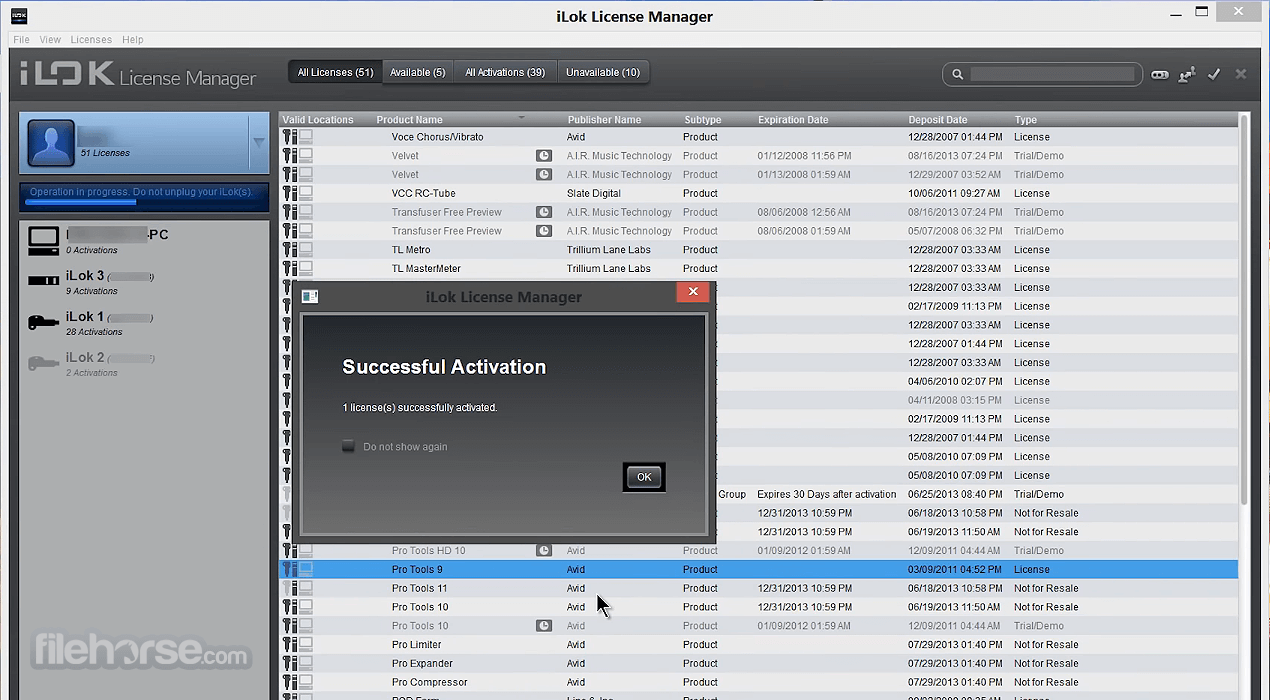
Once you install the License Manager, you'll be able to drag licenses from your account to your iLok and back again. The iLok.com website will still host the Store and support resources for your convenience.
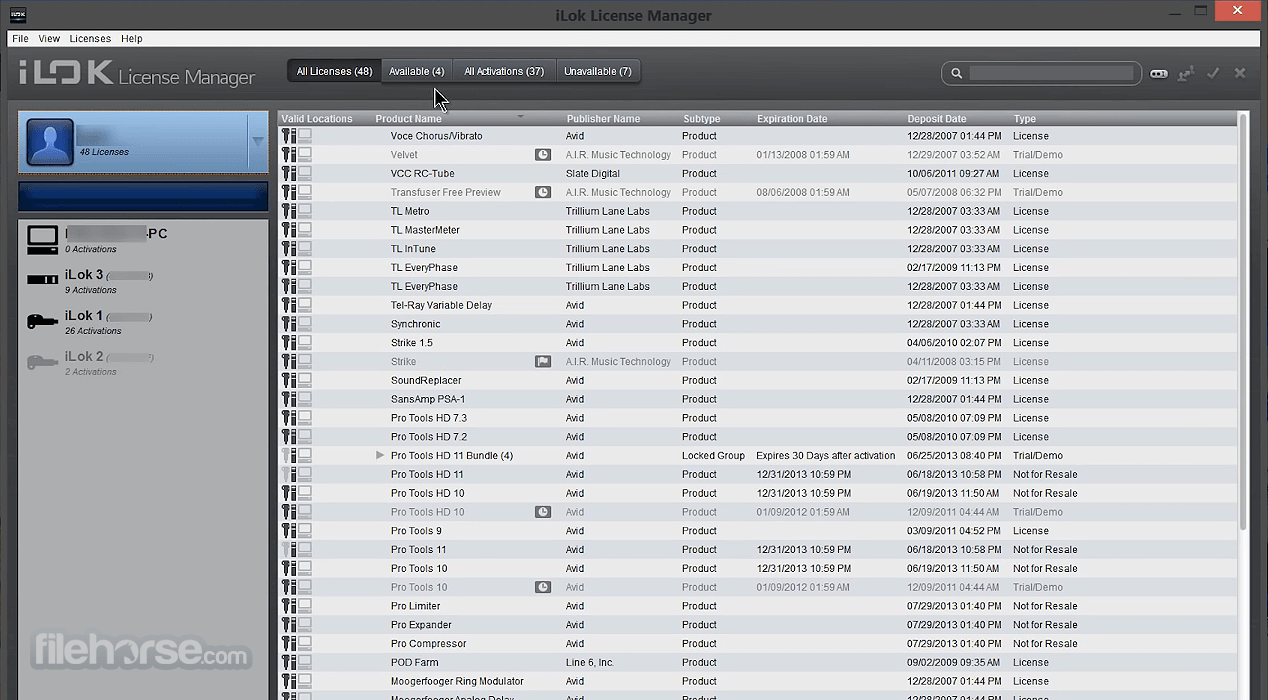
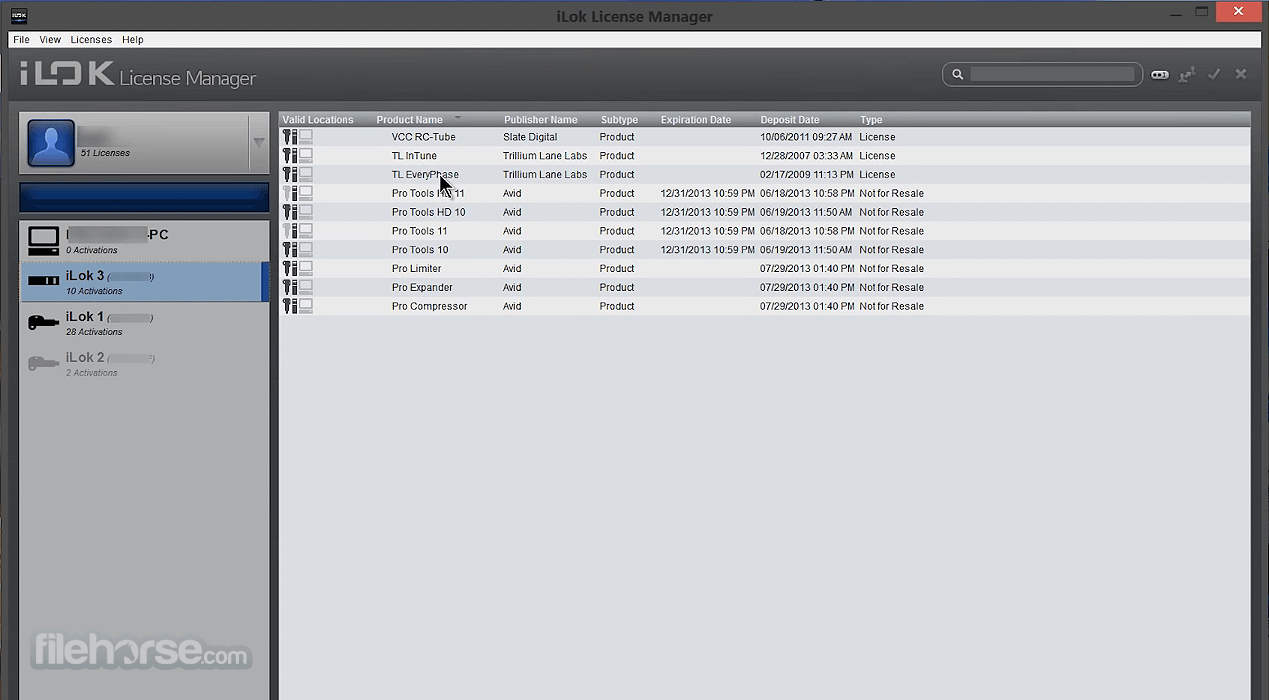
In the world of the iLok License Manager, a license is an asset that you have purchased or have acquired in your account. You will activate it to a location. A location is a place where you can hold an activation such as your iLok or machine. The Account View shows you your licenses and the grid is customizable.
You can right-click on the table header to choose which columns are shown. You can dynamically sort the list of licenses by clicking on a column header and even drag the columns to rearrange them.
The tabs across the top show you these views of your account:
All Licenses - Shows all of the licenses in your account, both activated and not activated.
Available - Shows the licenses eligible for activation to a location - Similar to the Licenses Available in the old iLok.com
All Activations - Shows only your activated licenses (the ones on locations) - This view is the most similar to the My Licenses view in the old iLok.com
Unavailable - Shows licenses have expired, been surrendered, or have been transferred to another account
Hidden - Shows licenses that you have chose to hide from the other views. Only licenses that are not activated on any location are eligible to be hidden.
To HIDE a license:
Managing licenses just got easier. Need to move a license to your iLok Anti-piracy protection app, or from your app back to your account? Just drag and drop. It's that easy. Licenses in bold type are ones you haven't looked at before, so new entries in your account are easy to see.
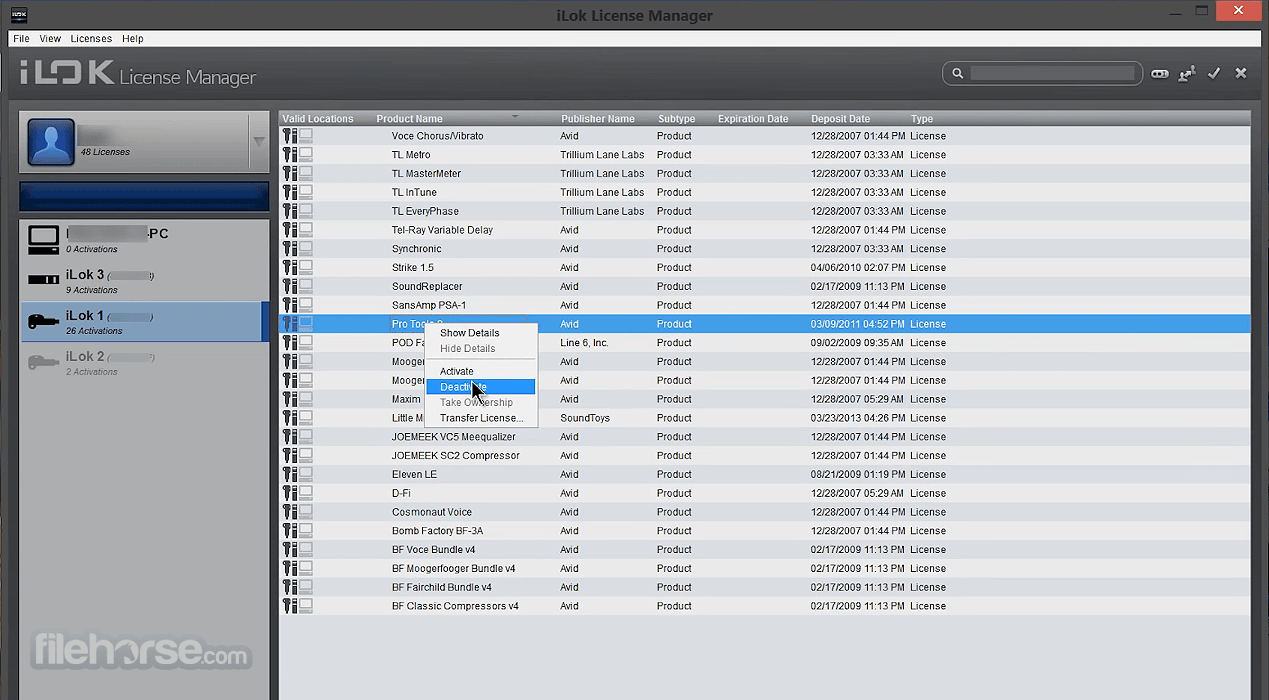
If the detail pane is hidden, click the "Show Details" button. You may also start Activate, Deactivate and License Transfer operations from the detail pane.
Some of your licenses may be grouped together. Software publishers can deposit licenses in two types of groups: locked and unlocked.
Your registered iLoks will appear in the Locations list on the left of your screen. The list includes offline iLoks registered to your account and all currently plugged in iLoks. Black icons indicate a plugged in location, gray icons indicate offline. You will be able to see what is on the offline iLoks, making it easier for you to manage your license inventory.
Temporary replacement licenses keep you going while your damaged iLok goes through the RMA License Recovery and Replacement process. Temporary licenses are immediately deposited to your account when an RMA order is placed. Activate the temporary licenses to a spare iLok Anti-piracy software to maintain continuous access to your iLok-enabled software.
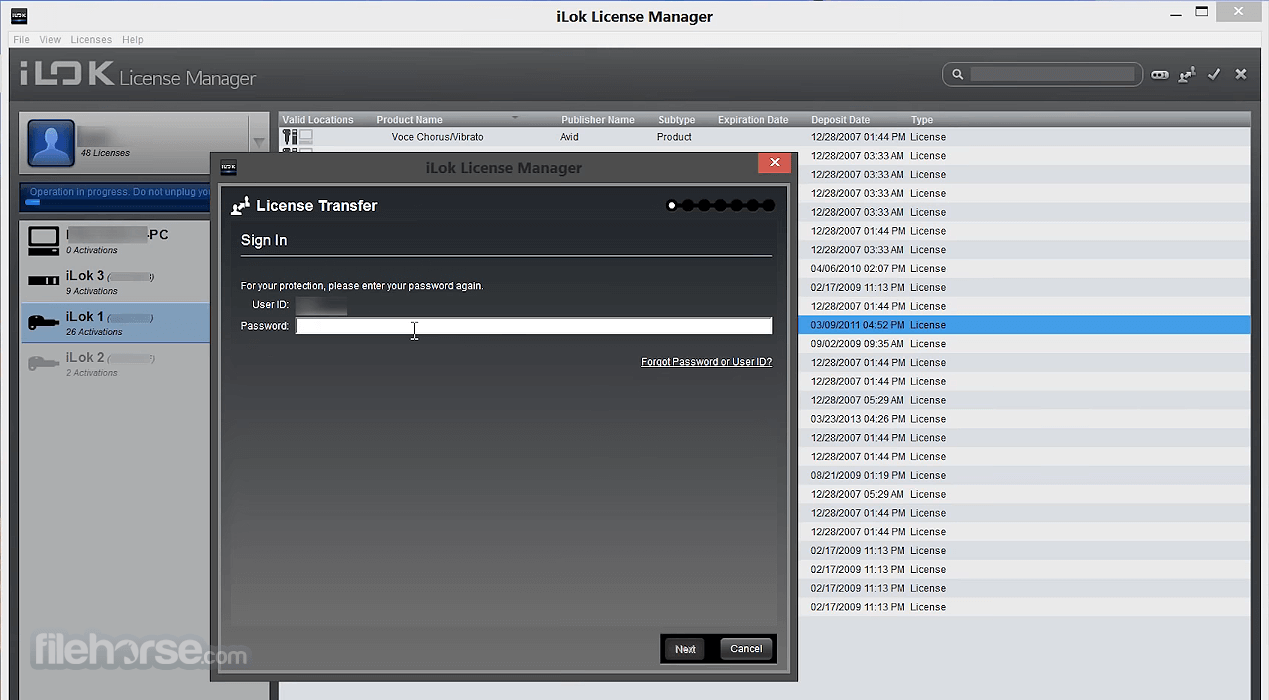
When transferring a license, you will be asked to confirm your account information by signing in again. This protects you if you leave your account signed in where others can access your computer. During a transfer you are asked to enter the User ID that you are transferring the licenses to; be careful when entering the destination User ID as transfers cannot be reversed.
Software publishers now have the ability to provide you with a special type of license that may be shared across your local network.
You can use the iLok License Manager to configure your networked computer to act as a server and share these licenses to other computers on your network. Creating connections from the server to the license users is simple thanks to the use of Zero Configuration standards.
There are varying levels of privacy supported so that you can make your network private or public. Network licenses are ideal for classrooms and large businesses that require a robust license sharing system.
PROS
Download iLok License Manager Latest Version Why is this app published on FileHorse? (More info)
While you will still need to have an internet connection available, you no longer need to use an internet browser like Safari, Firefox, Chrome, Opera or Internet Explorer to manage your licenses.
Once you install the License Manager, you'll be able to drag licenses from your account to your iLok and back again. The iLok.com website will still host the Store and support resources for your convenience.
In the world of the iLok License Manager, a license is an asset that you have purchased or have acquired in your account. You will activate it to a location. A location is a place where you can hold an activation such as your iLok or machine. The Account View shows you your licenses and the grid is customizable.
You can right-click on the table header to choose which columns are shown. You can dynamically sort the list of licenses by clicking on a column header and even drag the columns to rearrange them.
The tabs across the top show you these views of your account:
All Licenses - Shows all of the licenses in your account, both activated and not activated.
Available - Shows the licenses eligible for activation to a location - Similar to the Licenses Available in the old iLok.com
All Activations - Shows only your activated licenses (the ones on locations) - This view is the most similar to the My Licenses view in the old iLok.com
Unavailable - Shows licenses have expired, been surrendered, or have been transferred to another account
Hidden - Shows licenses that you have chose to hide from the other views. Only licenses that are not activated on any location are eligible to be hidden.
To HIDE a license:
- Navigate to any other tab
- Right-click a license that is NOT activated on any location
- Select HIDE from the pull-down menu
- Navigate to the Hidden tab
- Right-click the license
- Select SHOW from the pull-down menu
Managing licenses just got easier. Need to move a license to your iLok Anti-piracy protection app, or from your app back to your account? Just drag and drop. It's that easy. Licenses in bold type are ones you haven't looked at before, so new entries in your account are easy to see.
If the detail pane is hidden, click the "Show Details" button. You may also start Activate, Deactivate and License Transfer operations from the detail pane.
Some of your licenses may be grouped together. Software publishers can deposit licenses in two types of groups: locked and unlocked.
- Locked groups (previously called Bundles) always stay together and must move as a single unit.
- Licenses in unlocked groups can be split up - some group members can be on an iLok while others from the same unlocked group are still in your account or on a different iLok.
Your registered iLoks will appear in the Locations list on the left of your screen. The list includes offline iLoks registered to your account and all currently plugged in iLoks. Black icons indicate a plugged in location, gray icons indicate offline. You will be able to see what is on the offline iLoks, making it easier for you to manage your license inventory.
Temporary replacement licenses keep you going while your damaged iLok goes through the RMA License Recovery and Replacement process. Temporary licenses are immediately deposited to your account when an RMA order is placed. Activate the temporary licenses to a spare iLok Anti-piracy software to maintain continuous access to your iLok-enabled software.
When transferring a license, you will be asked to confirm your account information by signing in again. This protects you if you leave your account signed in where others can access your computer. During a transfer you are asked to enter the User ID that you are transferring the licenses to; be careful when entering the destination User ID as transfers cannot be reversed.
Software publishers now have the ability to provide you with a special type of license that may be shared across your local network.
You can use the iLok License Manager to configure your networked computer to act as a server and share these licenses to other computers on your network. Creating connections from the server to the license users is simple thanks to the use of Zero Configuration standards.
There are varying levels of privacy supported so that you can make your network private or public. Network licenses are ideal for classrooms and large businesses that require a robust license sharing system.
PROS
- Secure License Protection – Prevents unauthorized use.
- Cloud and USB Options – Flexible storage choices.
- Supports Multiple Devices – Use licenses on different PCs.
- Easy License Transfers – Move licenses between machines.
- Industry Standard – Trusted by major software brands.
- USB Dongle Required – Some licenses need a physical key.
- Internet Required for Cloud – Must be online for cloud use.
- Can Be Confusing – Interface is not beginner-friendly.
- Limited Free Licenses – Some features require payment.
- Occasional Sync Issues – Can have activation problems.
Download iLok License Manager Latest Version Why is this app published on FileHorse? (More info)
##
畫面截圖
- 2026-07-10 iLok License Manager 6.0.0 157.98 MB
- 2026-04-16 iLok License Manager 5.10.5 117.03 MB
- 2026-02-07 iLok License Manager 5.10.4 117.03 MB
- 2025-12-09 iLok License Manager 5.10.3 117.03 MB
- 2025-09-25 iLok License Manager 5.10.2 117.03 MB
- 2025-04-04 iLok License Manager 5.10.1 117.03 MB
- 2025-01-11 iLok License Manager 5.10.0 117.03 MB
- 2024-10-04 iLok License Manager 5.9.1 116.64 MB