- 目前版本1.5.1007
- 更新日期2026-04-17
- 檔案大小2.3 MB
- 檔案名稱imageusb.zip
- 作業系統Windows 7 / Windows 8 / Windows 10 / Windows 11
- 支援語系English
- 授權型式免費軟體
- 開發商 PassMark Software
- 軟體分類Windows 軟體 / 系統優化
##
翻譯排程處理中,以下暫以英文原文呈現
軟體介紹
ImageUSB is a powerful and lightweight tool developed by PassMark Software, designed for Windows PC users who need to create exact bit-level copies of USB flash drives.
It allows users to write an image to multiple USB devices simultaneously, making it particularly useful for IT professionals, system administrators, and users who need to deploy bootable or forensic USB drives efficiently.
Unlike traditional file-copying methods, ImageUSB for Windows ensures a one-to-one duplication process, preserving the original drive structure, including partition tables, boot sectors, and unused disk space.
This makes it ideal for duplicating bootable USBs, forensic imaging, and mass deployment scenarios.
Key Features
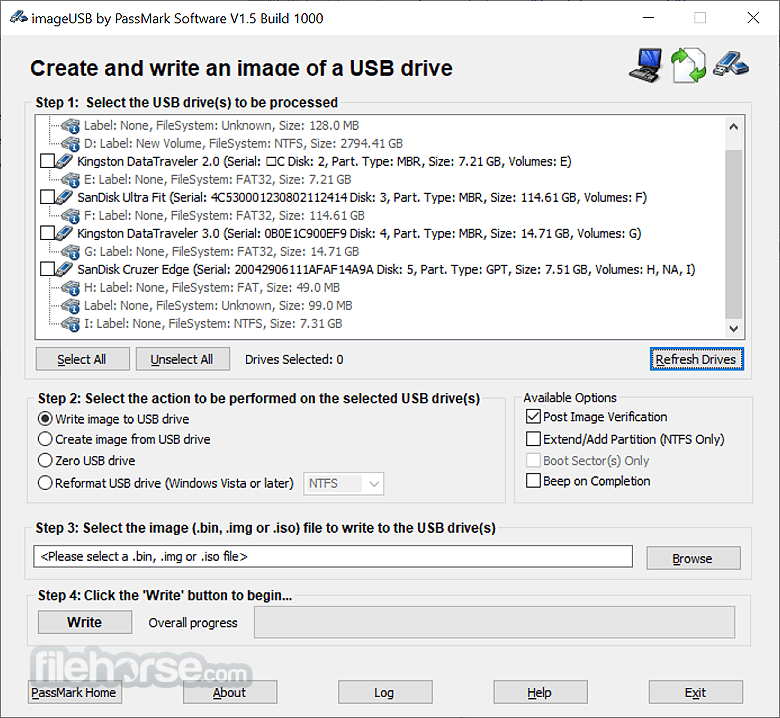
It features a minimalist, no-frills interface that prioritizes functionality over aesthetics. The interface consists of a simple window with clearly labeled sections for selecting USB devices, choosing operations (write, read, or zero wipe), and monitoring progress.
While it lacks a modern UI design, its straightforward layout makes it easy to navigate even for less experienced users.
Installation and Setup
ImageUSB does not require installation. Users simply need to download the executable from PassMark Software's official website and run it.
This portability allows the software to be used directly from a USB drive, making it highly convenient for IT professionals working on multiple systems.
How to Use Write an image to a USB. Create an image from a USB. Zero-wipe USB drive.
Can ImageUSB create bootable USBs?
Yes, but only if the original image is bootable. This software does not add bootable attributes itself.
Does ImageUSB support copying files directly between USB drives?
No, it only works with complete disk images, not individual files.
Can ImageUSB write ISO files to a USB drive?
No, it primarily works with RAW image files (.bin, .img), not ISO files.
Is ImageUSB safe to use?
Yes, but users should be cautious when selecting drives, as operations like zero-wiping are irreversible.
Does ImageUSB work on macOS or Linux?
No, this program is designed specifically for Windows PCs.
Alternatives
Rufus - Better for creating bootable USB drives from ISO files.
Balena Etcher - User-friendly tool for flashing images to USB and SD cards.
Win32 Disk Imager - Similar functionality but with a slightly older interface.
Ventoy - An open-source Windows PC tool to create a bootable USB drive for ISO files.
UNetbootin - Another popular open-source software capable of creating bootable USB drives on Windows, macOS, and Linux.
WinToUSB - A Windows-specific utility that enables the creation of bootable USB drives with Windows installations.
YUMI - A versatile multiboot USB creator that allows users to add multiple ISO files and create a single USB drive with multiple bootable systems.
Pricing
The program is completely FREE and does not require any license or activation.
System Requirements
If a smaller image (e.g., 2GB) is copied to a larger drive (e.g., 8GB), only the image size will be usable. To access the remaining storage, you must reformat the USB drive.
PROS
ImageUSB by PassMark Software is an excellent tool for users needing precise USB duplication and forensic imaging. While it lacks a modern interface and ISO support, its reliability, speed, and free availability make it a solid choice for IT professionals and advanced users.
Download ImageUSB Latest Version Why is this app published on FileHorse? (More info)
It allows users to write an image to multiple USB devices simultaneously, making it particularly useful for IT professionals, system administrators, and users who need to deploy bootable or forensic USB drives efficiently.
Unlike traditional file-copying methods, ImageUSB for Windows ensures a one-to-one duplication process, preserving the original drive structure, including partition tables, boot sectors, and unused disk space.
This makes it ideal for duplicating bootable USBs, forensic imaging, and mass deployment scenarios.
Key Features
- Bit-by-bit cloning: Copies entire USB drives, including all file systems and partition structures.
- Multiple USB duplication: Write to multiple USB drives simultaneously with no loss in speed.
- Image creation from USB: Create an exact copy of a USB drive in image format for later use.
- Support for various formats: Works with RAW image formats and supports forensic duplication.
- Zero wipe feature: Securely wipes USB drives by overwriting them with zeros to ensure data is unrecoverable.
- Lightweight and portable: No installation required; runs as a standalone executable.
It features a minimalist, no-frills interface that prioritizes functionality over aesthetics. The interface consists of a simple window with clearly labeled sections for selecting USB devices, choosing operations (write, read, or zero wipe), and monitoring progress.
While it lacks a modern UI design, its straightforward layout makes it easy to navigate even for less experienced users.
Installation and Setup
ImageUSB does not require installation. Users simply need to download the executable from PassMark Software's official website and run it.
This portability allows the software to be used directly from a USB drive, making it highly convenient for IT professionals working on multiple systems.
How to Use
- Download and launch: No installation is needed—simply run the executable.
- Select USB devices: Choose the USB drive(s) to image or clone.
- Choose an operation:
- Select the image file (if applicable): If writing to USB, browse and select the image file.
- Start the process: Click "Write" or "Create" and wait for the operation to complete.
- Verify completion: The software will confirm when the process is done.
Can ImageUSB create bootable USBs?
Yes, but only if the original image is bootable. This software does not add bootable attributes itself.
Does ImageUSB support copying files directly between USB drives?
No, it only works with complete disk images, not individual files.
Can ImageUSB write ISO files to a USB drive?
No, it primarily works with RAW image files (.bin, .img), not ISO files.
Is ImageUSB safe to use?
Yes, but users should be cautious when selecting drives, as operations like zero-wiping are irreversible.
Does ImageUSB work on macOS or Linux?
No, this program is designed specifically for Windows PCs.
Alternatives
Rufus - Better for creating bootable USB drives from ISO files.
Balena Etcher - User-friendly tool for flashing images to USB and SD cards.
Win32 Disk Imager - Similar functionality but with a slightly older interface.
Ventoy - An open-source Windows PC tool to create a bootable USB drive for ISO files.
UNetbootin - Another popular open-source software capable of creating bootable USB drives on Windows, macOS, and Linux.
WinToUSB - A Windows-specific utility that enables the creation of bootable USB drives with Windows installations.
YUMI - A versatile multiboot USB creator that allows users to add multiple ISO files and create a single USB drive with multiple bootable systems.
Pricing
The program is completely FREE and does not require any license or activation.
System Requirements
- Operating System: Windows 7, 8, 8.1, 10, and 11
- Storage: Minimal disk space required
- RAM: 512MB or more recommended
- USB Port: Required for connecting USB drives
If a smaller image (e.g., 2GB) is copied to a larger drive (e.g., 8GB), only the image size will be usable. To access the remaining storage, you must reformat the USB drive.
PROS
- 100% free and lightweight
- Portable, no installation required
- Supports multiple USB duplication
- Ideal for forensic and bit-level cloning
- Secure zero-wipe function
- Basic user interface with no modern design elements
- Cannot create bootable USBs from ISO files
- Windows-only support
- No file-by-file copying, only full disk images
- Lacks advanced configuration options
ImageUSB by PassMark Software is an excellent tool for users needing precise USB duplication and forensic imaging. While it lacks a modern interface and ISO support, its reliability, speed, and free availability make it a solid choice for IT professionals and advanced users.
Download ImageUSB Latest Version Why is this app published on FileHorse? (More info)
##
畫面截圖