⚠ 這是歷史版本頁面 — 查看 iMyFone MirrorTo 最新版本 →

- 目前版本2.2.0
- 更新日期2022-05-23
- 檔案大小135.71 MB
- 檔案名稱mirrorto_setup.exe
- 作業系統Windows 7 / Windows 8 / Windows 10 / Windows 11
- 支援語系English
- 授權型式試用版
- 開發商 iMyfone Technology
- 軟體分類Windows 軟體 / 手機工具
##
編輯短評
iMyFone MirrorTo 是一款螢幕鏡像工具,讓使用者能將 Android 或 iOS 裝置的畫面同步到電腦上。它主要解決在小螢幕操作不便的問題,最核心的特色在於支援透過電腦的鍵盤與滑鼠直接控制手機,讓使用者能在大螢幕上流暢運行手遊或管理社群應用程式。該軟體目前維護狀態活躍,且在同類工具中擁有一定的知名度與普遍不錯的評價。
這套工具適合需要長時間操作手機、或希望在電腦上同步處理社群訊息的使用者,尤其是追求遊戲操作優勢的玩家。相較於 3uTools 或 Samsung Kies 等側重裝置管理的替代方案,iMyFone MirrorTo 更專注於即時畫面傳輸與反向控制。使用者在下載前需留意,本軟體提供 Windows 與 macOS 版本且為試用版授權,目前僅支援英文介面。
##
翻譯排程處理中,以下暫以英文原文呈現
軟體介紹
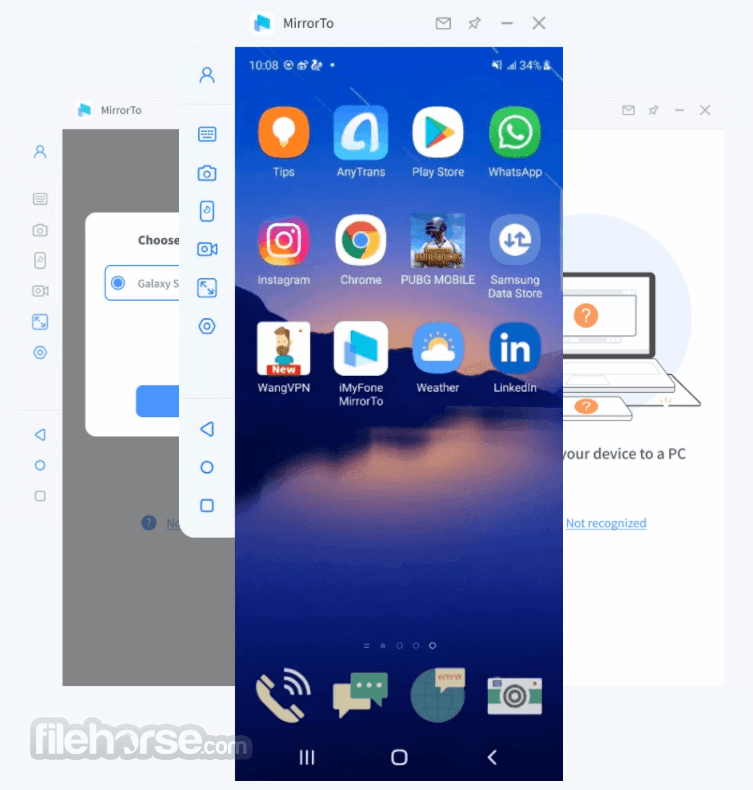
With iMyFone MirrorTo, you can easily enjoy Android games, manage all social applications from a computer in simple steps. And you can freely control your iPhone/Android device with a keyboard and mouse on a computer.
iOS 26/18 & Android 16 and 16 Supported!
Screen Mirroring to PC/Mac in 3 Simple Steps - BUY NOW!
Do you know how to reply to WhatsApp messages or view your phone content directly on your PC? Mirror iPhone/Android Phones to PC with iMyFone MirrorTo Software!
How to Use
Better Office Work
You can easily save screenshots to the clipboard between your device and PC. This is convenient for work & presentation.
Entertainment Activity
Troubled by a small phone screen when watching a video? Don't worry! You can enjoy a large screen by casting Android screen from a computer in this case.
Convenient Phone Screen Record
You can freely record Android screens after successfully casting your Android to a PC. Then you can save the recorded videos to a computer.
Better Communication
It's efficient to deal with messages on SMS or WhatsApp and reply on social media platforms by customizing keys on the keyboard.
Stream Live Mobile Games
You can stream live mobile games on your computer with MirroTo. So many people can watch your wonderful show.
FAQ
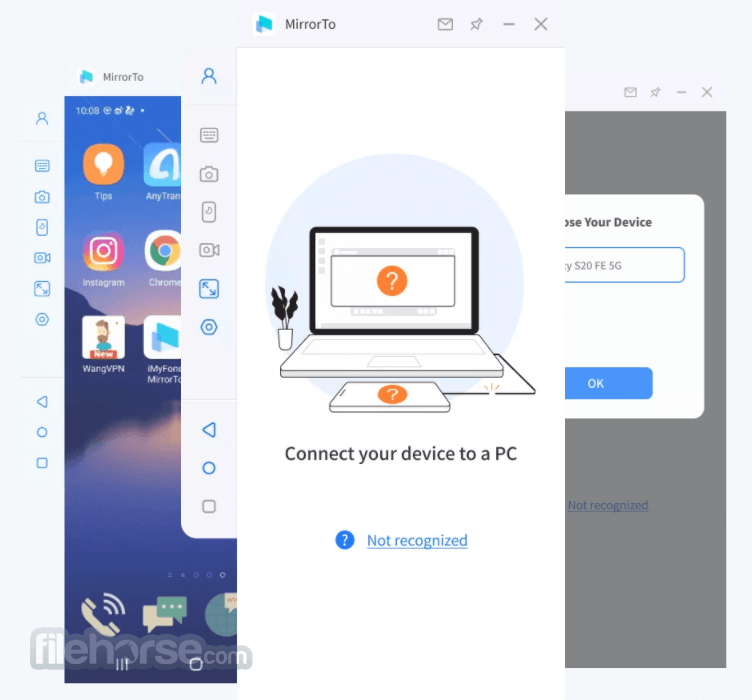
What to do if I cannot connect my device to the computer?
Step 1. First, use your cable to connect the computer and the mobile phone, and try multiple USB ports on the desktop.
Step 2. Change the USB transport from charging only to file transport, and Huawei should be changed to (MTP).
Step 3. After finishing the above, check whether the computer can recognize your mobile phone. If it can, you can start the next step. If you can't, you need to change the data cable or USB ports.
What to do if my computer cannot recognize my device?
Step 1. Replace the USB cable or the USB ports of the computer.
Step 2. Check the connection mode of the phone. If it is USB charging mode, please switch to file transfer mode or MTP, or PTP mode.
Step 3. Then follow the MirrorTo app guide to turn on USB debugging and continue.
Compability
It supports Android versions from 6.0 to the latest 15.0 and iOS 7 to the latest iOS 26. Also, Windows 11 and Windows 10 are supported.
Android Devices: All models of Samsung, Google Pixel, Huawei, LG, Sony, Oppo, Vivo, Xiaomi, OnePlus, Motorola, etc.
iOS Devices: All models of iPhone, including the newest iPhone 17 series.
All models of iPad Air, iPad mini, iPad Pro, and iPad.
Pricing
Lifetime Plan - $59.99 (One-time purchase)
Tenorshare Phone Mirror - a tool that allows users to mirror their Android or iOS device screens to a PC in real time. It supports screen recording, screenshots, and control of Android devices from a computer using a mouse and keyboard.
ApowerMirror - a screen mirroring app that works with Android, iOS, Windows, and Mac, enabling wireless casting between devices. It also supports screen recording, annotation, and remote control of Android devices from a PC.
AnyMiro - a stable and high-quality screen mirroring tool for iOS and Android devices, ideal for streaming mobile content to a PC or Mac. It’s especially useful for live streaming, offering low-latency performance and seamless video quality.
System Requirement
Also Available: Download iMyFone MirrorTo for Mac
Download iMyFone MirrorTo Latest Version Why is this app published on FileHorse? (More info)
iOS 26/18 & Android 16 and 16 Supported!
Screen Mirroring to PC/Mac in 3 Simple Steps - BUY NOW!
- Freely control your phone with a large screen from a computer
- Fluently play mobile games or manage social Apps without delay on a Laptop
- Conveniently operate the keyboard when mirroring the screen to the Computer
- Use a game keyboard to control the phone screen to get more advantages
- A big screen gives you a crazy sense of vivacity when playing games on PC
- Game records will be automatically saved on your smartphone
- Execute a combination of moves by keyboard & mouse
Do you know how to reply to WhatsApp messages or view your phone content directly on your PC? Mirror iPhone/Android Phones to PC with iMyFone MirrorTo Software!
How to Use
- Launch the app
- Connect your devices
- Go to the Developer options and enable USB debugging
- Open Permission to MirrorTo Tool
- Start to control your Android phone from your PC
Better Office Work
You can easily save screenshots to the clipboard between your device and PC. This is convenient for work & presentation.
Entertainment Activity
Troubled by a small phone screen when watching a video? Don't worry! You can enjoy a large screen by casting Android screen from a computer in this case.
Convenient Phone Screen Record
You can freely record Android screens after successfully casting your Android to a PC. Then you can save the recorded videos to a computer.
Better Communication
It's efficient to deal with messages on SMS or WhatsApp and reply on social media platforms by customizing keys on the keyboard.
Stream Live Mobile Games
You can stream live mobile games on your computer with MirroTo. So many people can watch your wonderful show.
FAQ
What to do if I cannot connect my device to the computer?
Step 1. First, use your cable to connect the computer and the mobile phone, and try multiple USB ports on the desktop.
Step 2. Change the USB transport from charging only to file transport, and Huawei should be changed to (MTP).
Step 3. After finishing the above, check whether the computer can recognize your mobile phone. If it can, you can start the next step. If you can't, you need to change the data cable or USB ports.
What to do if my computer cannot recognize my device?
Step 1. Replace the USB cable or the USB ports of the computer.
Step 2. Check the connection mode of the phone. If it is USB charging mode, please switch to file transfer mode or MTP, or PTP mode.
Step 3. Then follow the MirrorTo app guide to turn on USB debugging and continue.
Compability
It supports Android versions from 6.0 to the latest 15.0 and iOS 7 to the latest iOS 26. Also, Windows 11 and Windows 10 are supported.
Android Devices: All models of Samsung, Google Pixel, Huawei, LG, Sony, Oppo, Vivo, Xiaomi, OnePlus, Motorola, etc.
iOS Devices: All models of iPhone, including the newest iPhone 17 series.
All models of iPad Air, iPad mini, iPad Pro, and iPad.
Pricing
Lifetime Plan - $59.99 (One-time purchase)
- Includes 1 PC upgrade anytime as needed.
- Automatically mirror the iOS/Android screen on PC/Mac.
- Support USB/Wi-Fi/QR Code/AirPlay connection.
- High-quality 1080P & 60 FPS screen mirroring.
- Control iOS & Android devices.
- Seamless keyboard input for efficient typing.
- Customize game controls with keyboard mapping.
- Stream phone screen on YouTube, Twitch, Zoom, etc.
- Record phone screen in 1080P with audio.
- 24/7 customer support.
- Lifetime free upgrades for upcoming features.
Tenorshare Phone Mirror - a tool that allows users to mirror their Android or iOS device screens to a PC in real time. It supports screen recording, screenshots, and control of Android devices from a computer using a mouse and keyboard.
ApowerMirror - a screen mirroring app that works with Android, iOS, Windows, and Mac, enabling wireless casting between devices. It also supports screen recording, annotation, and remote control of Android devices from a PC.
AnyMiro - a stable and high-quality screen mirroring tool for iOS and Android devices, ideal for streaming mobile content to a PC or Mac. It’s especially useful for live streaming, offering low-latency performance and seamless video quality.
System Requirement
- CPU: 1GHz (32-bit or 64-bit)
- Hard Disk Space: 200 MB or more of free space
- RAM: 256 MB or more of RAM (1024MB Recommended)
- OS: Win 11/10/8.1/8/7
- Easy to Use Interface
- High-Quality Screen Mirroring
- Cross-Platform Compatibility
- Low Latency Performance
- Multiple Connection Options
- Limited Free Features
- Requires a Stable Internet Connection
- Potential for Lag in High-Resolution
- Occasional Connection Drops
Also Available: Download iMyFone MirrorTo for Mac
Download iMyFone MirrorTo Latest Version Why is this app published on FileHorse? (More info)
##
影片介紹
##
畫面截圖
- 2026-02-18 iMyFone MirrorTo 3.0.0 151.54 MB
- 2022-05-23 iMyFone MirrorTo 2.2.0 135.71 MB
- 2022-02-22 iMyFone MirrorTo 2.1.2 121.41 MB
- 2021-11-16 iMyFone MirrorTo 1.2.0 113.74 MB