⚠ 這是歷史版本頁面 — 查看 KaraFun Player 3.12.0 Build 最新版本 →

- 目前版本0
- 更新日期2020-09-28
- 檔案大小44.08 MB
- 檔案名稱karafunplayer_2.6.2.0.exe
- 作業系統Windows 8 / Windows 10 / Windows 11
- 支援語系English
- 授權型式免費軟體
- 開發商 Recisio
- 軟體分類Windows 軟體 / 音訊軟體
##
編輯短評
KaraFun Player 是一款把電腦變成卡拉OK機的Windows軟體,主打內建龐大的歌曲資料庫與直覺操作介面,讓獨唱、派對同樂或練唱都能一氣呵成。它的辨識度在於整合了歌詞同步顯示與音效調整功能,整體介面設計偏向親和易上手;從收錄版本與更新頻率來看,屬於長期維護、持續推出的工具,在同類音訊軟體中評價算是中等偏上,但並非壓倒性的主流首選。
這套軟體適合偶爾想在家開唱、或需要快速找歌的輕中度使用者,尤其是不想花時間設定複雜音軌的人。相較於 Virtual DJ 或 iTunes 這類偏重混音或音樂管理的替代方案,KaraFun 更專注在「跟著歌詞唱」這件事,但代價是進階編輯功能較少,且僅提供英文介面,對不熟悉英文的使用者稍有門檻。授權為免費軟體,Windows 與 macOS 都有版本,下載前建議留意歌曲庫的取得方式與網路連線需求,以免實際使用時與預期有落差。
##
翻譯排程處理中,以下暫以英文原文呈現
軟體介紹
KaraFun Karaoke Player is a feature-rich karaoke app designed for Windows PCs. It allows users to turn their computer into a karaoke machine, providing access to a vast library of karaoke songs, a user-friendly interface, and a wide range of customizable features.
Whether you're a solo performer, hosting a karaoke party, or just looking to practice your singing skills, it aims to be your go-to karaoke companion.
In the world of digital entertainment, karaoke has taken on a life of its own. KaraFun Player is a software that promises to bring the joy of karaoke to your PC, making it easier than ever to sing your heart out.
In this in-depth review, we will explore all aspects of KaraFun Player for PC, from its software description to its pros and cons, to help you decide if it's the right karaoke software for you.
Key Features
Extensive Song Library
It offers access to a massive catalog of over 57,000 karaoke tracks across various genres, ensuring there's something for everyone. The library is regularly updated to keep your repertoire fresh.
Customizable Backgrounds
Personalize your karaoke experience by choosing from a selection of visually appealing backgrounds that can be displayed while you sing.
Offline Mode
Download your favorite songs and sing them without an internet connection, making it convenient for impromptu karaoke sessions or when you're on the go.
Key and Tempo Adjustment
Modify the key and tempo of songs to match your vocal range and style, making it easier to sing along and practice.
Voice Recording
It allows you to record your singing performances, so you can track your progress and share your talent with friends and family.
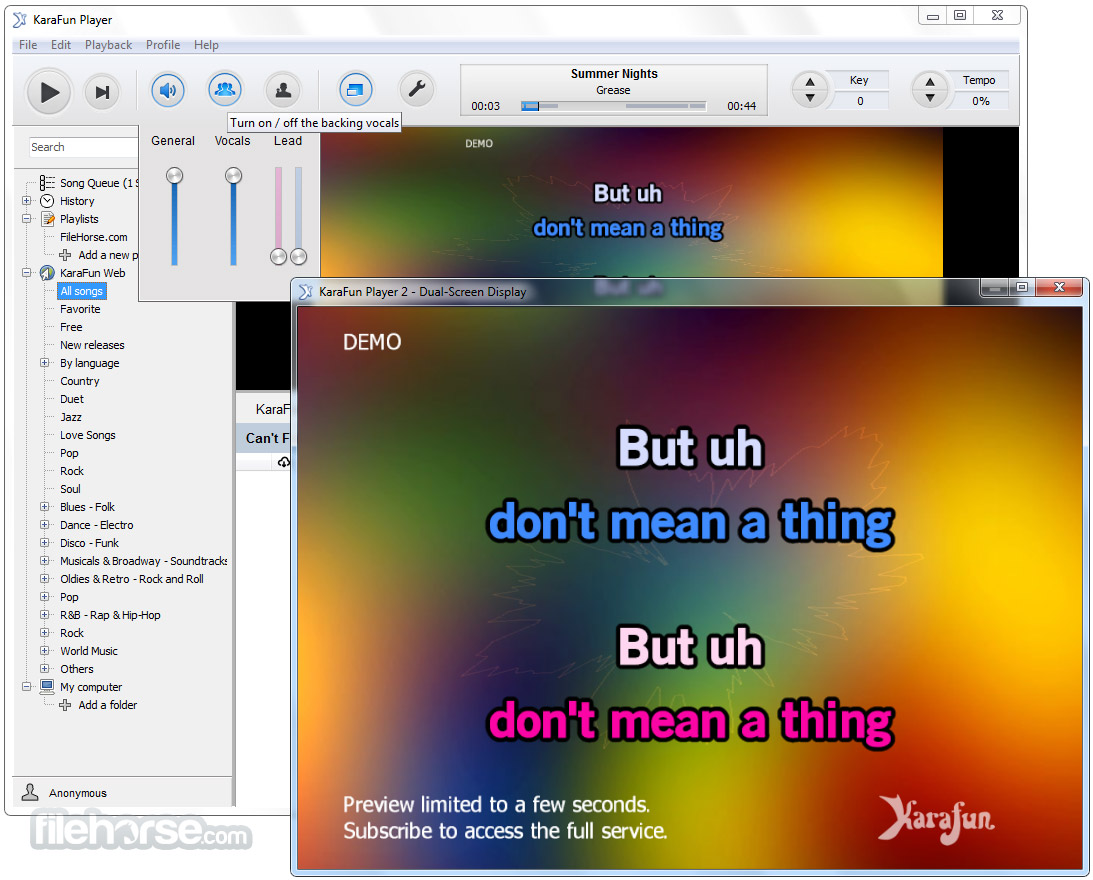
Dual Screen Display
Utilize two monitors for an immersive karaoke experience, displaying lyrics on one screen and controls on the other.
Party Mode
Perfect for gatherings, KaraFun's Party Mode lets you create playlists, manage the queue, and enjoy seamless transitions between songs.
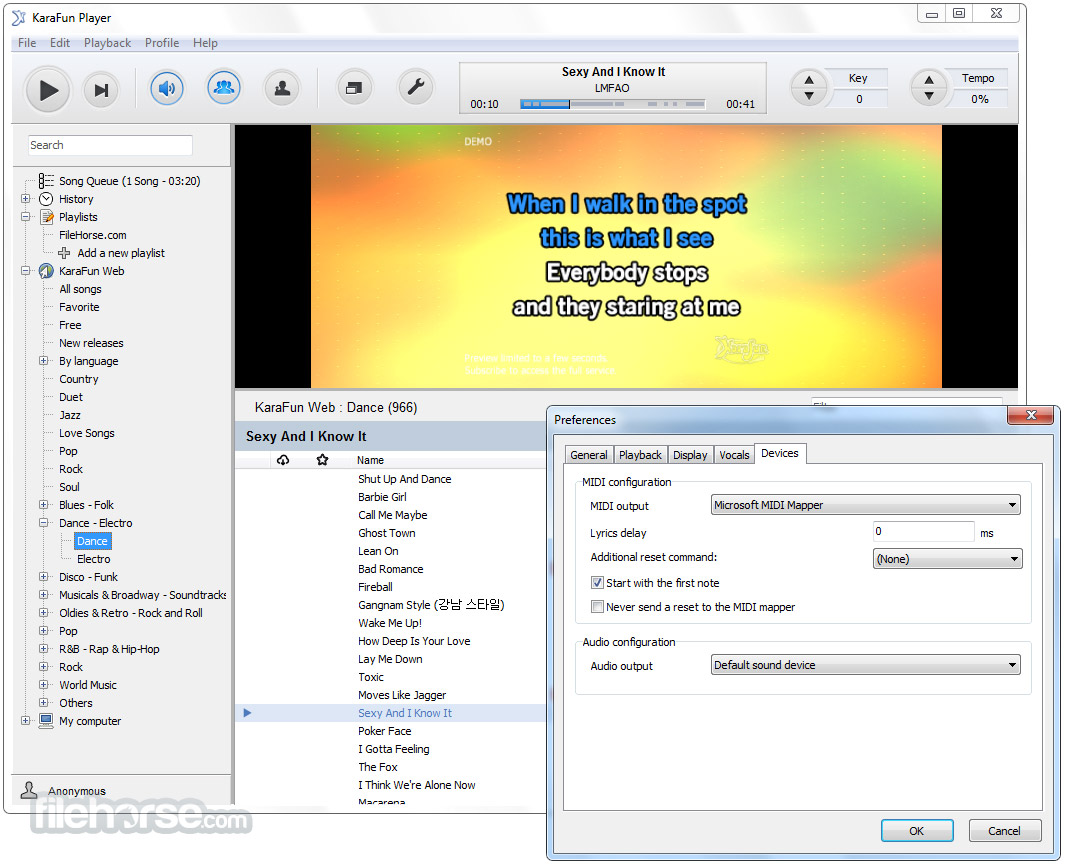
Synced Lyrics and Highlighting
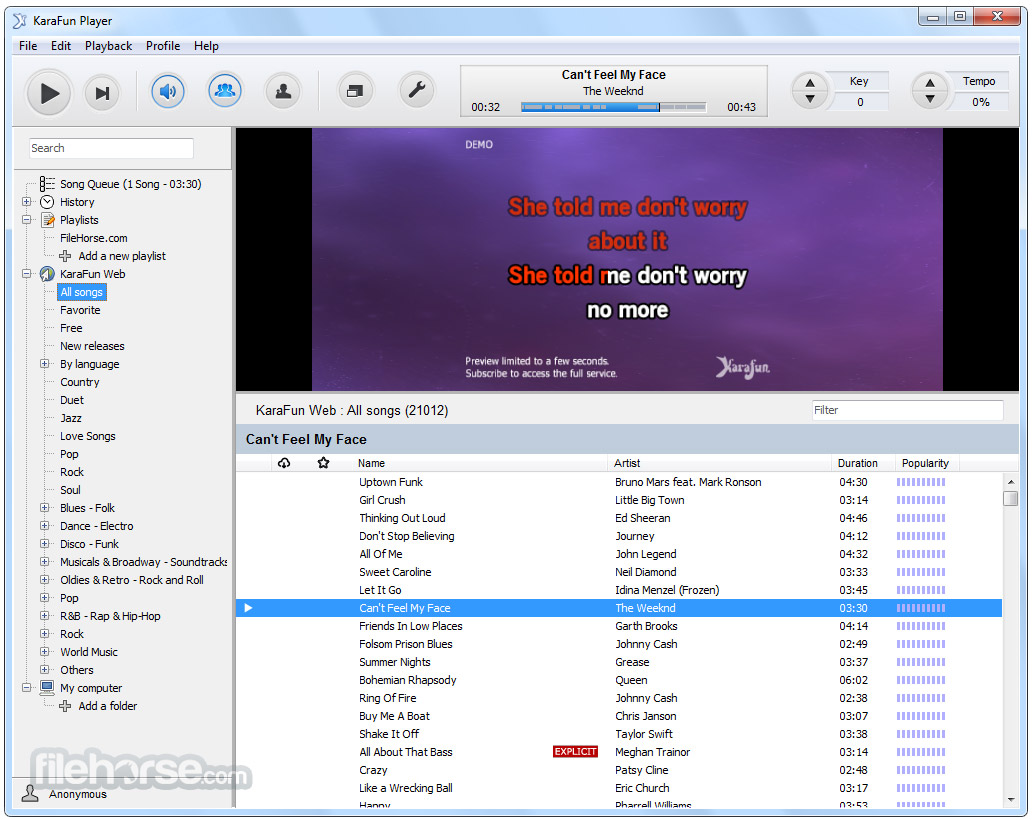
Lyrics are displayed in real-time with synchronized highlighting, making it easier to follow along and stay on beat.
User Interface
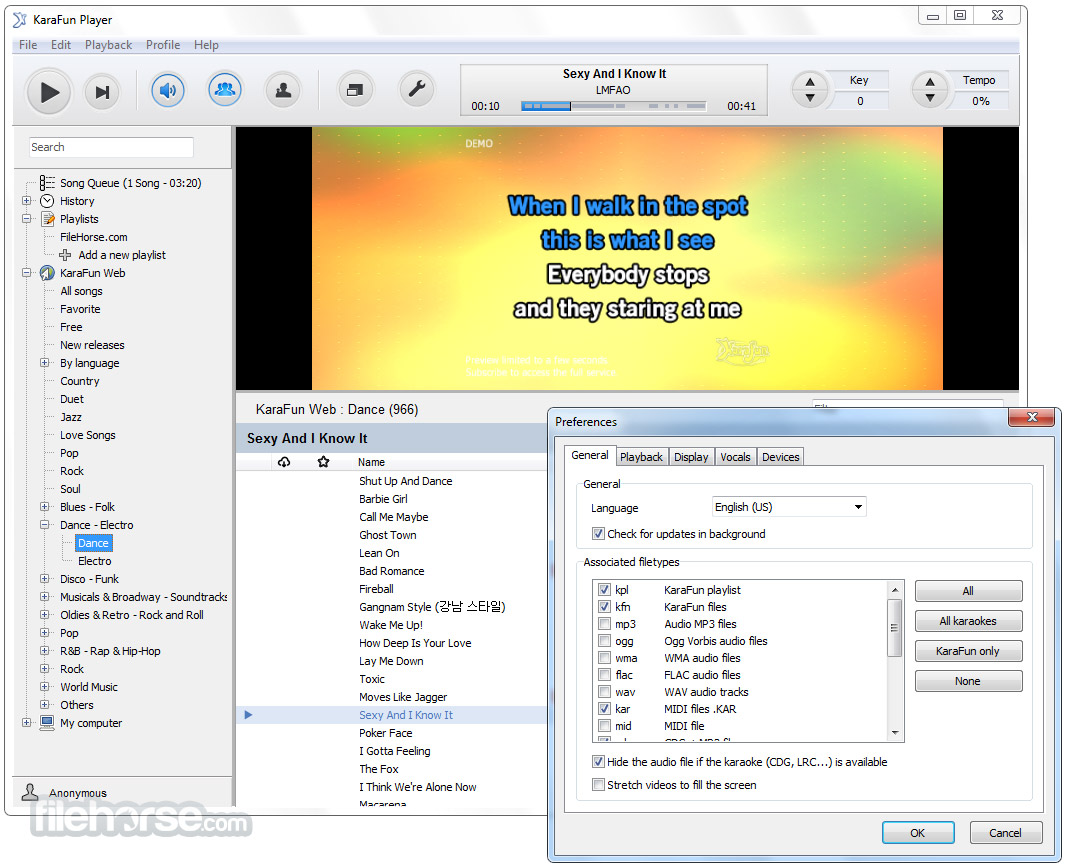
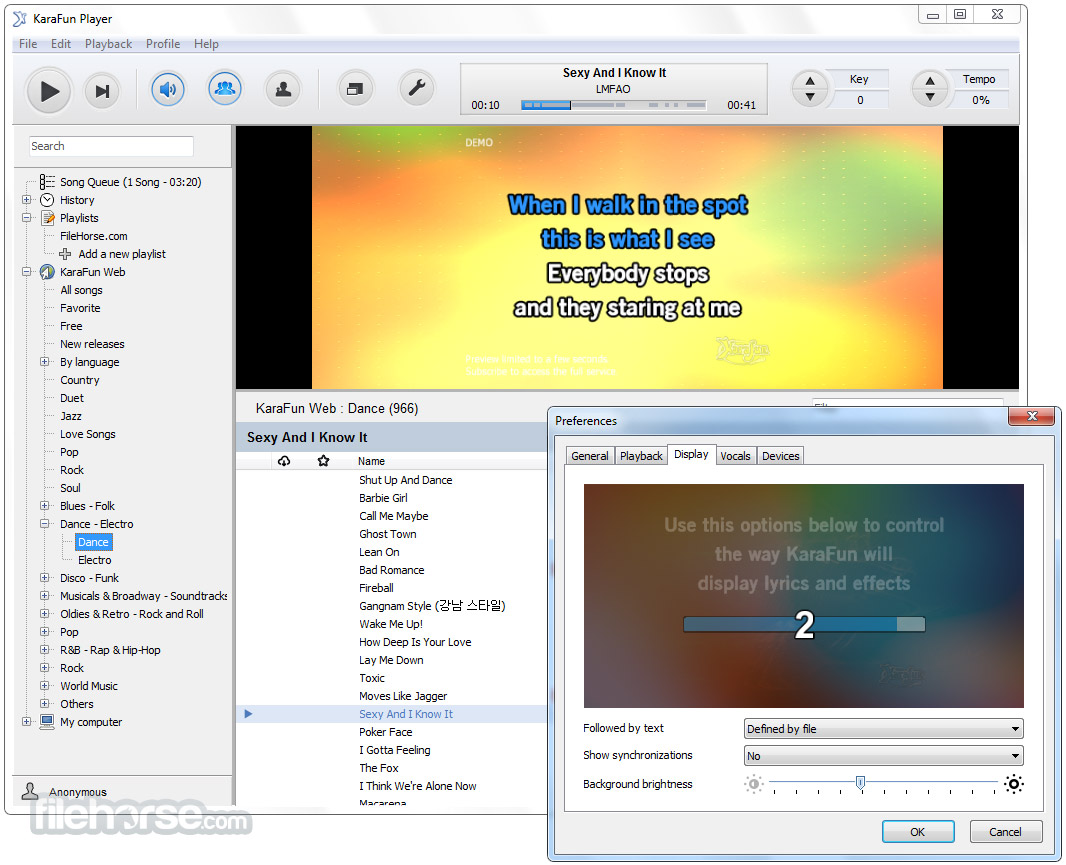
It features a user-friendly interface that's intuitive and easy to navigate. The main screen prominently displays song search, playback controls, and options for customization.
The visual design is modern and clean, ensuring that users of all ages can comfortably interact with the software.
Installation and Setup
Installing KaraFun Karaoke Player is a straightforward process.
You can download the software from the official website or FileHorse.com and follow the on-screen instructions.
The setup wizard guides you through the installation, and you can choose to customize settings like installation directory and shortcuts.
Once installed, it automatically scans your system for available songs and is ready to use.
How to Use
Can I import my own karaoke tracks into KaraFun?
Unfortunately, KaraFun Player does not support importing custom karaoke tracks. You can only access songs from its extensive built-in library.
How often is the song library updated?
It regularly updates its song library, typically on a weekly basis, to include the latest hits and classic favorites.
Can I create and save playlists?
Yes, you can create and save playlists in KaraFun's Party Mode, making it easy to organize and enjoy your favorite songs in the order you prefer.
Are there any additional charges for downloading songs for offline use?
Downloading songs for offline use is included in the KaraFun subscription, so there are no extra charges for this feature.
Alternatives
Kanto Karaoke Player - Easy to Use Free Karaoke Player and Recording tool for Windows PC.
Karaoke 5 - A versatile karaoke player and creator for Windows, featuring advanced playback options and customizable settings.
Smule - A social karaoke app that allows you to sing duets with friends and strangers from around the world.
Pricing
Free Plan
Enjoy free songs and Premium songs previews from the catalog. Try out all features.
Premium - $9.99 / month
KaraFun Karaoke Player is a fantastic addition to any karaoke enthusiast's software collection. Its vast song library, user-friendly interface, and customization options make it a top choice for those looking to elevate their singing experience.
Its affordable subscription options offer great value for the extensive karaoke catalog and features it provides. Whether you're practicing your vocals or hosting karaoke parties, it promises hours of singing enjoyment and entertainment.
Also Available: Download KaraFun Karaoke Player for Mac
Download KaraFun Karaoke Player Latest Version Why is this app published on FileHorse? (More info)
Whether you're a solo performer, hosting a karaoke party, or just looking to practice your singing skills, it aims to be your go-to karaoke companion.
In the world of digital entertainment, karaoke has taken on a life of its own. KaraFun Player is a software that promises to bring the joy of karaoke to your PC, making it easier than ever to sing your heart out.
In this in-depth review, we will explore all aspects of KaraFun Player for PC, from its software description to its pros and cons, to help you decide if it's the right karaoke software for you.
Key Features
Extensive Song Library
It offers access to a massive catalog of over 57,000 karaoke tracks across various genres, ensuring there's something for everyone. The library is regularly updated to keep your repertoire fresh.
Customizable Backgrounds
Personalize your karaoke experience by choosing from a selection of visually appealing backgrounds that can be displayed while you sing.
Offline Mode
Download your favorite songs and sing them without an internet connection, making it convenient for impromptu karaoke sessions or when you're on the go.
Key and Tempo Adjustment
Modify the key and tempo of songs to match your vocal range and style, making it easier to sing along and practice.
Voice Recording
It allows you to record your singing performances, so you can track your progress and share your talent with friends and family.
Dual Screen Display
Utilize two monitors for an immersive karaoke experience, displaying lyrics on one screen and controls on the other.
Party Mode
Perfect for gatherings, KaraFun's Party Mode lets you create playlists, manage the queue, and enjoy seamless transitions between songs.
Synced Lyrics and Highlighting
Lyrics are displayed in real-time with synchronized highlighting, making it easier to follow along and stay on beat.
User Interface
It features a user-friendly interface that's intuitive and easy to navigate. The main screen prominently displays song search, playback controls, and options for customization.
The visual design is modern and clean, ensuring that users of all ages can comfortably interact with the software.
Installation and Setup
Installing KaraFun Karaoke Player is a straightforward process.
You can download the software from the official website or FileHorse.com and follow the on-screen instructions.
The setup wizard guides you through the installation, and you can choose to customize settings like installation directory and shortcuts.
Once installed, it automatically scans your system for available songs and is ready to use.
How to Use
- Launch the program.
- Browse or search for your favorite songs in the extensive library.
- Click on a song to add it to the queue.
- Customize the song's settings, such as key and tempo adjustments.
- Click the "Play" button to start singing along.
- Utilize the on-screen controls to manage playback, recording, and more.
- Enjoy the karaoke experience with synchronized lyrics and background visuals.
Can I import my own karaoke tracks into KaraFun?
Unfortunately, KaraFun Player does not support importing custom karaoke tracks. You can only access songs from its extensive built-in library.
How often is the song library updated?
It regularly updates its song library, typically on a weekly basis, to include the latest hits and classic favorites.
Can I create and save playlists?
Yes, you can create and save playlists in KaraFun's Party Mode, making it easy to organize and enjoy your favorite songs in the order you prefer.
Are there any additional charges for downloading songs for offline use?
Downloading songs for offline use is included in the KaraFun subscription, so there are no extra charges for this feature.
Alternatives
Kanto Karaoke Player - Easy to Use Free Karaoke Player and Recording tool for Windows PC.
Karaoke 5 - A versatile karaoke player and creator for Windows, featuring advanced playback options and customizable settings.
Smule - A social karaoke app that allows you to sing duets with friends and strangers from around the world.
Pricing
Free Plan
Enjoy free songs and Premium songs previews from the catalog. Try out all features.
Premium - $9.99 / month
- All songs
- Offline Sync
- Create your playlists
- Customize singers’ volumes, key, and tempo
- Includes commercial licence
- Permanent QR Code
- Advanced interface customization
- Windows 7 or later
- 2 GHz processor
- 4 GB RAM
- DirectX 9.0 compatible sound card
- An active internet connection for online features
- Extensive song library with regular updates.
- User-friendly interface suitable for all ages.
- Customization options for key and tempo adjustments.
- Offline mode for singing without an internet connection.
- Voice recording feature to track your progress.
- Free version includes advertisements.
- No support for importing custom karaoke tracks.
- The monthly subscription cost may be considered steep by some users.
- Some users may prefer more advanced audio editing features.
KaraFun Karaoke Player is a fantastic addition to any karaoke enthusiast's software collection. Its vast song library, user-friendly interface, and customization options make it a top choice for those looking to elevate their singing experience.
Its affordable subscription options offer great value for the extensive karaoke catalog and features it provides. Whether you're practicing your vocals or hosting karaoke parties, it promises hours of singing enjoyment and entertainment.
Also Available: Download KaraFun Karaoke Player for Mac
Download KaraFun Karaoke Player Latest Version Why is this app published on FileHorse? (More info)
##
畫面截圖
- 2026-05-21 KaraFun Player 3.12.0 Build 146 120.66 MB
- 2025-04-01 KaraFun Player 3.5.3 Build 89 102.8 MB
- 2024-11-14 KaraFun Player 3.2.2 Build 56 102.61 MB
- 2020-09-28 KaraFun Player 2.6.2 Build 0 44.08 MB
- 2019-10-09 KaraFun Player 2.6.1 Build 1 44.05 MB
- 2019-04-02 KaraFun Player 2.6.0 Build 9 44.01 MB
- 2018-04-20 KaraFun Player 2.6.0 Build 4 43.9 MB
- 2017-12-20 KaraFun Player 2.5.2 43.7 MB