⚠ 這是歷史版本頁面 — 查看 Kaspersky Premium 最新版本 →

Kaspersky Premium 21.13.5.506
v 21.13.5.506
Windows
商業試用
7.26/10 (47)
- 目前版本21.13.5.506
- 更新日期2023-05-19
- 檔案大小3.97 MB
- 檔案名稱startup.exe
- 作業系統Windows 7 / Windows 8 / Windows 10 / Windows 11
- 支援語系English
- 授權型式商業試用
- 開發商 Kaspersky Lab
- 軟體分類Windows 軟體 / 安全工具
##
編輯短評
Kaspersky Premium 是卡巴斯基實驗室推出的全方位安全防護方案,把防毒、隱私保護、身分防護與系統最佳化整合在單一產品中。它最鮮明的特色是內建無限流量 VPN 與密碼管理器,並涵蓋即時防毒、線上付款保護、資料外洩檢查等功能,等於用一套軟體包辦數位生活的多數安全需求。以同分類 175 套工具來看,它的評價屬於中上水準,但評分人數不多,參考性有限;版本更新頻率不算密集,近一年僅有一次更新,維護節奏偏向穩定而非激進。
這套軟體適合想要一次搞定防毒、VPN 與密碼管理的使用者,尤其常在公共 Wi-Fi 環境工作、或對個資外洩風險較敏感的人。與 Folder Lock、360 Total Security 等替代方案相比,Kaspersky Premium 的整合度更高,但相對地也較吃系統資源,且目前僅提供英文介面,對不熟悉英文操作介面的使用者稍有門檻。授權為試用版,平台限 Windows,下載前需留意試用期滿後的續訂成本,以及它與其他防毒軟體並存時可能產生的衝突。
##
翻譯排程處理中,以下暫以英文原文呈現
軟體介紹
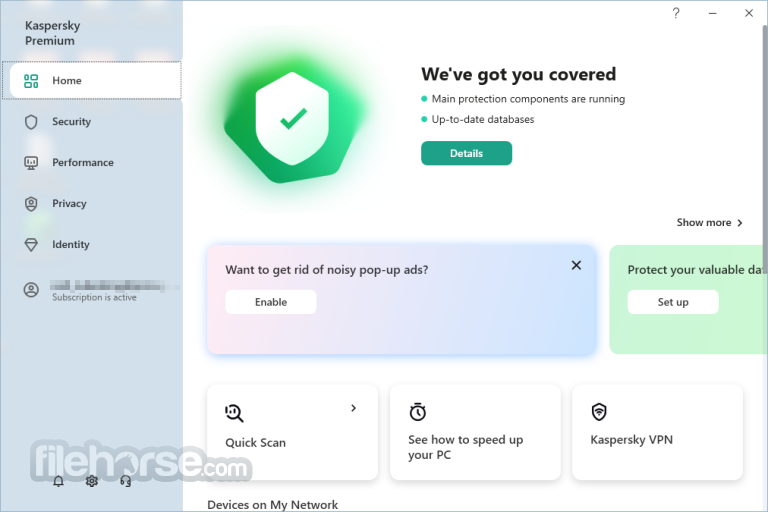
Kaspersky Premium is the all-inclusive security solution for your devices, privacy, and identity! Elevate your digital existence with a comprehensive package, featuring acclaimed antivirus protection, privacy and identity safeguards, performance optimization, and essential premium perks.
Benefit from unrivaled features like unlimited VPN access and a convenient password manager, ensuring complete protection for your digital world.
Throughout 2021, Kaspersky products participated in 75 independent tests and emerged victorious, securing an impressive 57 first-place awards.
What’s included in Kaspersky Premium Security?
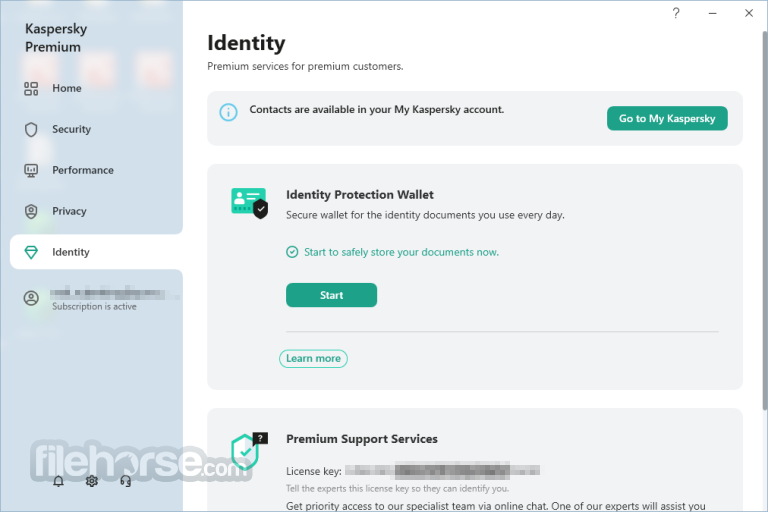
Identity Protection
Ensure the security of your identity, safeguard your documents, and prevent unauthorized remote access to your system.
24/7 Remote IT Support
Premium customers receive dedicated support around the clock, assisting you in resolving security issues whenever needed.
Private and Uninterrupted Browsing
Tools to block online tracking, advertisements, and unauthorized connections to your home devices, ensuring the security of your data and smart home system.
Personal and Payment Info Protection
Secure your banking apps, detect data and password leaks, and shield yourself from crypto scams.
Unlimited and Fast VPN
Experience complete online privacy and unrestricted access without compromising on speed.
Hard Disk Cleaner and Health Monitor
Manage your device storage space, conduct HDD health checks, and prevent any data loss.
Performance Optimization
Quick measures to boost the speed and performance of your devices, allowing them to operate at their full potential.
Uninterrupted Entertainment
Enjoy movies, games, and fullscreen apps without any disruptions, all at maximum speed.
Antivirus Protection
Multilayered defense system designed to prevent and neutralize viruses and malware threats.
Anti-Hacking Measures
Tools to prevent unauthorized access and hijacking of your computer, including anti-ransomware, firewall protection, and defense against cryptojacking.
Existing Threat Removal
Technologies to detect vulnerabilities, remove viruses, and repair your PC if it has already been infected.
What`s New in latest version 2026
Optimize Device Storage
Eliminate duplicate and large files from your PC while decluttering unused apps from your Android phone.
Hard Drive Health Monitoring
Continuously monitor the health of your PC's hard disk and receive instant notifications regarding any detected issues.
App and Software Management
Receive prompt alerts for available app updates, ensuring your apps and devices remain fast and secure.
Windows PC Acceleration
Take control of data-consuming apps, prevent certain apps from launching at startup, and boost your PC's speed for a smoother experience.
Pricing
Kaspersky Premium Plan
1 Device for 1 Year - $46.99 (A My Kaspersky account is required to use the solution.)
Introductory price for the first year of your subscription. It will renew automatically at $59.99 per year. All prices are VAT exclusive. Cancel your subscription at any time.
How your subscription works
Pricing Information
When you subscribe to (Kaspersky Premium, Kaspersky Plus, or Kaspersky Standard), you will be charged the introductory price for the initial term.
The introductory price is clearly displayed on the offer page, in the shopping cart, and in your email receipt. It includes important details about your subscription, such as:
Auto-Renewal
Your subscription will automatically renew at the end of each term unless you choose to cancel it. You will receive an email notification regarding the upcoming auto-renewal.
Cancellation Process
You have the option to cancel the auto-renewal of your subscription at any time.
If you decide to cancel, your subscription will remain active until the end of the paid term. After this date, your subscription will expire, and you will not be charged for any subsequent periods.
To cancel the auto-renewal, you can follow these steps:
Refund Policy
If you have already been charged for the next subscription term, you have 30 days from the billing date to request a full refund of the renewal payment.
Alternatives
Bitdefender Total Security: Protect your PC from malware threats with this program.
Norton 360 Deluxe: A well-established competitor offering similar comprehensive protection and features.
Avast One: Essential protection for your life today!
AVG Ultimate: The best-in-class antivirus, tuneup, and VPN in one ultimate package!
ESET Smart Security: Comprehensive protection for everyday web users!
System Requirements
With an affordable upgrade fee, Kaspersky Premium offers exclusive benefits such as VIP tech support and comprehensive parental control features. If you're considering Kaspersky security software, this option stands out as the optimal choice. The FileHorse review team highly recommends this outstanding security suite.
Free trial period
Your free trial lasts 30 days. It will remind you 7 days before your trial ends. Unless you cancel your subscription within the trial period, a paid yearly subscription will start.
Download Kaspersky Premium Latest Version Why is this app published on FileHorse? (More info)
Benefit from unrivaled features like unlimited VPN access and a convenient password manager, ensuring complete protection for your digital world.
- Real-Time Antivirus
- Online Payment Protection
- Performance Optimisation
- Unlimited Superfast VPN
- Data Leak Checker
- Identity Protection
- Expert Virus Check & Removal
- + Kaspersky Safe Kids (1 YEAR FREE)
Throughout 2021, Kaspersky products participated in 75 independent tests and emerged victorious, securing an impressive 57 first-place awards.
What’s included in Kaspersky Premium Security?
Identity Protection
Ensure the security of your identity, safeguard your documents, and prevent unauthorized remote access to your system.
24/7 Remote IT Support
Premium customers receive dedicated support around the clock, assisting you in resolving security issues whenever needed.
Private and Uninterrupted Browsing
Tools to block online tracking, advertisements, and unauthorized connections to your home devices, ensuring the security of your data and smart home system.
Personal and Payment Info Protection
Secure your banking apps, detect data and password leaks, and shield yourself from crypto scams.
Unlimited and Fast VPN
Experience complete online privacy and unrestricted access without compromising on speed.
Hard Disk Cleaner and Health Monitor
Manage your device storage space, conduct HDD health checks, and prevent any data loss.
Performance Optimization
Quick measures to boost the speed and performance of your devices, allowing them to operate at their full potential.
Uninterrupted Entertainment
Enjoy movies, games, and fullscreen apps without any disruptions, all at maximum speed.
Antivirus Protection
Multilayered defense system designed to prevent and neutralize viruses and malware threats.
Anti-Hacking Measures
Tools to prevent unauthorized access and hijacking of your computer, including anti-ransomware, firewall protection, and defense against cryptojacking.
Existing Threat Removal
Technologies to detect vulnerabilities, remove viruses, and repair your PC if it has already been infected.
What`s New in latest version 2026
- Enhanced real-time protection with improved behavioral threat detection.
- Upgraded anti-ransomware engine with stronger file protection.
- Improved phishing and malicious website blocking accuracy.
- Optimized performance with lower CPU usage during scans.
- Enhanced privacy tools including webcam and microphone protection.
- Improved password manager integration and secure vault stability.
- Updated vulnerability scanner for outdated apps and system risks.
- Refined user interface with simplified navigation.
- Better compatibility with the latest Windows 11 updates.
- Bug fixes and overall stability improvements across the suite.
- Protect your data on insecure public Wi-Fi networks with encryption.
- Conceal your IP address, even from your internet service provider (ISP).
- Prevent your online actions from being logged.
- Access content from any location worldwide.
- Safely make payments using an encrypted browser.
- Block irritating and malicious online advertisements on your computer.
- Safeguard your passwords in a secure vault.
- Safely and conveniently autofill your address and card details.
Optimize Device Storage
Eliminate duplicate and large files from your PC while decluttering unused apps from your Android phone.
Hard Drive Health Monitoring
Continuously monitor the health of your PC's hard disk and receive instant notifications regarding any detected issues.
App and Software Management
Receive prompt alerts for available app updates, ensuring your apps and devices remain fast and secure.
Windows PC Acceleration
Take control of data-consuming apps, prevent certain apps from launching at startup, and boost your PC's speed for a smoother experience.
Pricing
Kaspersky Premium Plan
1 Device for 1 Year - $46.99 (A My Kaspersky account is required to use the solution.)
Introductory price for the first year of your subscription. It will renew automatically at $59.99 per year. All prices are VAT exclusive. Cancel your subscription at any time.
How your subscription works
Pricing Information
When you subscribe to (Kaspersky Premium, Kaspersky Plus, or Kaspersky Standard), you will be charged the introductory price for the initial term.
The introductory price is clearly displayed on the offer page, in the shopping cart, and in your email receipt. It includes important details about your subscription, such as:
- Number of devices covered
- Duration of the first term and subsequent terms
- Renewal price for future terms
Auto-Renewal
Your subscription will automatically renew at the end of each term unless you choose to cancel it. You will receive an email notification regarding the upcoming auto-renewal.
Cancellation Process
You have the option to cancel the auto-renewal of your subscription at any time.
If you decide to cancel, your subscription will remain active until the end of the paid term. After this date, your subscription will expire, and you will not be charged for any subsequent periods.
To cancel the auto-renewal, you can follow these steps:
- Log in to your My Kaspersky account at my.kaspersky.com.
- Proceed to your Subscription page.
- Click on "Manage Subscription".
- Choose "Cancel Subscription" and follow the provided steps to confirm the cancellation.
Refund Policy
If you have already been charged for the next subscription term, you have 30 days from the billing date to request a full refund of the renewal payment.
Alternatives
Bitdefender Total Security: Protect your PC from malware threats with this program.
Norton 360 Deluxe: A well-established competitor offering similar comprehensive protection and features.
Avast One: Essential protection for your life today!
AVG Ultimate: The best-in-class antivirus, tuneup, and VPN in one ultimate package!
ESET Smart Security: Comprehensive protection for everyday web users!
System Requirements
- OS: Windows 11 / 10 / 8.1 / 8 / 7 SP1+
- Internet connection
- My Kaspersky account
- 3.5 GB free space, 1 GHz Processor, 2 GB Memory
- English
- Indonesian
- Lithuanian
- Latvian
- Estonian
- Spanish
- Portuguese
- Russian
- Real-Time Antivirus Protection
- Unlimited High-Speed VPN
- Cross-Platform Safe Kids Parental Control
- Personalized Premium-Level Tech Support
- Encrypted Storage for Identity Documents
- Minimal Upgrade Cost
- ID Document Storage Limited to Password Manager Feature
- New User Interface Makes Feature Navigation Challenging
With an affordable upgrade fee, Kaspersky Premium offers exclusive benefits such as VIP tech support and comprehensive parental control features. If you're considering Kaspersky security software, this option stands out as the optimal choice. The FileHorse review team highly recommends this outstanding security suite.
Free trial period
Your free trial lasts 30 days. It will remind you 7 days before your trial ends. Unless you cancel your subscription within the trial period, a paid yearly subscription will start.
Download Kaspersky Premium Latest Version Why is this app published on FileHorse? (More info)
##
畫面截圖
- 2026-04-22 Kaspersky Premium 21.25.7.504 6.66 MB
- 2025-05-26 Kaspersky Premium 21.21.7.384 4.53 MB
- 2024-04-03 Kaspersky Premium 21.16.6.467 4.22 MB
- 2023-05-19 Kaspersky Premium 21.13.5.506 3.97 MB