
K-Lite Codec Pack Mega 19.9.0
v 19.9.0
Windows
免費軟體
8.72/10 (266)
- 目前版本19.9.0
- 更新日期2026-08-11
- 檔案大小65.14 MB
- 檔案名稱K-Lite_Codec_Pack_1990_Mega.exe
- 作業系統Windows 7 / Windows 8 / Windows 10 / Windows 11
- 支援語系English
- 授權型式免費軟體
- 開發商 Codec Guide
- 軟體分類Windows 軟體 / 影片軟體
##
編輯短評
K-Lite Codec Pack Mega 是一套专为 Windows 设计的影音编解码器整合包,主要解决播放影片时常遇到的「找不到编解码器」错误。Mega 版本是系列中内容最完整的版本,涵盖 Basic、Standard、Full 所有功能,并额外加入给进阶使用者与专业人士的工具和编解码器,让你能用惯用的播放器开启几乎所有主流多媒体格式。这套软体由 Codec Guide 长期维护,更新相当活跃,在同类型工具中属于热门首选,使用者评价普遍不错。
如果你经常下载各种格式的影片、或手边有播放器播不了的档案,这套软体就很适合你。与 KMPlayer 这类自带解码的播放器相比,K-Lite 的定位是补强系统与播放器的解码能力,让你继续使用原本习惯的播放软体。Mega 版功能最齐全,但相对档案较大,若只是日常观看影片,功能较精简的版本或许更轻量。软体为免费授权,仅提供英文介面,但安装与使用上不太需要额外语言支援,Windows 用户可安心使用。
##
翻譯排程處理中,以下暫以英文原文呈現
軟體介紹
K-Lite Codec Pack Mega is a comprehensive collection of audio and video codecs for Microsoft Windows. K-Lite Codec Pack Mega enables users to play virtually every popular multimedia file format using their favorite media player.
The “Mega” variant is the most extensive edition, including all the features of the Basic, Standard, and Full versions, along with additional tools and codecs for power users and professionals.
Originally developed to address the frequent "codec not found" errors users encounter when trying to play certain formats, K-Lite Codec Pack has grown into a dependable tool that enhances media compatibility across the entire Windows ecosystem.
Features
Extensive Codec Library: Supports virtually all video and audio formats, including AVI, MKV, MP4, FLV, AAC, OGG, and more.
DirectShow Filters: Includes filters such as LAV, ffdshow, and Haali for optimal decoding.
Media Player Classic Home Cinema (MPC-HC): Bundled lightweight media player optimized for codec pack usage.
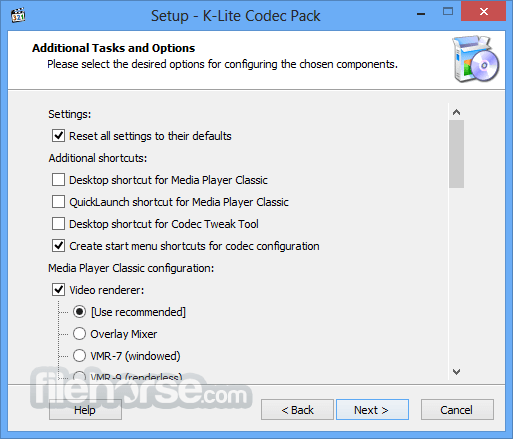
Customization Options: Choose components during installation for a tailored experience.
Regular Updates: Maintained actively to support the latest file formats and fixes.
Subtitle Support: Enhanced subtitle rendering for complex formats.
32-bit and 64-bit Compatibility: Runs seamlessly on all modern Windows versions.
User Interface
K-Lite Codec Pack doesn’t have a standalone interface of its own, as it's primarily a background utility. However, the included Codec Tweak Tool provides a clean and functional UI to manage and configure installed codecs.
The bundled MPC-HC media player also offers a user-friendly interface with minimal design and comprehensive playback controls.
Installation and Setup
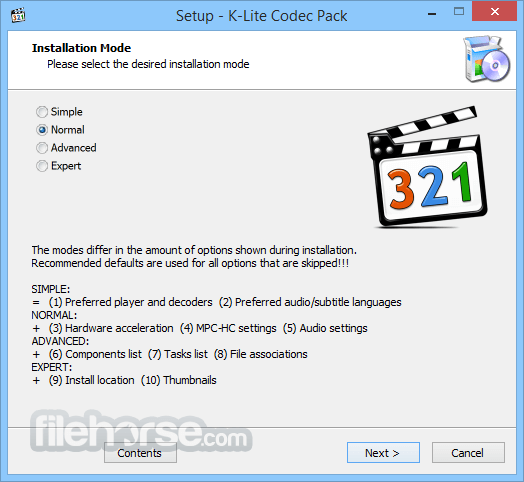
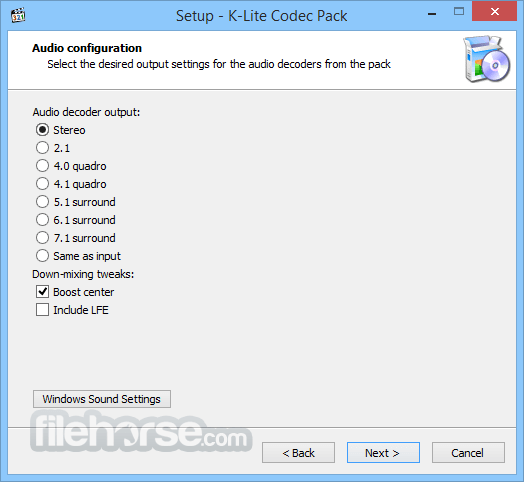
Installing the K-Lite Codec Pack Mega is straightforward. The installer offers both a normal and advanced mode. Beginners can go with the default settings, while advanced users can dive deep into customizing filter priorities, hardware acceleration, and codec selections.
It’s lightweight and doesn’t install any bloatware.
How to Use
Once installed, K-Lite works silently in the background. You simply open your media files with any compatible media player (like MPC-HC or Windows Media Player), and the right codecs are automatically used for decoding.
The Codec Tweak Tool lets you fine-tune playback settings, disable unwanted codecs, and troubleshoot playback issues.
FAQs
Is K-Lite Codec Pack Mega safe to install?
Yes, it’s free of malware and adware. Download it only from the official website to ensure safety.
Do I need all the included codecs?
Not necessarily. The installer allows you to choose only what you need.
Will it work with other media players like VLC?
VLC has built-in codecs, so K-Lite is unnecessary for it. However, it improves playback in MPC-HC and Windows Media Player.
Does it support 4K or HDR content?
Yes, with the right hardware and filters enabled, it supports modern formats like 4K, HEVC, and HDR.
Can I update K-Lite without reinstalling?
Yes, updates are released frequently and can be installed over existing versions.
Alternatives
K-Lite Codec Pack Full – Free package of media player codecs that can improve audio/video playback.
Shark007 Codecs – More advanced but less user-friendly.
Combined Community Codec Pack (CCCP) – Less frequently updated.
VLC Media Player – Doesn’t need external codecs, but offers less flexibility.
PotPlayer – Comes with built-in codecs and advanced settings.
System Requirements
K-Lite Codec Pack Mega remains one of the best choices for users who demand maximum compatibility and control over their multimedia playback experience. Whether you're a casual movie watcher or a media professional, this pack ensures that your system can handle virtually any file format you throw at it.
Also Available: CodecK-Lite Codec Pack Full
Download K-Lite Codec Pack Mega Latest Version Why is this app published on FileHorse? (More info)
The “Mega” variant is the most extensive edition, including all the features of the Basic, Standard, and Full versions, along with additional tools and codecs for power users and professionals.
Originally developed to address the frequent "codec not found" errors users encounter when trying to play certain formats, K-Lite Codec Pack has grown into a dependable tool that enhances media compatibility across the entire Windows ecosystem.
Features
Extensive Codec Library: Supports virtually all video and audio formats, including AVI, MKV, MP4, FLV, AAC, OGG, and more.
DirectShow Filters: Includes filters such as LAV, ffdshow, and Haali for optimal decoding.
Media Player Classic Home Cinema (MPC-HC): Bundled lightweight media player optimized for codec pack usage.
Customization Options: Choose components during installation for a tailored experience.
Regular Updates: Maintained actively to support the latest file formats and fixes.
Subtitle Support: Enhanced subtitle rendering for complex formats.
32-bit and 64-bit Compatibility: Runs seamlessly on all modern Windows versions.
User Interface
K-Lite Codec Pack doesn’t have a standalone interface of its own, as it's primarily a background utility. However, the included Codec Tweak Tool provides a clean and functional UI to manage and configure installed codecs.
The bundled MPC-HC media player also offers a user-friendly interface with minimal design and comprehensive playback controls.
Installation and Setup
Installing the K-Lite Codec Pack Mega is straightforward. The installer offers both a normal and advanced mode. Beginners can go with the default settings, while advanced users can dive deep into customizing filter priorities, hardware acceleration, and codec selections.
It’s lightweight and doesn’t install any bloatware.
How to Use
Once installed, K-Lite works silently in the background. You simply open your media files with any compatible media player (like MPC-HC or Windows Media Player), and the right codecs are automatically used for decoding.
The Codec Tweak Tool lets you fine-tune playback settings, disable unwanted codecs, and troubleshoot playback issues.
FAQs
Is K-Lite Codec Pack Mega safe to install?
Yes, it’s free of malware and adware. Download it only from the official website to ensure safety.
Do I need all the included codecs?
Not necessarily. The installer allows you to choose only what you need.
Will it work with other media players like VLC?
VLC has built-in codecs, so K-Lite is unnecessary for it. However, it improves playback in MPC-HC and Windows Media Player.
Does it support 4K or HDR content?
Yes, with the right hardware and filters enabled, it supports modern formats like 4K, HEVC, and HDR.
Can I update K-Lite without reinstalling?
Yes, updates are released frequently and can be installed over existing versions.
Alternatives
K-Lite Codec Pack Full – Free package of media player codecs that can improve audio/video playback.
Shark007 Codecs – More advanced but less user-friendly.
Combined Community Codec Pack (CCCP) – Less frequently updated.
VLC Media Player – Doesn’t need external codecs, but offers less flexibility.
PotPlayer – Comes with built-in codecs and advanced settings.
System Requirements
- OS: Windows 7, 8, 10, 11 (32-bit or 64-bit)
- RAM: 512MB minimum
- Storage: ~100MB free space
- CPU: Any modern Intel/AMD processor
- Plays nearly all audio and video formats
- Frequent updates and active development
- Highly customizable installation
- Includes lightweight MPC-HC player
- Useful configuration tools for advanced users
- Overwhelming options for beginners
- No benefit for VLC users
- Slight chance of filter conflicts with other codec packs
K-Lite Codec Pack Mega remains one of the best choices for users who demand maximum compatibility and control over their multimedia playback experience. Whether you're a casual movie watcher or a media professional, this pack ensures that your system can handle virtually any file format you throw at it.
Also Available: CodecK-Lite Codec Pack Full
Download K-Lite Codec Pack Mega Latest Version Why is this app published on FileHorse? (More info)
##
畫面截圖
- 2026-08-11 K-Lite Codec Pack Mega 19.9.0 65.14 MB
- 2026-07-21 K-Lite Codec Pack Mega 19.8.5 65.36 MB
- 2026-06-17 K-Lite Codec Pack Mega 19.8.0 65.27 MB
- 2026-06-05 K-Lite Codec Pack Mega 19.7.5 65.22 MB
- 2026-05-08 K-Lite Codec Pack Mega 19.7.0 64.84 MB
- 2026-04-05 K-Lite Codec Pack Mega 19.6.6 64.44 MB
- 2026-03-20 K-Lite Codec Pack Mega 19.6.0 65.17 MB
- 2026-03-04 K-Lite Codec Pack Mega 19.5.5 65.19 MB