⚠ 這是歷史版本頁面 — 查看 Laragon 最新版本 →

- 目前版本4.0.12
- 更新日期2019-03-08
- 檔案大小83.9 MB
- 檔案名稱laragon-wamp.exe
- 作業系統Windows 7 64 / Windows 8 64 / Windows 10 64 / Windows 11
- 支援語系English
- 授權型式開源軟體
- 開發商 Leo Khoa
- 軟體分類Windows 軟體 / 開發者工具
##
編輯短評
Laragon 是一套專為 Windows 設計的輕量級開發環境,可攜帶且具隔離性,能一次搞定 Apache、Nginx、MariaDB、PHP、Node.js、Redis 等常用服務,並支援 Python、Java、Go 等多種語言。它主打快速、簡單、易於擴展,相較於 XAMPP 或 WAMP 更輕巧,特別適合用來建置與管理現代 Web 應用。此軟體長期維護,但更新頻率不算高;在同類工具中屬於中段班,使用者評價普遍不錯,算是穩定可靠的選擇。
若你常需要在本機快速切換不同專案環境,或想找一套免安裝、可隨身攜帶的開發工具,Laragon 會很實用。與 BlueStacks、Turbo C++ 等替代品相比,它更聚焦於伺服器與後端開發,而非模擬器或編譯器;和 XAMPP 相比則更輕量、隔離性更好,但功能面可能較精簡。此軟體為開源授權,僅支援 Windows,介面只有英文,使用前需留意語系與平台限制。
##
翻譯排程處理中,以下暫以英文原文呈現
軟體介紹
Laragon Wamp is a portable, isolated, fast & powerful universal development environment for Apache, Nginx, MariaDB, PHP, Node.js, Redis, Memcached, yarn + ngrok, git... It is fast, lightweight, easy-to-use, and easy-to-extend.
Software is great for building and managing modern web applications. It is focused on performance - designed around stability, simplicity, flexibility, and freedom.
Laragon is a portable, isolated, fast & powerful development environment for PHP, Node.js, Python, Java, Go, Ruby. It is a lightweight alternative to XAMPP or WAMP, with a focus on simplicity and ease of use.
It provides a one-click solution for setting up local development environments, enabling developers to focus on coding rather than configuration.
The toolis created by Leo Khoa. He is a Head of DevOps for a fast-growing SaaS company. He built the program with one goal: to make web development fast, fun & enjoyable. Productive. Portable. Fast. Effective. Awesome!
It has its own service orchestration which manages services asynchronously and non-blocking so you'll find things run fast & smoothly with the program.
Laragon for PC is truly isolated & portable. However, you may need to use the installer as it will detect and install missing run-time components that are required to run C++ applications built using Visual Studio such as PHP, Apache for you. The app starts instantly. You can set program autorun when Windows starts. When running, the software uses just a little amount of your RAM.
It is very easy to install & upgrade. Just download the latest version and click Next, Next, Next... Laragon IDE is very easy to use. For almost time, it will work out-of-the-box that you don't need to touch any configuration files. Laragon Wamp is very easy to extend. You can add other services to your current stack by just extracting them to the app's bin folder.
Why this tool?
It is reasonable that you may need some reasons to know why using this tool is a good choice. The program is a modern, maintained, and rich-featured local development environment.
The software improves web development. Developers all over the world are using the program to make apps quickly and easily. It is used by thousands of developers with loves.
Highlights
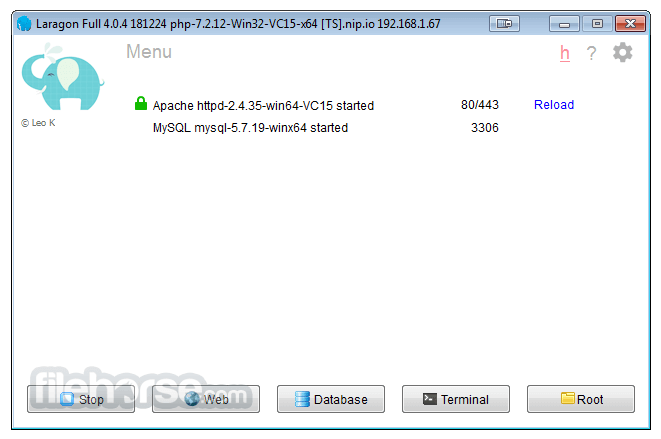
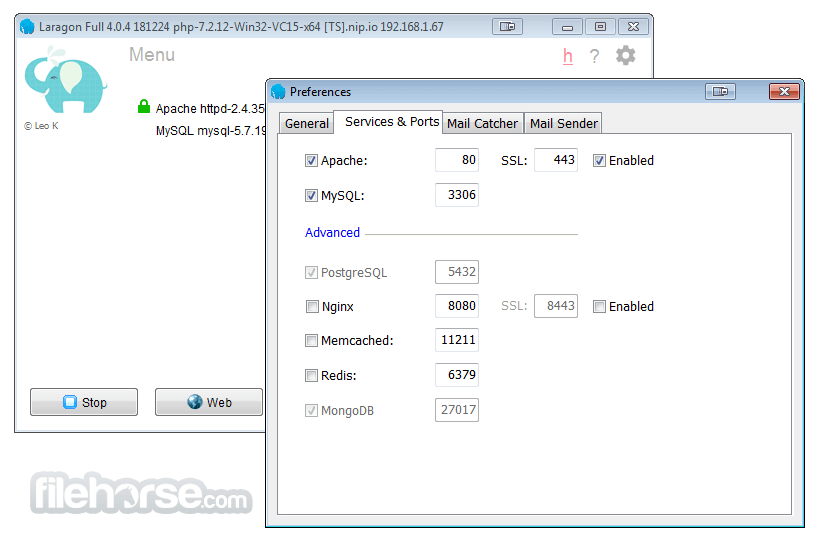
The app features a clean and intuitive user interface that is easy to navigate. The main dashboard provides quick access to essential tools and settings, while project management features allow you to organize your projects efficiently.
Installation and Setup
Installing this tool is a breeze - simply download the installer from the official website or FileHorse and follow the on-screen instructions.
Once installed, it will automatically configure your development environment, and you can start creating projects immediately.
How to Use
Can I use Laragon on macOS or Linux?
No, the program is currently only available for Windows.
Does Laragon support WordPress or other CMS platforms?
Yes, it supports popular CMS platforms like WordPress, Joomla, and Drupal.
Can I customize the PHP or Apache settings in Laragon?
Yes, it allows you to customize various settings through its configuration files.
Is Laragon suitable for large-scale projects?
While the software is primarily designed for local development, it can handle large-scale projects with ease.
Does Laragon require an internet connection to work?
No, the software is a fully offline development environment and does not require an internet connection once installed.
Pricing
Laragon 6: This version remains free and available for download. You can use it without restrictions for personal and non-commercial projects. The download is available on the project's GitHub page.
Laragon 7, 8, and newer versions: These versions require a license purchase. There are two types of licenses:
Non-Commercial License: A one-time payment that allows lifetime use for personal, educational, and non-commercial purposes. It includes one year of free updates.
Commercial License: Intended for commercial use, such as software development for clients or within companies. Details about this license are available in the EULA document.
Recommendation
If you need a free tool for local development, Laragon 6 is still a great choice. However, keep in mind that this version no longer receives updates, so it may have limited support for the latest versions of PHP, Apache, and other components.
Alternatives
XAMPP - A popular open-source cross-platform web server solution stack package developed by Apache Friends, consisting mainly of the Apache HTTP Server, MariaDB database, and interpreters for scripts written in the PHP and Perl programming languages.
WampServer - A Windows web development environment. It allows you to create web applications with Apache2, PHP, and a MySQL database.
MAMP - A free, local server environment that can be installed under macOS and Windows with just a few clicks. MAMP provides all the tools you need to run WordPress on your desktop PC for testing or development purposes.
Docker - Docker is a containerization platform that allows you to create isolated environments for your web applications. It's a bit more complex to set up but offers excellent flexibility.
Pricing
The program is completely FREE to use, making it an affordable option for developers of all skill levels.
System Requirements
Download Laragon Latest Version Why is this app published on FileHorse? (More info)
Software is great for building and managing modern web applications. It is focused on performance - designed around stability, simplicity, flexibility, and freedom.
Laragon is a portable, isolated, fast & powerful development environment for PHP, Node.js, Python, Java, Go, Ruby. It is a lightweight alternative to XAMPP or WAMP, with a focus on simplicity and ease of use.
It provides a one-click solution for setting up local development environments, enabling developers to focus on coding rather than configuration.
The toolis created by Leo Khoa. He is a Head of DevOps for a fast-growing SaaS company. He built the program with one goal: to make web development fast, fun & enjoyable. Productive. Portable. Fast. Effective. Awesome!
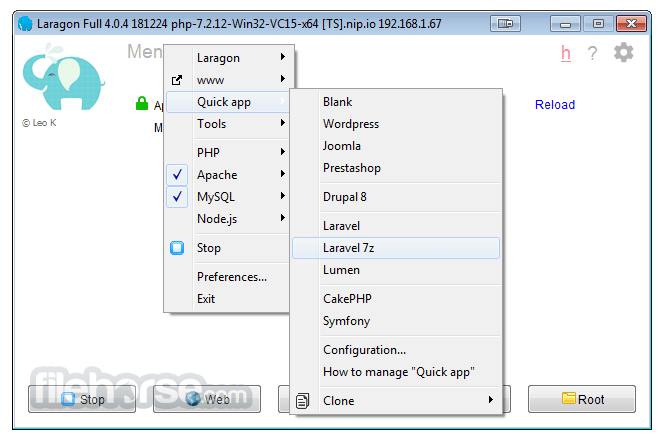
- Wanna have a Wordpress CMS? Just 1 click.
- Wanna show your local project to customers? Just 1 click.
- Wanna enable/disable a PHP extension? Just 1 click.
It has its own service orchestration which manages services asynchronously and non-blocking so you'll find things run fast & smoothly with the program.
Laragon for PC is truly isolated & portable. However, you may need to use the installer as it will detect and install missing run-time components that are required to run C++ applications built using Visual Studio such as PHP, Apache for you. The app starts instantly. You can set program autorun when Windows starts. When running, the software uses just a little amount of your RAM.
It is very easy to install & upgrade. Just download the latest version and click Next, Next, Next... Laragon IDE is very easy to use. For almost time, it will work out-of-the-box that you don't need to touch any configuration files. Laragon Wamp is very easy to extend. You can add other services to your current stack by just extracting them to the app's bin folder.
Why this tool?
It is reasonable that you may need some reasons to know why using this tool is a good choice. The program is a modern, maintained, and rich-featured local development environment.
The software improves web development. Developers all over the world are using the program to make apps quickly and easily. It is used by thousands of developers with loves.
Highlights
- Pretty URLs Use app.test instead of localhost/app.
- Portable You can move the app folder around (to other disks, to other laptops, sync to Cloud,...) without any worries.
- Isolated software has an isolated environment with your OS - it will keep your system clean.
- Easy Operation, Unlike others which pre-config for you, the app auto-configs all the complicated things. That why you can add other versions of PHP, Python, Ruby, Java, Go, Apache, Nginx, MySQL, PostgreSQL, MongoDB,... effortlessly.
- Modern & Powerful tool comes with a modern architect which is suitable to build modern web apps. You can work with both Apache & Nginx as they are fully-managed. Also, the app makes things a lot easier.
- Easy Installation: It can be installed with just a few clicks, and it doesn't require any complex configuration.
- Multiple Programming Language Support: It supports various programming languages including PHP, Node.js, Python, Java, Go, and Ruby, making it versatile for different types of projects.
- Portable: The tool is a portable application, meaning you can carry your development environment with you on a USB drive and use it on any Windows PC.
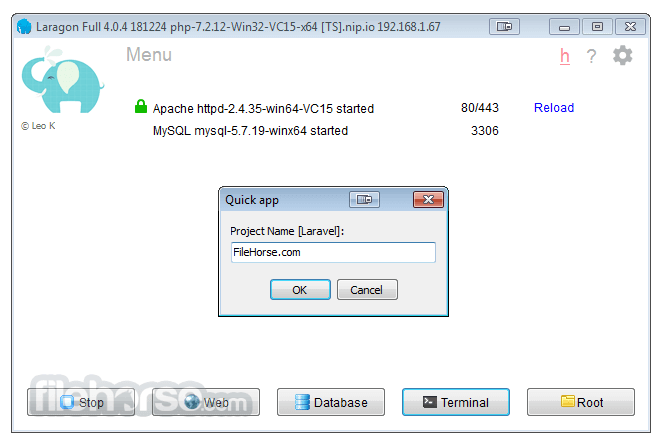
- Quick Project Creation: With the app, you can create new projects with a single click, saving you time and effort.
- Virtual Hosts: It allows you to set up virtual hosts easily, enabling you to work on multiple projects simultaneously without conflicts.
- Database Management: It includes tools for managing databases such as MySQL, MariaDB, MongoDB, and PostgreSQL.
- SSL Support: It provides SSL support out of the box, allowing you to develop secure web applications locally.
- Git Integration: It comes with Git pre-installed, making it easy to version control your projects.
The app features a clean and intuitive user interface that is easy to navigate. The main dashboard provides quick access to essential tools and settings, while project management features allow you to organize your projects efficiently.
Installation and Setup
Installing this tool is a breeze - simply download the installer from the official website or FileHorse and follow the on-screen instructions.
Once installed, it will automatically configure your development environment, and you can start creating projects immediately.
How to Use
- After installing the app, launch the application from the Start menu.
- Click on the "Quick app" button to create a new project or select an existing project from the dashboard.
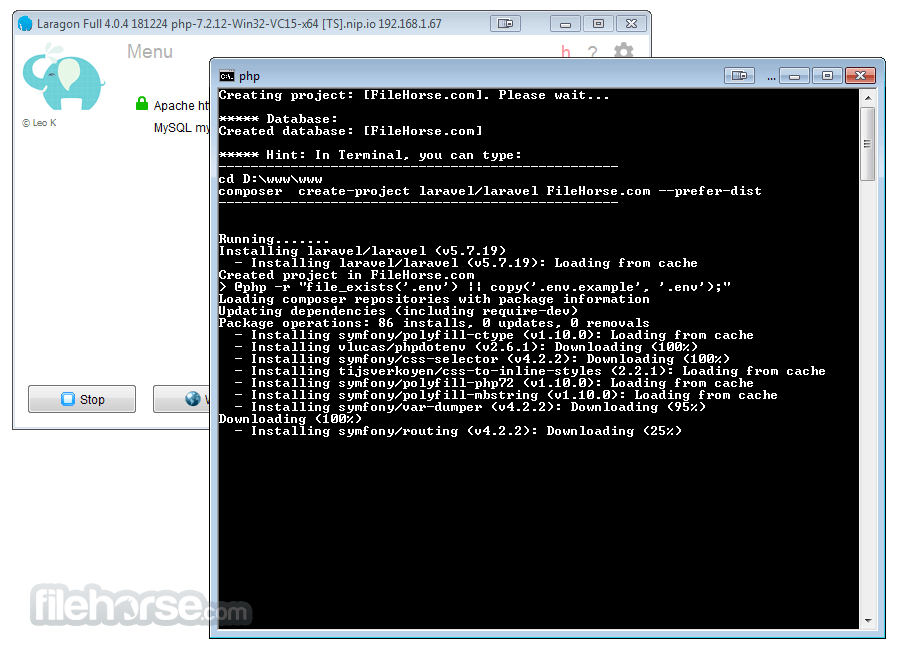
- It will automatically set up the necessary environment for your project, including installing dependencies and configuring virtual hosts.
- Start coding your project using your preferred text editor or IDE.
- Once you're done, you can deploy your project to a live server directly from Laragon.
Can I use Laragon on macOS or Linux?
No, the program is currently only available for Windows.
Does Laragon support WordPress or other CMS platforms?
Yes, it supports popular CMS platforms like WordPress, Joomla, and Drupal.
Can I customize the PHP or Apache settings in Laragon?
Yes, it allows you to customize various settings through its configuration files.
Is Laragon suitable for large-scale projects?
While the software is primarily designed for local development, it can handle large-scale projects with ease.
Does Laragon require an internet connection to work?
No, the software is a fully offline development environment and does not require an internet connection once installed.
Pricing
Laragon 6: This version remains free and available for download. You can use it without restrictions for personal and non-commercial projects. The download is available on the project's GitHub page.
Laragon 7, 8, and newer versions: These versions require a license purchase. There are two types of licenses:
Non-Commercial License: A one-time payment that allows lifetime use for personal, educational, and non-commercial purposes. It includes one year of free updates.
Commercial License: Intended for commercial use, such as software development for clients or within companies. Details about this license are available in the EULA document.
Recommendation
If you need a free tool for local development, Laragon 6 is still a great choice. However, keep in mind that this version no longer receives updates, so it may have limited support for the latest versions of PHP, Apache, and other components.
Alternatives
XAMPP - A popular open-source cross-platform web server solution stack package developed by Apache Friends, consisting mainly of the Apache HTTP Server, MariaDB database, and interpreters for scripts written in the PHP and Perl programming languages.
WampServer - A Windows web development environment. It allows you to create web applications with Apache2, PHP, and a MySQL database.
MAMP - A free, local server environment that can be installed under macOS and Windows with just a few clicks. MAMP provides all the tools you need to run WordPress on your desktop PC for testing or development purposes.
Docker - Docker is a containerization platform that allows you to create isolated environments for your web applications. It's a bit more complex to set up but offers excellent flexibility.
Pricing
The program is completely FREE to use, making it an affordable option for developers of all skill levels.
System Requirements
- Operating System: Windows 7/8/10/11
- Processor: 1 GHz or faster
- RAM: 512 MB or more
- Disk Space: 100 MB of free space
- Easy to install and use.
- Supports multiple programming languages.
- Portable and lightweight.
- Includes essential development tools out of the box.
- Actively maintained and updated.
- Only available for Windows.
- Limited to local development environments.
- Less customization options compared to some other solutions.
Download Laragon Latest Version Why is this app published on FileHorse? (More info)
##
畫面截圖
- 2026-03-02 Laragon 8.6.1 227 MB
- 2022-09-17 Laragon 6.0.0 173 MB
- 2021-05-26 Laragon 5.0.0 147 MB
- 2019-07-04 Laragon 4.0.15 86 MB
- 2019-06-26 Laragon 4.0.14 83.9 MB
- 2019-03-08 Laragon 4.0.12 83.9 MB
- 2019-02-24 Laragon 4.0.11 83.9 MB
- 2019-02-14 Laragon 4.0.10 83.9 MB