⚠ 這是歷史版本頁面 — 查看 LaunchBox 最新版本 →

- 目前版本13.24
- 更新日期2025-09-30
- 檔案大小495.76 MB
- 檔案名稱LaunchBox-13.24-Setup.exe
- 作業系統Windows 7 / Windows 8 / Windows 10 / Windows 11
- 支援語系English
- 授權型式試用版
- 開發商 Unbroken Software, LLC
- 軟體分類Windows 軟體 / 遊戲
##
編輯短評
LaunchBox 是一款以「遊戲庫管理」為核心的 Windows 軟體,最初是為了替 DOSBox 打造美觀的啟動介面,後來逐步擴展到支援現代 PC 遊戲與各類模擬器平台。它最大的特色是自動抓取遊戲的盒裝封面與中繼資料,並提供免安裝的攜帶式執行方式,讓使用者能將 DOS 老遊戲、ROM 檔與 Steam 遊戲集中在一處管理與啟動。開發商持續維護,更新頻率穩定,在同類工具中屬於評價普遍不錯的熱門選擇。
這套軟體特別適合收藏大量懷舊遊戲、或同時使用多款模擬器的玩家,能省去逐一整理捷徑與封面的麻煩。與 BlueStacks 等 Android 模擬器或特定遊戲的專用啟動器相比,LaunchBox 定位是「整合型前端」,本身不執行遊戲,而是負責統一啟動與管理。需要注意的是,它僅提供試用版授權,且介面目前只支援英文,對不熟悉英文介面的使用者來說,初期可能需要花點時間適應。
##
翻譯排程處理中,以下暫以英文原文呈現
軟體介紹
LaunchBox was originally built as an attractive frontend to DOSBox but has since expanded to support both modern PC games and emulated console platforms.
Launch Box aims to be the one-stop-shop for gaming on your computer, for both modern and historical games. Launch Box is a portable Windows software, box-art-based games database, and launcher for DOSBox, emulators, arcade cabinets, and PC Games.
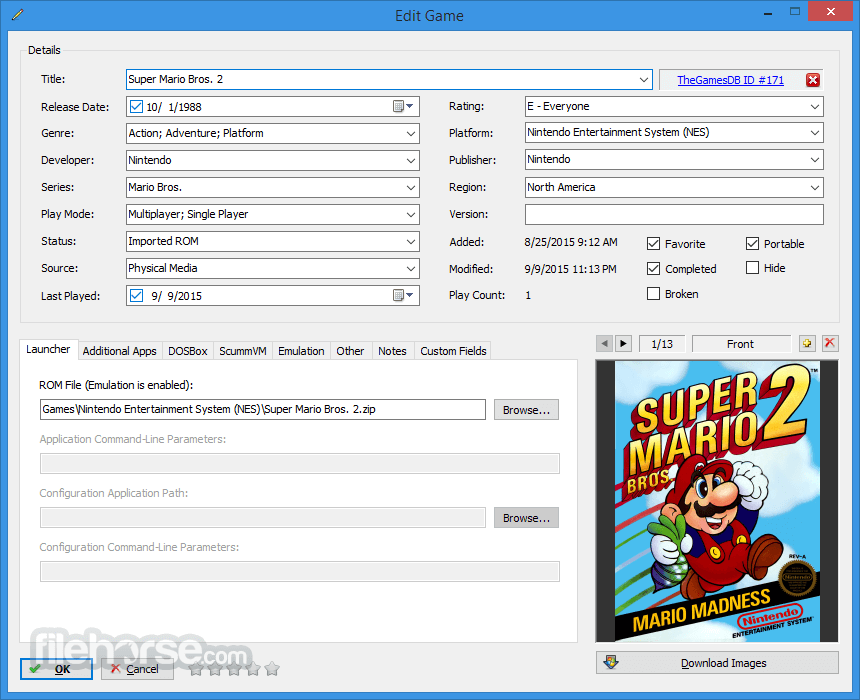
It includes automated import processes for your MS-DOS games, ROM files, and Steam in order to help get you up and running as quickly as possible. Game box-art and metadata are automatically downloaded from the Games Database, a community-based online database that allows anyone to contribute.
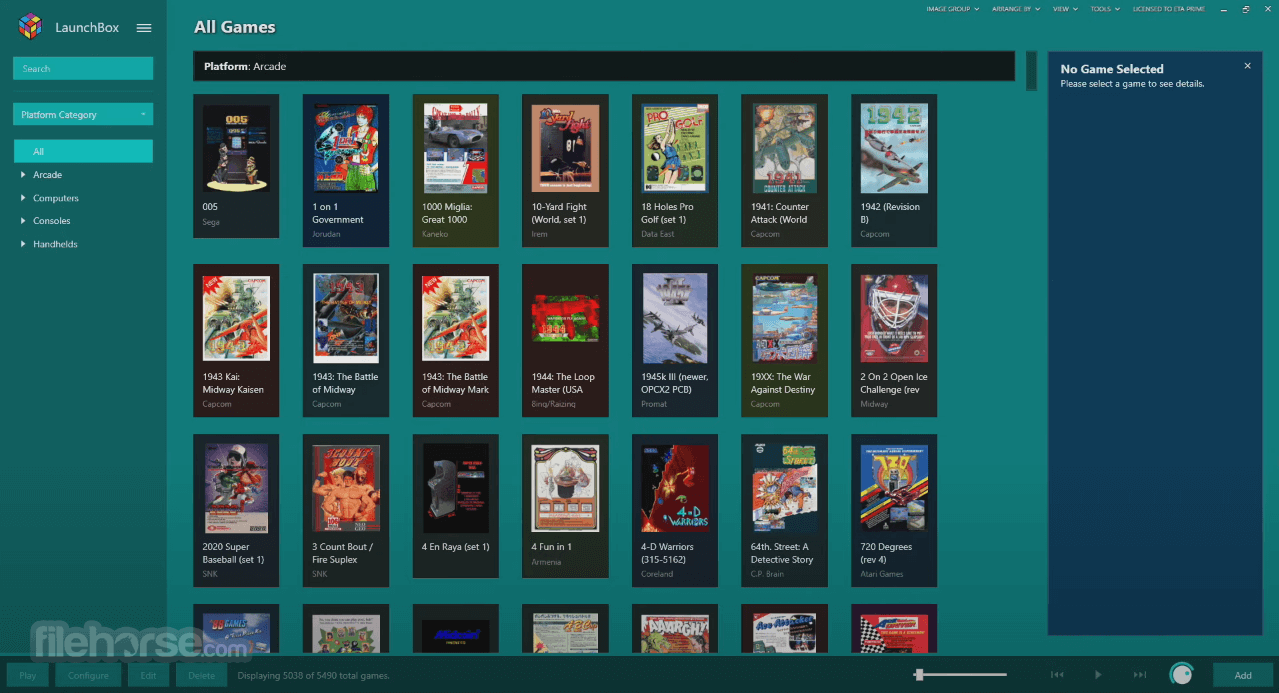
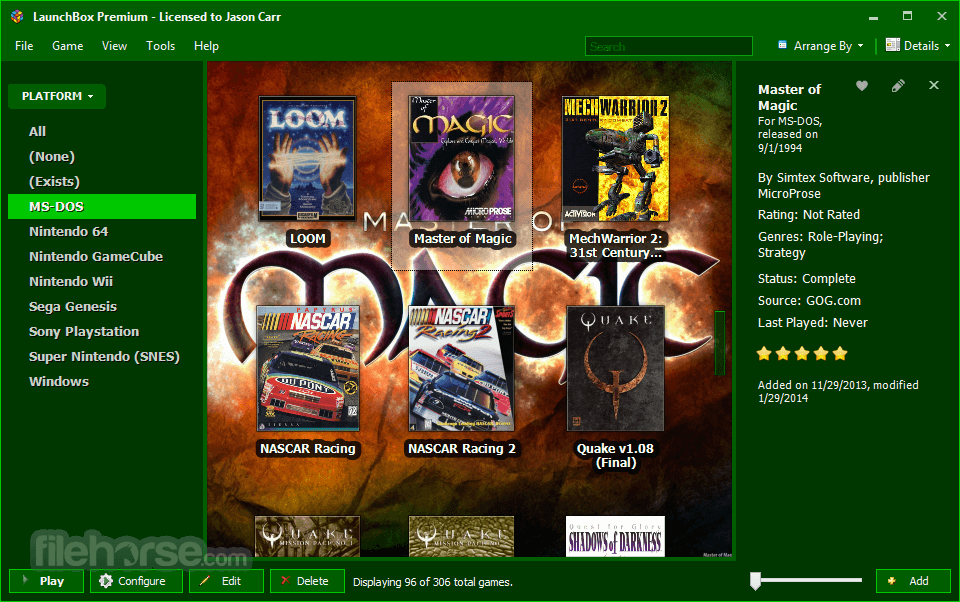
It supports arranging and filtering by genre, platform, ESRB rating, developer, publisher, and much more, and even has custom status and source fields to use to classify your games however you choose. LaunchBox’s interface is incredibly easy to use and powerful all at the same time.
Not only does LaunchBox automatically download the box art for your games, but it also grabs beautiful fanart, screenshots, logos, and more, creating a surprisingly immersive experience. Fanart and other images can be used as the app’s background as you browse your games, which really helps to create an attractive, fun experience.
Features
Comprehensive Game Library Management – Import and organize games from Steam, GOG, Epic Games, Origin, and even ROMs for various emulators.
Built-in Emulator Support – Automatically configures and launches games through emulators like RetroArch, MAME, Dolphin, and more.
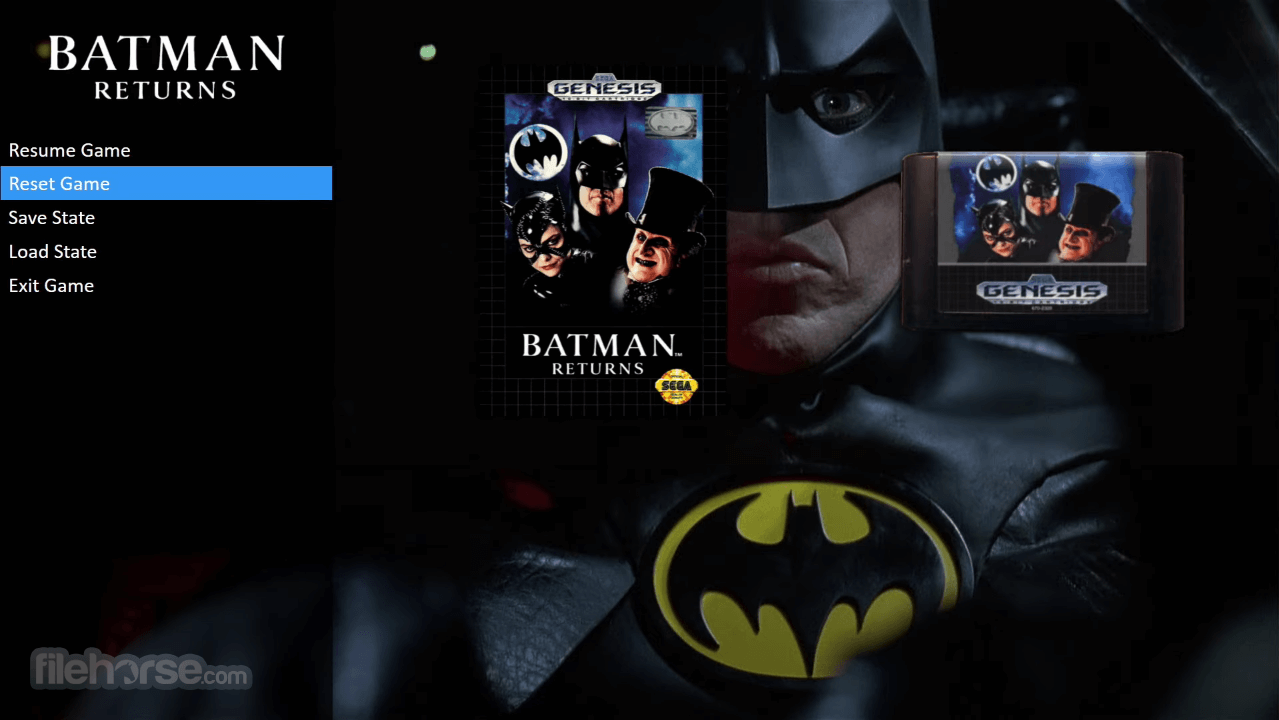
Big Box Mode – A premium feature offering a sleek, full-screen experience for a home-theater-style gaming setup.
Custom Themes & Artwork – Users can apply custom themes, cover art, videos, and metadata for a visually rich interface.
Automated Metadata Scraping – Fetches game descriptions, box art, and additional media from databases like TheGamesDB and EmuMovies.
Portable Mode – Allows users to carry their game library on an external drive without reinstallation.
Controller Support – Enables seamless navigation with gamepads, perfect for couch gaming.
Cloud Sync & Backup – Backup and sync game libraries across multiple devices.
Plugins & Custom Scripts – Advanced users can extend functionality using third-party plugins and scripts.
High Performance – Optimized for fast loading times and smooth operation even with large game libraries.
User Interface
It features an intuitive and visually appealing interface, focusing on high-quality box art, video previews, and customizable themes.
The main dashboard allows users to browse their collections effortlessly, with sorting and filtering options for better organization.
Big Box Mode, available in the premium version, provides a full-screen experience similar to a console dashboard, perfect for use with a controller.
Installation and Setup
Is LaunchBox free?
Yes, the basic version is free, but Big Box Mode and advanced features require a paid license.
What emulators does LaunchBox support?
It supports a wide range, including RetroArch, Dolphin, PCSX2, MAME, CEMU, and more.
Can I add my Steam and GOG library?
Yes, it can import Steam, GOG, Epic Games, and Origin libraries automatically.
Does LaunchBox work with game controllers?
Yes, Big Box Mode offers full controller support for seamless navigation.
Can I run LaunchBox from an external drive?
Yes, the portable mode allows you to store and launch your collection from an external device.
Alternatives
Playnite – A free and open-source launcher with Steam, GOG, and emulator support.
RetroArch – A multi-system emulator with a built-in frontend for retro gaming.
Pricing
Free Version – Includes game importing, emulator support, and metadata scraping.
Premium – $30 (lifetime license) or $15 (yearly) for Big Box Mode and additional customization features.
System Requirements
LaunchBox is an excellent solution for gamers who want to organize, customize, and enhance their game collection in one place. With built-in emulator support, metadata automation, and Big Box Mode, it offers a highly polished experience for both retro and modern gaming enthusiasts.
While the free version is powerful enough for casual users, the premium version is worth the investment for those looking for a console-like, full-screen experience.
Note: Limited functionality in the demo version.
Download LaunchBox Latest Version Why is this app published on FileHorse? (More info)
Launch Box aims to be the one-stop-shop for gaming on your computer, for both modern and historical games. Launch Box is a portable Windows software, box-art-based games database, and launcher for DOSBox, emulators, arcade cabinets, and PC Games.
It includes automated import processes for your MS-DOS games, ROM files, and Steam in order to help get you up and running as quickly as possible. Game box-art and metadata are automatically downloaded from the Games Database, a community-based online database that allows anyone to contribute.
It supports arranging and filtering by genre, platform, ESRB rating, developer, publisher, and much more, and even has custom status and source fields to use to classify your games however you choose. LaunchBox’s interface is incredibly easy to use and powerful all at the same time.
Not only does LaunchBox automatically download the box art for your games, but it also grabs beautiful fanart, screenshots, logos, and more, creating a surprisingly immersive experience. Fanart and other images can be used as the app’s background as you browse your games, which really helps to create an attractive, fun experience.
Features
Comprehensive Game Library Management – Import and organize games from Steam, GOG, Epic Games, Origin, and even ROMs for various emulators.
Built-in Emulator Support – Automatically configures and launches games through emulators like RetroArch, MAME, Dolphin, and more.
Big Box Mode – A premium feature offering a sleek, full-screen experience for a home-theater-style gaming setup.
Custom Themes & Artwork – Users can apply custom themes, cover art, videos, and metadata for a visually rich interface.
Automated Metadata Scraping – Fetches game descriptions, box art, and additional media from databases like TheGamesDB and EmuMovies.
Portable Mode – Allows users to carry their game library on an external drive without reinstallation.
Controller Support – Enables seamless navigation with gamepads, perfect for couch gaming.
Cloud Sync & Backup – Backup and sync game libraries across multiple devices.
Plugins & Custom Scripts – Advanced users can extend functionality using third-party plugins and scripts.
High Performance – Optimized for fast loading times and smooth operation even with large game libraries.
User Interface
It features an intuitive and visually appealing interface, focusing on high-quality box art, video previews, and customizable themes.
The main dashboard allows users to browse their collections effortlessly, with sorting and filtering options for better organization.
Big Box Mode, available in the premium version, provides a full-screen experience similar to a console dashboard, perfect for use with a controller.
Installation and Setup
- Download this app from the official website or FileHorse.
- Run the installer and follow the setup wizard.
- Choose an installation directory (portable mode is optional).
- Launch the application and follow the guided import process to add games.
- Configure emulators if using ROMs, and allow LaunchBox to handle settings automatically.
- Customize metadata with artwork, themes, and other settings.
- Adding Games – Import titles manually or use the built-in import wizard for Steam, GOG, or ROMs.
- Configuring Emulators – Set up default emulators for different platforms and let this program manage execution.
- Customizing Appearance – Apply themes, change artwork, and adjust viewing preferences.
- Organizing the Library – Use tags, playlists, and categories to sort and manage your collection.
- Launching Games – Simply click on any game in the interface to start playing.
Is LaunchBox free?
Yes, the basic version is free, but Big Box Mode and advanced features require a paid license.
What emulators does LaunchBox support?
It supports a wide range, including RetroArch, Dolphin, PCSX2, MAME, CEMU, and more.
Can I add my Steam and GOG library?
Yes, it can import Steam, GOG, Epic Games, and Origin libraries automatically.
Does LaunchBox work with game controllers?
Yes, Big Box Mode offers full controller support for seamless navigation.
Can I run LaunchBox from an external drive?
Yes, the portable mode allows you to store and launch your collection from an external device.
Alternatives
Playnite – A free and open-source launcher with Steam, GOG, and emulator support.
RetroArch – A multi-system emulator with a built-in frontend for retro gaming.
Pricing
Free Version – Includes game importing, emulator support, and metadata scraping.
Premium – $30 (lifetime license) or $15 (yearly) for Big Box Mode and additional customization features.
System Requirements
- OS: Windows 7/8/10/11
- CPU: Intel Core i3 or higher
- RAM: 4GB minimum (8GB+ recommended for large libraries)
- Storage: 1GB+ (varies based on game library size)
- Graphics: Integrated GPU sufficient (discrete GPU recommended for HD video previews)
- Easy-to-use interface with rich customization options.
- Supports multiple platforms, including Steam and emulators.
- Automated metadata scraping saves time.
- Portable mode for on-the-go gaming.
- Big Box Mode provides a premium console-like experience.
- Free version lacks Big Box Mode and some customization options.
- Can be resource-intensive with very large game libraries.
- Requires manual emulator setup for some systems.
LaunchBox is an excellent solution for gamers who want to organize, customize, and enhance their game collection in one place. With built-in emulator support, metadata automation, and Big Box Mode, it offers a highly polished experience for both retro and modern gaming enthusiasts.
While the free version is powerful enough for casual users, the premium version is worth the investment for those looking for a console-like, full-screen experience.
Note: Limited functionality in the demo version.
Download LaunchBox Latest Version Why is this app published on FileHorse? (More info)
##
畫面截圖
- 2026-05-14 LaunchBox 13.27 508.66 MB
- 2026-02-11 LaunchBox 13.26 502.18 MB
- 2026-01-29 LaunchBox 13.25 500.34 MB
- 2025-09-30 LaunchBox 13.24 495.76 MB
- 2025-08-22 LaunchBox 13.23 463.39 MB
- 2025-07-04 LaunchBox 13.22 460.44 MB
- 2025-04-25 LaunchBox 13.21 459.12 MB
- 2025-02-14 LaunchBox 13.19 378.79 MB