- 目前版本7.11.0
- 更新日期2026-07-23
- 檔案大小6.7 MB
- 檔案名稱cisdem-appcrypt.dmg
- 作業系統macOS 10.12 Sierra or later
- 支援語系English
- 授權型式試用版
- 開發商 Cisdem Inc.
- 軟體分類Mac 軟體 / 系統優化
##
翻譯排程處理中,以下暫以英文原文呈現
軟體介紹
AppCrypt is a reliable tool for Mac users to lock applications and block websites, it blocks online and offline distractions, keeps kids safe from inappropriate websites, protects privacy, and secures data from unauthorized access.
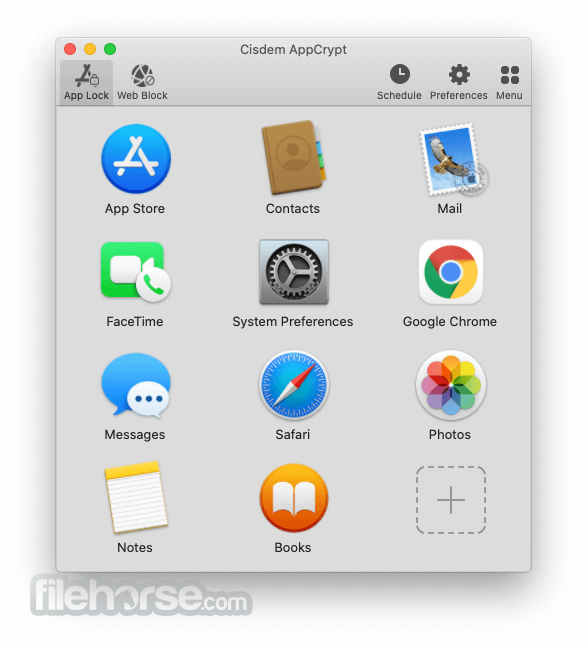
Lock applications with one password
AppCrypt can lock any application with one password to control the usage of applications on Mac, you can stop others from viewing your photos or videos in Photos, ban purchases in iTunes or App Store, encrypt chatting records in WhatsApp, disable game apps, prevents kids changing the settings, etc. Lock all applications, just one password.
Block access to harmful or distracting websites
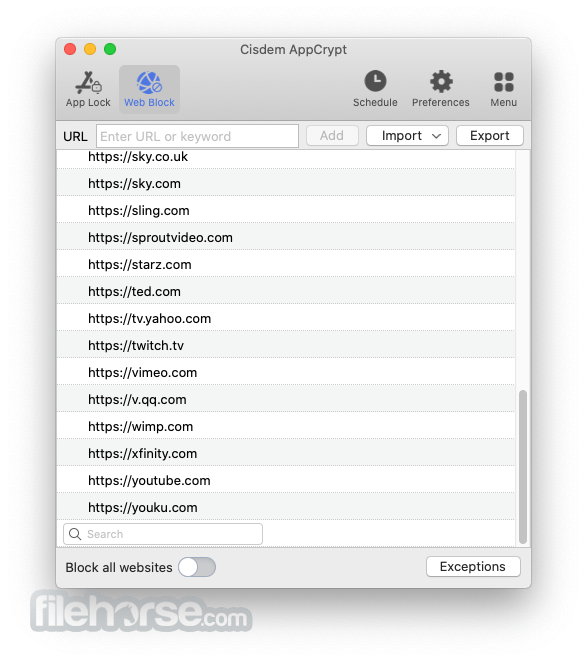
It can block access to harmful or distracting websites in Safari, Chrome, Edge, and Opera, it can block the entire domain or specific URLs. You can import from a default list of popular Games, News, Shopping, Social, Video, or other websites, set up a Blocklist to filter out inappropriate websites, or make Allow list to access websites that are useful for your work or study.
Set up a schedule in predefined sessions
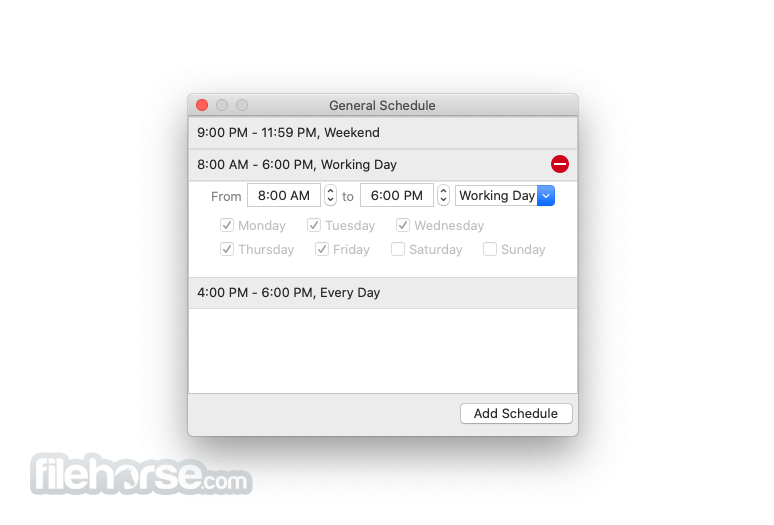
The app lets you set up a schedule for when you can use the app or website. The predefined sessions can be on any day and time of your choice. The schedule will automatically repeat every week. Without your password, no one is allowed to change the schedule settings.
Keep an eye on failed attempts to open locked apps
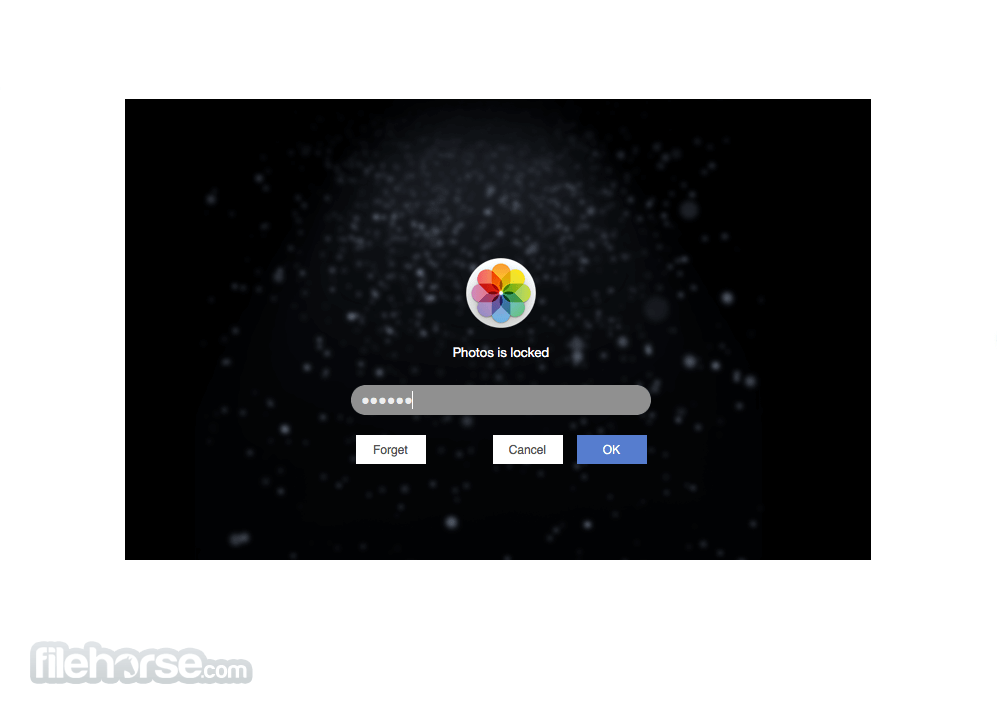
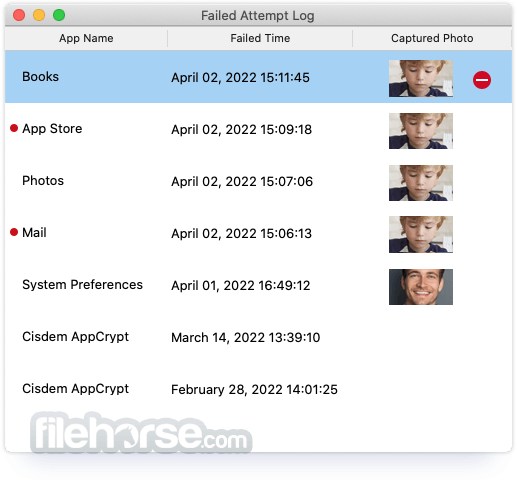
When launching a locked app, a password box will pop up. If the wrong password is typed, It will capture a photo to record this failed attempt with Mac’s camera. Failed attempts for launching AppCrypt for macOS itself will also be recorded.
Protect your privacy and secure your data
The program adds an extra layer of security to your privacy and data. It protects social media and chat apps, such as WhatsApp, Messenger, Skype, Facetime, etc. preventing others from snooping your privacy when you share your Mac with others. It secures your data in business or finance apps, such as Mail, MS Office, etc, stopping others to steal, alter or delete your data.
What`s New
Auto-lock deactivated apps
If the blocked app becomes deactivated or you leave your macOS for a set interval, It will automatically lock this app.
Self-protection
It can't be quit by Activity Monitor while running, nor deleted before a normal Quit.
Use little or no CPU
Running in the background, AppCrypt uses little CPU while working and not any CPU while idle.
Invisible to eyes
It lives unnoticed in your Menu bar. You can set global shortcuts to open/close the main window, enable/disable web block.
Import/Export configure file
Import or export the Configure file to apply the settings to AppCrypt on multiple Macs, instead of manually configuring from scratch.
Mac-friendly
It protects any macOS application without modifying anything in your system settings and applications.
What`s New
Intel or Apple Silicon processor
512MB physical RAM (memory) or more
50MB free space or more for installation
macOS 10.12 Sierra, macOS 10.13 High Sierra, macOS 10.14 Mojave, macOS 10.15 Catalina, macOS 11.0 Big Sur, macOS 12.0 Monterey, macOS 13.0 Ventura, macOS 14.0 Sonoma and macOS 15.0 Sequoia
Languages supported
English, German, French, Italian, Spanish, Portuguese and Japanese.
PROS
Download Cisdem AppCrypt for Mac Latest Version Why is this app published on FileHorse? (More info)
Lock applications with one password
AppCrypt can lock any application with one password to control the usage of applications on Mac, you can stop others from viewing your photos or videos in Photos, ban purchases in iTunes or App Store, encrypt chatting records in WhatsApp, disable game apps, prevents kids changing the settings, etc. Lock all applications, just one password.
Block access to harmful or distracting websites
It can block access to harmful or distracting websites in Safari, Chrome, Edge, and Opera, it can block the entire domain or specific URLs. You can import from a default list of popular Games, News, Shopping, Social, Video, or other websites, set up a Blocklist to filter out inappropriate websites, or make Allow list to access websites that are useful for your work or study.
Set up a schedule in predefined sessions
The app lets you set up a schedule for when you can use the app or website. The predefined sessions can be on any day and time of your choice. The schedule will automatically repeat every week. Without your password, no one is allowed to change the schedule settings.
Keep an eye on failed attempts to open locked apps
When launching a locked app, a password box will pop up. If the wrong password is typed, It will capture a photo to record this failed attempt with Mac’s camera. Failed attempts for launching AppCrypt for macOS itself will also be recorded.
Protect your privacy and secure your data
The program adds an extra layer of security to your privacy and data. It protects social media and chat apps, such as WhatsApp, Messenger, Skype, Facetime, etc. preventing others from snooping your privacy when you share your Mac with others. It secures your data in business or finance apps, such as Mail, MS Office, etc, stopping others to steal, alter or delete your data.
What`s New
- Added App Allowlist function to lock all apps except selected ones (reverse lock mode)
- Added ability to quickly add websites to block list without unlocking AppCrypt first
- Changed menu tab functions to Enable App Lock / Web Block without needing password
- Changed behavior to lock all managed apps automatically when Mac goes to sleep
- Fixed various minor bugs and stability issues
- Improved app locking and website blocking controls for easier setup and management
- Enhancements to scheduling feature for locking apps and blocking sites at specific times
- Better handling of failed login and access attempts (logging and protection)
- Support for multiple browsers including Chrome, Safari, Edge, Opera and Brave
- Improved password protection for app settings and uninstallation resistance
Auto-lock deactivated apps
If the blocked app becomes deactivated or you leave your macOS for a set interval, It will automatically lock this app.
Self-protection
It can't be quit by Activity Monitor while running, nor deleted before a normal Quit.
Use little or no CPU
Running in the background, AppCrypt uses little CPU while working and not any CPU while idle.
Invisible to eyes
It lives unnoticed in your Menu bar. You can set global shortcuts to open/close the main window, enable/disable web block.
Import/Export configure file
Import or export the Configure file to apply the settings to AppCrypt on multiple Macs, instead of manually configuring from scratch.
Mac-friendly
It protects any macOS application without modifying anything in your system settings and applications.
What`s New
- Added App Alowlist function.
- Added function to quickly add websites for blocking without entering a password.
- Changed the function on the menu tab to Enable App Lock/Web Block without a password.
- Changed the function to lock all the managed apps when Mac goes to sleep.
- Fix some minor bugs.
- Compatible with new and old version settings.
Intel or Apple Silicon processor
512MB physical RAM (memory) or more
50MB free space or more for installation
macOS 10.12 Sierra, macOS 10.13 High Sierra, macOS 10.14 Mojave, macOS 10.15 Catalina, macOS 11.0 Big Sur, macOS 12.0 Monterey, macOS 13.0 Ventura, macOS 14.0 Sonoma and macOS 15.0 Sequoia
Languages supported
English, German, French, Italian, Spanish, Portuguese and Japanese.
PROS
- Strong App Locking – Blocks access to selected apps.
- Website Blocking – Restricts unwanted websites easily.
- Auto Lock Schedule – Set time-based app restrictions.
- Stealth Mode – Runs silently in the background.
- Failed Attempt Alerts – Captures photos of intruders.
- Limited Features – Lacks advanced parental controls.
- Can Be Bypassed – Uninstalling removes protection.
- No Cloud Sync – Doesn’t sync settings across devices.
Download Cisdem AppCrypt for Mac Latest Version Why is this app published on FileHorse? (More info)
##
影片介紹
##
畫面截圖