⚠ 這是歷史版本頁面 — 查看 ffWorks 最新版本 →

- 目前版本5.1.6
- 更新日期2026-07-11
- 檔案大小99.88 MB
- 檔案名稱ffWorks.dmg
- 作業系統Mac OS X 10.11 or later
- 支援語系English
- 授權型式商業試用
- 開發商 OSBytes
- 軟體分類Mac 軟體 / 影片軟體
##
編輯短評
ffWorks 是 macOS 上少見的 FFmpeg 圖形化前端工具,原名 iFFmpeg,由 OSBytes 開發。它解決的核心問題很直接:FFmpeg 功能強大,但命令列操作對多數人來說門檻太高,這套軟體把轉檔、封裝、濾鏡等常用功能變成圖形介面,讓你不必背任何指令就能產出高品質影片。它的辨識度在於「簡潔」——介面設計以易用為出發點,而非塞滿進階參數。開發商持續投入,近一年更新相當頻繁,在同類工具中屬於口碑不錯的熱門選擇,評價人數雖不多,但分數相當高。
這套軟體適合需要頻繁處理影片轉檔、格式轉換或基本影音處理,但不想碰命令列的使用者,例如影音創作者、剪輯助理或一般上班族。與 Adobe Premiere Pro 或 After Effects 這類完整剪輯軟體相比,ffWorks 更輕量、專注於 FFmpeg 的轉檔與處理能力,不提供時間軸剪輯或特效合成,取捨上很明確。要注意的是它僅支援 macOS、介面只有英文,且為試用版授權,長期使用需購買;另外,由於 FFmpeg 二進位檔涉及各國授權差異,軟體本身未內建,需自行準備,這點在初次設定時會需要多花一點時間。
##
翻譯排程處理中,以下暫以英文原文呈現
軟體介紹
ffWorks (formerly iFFmpeg) for Mac is a Comprehensive Media Tool for macOS! Focused on simplicity, the app brings a fresh approach to use FFmpeg, to create ultra high quality movies without the need to write one single command-line code. The app has a feature-set for operating the open source FFmpeg without the need to type long command lines.
Graphical controls are sent programmatically to such external components developed by third parties and running outside the ffWorks application. In order to comply with applicable laws and licenses which may vary from country to country, no FFmpeg binary is included.
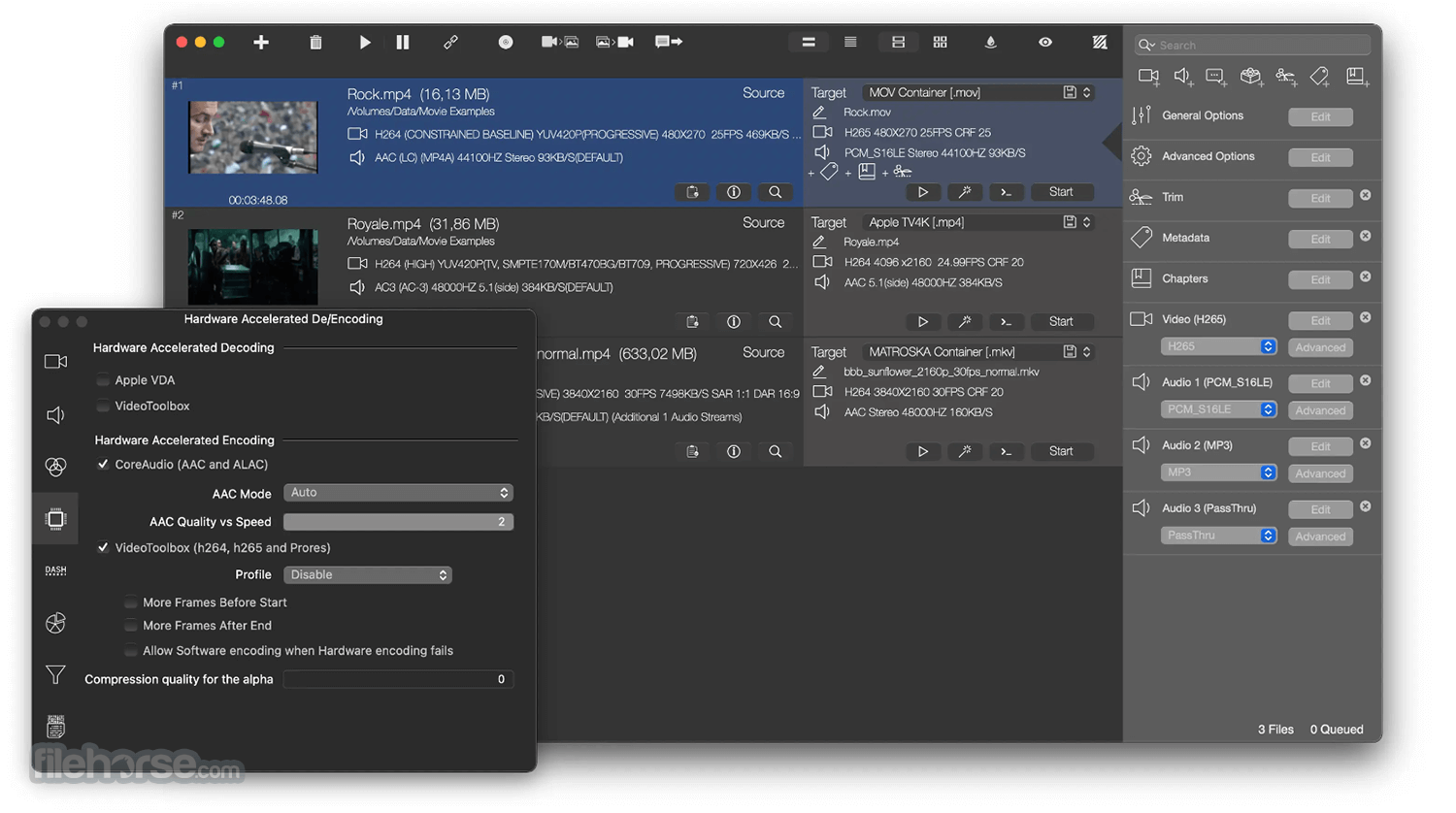
ff·Works is a user-friendly video converter that allows you to create top-notch movies without the need to write command-line code. It offers comprehensive technical information on media files, including video and audio codecs, format, encoding settings, frame rate, color info, and more.
The software comes with a convenient feature called Watch Folders that allows you to automatically process files in a designated folder with a specific target. Creating a droplet is a breeze, and you can simply drag and drop files onto it to send them to ffWorks for processing.
Drop zones are another handy feature that enables you to process source files to different targets effortlessly. You can create unlimited drop zones and drag files onto them to start the conversion process.
Whether you're a novice or an advanced user, ff·Works for macOS is the perfect tool for converting and processing audio and video files with exceptional quality. The software provides a wealth of options that give you complete control over the conversion process.
Main Features
High Quality and Control
Convert and processes many media files with high level quality using ffWorks for macOS with no knowledge. Advanced users are not left out in the cold with lots of options to work with.
Media Formats
Support for many codecs and containers like MPEG4, H264, H265 HEVC, Matroska, PRORES, DNxHD, DVVideo, MPEG TS, MPEG PS, XAVS, FLV, Theora, AVI, OGG, VP8 & VP9 (.webm), Animated GIF, VOB, MXF, GFX and many more.
Merging media files
Stitch unlimited files to one file. Two methods: Concat passthru (blistering fast) and Complex Filter.
Subtitles support
Both hardburn subtitles and soft subtitles are supported (External or Embedded).
Presets
A lot of presets are included by default: iPod, iPad, iPhone, Apple TV, PS4, Xbox One, Wii-U, Android, YouTube, Facebook, Vimeo and many more
Encode multiple files at once
Encode up to 8 batch at the same time.
Highlights
+400 advanced options
Convert with control and power
+50 Video filters
Add watermark, timecode rendering, padding and cropping, rotating, video stabilisation, sharpen, blurring, sharpening,deinterlace and many more..
Export movies to Images
Support for .png, .bmp, .jpg, .tiff, .dpx, .sgi, .tga
4K, 5K and 8K Support
Creates Ultra HQ movies
Audio Filters
Adjust Volume, Fade In/Out, Earwax, Audio Tempo, Bauer stereo, Channel Mapping, Dynamic normalizer, EBU R128, Exciter, ..
Images to movies
Convert .png, .bmp, .jpg, .tga, .tiff, .dpx images to any movie format.
Monitor Output
Keep track of FFmpeg output for debug errors.
Hardware Accelerated Encoding
By using Apple VideoToolBox, you can encode extremely fast to H264, H265 and ProRes video codecs and ALAC, AAC audio codec..
Trimming movies
Cut start and endings with ease.
Presets
Includes many high quality presets for iPhone, iPad, Apple TV, Desktop, Production, Youtube, Whatsapp, TikTok and many more. Or make and manage your own presets.
How to Use
Launch the app and drag media files into the interface
Choose a preset or customize encoding parameters
Add filters, subtitles, and metadata if needed
Click "Start" to begin encoding your media
Monitor the progress in the job queue window
Access completed files from the output folder
System Requirements
macOS 10.13 High Sierra or later
Intel or Apple Silicon (M1/M2) processor
Minimum 4 GB RAM (8 GB recommended)
At least 200 MB of free disk space
Requires FFmpeg (easily integrated within the app)
PROS
All in all, ffWorks is an excellent video converter that offers an intuitive and user-friendly interface, making it easy for anyone to use. It provides comprehensive technical information on media files and offers several convenient features like Watch Folders and Drop Zones, which simplify the conversion process.
Whether you're a beginner or an advanced user, it provides a wealth of options that give you complete control over the conversion process, ensuring top-notch quality. Overall, The app is a highly recommended tool for anyone looking to convert and process audio and video files.
Note: This trial version will allow you to convert 10 video files. Requires 64-bit processor.
Download ffWorks for Mac Latest Version Why is this app published on FileHorse? (More info)
Graphical controls are sent programmatically to such external components developed by third parties and running outside the ffWorks application. In order to comply with applicable laws and licenses which may vary from country to country, no FFmpeg binary is included.
ff·Works is a user-friendly video converter that allows you to create top-notch movies without the need to write command-line code. It offers comprehensive technical information on media files, including video and audio codecs, format, encoding settings, frame rate, color info, and more.
The software comes with a convenient feature called Watch Folders that allows you to automatically process files in a designated folder with a specific target. Creating a droplet is a breeze, and you can simply drag and drop files onto it to send them to ffWorks for processing.
Drop zones are another handy feature that enables you to process source files to different targets effortlessly. You can create unlimited drop zones and drag files onto them to start the conversion process.
Whether you're a novice or an advanced user, ff·Works for macOS is the perfect tool for converting and processing audio and video files with exceptional quality. The software provides a wealth of options that give you complete control over the conversion process.
Main Features
High Quality and Control
Convert and processes many media files with high level quality using ffWorks for macOS with no knowledge. Advanced users are not left out in the cold with lots of options to work with.
Media Formats
Support for many codecs and containers like MPEG4, H264, H265 HEVC, Matroska, PRORES, DNxHD, DVVideo, MPEG TS, MPEG PS, XAVS, FLV, Theora, AVI, OGG, VP8 & VP9 (.webm), Animated GIF, VOB, MXF, GFX and many more.
Merging media files
Stitch unlimited files to one file. Two methods: Concat passthru (blistering fast) and Complex Filter.
Subtitles support
Both hardburn subtitles and soft subtitles are supported (External or Embedded).
Presets
A lot of presets are included by default: iPod, iPad, iPhone, Apple TV, PS4, Xbox One, Wii-U, Android, YouTube, Facebook, Vimeo and many more
Encode multiple files at once
Encode up to 8 batch at the same time.
Highlights
+400 advanced options
Convert with control and power
+50 Video filters
Add watermark, timecode rendering, padding and cropping, rotating, video stabilisation, sharpen, blurring, sharpening,deinterlace and many more..
Export movies to Images
Support for .png, .bmp, .jpg, .tiff, .dpx, .sgi, .tga
4K, 5K and 8K Support
Creates Ultra HQ movies
Audio Filters
Adjust Volume, Fade In/Out, Earwax, Audio Tempo, Bauer stereo, Channel Mapping, Dynamic normalizer, EBU R128, Exciter, ..
Images to movies
Convert .png, .bmp, .jpg, .tga, .tiff, .dpx images to any movie format.
Monitor Output
Keep track of FFmpeg output for debug errors.
Hardware Accelerated Encoding
By using Apple VideoToolBox, you can encode extremely fast to H264, H265 and ProRes video codecs and ALAC, AAC audio codec..
Trimming movies
Cut start and endings with ease.
Presets
Includes many high quality presets for iPhone, iPad, Apple TV, Desktop, Production, Youtube, Whatsapp, TikTok and many more. Or make and manage your own presets.
How to Use
Launch the app and drag media files into the interface
Choose a preset or customize encoding parameters
Add filters, subtitles, and metadata if needed
Click "Start" to begin encoding your media
Monitor the progress in the job queue window
Access completed files from the output folder
System Requirements
macOS 10.13 High Sierra or later
Intel or Apple Silicon (M1/M2) processor
Minimum 4 GB RAM (8 GB recommended)
At least 200 MB of free disk space
Requires FFmpeg (easily integrated within the app)
PROS
- Advanced FFmpeg front-end interface
- No command-line knowledge needed
- Batch processing with queue management
- Customizable presets and automation
- Supports wide range of media formats
- Requires separate FFmpeg installation
- Interface may overwhelm new users
- No built-in media player for preview
- Limited free trial version available
- Mac-only, no Windows/Linux support
All in all, ffWorks is an excellent video converter that offers an intuitive and user-friendly interface, making it easy for anyone to use. It provides comprehensive technical information on media files and offers several convenient features like Watch Folders and Drop Zones, which simplify the conversion process.
Whether you're a beginner or an advanced user, it provides a wealth of options that give you complete control over the conversion process, ensuring top-notch quality. Overall, The app is a highly recommended tool for anyone looking to convert and process audio and video files.
Note: This trial version will allow you to convert 10 video files. Requires 64-bit processor.
Download ffWorks for Mac Latest Version Why is this app published on FileHorse? (More info)
##
畫面截圖
- 2026-07-20 ffWorks 5.2.0 99.95 MB
- 2026-07-11 ffWorks 5.1.6 99.88 MB
- 2026-06-24 ffWorks 5.1.4 99.88 MB
- 2026-06-16 ffWorks 5.1.2 3.33 MB
- 2026-06-12 ffWorks 5.1.1 99.89 MB
- 2026-05-22 ffWorks 5.1.0 99.89 MB
- 2026-04-30 ffWorks 5.0.8 99.86 MB
- 2026-04-15 ffWorks 5.0.6 99.76 MB