⚠ 這是歷史版本頁面 — 查看 Java JRE 8 Update 最新版本 →

- 目前版本451
- 更新日期2025-04-16
- 檔案大小46.89 MB
- 檔案名稱jre-8u451-macosx-x64.dmg
- 作業系統macOS 12.0 Monterey or later
- 支援語系English
- 授權型式免費軟體
- 開發商 Oracle
- 軟體分類Mac 軟體 / 瀏覽器與外掛
##
編輯短評
Java JRE 8 是 Oracle 推出的 Java 執行環境,負責在 macOS 上提供 Java 程式所需的資源與函式庫,讓開發者寫一次程式就能在不同平台執行。它也是 JDK 的重要組成,對新手和資深開發者都不可或缺。此版本長期維護、更新頻繁,在 Mac 同類工具中評價普遍不錯,是執行 Java 應用程式的熱門選擇。
如果你需要執行以 Java 撰寫的桌面應用程式或瀏覽器外掛,這套環境就是必備的底層元件。與 Chrome、Firefox 等瀏覽器不同,JRE 本身不提供介面,而是讓其他程式能順利運行。它免費且支援 macOS,但僅提供英文介面,使用時需留意。若你只偶爾跑 Java 程式,安裝後可減少相容性問題;若長期開發,則需搭配 JDK 使用。
##
翻譯排程處理中,以下暫以英文原文呈現
軟體介紹
Java Runtime Environment for Mac (also known as JRE) is a popular and widely supported software layer that runs on top of a computer's operating system and provides all the necessary resources and software libraries for Java programs to run.
It is a crucial component of the Java Development Kit (JDK), which is used for developing and running Java applications on all modern computer platforms, including Windows, Mac, and Linux.
By providing a consistent runtime environment, the JRE enables both novice and seasoned developers to write code once and run it on any platform that supports the JRE, without the need for platform-specific code.
This package combines Java code with the required libraries and creates an instance of the Java Virtual Machine (JVM) that executes the resulting program.
This all-in-one approach allows all legacy and modern Java programs to run on any operating system without modification, making the JRE an essential cross-platform compatible tool on the modern market.
One of the primary use cases for this software platform is in the development and execution of Java-based applications. This includes web applications, mobile applications, and desktop applications, as well as applets (plugins or extensions) that run inside web browsers.
Main Features
To install this app platform on a Mac computer, users must follow the instructions presented by the official installer that are distributed on the official Java.com website or here from the secure FileHorse servers.
Since this package integrates deeply inside the OS and provides crucial app execution code for modern browsers, users are required to have administrator privileges to finish the installation procedure.
Users should also be aware that JRE can only run on 64-bit processors (both Intel and Apple Silicon) and that there is no support for single-user basis installation. The package can only be deployed for all users on a Mac.
How to Use
Once installed, the JRE for macOS can be used to run any Java-based application or applet. This can be done by double-clicking the Java file or by opening a terminal window and navigating to the directory containing the Java program.
Users can then execute the program using the Java command followed by the name of the Java class.
The comprehensive help resources for JRE and other Java components are hosted on the official Java website, with extensive community resources hosted all over the web.
User Interface
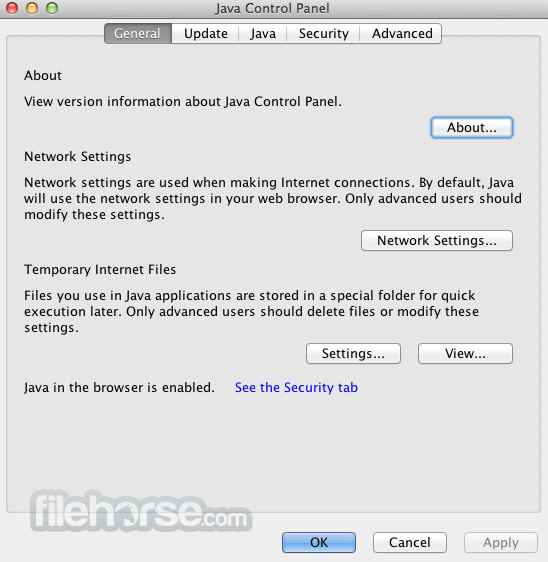
This app platform does not have a standalone user interface, as it is designed to run in the background and provide resources for Java programs that request them.
However, it may be accessed through the Java Development Kit (JDK) or other development tools that interact with the JRE.
FAQ
What is Java Runtime Environment?
It’s a software layer that provides the necessary resources for Java programs to run on various operating systems.
Is it safe?
Yes. This is a reliable software package used by dozens of millions of users all around the world on all major computer platforms. However, it is essential to install it only from a trusted source to avoid giving an unreliable installer access to administrative privileges.
Alternatives
Python – A popular programming language that comes with its runtime environment called “PyPy”.
Amazon Corretto – A no-cost, production-ready distribution of OpenJDK that provides long-term support and performance enhancements for running Java applications.
Pricing
This product is available to all users for free. It can be downloaded manually as a standalone package, and it also comes as a part of a Java Development Kit (JDK).
System Requirements
This application environment platform requires minimal system resources and can run on all modern and legacy Macs running macOS 10.7.3 (Lion) for Intel processors and macOS 12 for M-series processors.
JRE is optimized only for 64-bit processors, and it also can’t run inside 32-bit web browsers (64-bit Safari is recommended).
PROS
The Java Runtime Environment for Mac is an essential tool for both developers and general Mac users who work with Java-based applications.
Its ability to provide a consistent runtime environment across various platforms makes it a valuable asset for creating and executing Java programs, and an essential OS and browser component for users who want to experience the full potential of web content.
Note: Requires 64-bit web browser. Administrator privileges for installation.
Also Available: Download Java Runtime Environment for Windows
Download Java Runtime Environment for Mac Latest Version Why is this app published on FileHorse? (More info)
It is a crucial component of the Java Development Kit (JDK), which is used for developing and running Java applications on all modern computer platforms, including Windows, Mac, and Linux.
By providing a consistent runtime environment, the JRE enables both novice and seasoned developers to write code once and run it on any platform that supports the JRE, without the need for platform-specific code.
This package combines Java code with the required libraries and creates an instance of the Java Virtual Machine (JVM) that executes the resulting program.
This all-in-one approach allows all legacy and modern Java programs to run on any operating system without modification, making the JRE an essential cross-platform compatible tool on the modern market.
One of the primary use cases for this software platform is in the development and execution of Java-based applications. This includes web applications, mobile applications, and desktop applications, as well as applets (plugins or extensions) that run inside web browsers.
Main Features
- Platform-independent runtime environment for Java programs.
- Integration with the Java Development Kit (JDK).
- Support for various Java Virtual Machines (JVMs).
- Dynamic loading of Java classes and resources.
- Integration with development tools and libraries.
- Extensive official and community support.
To install this app platform on a Mac computer, users must follow the instructions presented by the official installer that are distributed on the official Java.com website or here from the secure FileHorse servers.
Since this package integrates deeply inside the OS and provides crucial app execution code for modern browsers, users are required to have administrator privileges to finish the installation procedure.
Users should also be aware that JRE can only run on 64-bit processors (both Intel and Apple Silicon) and that there is no support for single-user basis installation. The package can only be deployed for all users on a Mac.
How to Use
Once installed, the JRE for macOS can be used to run any Java-based application or applet. This can be done by double-clicking the Java file or by opening a terminal window and navigating to the directory containing the Java program.
Users can then execute the program using the Java command followed by the name of the Java class.
The comprehensive help resources for JRE and other Java components are hosted on the official Java website, with extensive community resources hosted all over the web.
User Interface
This app platform does not have a standalone user interface, as it is designed to run in the background and provide resources for Java programs that request them.
However, it may be accessed through the Java Development Kit (JDK) or other development tools that interact with the JRE.
FAQ
What is Java Runtime Environment?
It’s a software layer that provides the necessary resources for Java programs to run on various operating systems.
Is it safe?
Yes. This is a reliable software package used by dozens of millions of users all around the world on all major computer platforms. However, it is essential to install it only from a trusted source to avoid giving an unreliable installer access to administrative privileges.
Alternatives
Python – A popular programming language that comes with its runtime environment called “PyPy”.
Amazon Corretto – A no-cost, production-ready distribution of OpenJDK that provides long-term support and performance enhancements for running Java applications.
Pricing
This product is available to all users for free. It can be downloaded manually as a standalone package, and it also comes as a part of a Java Development Kit (JDK).
System Requirements
This application environment platform requires minimal system resources and can run on all modern and legacy Macs running macOS 10.7.3 (Lion) for Intel processors and macOS 12 for M-series processors.
JRE is optimized only for 64-bit processors, and it also can’t run inside 32-bit web browsers (64-bit Safari is recommended).
PROS
- Platform-independent Java applications environment.
- One of the world’s most popular app software layers.
- Full integration with the Java Development Kit (JDK).
- Comprehensive support for various Java Virtual Machines (JVMs).
- Dynamic loading of Java classes and resources.
- Integration with external development tools and libraries.
- High memory consumption.
- Java Virtual Machine can impact the performance of weaker Mac hardware.
- No native GUI.
The Java Runtime Environment for Mac is an essential tool for both developers and general Mac users who work with Java-based applications.
Its ability to provide a consistent runtime environment across various platforms makes it a valuable asset for creating and executing Java programs, and an essential OS and browser component for users who want to experience the full potential of web content.
Note: Requires 64-bit web browser. Administrator privileges for installation.
Also Available: Download Java Runtime Environment for Windows
Download Java Runtime Environment for Mac Latest Version Why is this app published on FileHorse? (More info)
##
畫面截圖
- 2026-07-22 Java JRE 8 Update 501 93.2 MB
- 2026-04-22 Java JRE 8 Update 491 95.83 MB
- 2026-01-21 Java JRE 8 Update 481 46.72 MB
- 2025-10-22 Java JRE 8 Update 471 46.91 MB
- 2025-07-16 Java JRE 8 Update 461 46.89 MB
- 2025-04-16 Java JRE 8 Update 451 46.89 MB
- 2025-01-22 Java JRE 8 Update 441 90.13 MB
- 2024-10-16 Java JRE 8 Update 431 90.2 MB